
Agentic Spark — declarative, self-healing Apache Spark blueprints.
Verified details
These details have been verified by PyPIProject links
GitHub Statistics
Maintainers

Project description

Aqueduct
Self-healing Spark pipelines. Declarative. Observable. Autonomous.
Your data never leaves your servers.







Why Aqueduct
A Spark job fails at 3 a.m. on a column rename upstream. Today that means a paged engineer scrolling a four-kilobyte JVM stack trace to find a one-line fix. Aqueduct turns it into a Git-diffable patch waiting for review in the morning.

Wake up to a pending patch — not a wall of Spark errors.
- Declarative, not DAG code. Pipelines are YAML Blueprints — no PySpark boilerplate, no scheduler glue, no operator classes. Bring your own scheduler; Aqueduct is the control plane on top of Spark.
- Self-healing, not just alerting. On failure an LLM agent diagnoses the root cause and emits a structured patch that passes guardrail, lineage, and sandbox gates before it touches your pipeline. No codegen, no shell access, no silent mutation — and a failure it has solved before heals from memory with zero tokens.
- Observable by construction. Every run, every heal attempt, every column-lineage edge lands in a queryable store — at zero extra Spark actions on the hot path.
- Model-agnostic — and local-first. Anthropic natively, or any OpenAI-compatible endpoint (OpenRouter, DeepSeek, Groq, Gemini-compat, a local 7B on Ollama / LM Studio) — set
provider+base_url. Point it at a model inside your perimeter and nothing — not your data, not your schemas, not your error traces — ever leaves your servers. Multi-model cascades escalate to bigger models only when needed. - The harness owns correctness — the model only proposes. The LLM is used for exactly one thing deterministic code can't do: turning an unstructured failure context into a structured hypothesis. Everything after that is deterministic: a constrained patch grammar (14 operations, no code generation), guardrail + lineage + sandbox gates, budget caps, and a signature cache. That division of labor is why a small local model is reliable here when raw "AI assistant" codegen isn't.
Table of Contents
- What You Get
- Core Concepts
- The Healing Flow
- Architecture
- Observability Dashboard
- Getting Started
- How It Compares
- References
- Contributing
What You Get
| Capability | What it does | Details |
|---|---|---|
| Self-healing | LLM diagnoses failures, emits gated, Git-diffable patches — human, CI, or auto approval | Spec §8 |
| Heal memory | Failure signatures cache validated fixes — repeat failures heal with zero LLM tokens | Spec §8.2 |
| Observability store | Runs, failures, heal attempts, metrics in queryable DuckDB/Postgres | Observability Guide |
| Column lineage | Compile-time, zero Spark actions; powers the patch lineage gate | Spec §7 |
| Data quality | Inline Assert rules + Spillway quarantine — bad rows routed, not dropped, typed like catch blocks |
Spec §4.4 |
| Module tests | aqueduct test runs transforms against inline fixtures — no I/O, no cluster |
CLI Reference |
| LLM benchmark | aqueduct benchmark scores models against simulated failures — pick the cheapest model that heals your pipelines |
CLI Reference |
| Safety rails | Guardrails, multi-axis budgets, hourly heal caps, sandbox replay before any live write | Spec §8.3 |
| Observability dashboard | aqueduct dashboard — local, read-only Streamlit viewer: fleet, runs, lineage, healing patches + before/after diff, performance, quality |
Observability Guide |
Core Concepts
| Concept | Purpose |
|---|---|
| Blueprint | Your pipeline definition |
| Ingress | Reads sources (CSV, Parquet, Delta, JDBC) |
| Channel | Transformations (SQL or native ops) |
| Egress | Writes sinks (overwrite, append, Delta merge) |
| Junction | Fan-out (conditional, broadcast, partition) |
| Funnel | Fan-in (unions, coalesce, zip) |
| Spillway | Routes bad rows to error sink |
| Probe | Non-blocking observability taps |
| Regulator | Gate driven by Probe signals (skip / abort / trigger agent) |
| Assert | Inline quality gates |
| Depot | Cross-run state & watermarks |
| Arcade | Reusable sub-pipelines |
Full details in the References.
The Healing Flow
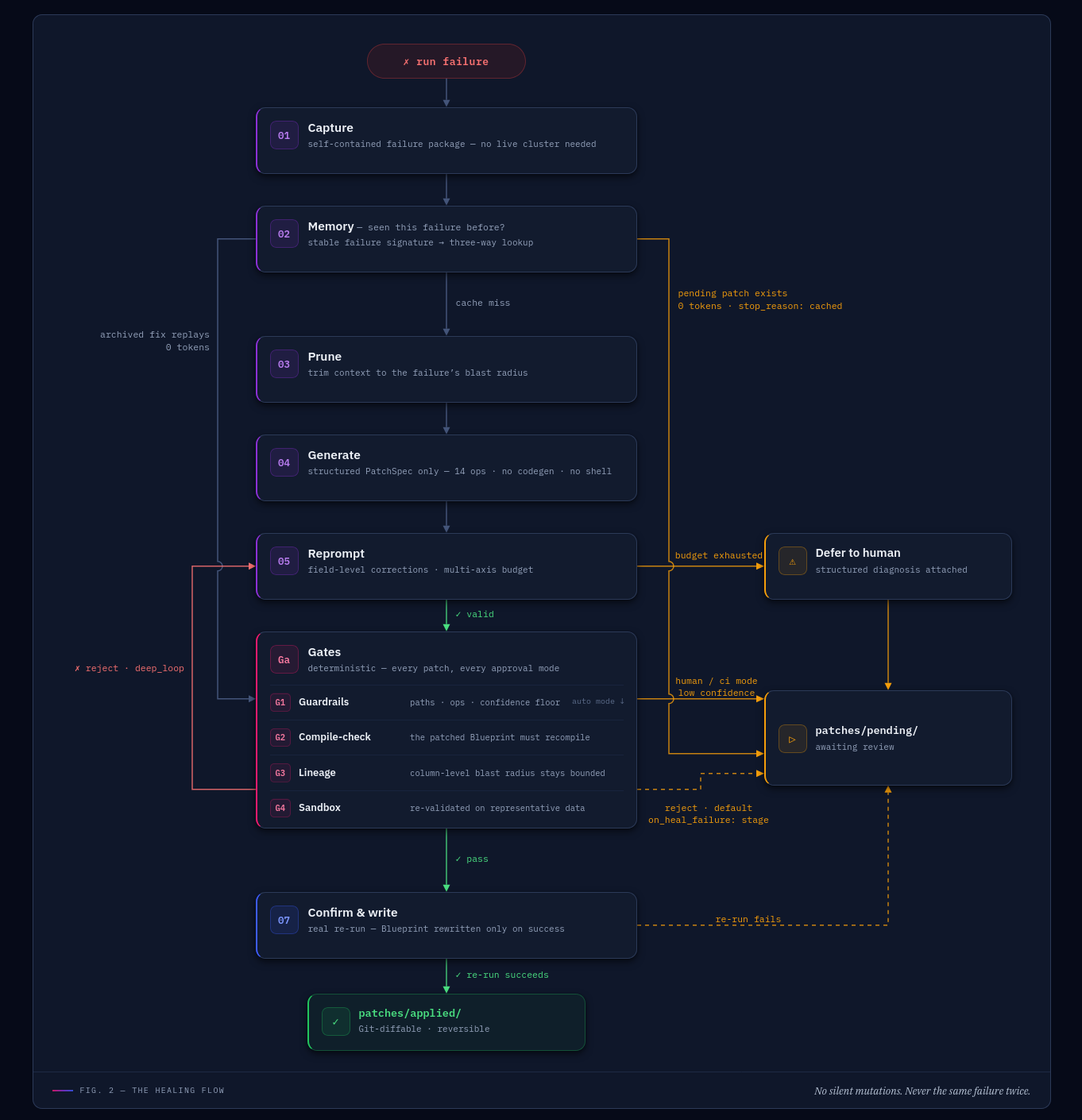
When a pipeline fails, Aqueduct does not throw a stack trace at an LLM and hope. Healing is a staged, auditable pipeline, and the model works inside a constrained grammar — it cannot write code, mutate files, or run shell commands.
A generated patch clears five gates before it ever touches the Blueprint — guardrails (deterministic policy: allowed paths, forbidden ops, minimum confidence), compile-check (the patched Blueprint must still parse), lineage (does the patch break a downstream column consumer), sandbox (replay against representative data), and a plan-regression check — in that order, first failure wins:
✓ guardrails → ✓ compile-check → ✓ lineage → ✓ sandbox → ✓ plan-regression → patch applied
Every patch clears the pyramid before it touches the Blueprint (aqueduct patch preview --sandbox runs the same pyramid on demand, before you decide to apply).
Approval modes
Who applies a generated patch. Deterministic guardrails — allowed paths, forbidden operations, minimum confidence — bound every patch regardless of mode.
| Mode | Who applies the patch | When the Blueprint changes | Use when |
|---|---|---|---|
disabled |
LLM never fires | Never | Healing is intentionally off. |
human |
Engineer reviews and applies | Only after human accepts | Production. Default behind CI/CD. |
ci |
External CI receives patch, opens a PR | Only after merge | Production with code review. |
auto |
Aqueduct applies in-memory, re-validates, writes only if the re-run succeeds | Only on a successful re-run | Trusted environments — dev, scoped pipelines. |
Low-confidence patches and any guardrail violation auto-escalate to human review.
What a patch looks like (click to expand)
Every patch is a PatchSpec — a structured, Git-diffable JSON document staged under patches/pending/. No code, no shell, just declarative operations against the Blueprint:
// patches/pending/hello-pipeline-20260611T031412.json (abridged)
{
  "patch_id": "hello-pipeline-20260611T031412",
  "run_id": "9f3c2e1a",
  "category": "config_error",
  "root_cause": "Ingress 'load' reads data/in.csv, but the upstream job renamed the file to data/input.csv.",
  "confidence": 0.92,
  "rationale": "PATH_NOT_FOUND on data/in.csv; a sibling data/input.csv exists with a matching schema, so the path is stale rather than the data missing.",
  "operations": [
    { "op": "set_module_config_key", "module_id": "load", "key": "path", "value": "data/input.csv" }
  ]
}
Review it, then aqueduct patch apply — or let auto mode validate and apply it for you.
Why it holds up
- No silent mutations. Every patch is a structured diff with a rationale and a confidence score; low confidence escalates.
- No production data corruption. The sandbox validates patches against representative data before any live write.
- No runaway loops. A multi-axis budget bounds wall-clock, tokens, reprompt count, and stuck-signature windows; a rolling rate-limit caps heals per hour per blueprint.
- No black-box decisions. Every LLM turn persists with the gate that rejected it, a stable error signature, and the prompt version. One run id joins every iteration of a heal.
- Efficient. Healing stops on the first successful patch. Structured error extraction replaces multi-kilobyte traces with a short root-cause block, and cheap lineage/sandbox checks reject bad patches in seconds before any full-pipeline replay.
For the stage-by-stage detail, see the Blueprint & Engine Spec.
Architecture
Where Aqueduct sits in a data platform — the control plane between your scheduler and Spark:
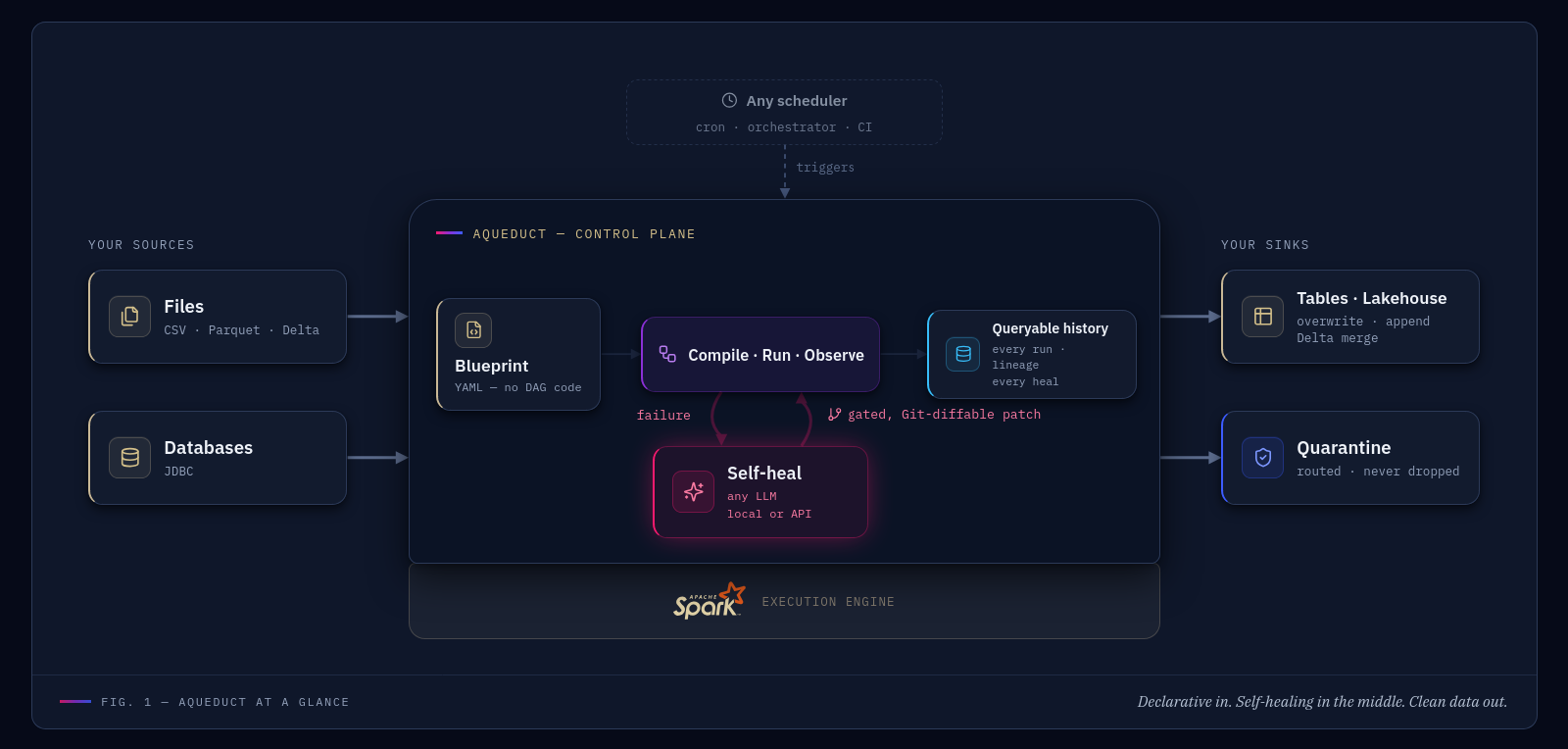
Inside the box, Aqueduct is a single CLI that runs on the Spark driver — no servers, no daemons. Logic flows through four immutable layers:
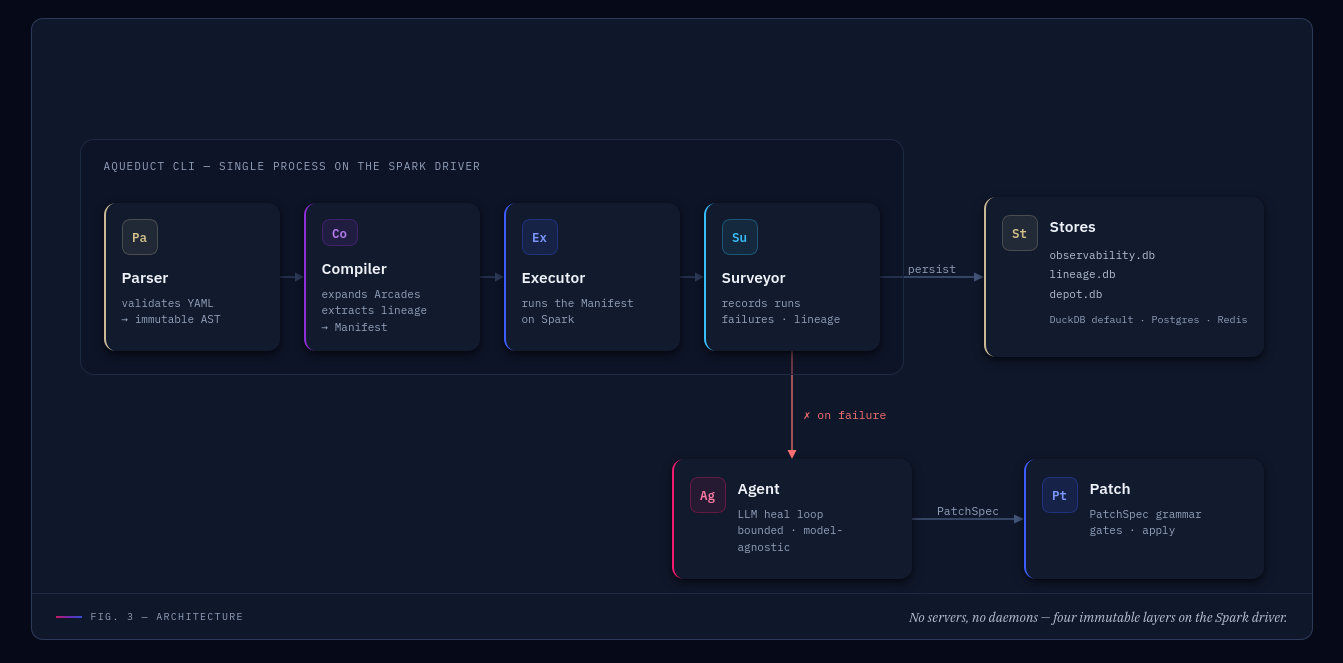
- Parser validates YAML into an immutable AST.
- Compiler resolves context, expands Arcades and macros, extracts column lineage, and assembles a fully-resolved Manifest.
- Executor runs the Manifest on Spark; all PySpark code is isolated under
executor/spark/. - Surveyor records runs, failures, and lineage to pluggable stores and triggers the Agent on failure.
Observability Dashboard
aqueduct dashboard launches a local, read-only Streamlit viewer over the same observability store the engine writes to — on-demand, like the Spark UI, never a production server and never required by a pipeline. One place for fleet health, per-run module metrics, column lineage, the self-heal patch stream with before/after diffs, performance trends, and data-quality signals — across every blueprint. Backend-agnostic (DuckDB or Postgres); every view re-reads with short-lived connections so it can't block a running pipeline's writer.
pip install "aqueduct-core[dashboard]"
aqueduct dashboard            # opens http://localhost:8501
Getting Started
Installation
pip install "aqueduct-core[spark]"
Requirements: Python 3.11+ · Java 17 for the
sparkextra (JAVA_HOMEmust point to it). Every release is CI-tested against three pinned combos — LTS (Python 3.11 · Spark 4.1), Latest (Python 3.13 · Spark 4.1), Legacy (Python 3.12 · Spark 3.5). Live results in the Compatibility Matrix.
Compose extras as needed — pip install "aqueduct-core[spark,airflow,aws]":
| Extra | Adds | Install when |
|---|---|---|
spark |
PySpark 4 + Delta Lake | Running pipelines on this host. |
airflow |
Apache Airflow operator shim | Scheduler / worker host; the box submitting jobs to Spark. |
secrets |
AWS + GCP + Azure secret-manager SDKs (or pick aws / gcp / azure individually) |
Resolving @aq.secret('KEY') against a cloud vault. |
stores |
Postgres + Redis backends (or pick postgres / redis individually) |
Replacing single-writer DuckDB defaults for obs / lineage / depot. |
llm |
json-repair — last-ditch recovery of malformed LLM patch JSON |
Healing with small local models that emit imperfect JSON. |
all |
Everything above | Single-laptop dev. |
A first blueprint
aqueduct: "1.0"
id: hello.pipeline
name: Hello Pipeline

macros:
  active: "status = 'active' AND deleted_at IS NULL"

modules:
  - id: load
    type: Ingress
    label: Load orders
    config: { format: csv, path: "data/in.csv", options: { header: true } }

  - id: clean
    type: Channel
    label: Filter active
    config:
      op: sql
      query: "SELECT order_id, amount FROM load WHERE {{ macros.active }}"

  - id: save
    type: Egress
    label: Write parquet
    config: { format: parquet, path: "data/out/", mode: overwrite }

edges:
  - { from: load,  to: clean }
  - { from: clean, to: save }

agent:
  approval: human
Engine-wide defaults live in a separate aqueduct.yml (LLM provider, store backends, danger settings). Inline module tests live in *.aqtest.yml. Repeatable healing benchmarks live in *.aqscenario.yml. The Gallery has runnable examples of each.
Five commands to know
aqueduct doctor blueprints/hello.yml— preflight check. Validates YAML, resolves paths, verifies LLM reachability, opens stores.aqueduct run blueprints/hello.yml— execute the pipeline. On failure, the agent generates a patch underpatches/pending/.aqueduct patch apply patches/pending/<id>.json --blueprint blueprints/hello.yml— review and accept a staged patch. Moves it topatches/applied/.aqueduct test blueprints/hello.aqtest.yml— run Channel / Junction / Funnel modules against inline data. No Ingress, no Egress, no external I/O.aqueduct benchmark gallery/aqscenarios/ --model claude-sonnet-4-6 --model qwen2.5-coder:7b— compare LLM models against simulated failures. No Spark required.
Full reference in CLI Reference.
How It Compares
| Aqueduct | dbt | Dagster / Airflow | Raw PySpark | |
|---|---|---|---|---|
| Pipeline definition | Declarative YAML Blueprints | SQL models | Python DAG code | Imperative code |
| Engine | Apache Spark | Warehouse SQL | Orchestration only | Apache Spark |
| On failure | Autonomous LLM patch + gates | Manual fix | Retry / alert | Manual fix |
| Column lineage | Built-in, compile-time | Built-in | Plugin | DIY |
| Built-in observability store | Yes (DuckDB/Postgres) | Partial | External | DIY |
Aqueduct sits where a Spark transformation engine and an autonomous repair loop meet — it is not a scheduler (pair it with Airflow via the airflow extra) and not a warehouse SQL tool.
References
- Blueprint & Engine Spec — Module types, configs, architecture, healing loop
- SKILL.md — Distilled Blueprint-authoring guide for LLMs (grammar, patterns, provider base_urls)
- CLI Reference — All commands and flags
- Spark Guide — Warnings, performance, tuning
- Observability Guide — Schemas + diagnostic query cookbook
- Production Guide — Cluster deployment, security, Delta operations
- Compatibility Matrix — Supported Python × Spark versions, pinning recipe
- Roadmap — Deferred features and future plans
- Gallery — Real working examples
Contributing
Contributions are welcome! See CONTRIBUTING.md.
Aqueduct is Apache 2.0 licensed — free, open source, no telemetry, no lock-in.
Project details
Verified details
These details have been verified by PyPIProject links
GitHub Statistics
Maintainers
Release history Release notifications | RSS feed


Download files
Download the file for your platform. If you're not sure which to choose, learn more about installing packages.
Source Distribution
Built Distribution
Filter files by name, interpreter, ABI, and platform.
If you're not sure about the file name format, learn more about wheel file names.
Copy a direct link to the current filters
File details
Details for the file aqueduct_core-2.0.2.tar.gz.
File metadata
- Download URL: aqueduct_core-2.0.2.tar.gz
- Upload date:
- Size: 605.1 kB
- Tags: Source
- Uploaded using Trusted Publishing? Yes
- Uploaded via: twine/6.1.0 CPython/3.13.12
File hashes
| Algorithm | Hash digest | |
|---|---|---|
| SHA256 |
a709c5b774736de34d60588f4bc1fb2ad9d53106aa6e3ec3ab220355cc1da03d
|
|
| MD5 |
c4ada5cca4f4bfe268ed25b595b29341
|
|
| BLAKE2b-256 |
6a535306cd15e4762107b0fe33539d93c167b3fea03f85e698b65883197dc074
|
Provenance
The following attestation bundles were made for aqueduct_core-2.0.2.tar.gz:
Publisher:
release.yml on sadigaxund/Aqueduct
-
Statement:
-
Statement type:
https://in-toto.io/Statement/v1 -
Predicate type:
https://docs.pypi.org/attestations/publish/v1 -
Subject name:
aqueduct_core-2.0.2.tar.gz -
Subject digest:
a709c5b774736de34d60588f4bc1fb2ad9d53106aa6e3ec3ab220355cc1da03d - Sigstore transparency entry: 2142951504
- Sigstore integration time:
-
Permalink:
sadigaxund/Aqueduct@259865048fcb47adcaf6c2dd01f6c2635c4c784f -
Branch / Tag:
refs/tags/2.0.2 - Owner: https://github.com/sadigaxund
-
Access:
public
-
Token Issuer:
https://token.actions.githubusercontent.com -
Runner Environment:
github-hosted -
Publication workflow:
release.yml@259865048fcb47adcaf6c2dd01f6c2635c4c784f -
Trigger Event:
push
-
Statement type:
File details
Details for the file aqueduct_core-2.0.2-py3-none-any.whl.
File metadata
- Download URL: aqueduct_core-2.0.2-py3-none-any.whl
- Upload date:
- Size: 593.2 kB
- Tags: Python 3
- Uploaded using Trusted Publishing? Yes
- Uploaded via: twine/6.1.0 CPython/3.13.12
File hashes
| Algorithm | Hash digest | |
|---|---|---|
| SHA256 |
7ff5f440baec5379743170a0f9fb3cb18012b5a66636a4b2b1111c980abc2875
|
|
| MD5 |
a6cf8d63abf62fc41a004669462b1b30
|
|
| BLAKE2b-256 |
2ce9740dbf4097a4aefde9242fdc3dbbb990f992359f687b4e5c5ba1b16836c0
|
Provenance
The following attestation bundles were made for aqueduct_core-2.0.2-py3-none-any.whl:
Publisher:
release.yml on sadigaxund/Aqueduct
-
Statement:
-
Statement type:
https://in-toto.io/Statement/v1 -
Predicate type:
https://docs.pypi.org/attestations/publish/v1 -
Subject name:
aqueduct_core-2.0.2-py3-none-any.whl -
Subject digest:
7ff5f440baec5379743170a0f9fb3cb18012b5a66636a4b2b1111c980abc2875 - Sigstore transparency entry: 2142951749
- Sigstore integration time:
-
Permalink:
sadigaxund/Aqueduct@259865048fcb47adcaf6c2dd01f6c2635c4c784f -
Branch / Tag:
refs/tags/2.0.2 - Owner: https://github.com/sadigaxund
-
Access:
public
-
Token Issuer:
https://token.actions.githubusercontent.com -
Runner Environment:
github-hosted -
Publication workflow:
release.yml@259865048fcb47adcaf6c2dd01f6c2635c4c784f -
Trigger Event:
push
-
Statement type:






