
AQVEN
Discover what your AI workflow needs to work reliably. A Python framework and a local Studio for AI workflows. Your coding agent runs the experiments. You see the evidence and decide.
Documentation · Quickstart · Use cases · Studio · GitHub
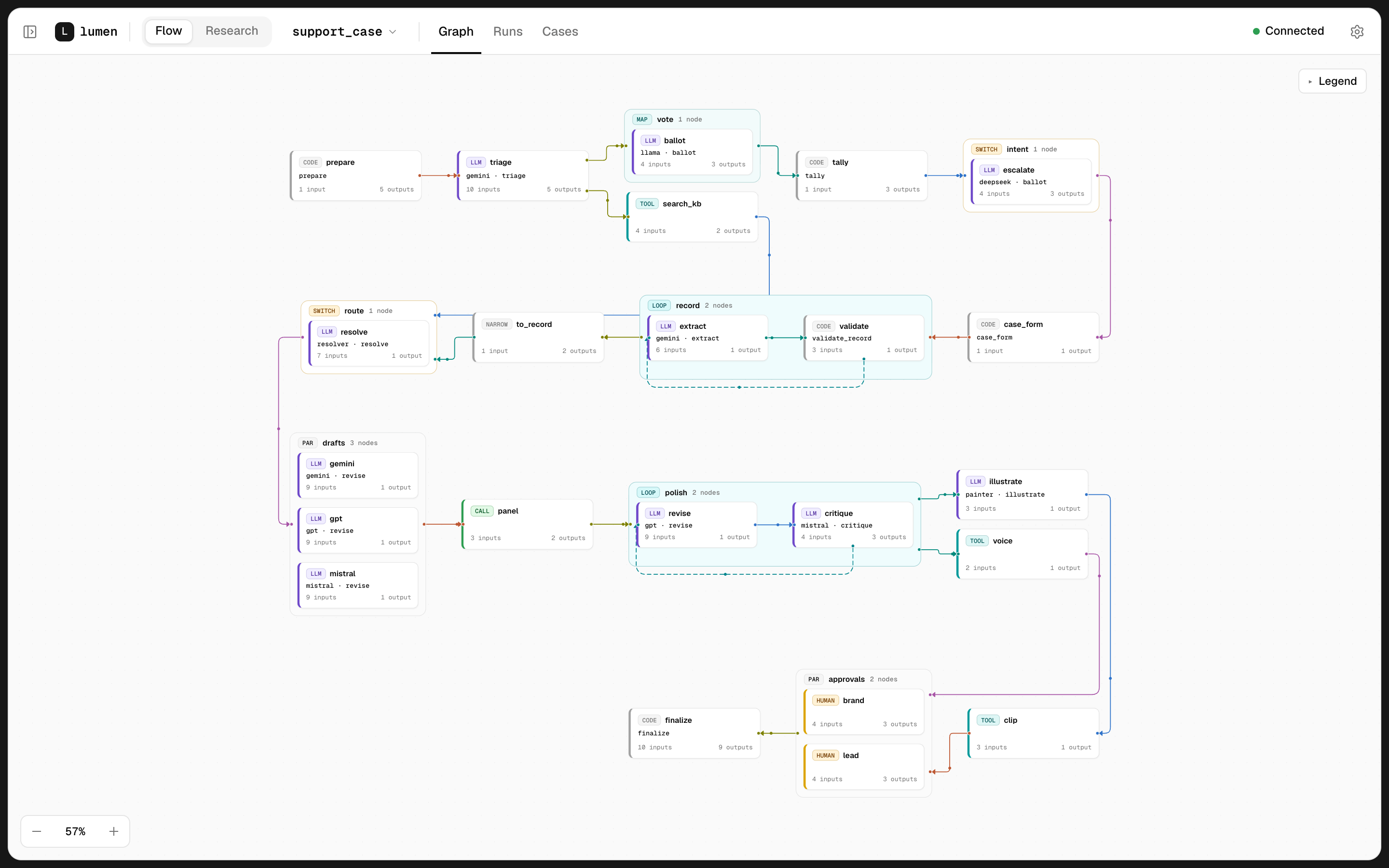
AQVEN keeps an AI workflow as typed files in your repository: a flow, one file per step, prompts in
Markdown, and declared types, agents and tools. aqven check validates every connection and simulates
every flow before you spend a token. Studio, a local browser app in the same install, shows each run
step by step. Your coding agent works on the same files through AQVEN's MCP server, and runs experiments
whose verdicts AQVEN computes.
AQVEN is in alpha: expect changes between releases.
What it's for
- Find. "What am I missing?" Your agent explores cases and variants you wouldn't try yourself.
- Explain. "Why did this fail?" Follow a bad answer back to the step where it started.
- Compare. "What should I change?" Models and prompts side by side, with cost and latency.
- Confirm. "Can I trust this change?" A verdict on held-out cases that is allowed to say inconclusive.
- Build. "How do I keep it readable as it grows?" Typed files in your repo, checked before a run costs a token.
Install
You need uv. AQVEN runs on Python 3.14, and uv fetches it for you. Studio ships inside the package: no Node.js toolchain, nothing to build.
uv tool install aqven
aqven new my_project --template minimal --provider openrouter
cd my_project
uv run aqven check my_project
errors: 0, warnings: 0
aqven new writes the project, installs its environment and generates typed Python models. It also
prepares the project for a coding agent: AGENTS.md, CLAUDE.md, an .mcp.json that registers AQVEN's
MCP server, and Claude Code hooks that run aqven check as the agent works. aqven check needs no API key
and no network.
Work with your coding agent
Start Claude Code in the project, approve the aqven server, and hand it a task. It builds the flow,
explores on working cases and confirms once on held-out cases; you read the first traces and make the
decisions. Open Studio next to it with uv run aqven dev my_project.
For Codex, Cursor or another MCP client, see How to set up a coding agent outside Studio.
Commands
| Command | What it does |
|---|---|
aqven new |
creates a project from a template, installs its environment and generates its models |
aqven check |
checks the project and simulates every flow without network or tokens |
aqven run |
runs a flow locally and prints run events as they happen |
aqven dev |
starts the project server and opens Studio in the browser |
aqven serve |
the project server without a browser: Studio API, engine and MCP |
aqven mcp |
MCP over stdio, for a coding agent outside Studio |
Built on
Pydantic AI calls the models, DBOS checkpoints every run on SQLite, the official MCP Python SDK serves and consumes MCP, and FastAPI serves Studio and the API. Runs locally.
License
AQVEN is source-available, not open source, under the AQVEN License 1.0.0, based on PolyForm Shield 1.0.0. Use it for any purpose, including in production and in commercial products you build with it. You may not use it to provide a product that competes with AQVEN, and you may redistribute AQVEN itself only free of charge and for a non-commercial purpose. Full terms: LICENSE.
Copyright Kirill Burkhanov.
1 maintainer

Release files for aqven 0.0.4
For a detailed explanation of source distributions (sdists) and built distributions (wheels), please see the package formats documentation.
Source distribution (sdist)
| File | Size | Uploaded | |
|---|---|---|---|
| aqven-0.0.4.tar.gz | 2.0 MB | Details |
Built distribution (wheel)
| File | Interpreter | ABI | Platform | Reset |
|---|---|---|---|---|
| aqven-0.0.4-py3-none-any.whl | Python 3 | none | any | Details |
Total release size: 4.5 MB
Release files / aqven-0.0.4.tar.gz
| Download URL | aqven-0.0.4.tar.gz |
|---|---|
| Size | 2.0 MB |
| Tags | Source |
|
SHA-256 checksum How to use checksums |
cd2accc251920eb3c7fcbf812501a39afe1bb4f7b4e797fe426a1d35f6cc148d
|
|
BLAKE2b-256 checksum How to use checksums |
43ab467a976ed27db6b3511899abf99a30a06f069eb5a1dfba4e1991c950a5fb
|
| Upload date | |
|
Uploaded using Trusted Publishing? What is trusted publishing? |
Yes |
| Uploaded via |
uv/0.12.15 {"installer":{"name":"uv","version":"0.12.15","subcommand":["publish"]},"python":null,"implementation":{"name":null,"version":null},"distro":{"name":"Ubuntu","version":"24.04","id":"noble","libc":null},"system":{"name":null,"release":null},"cpu":null,"openssl_version":null,"setuptools_version":null,"rustc_version":null,"ci":true}
|
Release files / aqven-0.0.4-py3-none-any.whl
| Download URL | aqven-0.0.4-py3-none-any.whl |
|---|---|
| Size | 2.5 MB |
| Tags | Python 3 |
|
SHA-256 checksum How to use checksums |
edb6a4174076632a0cab6b58424c0e8b14ca0044b9dd9102615c48ddc9a24845
|
|
BLAKE2b-256 checksum How to use checksums |
b765fbf495cdb2ca1c06c9f0966937b96d3538a245fc6cdc5b4fbc1c721f2473
|
| Upload date | |
|
Uploaded using Trusted Publishing? What is trusted publishing? |
Yes |
| Uploaded via |
uv/0.12.15 {"installer":{"name":"uv","version":"0.12.15","subcommand":["publish"]},"python":null,"implementation":{"name":null,"version":null},"distro":{"name":"Ubuntu","version":"24.04","id":"noble","libc":null},"system":{"name":null,"release":null},"cpu":null,"openssl_version":null,"setuptools_version":null,"rustc_version":null,"ci":true}
|














