
Arabic Layout Fixer
Typed in Arabic by mistake (or English with the Arabic layout on)? Select the text, press Ctrl + Alt + A (changeable in Settings), and it is replaced with what you meant to type. Works in both directions and picks the direction automatically. Free and open source.
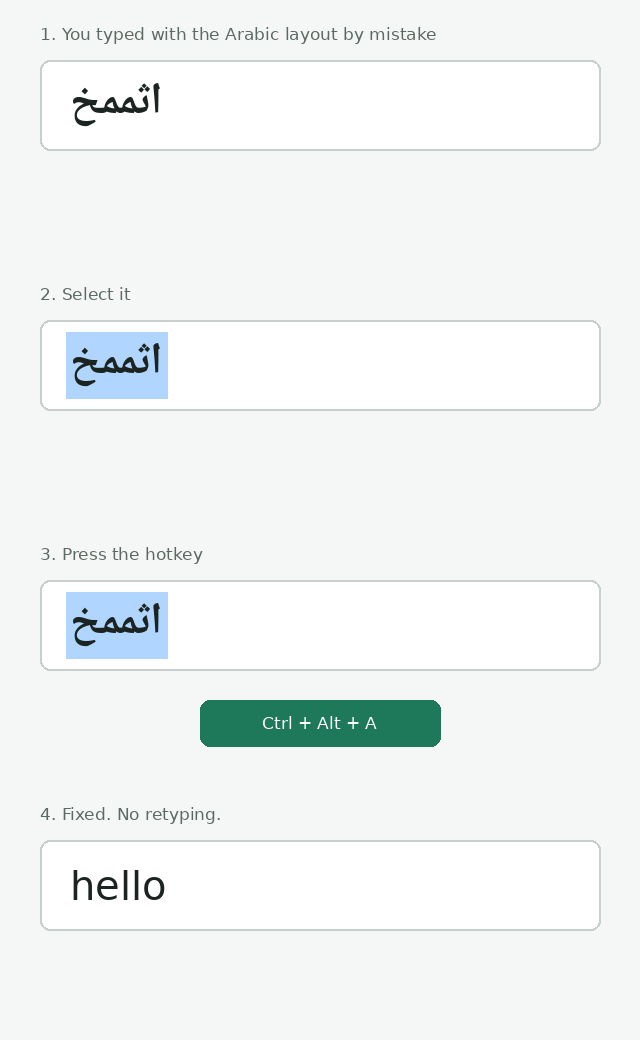
اثممخ → hello · hello → اثممخ
Press the hotkey again on the converted text (within 10 minutes) to undo it.
Install
One line (installs for your user only, no admin rights, and checks the download against the published SHA256 checksum before installing):
| System | Paste this |
|---|---|
| Windows (PowerShell) | irm https://raw.githubusercontent.com/Aelassal/arabic_english_layout_fixer/main/install.ps1 | iex |
| macOS (Terminal) | curl -fsSL https://raw.githubusercontent.com/Aelassal/arabic_english_layout_fixer/main/install.sh | sh |
| Linux (terminal) | curl -fsSL https://raw.githubusercontent.com/Aelassal/arabic_english_layout_fixer/main/install.sh | sh |
The scripts are short, so you can read install.sh and install.ps1 first.
To remove the app, run the same line with --uninstall (macOS/Linux: ... \| sh -s -- --uninstall) or, on
Windows, $env:LAYOUTFIX_UNINSTALL=1 before it.
Or with Python (a tiny download from PyPI, the same on all three systems; also avoids the "unknown publisher" prompt, because nothing unsigned is run):
pipx install arabic-layout-fixer      # or: pip install arabic-layout-fixer
arabic-layout-fixer-tray              # starts the tray app (no console window on Windows)
On Linux the Settings window needs Tk: sudo apt install python3-tk (Debian/Ubuntu) or sudo dnf install python3-tkinter.
Or download by hand from Releases. Each release also lists SHA256 checksums (SHA256SUMS.txt).
- Windows: run
ArabicLayoutFixer-Windows.exe(one file, about 11 MB;ArabicLayoutFixer-Windows.zipis the same app as a folder, which starts faster). SmartScreen may warn "unknown publisher" because the app is not code-signed: click More info → Run anyway. - macOS: open the
.dmg(Apple Silicon or Intel), drag the app to Applications and open it. The first time macOS blocks it: open System Settings → Privacy & Security and click Open Anyway. Then allow it under Privacy & Security → Accessibility and Input Monitoring. Because the app is not notarized, macOS may ask again after an update. Default hotkey on Mac: Ctrl + Shift + A. - Linux (X11): run
ArabicLayoutFixer-Linux(one file, about 12 MB;ArabicLayoutFixer-Linux.tar.gzis the same app as a folder, which starts faster). Nothing else is needed (xclipis only used as a fallback). - Linux (Wayland, e.g. GNOME): the desktop blocks global hotkeys, so use a system shortcut instead. Install
ydotool(theydotooldservice must be running), then add a custom shortcut (GNOME: Settings → Keyboard → Custom Shortcuts) that runsArabicLayoutFixer-Linux --once. (The one-line installer adds the GNOME shortcut Ctrl+Alt+A for you.) The clipboard is handled through XWayland (on by default in GNOME;DISPLAYmust be set for the shortcut), so no helper programs run and no window ever opens. If XWayland is disabled,wl-clipboardis used as a fallback; note that on GNOME eachwl-copy/wl-pastecall opens a tiny window to get focus, which makes the dock flicker.
A green swap-arrows icon appears in the tray / menu bar. Click it for Settings... and Start with computer. On GNOME the tray icon needs the AppIndicator extension; the hotkey works without it.
How it behaves
- It converts the highlighted text and pastes the result over it. On Windows and macOS it copies with Ctrl/Cmd+C (Ctrl+Insert on Windows) and pastes with Ctrl/Cmd+V (Shift+Insert on Windows). Linux reads the highlighted text directly and pastes with Shift+Insert.
- Your clipboard is put back afterwards. If the clipboard holds an image or files, Linux restores them; on Windows and macOS the app refuses to run and tells you, so nothing is lost.
- In a terminal the fixed text is pasted at the cursor (a terminal cannot replace highlighted output).
- On Linux the paste key goes out about 0.25 s after the hotkey press (so the hotkey is released first) and the
clipboard is put back as soon as the app has read the text. If no app has read the text after 0.6 s (the paste
key was swallowed, e.g. because a hotkey key was still held), the text is offered again and the paste key is
sent once more; it is never sent again once the app has read the text, so nothing is pasted twice. A small
background process keeps serving the restored clipboard until you copy something else, like
wl-copywould. - Nothing is sent anywhere. The app has no network code. It does not log or store what you type, except the last conversion (kept for 10 minutes, in your settings folder) so the hotkey can undo it.
- Problems are written to a log file in the settings folder (
%APPDATA%\ArabicLayoutFixer,~/Library/Application Support/ArabicLayoutFixeror~/.config/arabic-layout-fixer). On Linux each fix logs a timeline from the hotkey press (process start) to the clipboard restore: lengths, timings and which window asked for the text (an X11 window id), never the text itself.
Change the hotkey
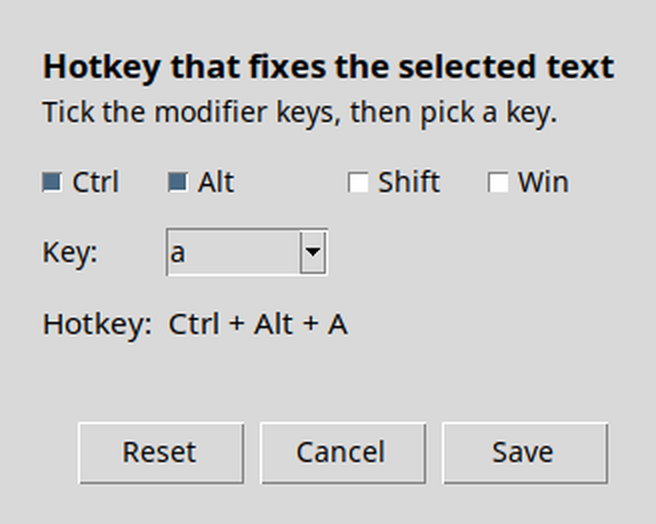
Tray icon → Settings..., tick the modifier keys (Ctrl, Alt, Win/Cmd; Shift alone is not allowed), pick a key, press Save. It takes effect immediately.
The fix starts when you let go of the hotkey, not when you press it. The app then sends its own keys (copy, paste) with none of your hotkey's keys still held down, which is what makes it work reliably in browsers, Electron apps and chat boxes. If you keep holding the keys, it simply waits.
A function key on its own (F1-F12) also works as a hotkey, for example F9. It has no modifier that can be held down at all. Apps still see that key too, so pick one you don't use. On Linux with Wayland (GNOME) you set the key in Settings → Keyboard → Custom Shortcuts instead.
Run from source
pip install .
arabic-layout-fixer           # tray app (or: python -m layoutfix)
python -m layoutfix --once    # fix the current selection once (for custom shortcuts)
python -m unittest discover -s tests
Limitations
- Assumes the standard Arabic 101 layout.
- The key that types
لاis read asb; a realgthenhis ambiguous. - Plain-symbol results such as
][/cannot be converted back, since nothing marks them as Arabic. - If nothing is highlighted on Linux, an older highlight may still be the "current selection".
- Rich formatting (bold, links) is not kept in the converted text, and may be lost from the clipboard on Windows/macOS when it held formatted text.
- Not code-signed or notarized yet.
1 maintainer

Metadata
1 maintainer
Release files for arabic-layout-fixer 0.5.1
For a detailed explanation of source distributions (sdists) and built distributions (wheels), please see the package formats documentation.
Source distribution (sdist)
| File | Size | Uploaded | Provenance | |
|---|---|---|---|---|
| arabic_layout_fixer-0.5.1.tar.gz | 42.7 kB | With provenance | Details |
Built distribution (wheel)
| File | Interpreter | ABI | Platform | Reset |
|---|---|---|---|---|
| arabic_layout_fixer-0.5.1-py3-none-any.whl | Python 3 | none | any | Details |
Total release size: 78.9 kB
Release files / arabic_layout_fixer-0.5.1.tar.gz
| Download URL | arabic_layout_fixer-0.5.1.tar.gz |
|---|---|
| Size | 42.7 kB |
| Tags | Source |
|
SHA-256 checksum How to use checksums |
2bdbc5bf3f44b642fee8f2ec7d953ef9b2a8c6608183895210384a87a8aa532f
|
|
BLAKE2b-256 checksum How to use checksums |
c417ad4a020203faa557c25decdfc386096b44c2f9f4f3fd22b9dfbcaadf8924
|
| Upload date | |
|
Uploaded using Trusted Publishing? What is trusted publishing? |
Yes |
| Uploaded via |
twine/7.0.0 CPython/3.13.14
|
Provenance
Provenance describes where a file came from. On PyPI, provenance is shared via attestations, which provide a verifiable record of the build or publishing details. View details, limitations and caveats.


PyPI Publish Attestation
PyPI verified that this artifact, at this checksum, originated from the publisher listed below.
Signed by GitHub Actions, verified by PyPI on Oct 17, 2026.
Transparency logRelease files / arabic_layout_fixer-0.5.1-py3-none-any.whl
| Download URL | arabic_layout_fixer-0.5.1-py3-none-any.whl |
|---|---|
| Size | 36.3 kB |
| Tags | Python 3 |
|
SHA-256 checksum How to use checksums |
9bccd7987fd396cc53d45e513856cd744b1bf0534aa030a234ce467da46ee60b
|
|
BLAKE2b-256 checksum How to use checksums |
e185a4c617d736efb49cb7de7972abcc61f79903326d8d53fe17599cdeb2aecb
|
| Upload date | |
|
Uploaded using Trusted Publishing? What is trusted publishing? |
Yes |
| Uploaded via |
twine/7.0.0 CPython/3.13.14
|
Provenance
Provenance describes where a file came from. On PyPI, provenance is shared via attestations, which provide a verifiable record of the build or publishing details. View details, limitations and caveats.
PyPI Publish Attestation
PyPI verified that this artifact, at this checksum, originated from the publisher listed below.
Signed by GitHub Actions, verified by PyPI on Oct 17, 2026.
Transparency logSecurity for arabic-layout-fixer 0.5.1
Provenance
Provenance describes where a file came from. On PyPI, provenance is shared via attestations, which provide a verifiable record of the build or publishing details. View details, limitations and caveats.
Full provenance
All 2 files in this release have been uploaded with provenance metadata.
Attestation for arabic_layout_fixer-0.5.1.tar.gz
PyPI Publish Attestation
PyPI verified that this artifact, at this checksum, originated from the publisher listed below.
Signed by GitHub Actions, verified by PyPI on Oct 17, 2026.
Transparency logA note on package security
PyPI is a repository for distributing packages, not a service for auditing them. While third-party security researchers and our staff do their best to detect and remove malicious packages, PyPI cannot guarantee the quality, security or suitability of any given package.
To learn more about protecting yourself from malicious actors, visit our package security documentation.














