
Arbora

The process the operator runs to open the Knuckles agent platform.
MCP · REST · A2A · identity policy · fleet supervision · hosted interfaces



















Documentation · Capabilities · Interfaces · Status
Overview
Run Arbora when an MCP client, HTTP application, A2A peer, or hosted interface needs one authenticated way into the platform. One serving lifecycle composes the same application services across transports, applies identity and tenant policy, and keeps tool discovery tied to the live fleet catalog.
Arbora is the platform edge and composition root. It is not the agent harness, the durable database, a connector implementation, or the browser UI.
Key Capabilities
- Serve local MCP over
stdioand authenticated MCP over streamable HTTP. - Project the same governed operations through REST and unary A2A.
- Discover, admit, supervise, and route the MCP connector fleet.
- Apply identity, tenant, action-policy, idempotency, and provenance controls.
- Host Agent Web UI and coordinate terminal, desktop, messaging, and attended browser capabilities.
- Generate deployment configuration and report live readiness through
/health.
Documentation
Start with the visual platform guide, then use the task-oriented references:
- Start Arbora
- Review capabilities
- Choose an interface
- Understand the architecture
- Check live status
- Configure a deployment
Architecture
| Layer | Authority | Relationship to Arbora |
|---|---|---|
| Agent Web UI | Browser experience and local interaction state | Arbora hosts it and supplies governed application routes. |
| Agent Terminal UI | Terminal and headless interaction | Uses the governed Arbora REST interface. |
| Geniusbot | Desktop cockpit | Uses the governed Arbora gateway for its primary panels. |
| Messaging channels | Chat and voice entrypoints | Arbora hosts and supervises them; agent-utilities owns adapters and routing. |
| Arbora | MCP, REST, A2A, identity policy, fleet supervision | The running process and public door. |
| agent-utilities | Agents, workflows, evaluation, and skills | Arbora invokes its typed control-plane services. |
| epistemic-graph | Durable graph, SQL, RDF, vector, time, reasoning, and provenance | Arbora uses its generated client contracts. |
| agent-connector-sdk | Connector servers, source synchronization, and governed effects | Arbora discovers and routes SDK-based connector services. |
The boundary is deliberate: Arbora authenticates, composes, routes, supervises, and projects. Each sibling remains the source of truth for its own domain.
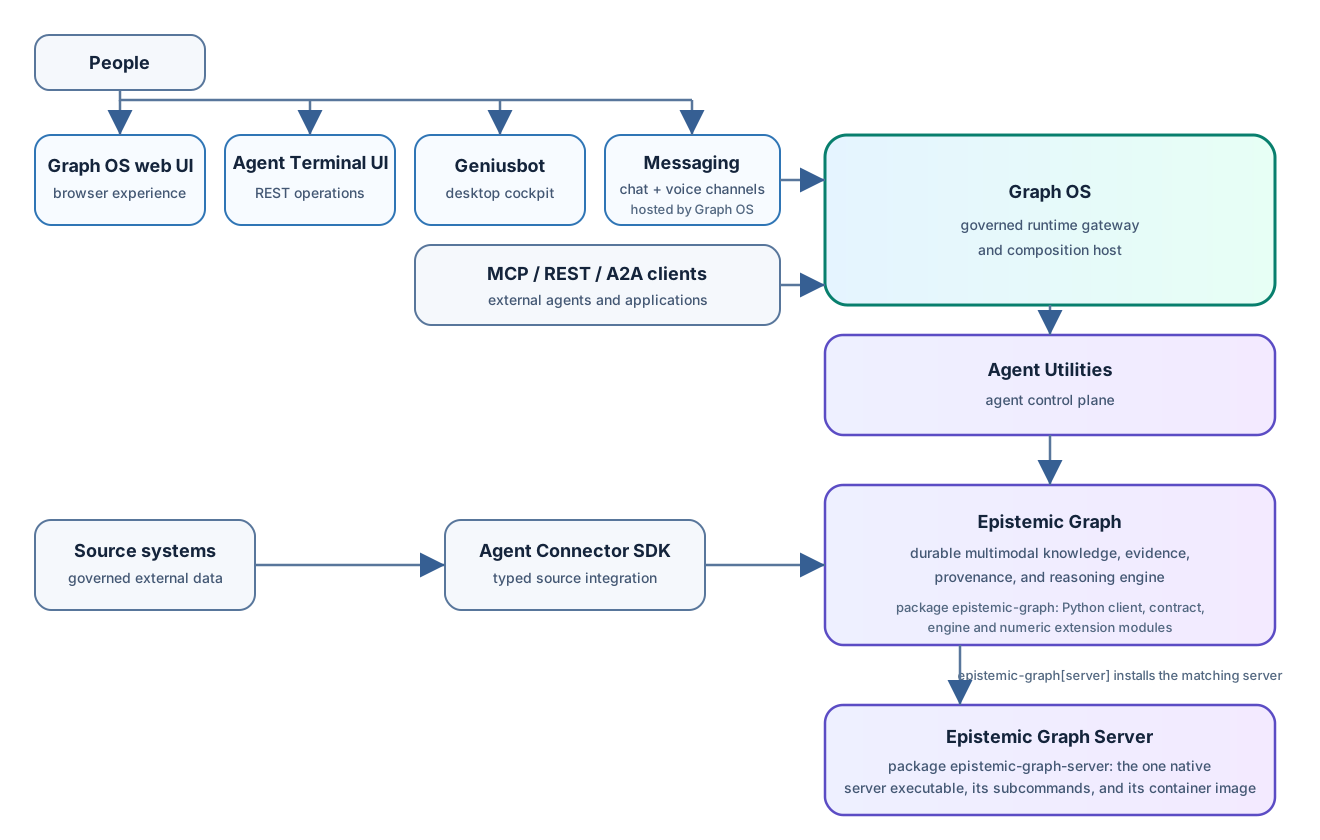
Quick Start
Requires Python 3.12–3.14 and uv. Install the
bundled runtime, generate the local profile, and register its stdio launcher
with Codex:
uv tool install "arbora[webui]"
setup-config generate --profile tiny
setup-config doctor --profile tiny
setup-config codex
The doctor command is the first observable result: it reports whether the local
profile and required authorities are ready before a listener starts. Arbora
then appears as the arbora MCP server in Codex. Other MCP clients can
start the same local transport directly:
arbora --transport stdio
Network deployments use the identity, TLS, and authorization settings in the deployment guide.
Contributing
Issues and pull requests are welcome. Read AGENTS.md for source boundaries and quality gates. Report vulnerabilities through GitHub Security Advisories.
Development
Run scripts/bootstrap.sh, then follow CONTRIBUTING.md
for the hooks, tests, and branch and pull-request flow.
License
Arbora is released under the MIT License.
1 maintainer

Metadata
1 maintainer
Release files for arbora 0.1.4
For a detailed explanation of source distributions (sdists) and built distributions (wheels), please see the package formats documentation.
Built distribution (wheel)
| File | Interpreter | ABI | Platform | Reset |
|---|---|---|---|---|
| arbora-0.1.4-py3-none-any.whl | Python 3 | none | any | Details |
Release files / arbora-0.1.4-py3-none-any.whl
| Download URL | arbora-0.1.4-py3-none-any.whl |
|---|---|
| Size | 2.9 MB |
| Tags | Python 3 |
|
SHA-256 checksum How to use checksums |
dadf0959b29d1ba71477a601fb9fa06bdf6b61ab50d33cc8a248ee774f58354e
|
|
BLAKE2b-256 checksum How to use checksums |
1334f05d5e748cf965dd752623f307ea6a5a414a1a17a63c3108363c92f5b11c
|
| Upload date | |
|
Uploaded using Trusted Publishing? What is trusted publishing? |
No |
| Uploaded via |
uv/0.13.1 {"installer":{"name":"uv","version":"0.13.1","subcommand":["publish"]},"python":null,"implementation":{"name":null,"version":null},"distro":{"name":"Ubuntu","version":"24.04","id":"noble","libc":null},"system":{"name":null,"release":null},"cpu":null,"openssl_version":null,"setuptools_version":null,"rustc_version":null,"ci":true}
|














