
arbtt-chart



Overview
Textual chart for arbtt, the automatic, rule-based time tracker.
Similar to arbtt-graph, just in plain monospace text.
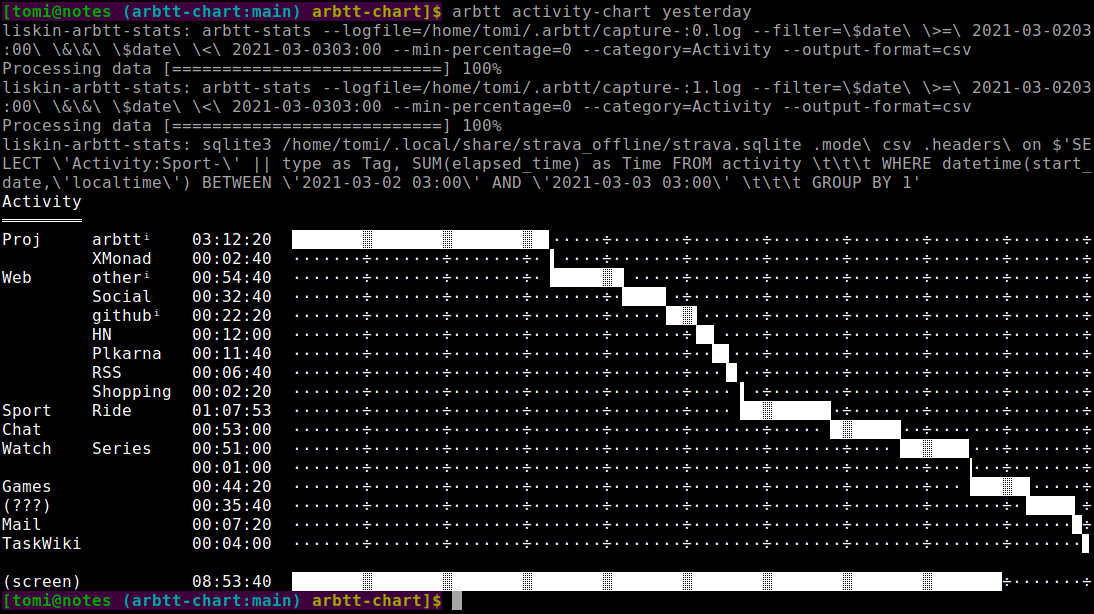
(The above screenshot is generated using my liskin-arbtt-stats which provides a few handy commands and combines data from multiple X sessions and Strava.)
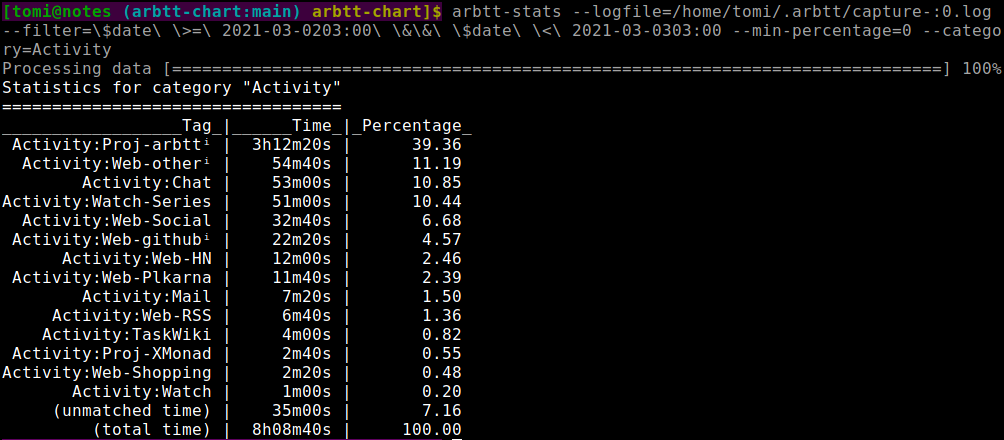
Raw arbtt-stats output for the same time period looks something like this:
Getting started
-
Install arbtt and make sure
arbtt-captureruns in your graphical login session. -
Configure arbtt rules in
~/.arbtt/categorize.cfg. See Configuring the arbtt categorizer, Effective Use of Arbtt, and sample categorize.cfg for arbtt-graph. -
Try
arbtt-stats --output-format=csv --each-category | arbtt-chartorarbtt-stats --output-format=csv --category=Graph | arbtt-chart
Installation
Using uv:
$ uv tool install arbtt-chart
Using pipx:
$ pipx ensurepath
$ pipx install arbtt-chart
From a git clone:
$ git clone https://github.com/liskin/arbtt-chart
$ uv tool install ./arbtt-chart
Or, since the only dependency is pandas, you can just sudo apt install python3-pandas and run arbtt_chart.py directly. :-)
Usage
$ arbtt-chart --help
usage: arbtt-chart [-h] [--no-stacked] [--subtags] [--totals-re RE]

Plot charts from arbtt-stats to terminal. Expects `arbtt-stats --output-
format=csv --category=…` or `arbtt-stats --output-format=csv --each-category`
output on stdin.

options:
  -h, --help      show this help message and exit
  --no-stacked    don't stack bar chart
  --subtags       recognize subtags (separated by '-') and sort them together
  --totals-re RE  totals row regexp, default: ^\(total time\)$
Examples
single category
$ arbtt-stats --filter='$date >= 2021-03-0220:00 && $date < 2021-03-0303:00' \
>             --min-percentage=2 --category=Activity --output-format=csv \
> | arbtt-chart
Activity
════════
Proj-arbttⁱ          03:11:40  ███████████▓██████████▓██████████▓██▏········÷···
Chat                 00:30:20  ···········÷··········÷··········÷··█████▊···÷···
(8 entries omitted)  00:15:40  ···········÷··········÷··········÷·······▕██▊÷···
Web-Social           00:08:20  ···········÷··········÷··········÷··········▐▓▏··
Web-otherⁱ           00:06:40  ···········÷··········÷··········÷···········÷█▍·
Web-HN               00:06:20  ···········÷··········÷··········÷···········÷·▐▊
(unmatched time)     00:01:20  ···········÷··········÷··········÷···········÷··▕

(total time)         04:20:20  ███████████▓██████████▓██████████▓███████████▓███
single category, subtags
$ arbtt-stats --filter='$date >= 2021-03-0220:00 && $date < 2021-03-0303:00' \
>             --min-percentage=2 --category=Activity --output-format=csv \
> | arbtt-chart --subtags
Activity
════════
Proj                arbttⁱ  03:11:40  █████████▓█████████▓█████████▓█·······÷···
Chat                        00:30:20  ·········÷·········÷·········÷▕████▊··÷···
Web                 Social  00:08:20  ·········÷·········÷·········÷·····▕█▏÷···
                    otherⁱ  00:06:40  ·········÷·········÷·········÷·······█▏···
                    HN      00:06:20  ·········÷·········÷·········÷········▓▏··
(8 entries omitted)         00:15:40  ·········÷·········÷·········÷········÷██▋
(unmatched time)            00:01:20  ·········÷·········÷·········÷········÷··▕

(total time)                04:20:20  █████████▓█████████▓█████████▓████████▓███
multiple categories
$ arbtt-stats --filter='$date >= 2021-03-0220:00 && $date < 2021-03-0303:00' \
>             --min-percentage=2 --each-category --output-format=csv \
> | arbtt-chart
Activity
════════
Proj-arbttⁱ          03:11:40  ███████████▓██████████▓██████████▓██▏········÷···
Chat                 00:30:20  ···········÷··········÷··········÷··█████▊···÷···
(8 entries omitted)  00:15:40  ···········÷··········÷··········÷·······▕██▊÷···
Web-Social           00:08:20  ···········÷··········÷··········÷··········▐▓▏··
Web-otherⁱ           00:06:40  ···········÷··········÷··········÷···········÷█▍·
Web-HN               00:06:20  ···········÷··········÷··········÷···········÷·▐▊
(unmatched time)     00:01:20  ···········÷··········÷··········÷···········÷··▕

(total time)         04:20:20  ███████████▓██████████▓██████████▓███████████▓███

Desktop
═══════
4_arbtt              02:21:40  ███████████▓██████████▓███▊······÷···········÷···
6_arbtt_web          00:50:20  ···········÷··········÷···▐██████▓██·········÷···
1_irc                00:34:00  ···········÷··········÷··········÷··██████▌··÷···
2_web                00:34:00  ···········÷··········÷··········÷········▐██▓███
(1 entries omitted)  00:00:20  ···········÷··········÷··········÷···········÷··▕

(total time)         04:20:20  ███████████▓██████████▓██████████▓███████████▓███

Program
═══════
urxvt                02:38:00  ███████████▓██████████▓██████▊···÷···········÷···
google-chrome        01:21:40  ···········÷··········÷······▐███▓██████████▉÷···
app_element_io       00:14:40  ···········÷··········÷··········÷···········▓█▉·
(3 entries omitted)  00:06:00  ···········÷··········÷··········÷···········÷·▕█

(total time)         04:20:20  ███████████▓██████████▓██████████▓███████████▓███
custom inputs
$ arbtt-chart --totals-re='^\(' <<END
> Tag,Time
> Act:Work,02:30:00
> Act:Social,01:20:00
> Act:Mail,00:20:00
> Act:Movie,01:30:00
> (screen),05:40:00
>
> Tag,Time
> Act:Sport,3600
> Act:Commute,1800
> (outside),5400
> END
Act
═══
Work       02:30:00  ████████▓███████▓███▋···÷·······÷········÷·······÷·······÷·
Movie      01:30:00  ········÷·······÷···▐███▓███████▉········÷·······÷·······÷·
Social     01:20:00  ········÷·······÷·······÷·······▕████████▓█▊·····÷·······÷·
Sport      01:00:00  ········÷·······÷·······÷·······÷········÷·▕█████▓██·····÷·
Commute    00:30:00  ········÷·······÷·······÷·······÷········÷·······÷··████▏÷·
Mail       00:20:00  ········÷·······÷·······÷·······÷········÷·······÷······█▓▊

(screen)   05:40:00  ████████▓███████▓███████▓███████▓████████▓████▊··÷·······÷·
(outside)  01:30:00  ████████▓███▍···÷·······÷·······÷········÷·······÷·······÷·
custom inputs, multiple tables at same scale
$ arbtt-chart <<END
> Tag,Time
> Screen:Work,02:30:00
> Screen:Social,01:20:00
> Screen:Mail,00:20:00
> Screen:Movie,01:30:00
> (total time),05:40:00
>
> Tag,Time
> Outside:Sport,3600
> Outside:Commute,1800
> (total time),5400
> END
Screen
══════
Work          02:30:00  █████████▓█████████▓████▊····÷·········÷·········÷······
Movie         01:30:00  ·········÷·········÷····▐████▓█████████▍·········÷······
Social        01:20:00  ·········÷·········÷·········÷·········▐█████████▓██▊···
Mail          00:20:00  ·········÷·········÷·········÷·········÷·········÷··▐██▉

(total time)  05:40:00  █████████▓█████████▓█████████▓█████████▓█████████▓██████

Outside
═══════
Sport         01:00:00  █████████▓·········÷·········÷·········÷·········÷······
Commute       00:30:00  ·········▕████▊····÷·········÷·········÷·········÷······

(total time)  01:30:00  █████████▓████▉····÷·········÷·········÷·········÷······
Contributing
Code
We welcome bug fixes, (reasonable) new features, documentation improvements, and more. Submit these as GitHub pull requests. Use GitHub issues to report bugs and discuss non-trivial code improvements; alternatively, get in touch via IRC/Fediverse/email.
See CONTRIBUTING.md for more details about the code base (including running tests locally).
Note that this project was born out of a desire to solve a problem I was facing. While I'm excited to share it with the world, keep in mind that I'll be prioritizing features and bug fixes that align with my personal use cases. There may be times when I'm busy with other commitments and replies to contributions might be delayed, or even occasionally missed. Progress may come in bursts. Adjust your expectations accordingly.
1 maintainer

Metadata
1 maintainer
Release files for arbtt-chart 1.0.3
For a detailed explanation of source distributions (sdists) and built distributions (wheels), please see the package formats documentation.
Source distribution (sdist)
| File | Size | Uploaded | |
|---|---|---|---|
| arbtt_chart-1.0.3.tar.gz | 18.0 kB | Details |
Built distribution (wheel)
| File | Interpreter | ABI | Platform | Reset |
|---|---|---|---|---|
| arbtt_chart-1.0.3-py3-none-any.whl | Python 3 | none | any | Details |
Total release size: 26.5 kB
Release files / arbtt_chart-1.0.3.tar.gz
| Download URL | arbtt_chart-1.0.3.tar.gz |
|---|---|
| Size | 18.0 kB |
| Tags | Source |
|
SHA-256 checksum How to use checksums |
985061d204de7af44706b8a36c1cf03bd2251c53e89897d7805e704d403733b2
|
|
BLAKE2b-256 checksum How to use checksums |
1837bae33ad3ee713443b0b4e123bb6ace160c9e567272e1c6c69965c765b7d0
|
| Upload date | |
|
Uploaded using Trusted Publishing? What is trusted publishing? |
Yes |
| Uploaded via |
twine/6.1.0 CPython/3.13.12
|
Provenance
Provenance describes where a file came from. On PyPI, provenance is shared via attestations, which provide a verifiable record of the build or publishing details. View details, limitations and caveats.


PyPI Publish Attestation
PyPI verified that this artifact, at this checksum, originated from the publisher listed below.
Signed by GitHub Actions, verified by PyPI on Jun 16, 2026.
Transparency logRelease files / arbtt_chart-1.0.3-py3-none-any.whl
| Download URL | arbtt_chart-1.0.3-py3-none-any.whl |
|---|---|
| Size | 8.6 kB |
| Tags | Python 3 |
|
SHA-256 checksum How to use checksums |
733cf574e442dfaab3a167ffee4c21133731c872662a1c1f6b095bc520293647
|
|
BLAKE2b-256 checksum How to use checksums |
fcca95d751adab8a0e04e058edcde499fcbc02bfb3272591bc5b973e8cca365c
|
| Upload date | |
|
Uploaded using Trusted Publishing? What is trusted publishing? |
Yes |
| Uploaded via |
twine/6.1.0 CPython/3.13.12
|
Provenance
Provenance describes where a file came from. On PyPI, provenance is shared via attestations, which provide a verifiable record of the build or publishing details. View details, limitations and caveats.
PyPI Publish Attestation
PyPI verified that this artifact, at this checksum, originated from the publisher listed below.
Signed by GitHub Actions, verified by PyPI on Jun 16, 2026.
Transparency log













