
ARCADE
ARCADE is a research implementation for spatial mosaic multi-omics integration with reference-guided negative-binomial deconvolution.
The public package is being organized from the final Human Tonsil and Mouse Brain experiment notebooks. Reproduction fidelity is the primary design constraint: dataset-specific preprocessing, modality layouts, graph settings, reference construction, training, and evaluation are retained as separate workflows.
Documentation
Documentation is available through Read the Docs:
https://arcade-omics.readthedocs.io/en/latest/
It includes:
- installation and data preparation guides
- complete Human Tonsil and Mouse Brain tutorials
- validated result visualizations and evaluation metrics
- reproducibility notes
- API reference
A new user should follow the documentation in this order:
The tutorials contain complete final commands, expected outputs, plotting code, representative 200-epoch results, and explanations of what each figure does and does not represent.
Current contents
arcade_omics/: the canonical Python APImosaic_core/: compatibility imports for the final experiment notebooksscripts/run_human_tonsil.py: parameterized final Human Tonsil workflowscripts/run_mouse_brain.py: parameterized final Mouse Brain workflowdocs/: Sphinx and Read the Docs sources
The two original final notebooks are retained locally as line-by-line references, but are ignored by Git because they contain internal absolute paths. Their dataset-specific calculations are represented by the two public scripts instead of publishing private server paths.
Installation
ARCADE documents two environments that have been run with the public workflow:
| Environment | OS | Python | PyTorch | CUDA | PyTorch Geometric |
|---|---|---|---|---|---|
| Paper environment | Linux | 3.11 | 2.3.0 | 12.1 | 2.7.0 |
| Compatibility-tested environment | Linux | 3.12 | 2.8.0 | 12.8 | 2.6.1 |
For paper reproduction, clone the repository and create the curated Conda
environment. The full exported package snapshot is retained separately as
environments/paper-lock.yml for provenance.
git clone https://github.com/HokazeJunko/ARCADE.git
cd ARCADE
conda env create -f environments/paper.yml
conda activate arcade-paper
pip install -e . --no-deps
For the compatibility-tested PyTorch 2.8/CUDA 12.8 environment, install the matching compiled PyTorch Geometric extensions before ARCADE:
pip install torch==2.8.0 --index-url https://download.pytorch.org/whl/cu128
pip install torch_scatter torch_sparse \
  -f https://data.pyg.org/whl/torch-2.8.0+cu128.html
Install the released package from PyPI:
pip install arcade-omics
To run the repository scripts or contribute code outside the paper environment, clone the real repository and install the source checkout in editable mode:
git clone https://github.com/HokazeJunko/ARCADE.git
cd ARCADE
pip install -e .
For another PyTorch or CUDA version, select the matching extension wheel index before installing ARCADE. The complete environment notes are in the installation guide.
Quick import check
python -c "import arcade_omics; print(arcade_omics.__version__)"
The legacy import remains available for the confirmed final notebooks:
import mosaic_core
New code should use:
import arcade_omics
Run the final workflows
Human Tonsil:
python scripts/run_human_tonsil.py \
  --data-dir /path/to/data/human_tonsil \
  --output-dir /path/to/results/human_tonsil \
  --gpu 0 \
  --epochs 200
Mouse Brain:
python scripts/run_mouse_brain.py \
  --data-dir /path/to/data/mouse_brain \
  --output-dir /path/to/results/mouse_brain \
  --gpu 0 \
  --epochs 200
These commands use the confirmed final optimization settings by default. See
the RTD tutorial sources under docs/ for exact input and output filenames.
The formal reproduction value is --epochs 200. A one-epoch run is only an
installation smoke test and is not used for the published result figures.
Evaluation is intentionally separate. The public scripts
scripts/evaluate_human_tonsil.py and scripts/evaluate_mouse_brain.py
retain the final notebook metrics and annotation conventions. External
annotations and comparison-method outputs are not included; their expected
filenames are documented in docs/evaluation.rst.
Result visualization
The formal plotting scripts read saved outputs and do not rerun preprocessing or training:
python scripts/plot_human_tonsil_results.py \
  --result-dir outputs/human_tonsil \
  --figure-dir outputs/human_tonsil/figures

python scripts/plot_mouse_brain_results.py \
  --result-dir outputs/mouse_brain \
  --figure-dir outputs/mouse_brain/figures
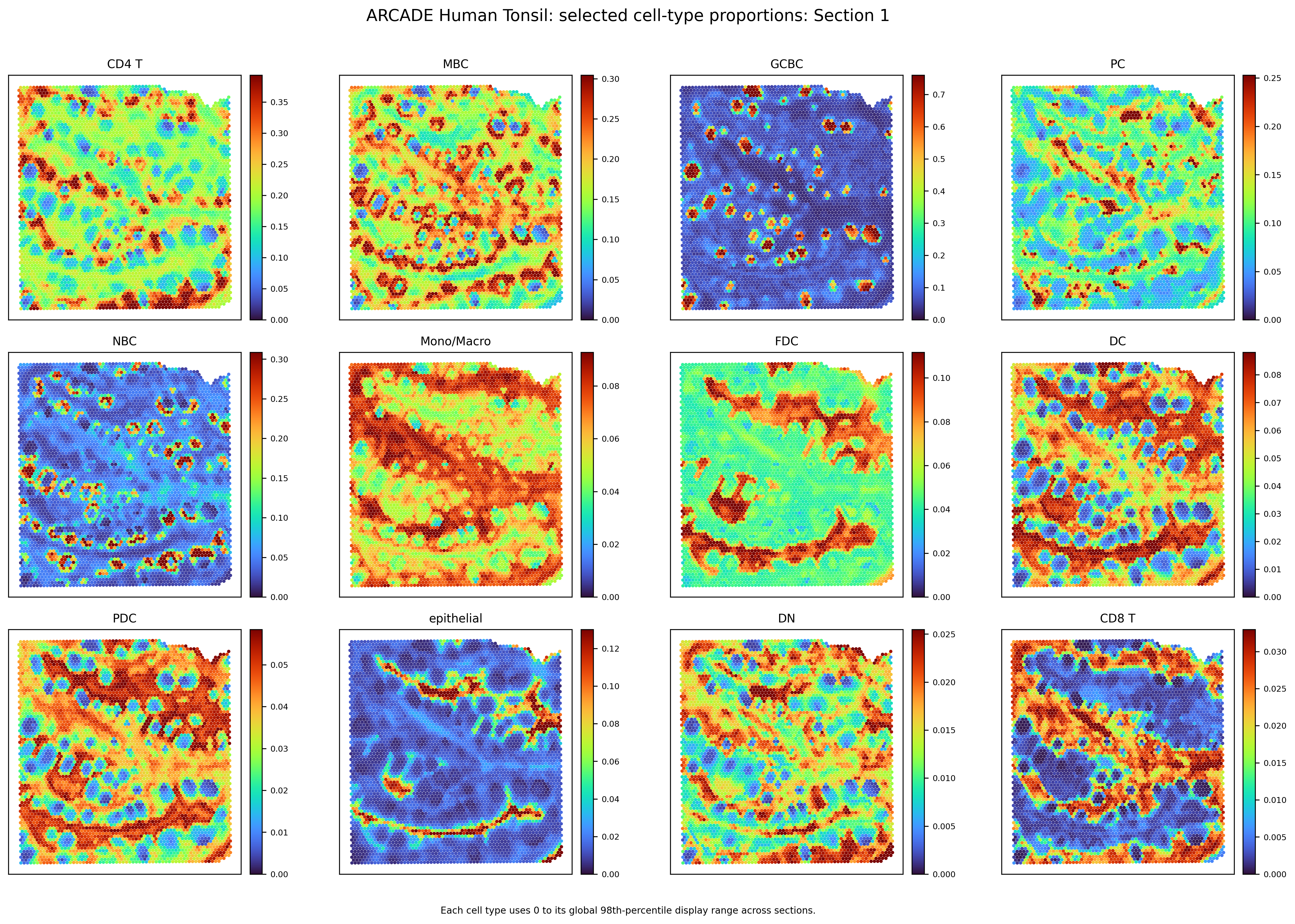
Continuous spatial proportions use a shared per-cell-type turbo scale across
sections; categorical colors remain fixed. Main plots are written as 300 dpi
PNG and vector PDF. ARCADE does not claim denoised-expression outputs because
the confirmed final workflows do not generate them.
The documentation uses the same result-display policy as the validated experiments: complete numeric outputs and individual cell-type maps are retained, while overview pages show a readable representative subset. Human Tonsil uses one globally selected top-12 set in all four panels; Mouse Brain has ten coarse cell types, so all ten are shown.
Representative Human Tonsil result (Section 1, shared top-12 display set):
Data availability
The Human Tonsil and Mouse Brain source datasets are publicly available, but the tutorial-ready processed H5AD files are not distributed in this repository. Do not add H5AD files or generated outputs to Git. See the data preparation page for official source accessions, download pages, exact input filenames, and the recommended directory tree.
Reproduction policy
ARCADE does not merge the two experiments into a synthetic one-size-fits-all pipeline. In particular, the following differences are preserved:
- Human Tonsil uses four sections with a partial RNA/ADT mosaic.
- Mouse Brain uses three paired sections with RNA and section-specific H3K27ac, H3K27me3, or ATAC gene-activity modalities.
- Coordinate repair, barcode alignment, reference grouping, preprocessing, graph weights, and evaluation annotations remain experiment-specific.
Citation and license
Formal citation and license information will be added after confirmation by the project authors.
1 maintainer

Download files
Download the file for your platform. If you're not sure which to choose, learn more about installing packages.
Source Distribution
Built Distribution
Filter files by name, interpreter, ABI, and platform.
If you're not sure about the file name format, learn more about wheel file names.
Copy a direct link to the current filters
File details
Details for the file arcade_omics-0.1.1.tar.gz.
File metadata
- Download URL: arcade_omics-0.1.1.tar.gz
- Upload date:
- Size: 35.1 kB
- Tags: Source
- Uploaded using Trusted Publishing? No
- Uploaded via:
twine/6.2.0 CPython/3.13.5
File hashes
| Algorithm | Hash digest | |
|---|---|---|
| SHA256 |
cf5abc450c61ee043db3ab9ff282bdc0520d3a4ba341f6f3bf58664d3e195e94
|
|
| MD5 |
533b357d9aeb2f4cefd6e2de47c345b9
|
|
| BLAKE2b-256 |
0f41d07941f3d8e28859274d35f072582aa86de15737e9d482b517b02f66b8ef
|
File details
Details for the file arcade_omics-0.1.1-py3-none-any.whl.
File metadata
- Download URL: arcade_omics-0.1.1-py3-none-any.whl
- Upload date:
- Size: 39.7 kB
- Tags: Python 3
- Uploaded using Trusted Publishing? No
- Uploaded via:
twine/6.2.0 CPython/3.13.5
File hashes
| Algorithm | Hash digest | |
|---|---|---|
| SHA256 |
10a5eccb15af381aa8eb0eb6c5ee591d168a5bfb38fcbbab4b30bcc2fbbd14c0
|
|
| MD5 |
52fbe8c9d5074197ebc6eff1a84a47ab
|
|
| BLAKE2b-256 |
355c7a815b29ee2c5f0a21353cfdabde7b81d9083390ce480ace417270357ec5
|














