
Render your project components automatically in plantuml


Project description
Description
Generate modules import graph for python project. Using plantuml for render.
Installation
pip install arch-blueprint
Usage
Commands
python arch_blueprint --help
usage: arch_blueprint [-h] [--modules [MODULES ...]] root

Generate component diagrams in plantuml for python applications

positional arguments:
  root                  Name of root python module in project (example: 'myapp'

options:
  -h, --help            show this help message and exit
  --modules [MODULES ...], -m [MODULES ...]
                        Selected modules for rendering (examples: 'myapp.somemodule',
                        'myapp.somemodule.*', 'myapp.somemodule.**')
Examples
Command usage example for taskiq lib
arch_blueprint taskiq -m "taskiq.api.*" "taskiq.cli.*" "taskiq.abc.*" "taskiq.result_backends.*" "taskiq.state" "taskiq.task" "taskiq.brokes.*" > out.puml
Example of graph
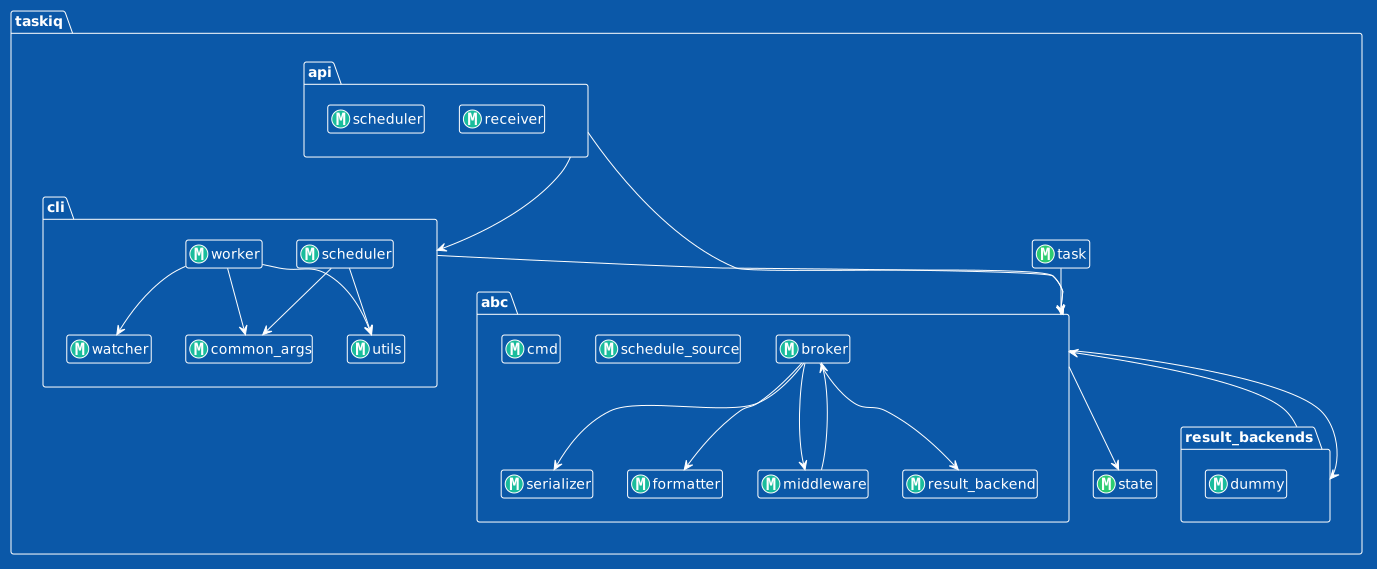
@startuml taskiq
!theme amiga

top to bottom direction
hide empty members

class taskiq.api.scheduler <<(M, #1ABC9C)>>

class taskiq.abc.result_backend <<(M, #1ABC9C)>>

class taskiq.abc.cmd <<(M, #1ABC9C)>>

class taskiq.abc.schedule_source <<(M, #1ABC9C)>>

class taskiq.abc.serializer <<(M, #1ABC9C)>>

class taskiq.abc.middleware <<(M, #1ABC9C)>>

class taskiq.cli.worker <<(M, #1ABC9C)>>

class taskiq.state <<(M, #2ECC71)>>

class taskiq.cli.utils <<(M, #1ABC9C)>>

class taskiq.cli.common_args <<(M, #1ABC9C)>>

class taskiq.cli.scheduler <<(M, #1ABC9C)>>

class taskiq.abc.formatter <<(M, #1ABC9C)>>

class taskiq.abc.broker <<(M, #1ABC9C)>>

class taskiq.result_backends.dummy <<(M, #1ABC9C)>>

class taskiq.task <<(M, #2ECC71)>>

class taskiq.cli.watcher <<(M, #1ABC9C)>>

class taskiq.api.receiver <<(M, #1ABC9C)>>
taskiq.result_backends -down-> taskiq.abc
taskiq.cli.worker -down-> taskiq.cli.watcher
taskiq.cli.scheduler -down-> taskiq.cli.common_args
taskiq.cli.scheduler -down-> taskiq.cli.utils
taskiq.abc.broker -down-> taskiq.abc.formatter
taskiq.task -down-> taskiq.abc
taskiq.abc -down-> taskiq.result_backends
taskiq.abc.broker -down-> taskiq.abc.result_backend
taskiq.abc.broker -down-> taskiq.abc.serializer
taskiq.api -down-> taskiq.cli
taskiq.abc.broker -down-> taskiq.abc.middleware
taskiq.cli.worker -down-> taskiq.cli.common_args
taskiq.cli.worker -down-> taskiq.cli.utils
taskiq.abc -down-> taskiq.state
taskiq.api -down-> taskiq.abc
taskiq.cli -down-> taskiq.abc
taskiq.abc.middleware -down-> taskiq.abc.broker
@enduml


Download files
Download the file for your platform. If you're not sure which to choose, learn more about installing packages.
Source Distribution
arch_blueprint-0.1.4.tar.gz
(33.5 kB
view details)
Built Distribution
Filter files by name, interpreter, ABI, and platform.
If you're not sure about the file name format, learn more about wheel file names.
Copy a direct link to the current filters
File details
Details for the file arch_blueprint-0.1.4.tar.gz.
File metadata
- Download URL: arch_blueprint-0.1.4.tar.gz
- Upload date:
- Size: 33.5 kB
- Tags: Source
- Uploaded using Trusted Publishing? No
- Uploaded via: uv/0.7.2
File hashes
| Algorithm | Hash digest | |
|---|---|---|
| SHA256 |
80a04382804f15e248e99d117af64f1eb6cc9193091e350b1bb0626e58df9ff9
|
|
| MD5 |
ffa943458688e53839924fce773ca751
|
|
| BLAKE2b-256 |
45a666ce535d94da6aafdaa8ca35cb8bd8294fb48033992a0cc63fe20232bf5a
|
File details
Details for the file arch_blueprint-0.1.4-py3-none-any.whl.
File metadata
- Download URL: arch_blueprint-0.1.4-py3-none-any.whl
- Upload date:
- Size: 5.7 kB
- Tags: Python 3
- Uploaded using Trusted Publishing? No
- Uploaded via: uv/0.7.2
File hashes
| Algorithm | Hash digest | |
|---|---|---|
| SHA256 |
1db7822c15836de9dc6826d46a82c9ebba681b50d270dd318e5d2acdbfea7a82
|
|
| MD5 |
2126da6ab126fd10bc3979c16b6325d0
|
|
| BLAKE2b-256 |
cac6804f48867b5065b65d6fc2bd8a701a6e18d3c096536e711f745f0ad21bbe
|






