
ArchBooster
Update your apps. Leave the OS alone.
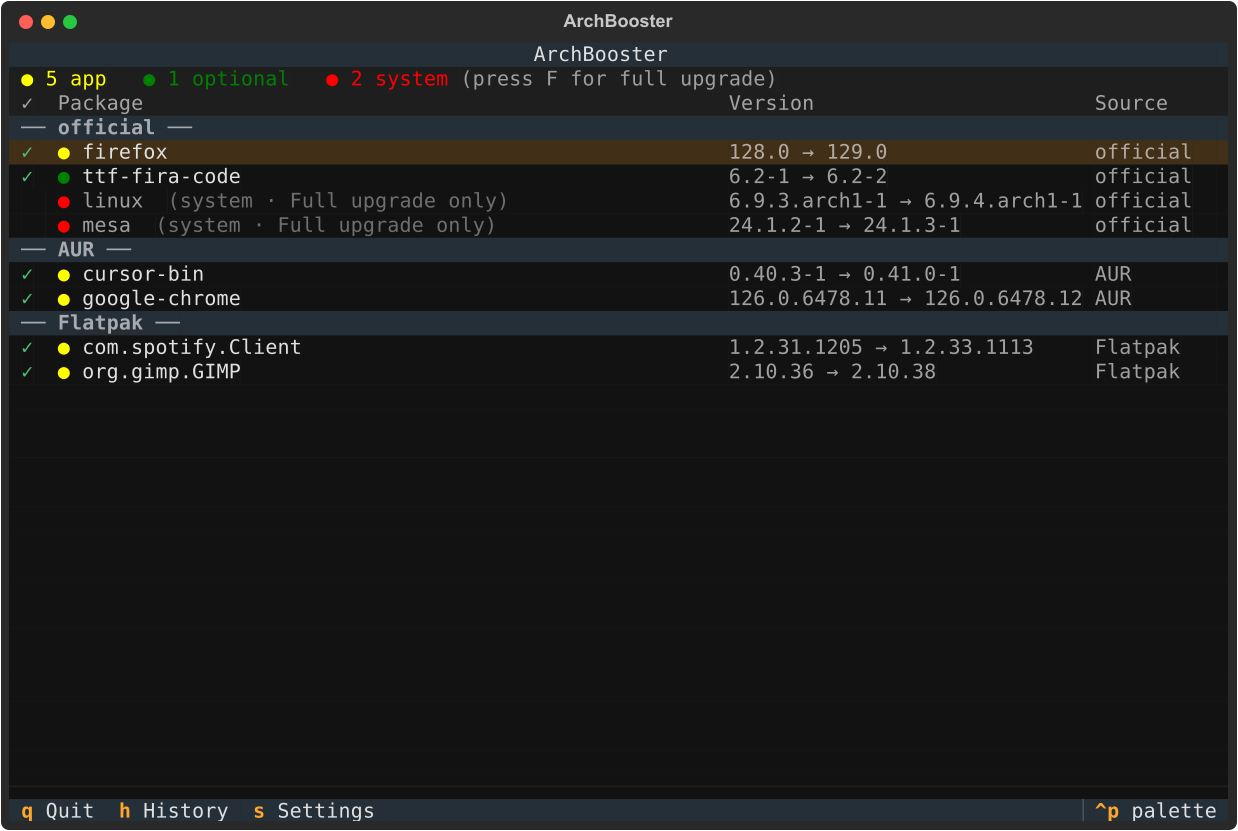
A selective update manager for Linux, built with Python and Textual — one checkbox-driven view across pacman, AUR, Flatpak, apt, dnf, Snap and Homebrew, with a hard guardrail between your apps and your system layer.


Demo

What it solves
Every package manager already has an "update everything" command. Running them one by one is tedious, and on a rolling release the fast path is also the risky one: a half-finished system upgrade is exactly how an Arch install breaks.
ArchBooster sits above all of them and adds the parts none of them have.
One list across every source. pacman, AUR and Flatpak updates on a single screen instead of three terminals — plus apt, dnf, Snap and Homebrew wherever they're installed.
One command that never touches the system layer. archbooster --update
(or Enter in the TUI) updates your apps and the libraries they need, while the
kernel, drivers, firmware and bootloader are always held back through pacman's
own --ignore mechanism. Moving the system layer takes an explicit full
upgrade, with a snapshot taken first.
A guardrail, not just a filter. ArchBooster knows the difference between an
app (Firefox, a Flatpak, an AUR -bin package) and the system (kernel,
mesa/nvidia drivers, glibc, systemd). System packages can never be
cherry-picked — they only ever move together, via a full -Syu.
Context around the list. Packages are sorted into plain vocabulary — Apps, CLI and libraries, Drivers and firmware, Kernel, Core system, Fonts and themes — filterable by type and by package manager. Every run is logged, changelogs and PKGBUILD diffs are one keystroke away, and a systemd timer can check on a schedule and notify you without updating anything.
Unification plus the app/system guardrail is the combination no single command gives you.
Features
Unified scanning
- One scan across pacman, AUR (yay/paru), Flatpak, apt, dnf, Snap and Homebrew, grouped by source
- Never a blank list — up-to-date packages are shown too, in the TUI and in
--scan, so "no updates" reads as a healthy inventory rather than an empty screen - Graceful degrade: a backend that isn't installed reports itself unavailable, so a Fedora box with only Flatpak gets a clean Flatpak-only list
Apps-first updating
archbooster --update/Enterupdates the app layer via-Syu --ignore=<system packages>— a coherent sync where libraries ride along, but kernel, drivers, firmware and bootloader are always held back- Critical / Normal / Optional categorization with configurable overrides and distro-specific system-package lists for apt and dnf
- Select individual packages — never forced, system packages always held
- Live streaming output during the update (real pacman/yay/flatpak/apt/dnf output, not a spinner)
Filters and inspection
- Type filter (
Tab) — Apps, CLI and libraries, Drivers and firmware, Kernel, Core system, Fonts and themes. User-facing apps are detected from their.desktoplaunchers; Flatpak and Snap count automatically - Source filter (
M) — narrow to a single package manager - Changelog and PKGBUILD diff viewer (
C) — see what actually changed in an AUR package or a Flatpak (OSTree commit log) before updating
Safety and automation
- Snapshot and rollback — a full system upgrade (
F) takes a snapper or timeshift snapshot first when one is installed; roll back anytime from the Snapshots screen (B) - Update profiles (
P) — cycle named groups of packages from config (for example "browsers"), auto-selecting just that group; also drives opt-in scheduled auto-update of a chosen safe subset, system packages always excluded - Update history log
- Background daemon via systemd timer, with a desktop notification when updates are found
Requirements
- Python 3.11 or newer
- At least one supported backend:
| Platform | Needs |
|---|---|
| Arch and Arch-based | pacman, plus yay or paru for AUR. Strongly recommended: pacman-contrib for checkupdates — sudo pacman -S pacman-contrib. Without it ArchBooster reads the local sync database instead, so the official-repo list can lag until the next sync; install.sh offers to install it and --scan says so if it's absent. |
| Debian and Ubuntu | apt (present by default) |
| Fedora and RHEL | dnf (present by default) |
| Any distro | flatpak with at least one remote (e.g. Flathub), snap (snapd), or brew (Homebrew/Linuxbrew) |
Optional extras:
| Optional | Gives you |
|---|---|
notify-send (libnotify) |
Desktop notifications from the background daemon — already present on most desktop distros |
snapper or timeshift |
Pre-upgrade snapshots and rollback |
systemd user services |
The scheduled background check |
Install
| Method | Command | Best for |
|---|---|---|
| pipx (PyPI) | pipx install archbooster |
Any distro with Python 3.11+ |
| Static binary | Download archbooster-linux-x86_64 from Releases |
Zero-Python install, quick try |
| AUR | yay -S archbooster (source) or archbooster-bin (prebuilt) |
Arch and Arch-based — pending, see note below |
# pipx (recommended)
pipx install archbooster

# from source, with the bundled installer (also sets up the systemd timer)
git clone https://github.com/ansu555/archbooster
cd archbooster
bash install.sh

# static binary
curl -LO https://github.com/ansu555/archbooster/releases/latest/download/archbooster-linux-x86_64
chmod +x archbooster-linux-x86_64
./archbooster-linux-x86_64
Need pipx first?
sudo pacman -S python-pipx/sudo apt install pipx/sudo dnf install pipx.
AUR status. The
PKGBUILDs are ready inpackaging/aur/, but new-account registration onaur.archlinux.orgis closed on Arch's side, so the packages aren't pushed yet. Use pipx or the static binary until that reopens.
Usage
| Command | Action |
|---|---|
archbooster |
Open the full TUI dashboard |
archbooster --update |
The one command — update the app layer now; system layer always held back |
archbooster --update --scope apps |
Same, but user-facing apps only (default scope is safe) |
archbooster --scan |
Print pending updates and an inventory summary (never blank) |
archbooster --scan --all |
Also list every up-to-date package |
archbooster --daemon |
Run one background check (used by systemd) |
Keybindings
| Key | Action |
|---|---|
↑ ↓ or j k |
Move between packages |
Space |
Toggle the highlighted package |
A |
Select all packages |
N |
Deselect all |
I |
Invert selection |
U |
Select user-facing apps only |
Tab |
Cycle type filter (Apps / CLI / Drivers / Kernel / System / Fonts) |
M |
Cycle source filter (pacman / AUR / Flatpak / …) |
Enter |
Update selected — app layer; system always held back |
F |
Full system upgrade (snapshot first, if enabled) |
R |
Re-scan for updates |
C |
Changelog / PKGBUILD diff for the highlighted row |
P |
Cycle update profiles (see [profiles] in config) |
H |
Open history |
S |
Open settings |
B |
Open snapshots — R to arm a rollback, Y to confirm |
Q |
Quit |
Configuration
Auto-created at ~/.config/archbooster/config.toml on first run:
[general]
aur_helper     = "yay"   # or "paru"
check_interval = 4       # hours between background daemon scans
confirm        = false   # false: run pacman/yay/flatpak non-interactively
                         #        (your selection in the TUI is the
                         #        confirmation)
                         # true:  also show the package manager's own prompts
                         #        (best from a plain terminal)
notify         = true    # desktop notification (notify-send) when the
                         # background daemon finds updates; no-ops quietly if
                         # notify-send isn't installed

[categories]
extra_critical = []      # extra package name prefixes to force "critical"
extra_optional = []      # extra package name prefixes to force "optional"

[ignore]
packages = []            # packages to hide from the update list entirely

[update]
default_scope = "safe"   # scope of `archbooster --update` / [Enter]:
                         # "safe" = everything except the system layer
                         #          (libraries ride along — recommended)
                         # "apps" = user-facing apps only

[snapshot]
enabled = true           # snapshot (snapper/timeshift) before a full upgrade
backend = "auto"         # "auto" | "snapper" | "timeshift" | "none"

[profiles]
# named package-name pattern groups for the [P] filter, e.g.:
# browsers = ["firefox", "chromium", "*chrome*"]

[automation]
auto_update         = false  # opt-in: daemon auto-updates auto_update_profile
auto_update_profile = ""     # name of a [profiles] entry
See docs/config.md for a field-by-field reference.
Project structure
archbooster/
├── main.py                     # Entry point + CLI flags
├── app.py                      # Textual app root + screen router
├── daemon.py                   # Background check loop (systemd) + notify
├── core/
│   ├── scanner.py              # Package dataclass + line parsing
│   ├── categorizer.py          # critical / normal / optional + guardrail
│   │                           #   (per-distro pattern lists: Arch/apt/dnf)
│   ├── updater.py              # runs yay/pacman, streams output
│   ├── procutil.py             # shared subprocess-streaming helper
│   ├── notify.py               # notify-send wrapper
│   ├── history.py              # read/write history.json
│   ├── config.py               # load/write config.toml
│   ├── snapshot.py             # snapper/timeshift snapshot + rollback
│   ├── profiles.py             # [profiles] pattern matching
│   └── backends/
│       ├── base.py             # Backend interface
│       ├── pacman.py           # official repos + AUR (+ PKGBUILD diff)
│       ├── flatpak.py          # Flatpak — the cross-distro path
│       ├── apt.py              # Debian/Ubuntu
│       ├── dnf.py              # Fedora/RHEL
│       ├── snap.py             # snapd
│       ├── brew.py             # Homebrew/Linuxbrew
│       └── registry.py         # auto-detects installed backends
├── screens/
│   ├── dashboard.py            # Main checklist UI, grouped by source
│   ├── progress.py             # Live update output (+ pre-upgrade snapshot)
│   ├── changelog.py            # Changelog / PKGBUILD diff viewer
│   ├── snapshots.py            # Snapshot list + rollback
│   ├── history.py              # Past updates log
│   └── settings.py             # Settings editor
├── systemd/
│   ├── archbooster.service     # Systemd user service
│   └── archbooster.timer       # Systemd timer (every N hours)
├── packaging/                  # PyInstaller binary + AUR PKGBUILDs
└── install.sh                  # One-shot pipx-based installer
Contributing
Every phase on the original roadmap has shipped, so there's no active feature
backlog. What is genuinely useful: new backend ports, real-world testing on
distros the maintainer can't run locally, and AUR publishing once registration
reopens. See CONTRIBUTING.md before opening a PR.
License
MIT — see LICENSE.
1 maintainer

Metadata
1 maintainer
Release files for archbooster 0.4.0
For a detailed explanation of source distributions (sdists) and built distributions (wheels), please see the package formats documentation.
Source distribution (sdist)
| File | Size | Uploaded | |
|---|---|---|---|
| archbooster-0.4.0.tar.gz | 74.5 kB | Details |
Built distribution (wheel)
| File | Interpreter | ABI | Platform | Reset |
|---|---|---|---|---|
| archbooster-0.4.0-py3-none-any.whl | Python 3 | none | any | Details |
Total release size: 139.2 kB
Release files / archbooster-0.4.0.tar.gz
| Download URL | archbooster-0.4.0.tar.gz |
|---|---|
| Size | 74.5 kB |
| Tags | Source |
|
SHA-256 checksum How to use checksums |
e7ffbab72a0f65422bcb8f8359be1855d15f199a7ce92887acd14afe147ccab1
|
|
BLAKE2b-256 checksum How to use checksums |
970b172865e2c61ebc69c8eb03c426df6a6cb967605af80164ea6a49c75ee593
|
| Upload date | |
|
Uploaded using Trusted Publishing? What is trusted publishing? |
No |
| Uploaded via |
twine/7.0.0 CPython/3.13.14
|
Release files / archbooster-0.4.0-py3-none-any.whl
| Download URL | archbooster-0.4.0-py3-none-any.whl |
|---|---|
| Size | 64.8 kB |
| Tags | Python 3 |
|
SHA-256 checksum How to use checksums |
11f0dc3232b09b595944f1b2bfb3ebb299e1a3600dbc17792636e90778109720
|
|
BLAKE2b-256 checksum How to use checksums |
69b90b546cc0a425e95c1082174f2050298060dbd0f347f55b923ccb60e1dcf9
|
| Upload date | |
|
Uploaded using Trusted Publishing? What is trusted publishing? |
No |
| Uploaded via |
twine/7.0.0 CPython/3.13.14
|














