
archdocs








archdocs is OpenAPI and SwaggerUI, but for architecture. It reads the source code of your fastapi or litestar service and serves a diagram of it: who calls the service, what the service calls itself, where it keeps data and how it is deployed.
- the code is the schema, so there is no second copy to keep in sync
- nothing to annotate: no decorators, no magic comments, no meta files. You bind the library to your app once and archdocs finds the rest on its own
Quickstart
Install the package:
uv add archdocs
Bind it to your app.
FastAPI:
import typing

import fastapi

from archdocs.integrations.fastapi import add_architecture_doc_routes
from archdocs.main import SettingsForArchdocs


example_app: typing.Final = fastapi.FastAPI()

add_architecture_doc_routes(
    example_app,
    arch_settings=SettingsForArchdocs(root_dir="src/", service_name="my-service"),
)
Litestar:
import typing

import litestar

from archdocs.integrations.litestar import add_architecture_doc_routes
from archdocs.main import SettingsForArchdocs


example_app: typing.Final = litestar.Litestar()

add_architecture_doc_routes(
    example_app,
    arch_settings=SettingsForArchdocs(root_dir="src/", service_name="my-service"),
)
root_dir is where your sources live, service_name is the label of your service on the
diagram. Both integrations take the same arguments and serve the page at route_path, which
is /docs/architecture/ until you set another one.
Start the app, open /docs/architecture/ and the schema is already there.
What archdocs finds
- HTTP endpoints: fastapi and litestar routes
- Application servers: granian, uvicorn, gunicorn with its worker class, hypercorn, daphne, waitress and the rest of the ASGI/WSGI family, with worker count, port, TLS and HTTP/2
- HTTP clients: httpx, aiohttp, requests, niquests
- Databases: SQLAlchemy engines, sync and async, with pool settings and the driver behind the DSN
- Caches: Redis, plain, Sentinel and Cluster
- Message brokers: FastStream over RabbitMQ, Kafka, NATS and Redis
- Task queues: Celery, Taskiq, Arq, RQ, Dramatiq, Huey
- Kubernetes: ingress hosts and TLS, service type and port, workload kind, replicas, the HPA range and its CPU target, cpu, RAM and GPU requests and limits, ConfigMaps and Secrets as environment or as volumes, volume claims and their size
Kubernetes
Manifests are read straight from your repository. A Helm chart and a plain directory of
manifests both work, no helm template run and no extra dependency: templated {{ ... }}
values are skipped in favour of what values.yaml says. archdocs looks under root_dir and,
if nothing is there, a couple of directories above it, never outside the repository your
sources live in. If your layout differs, point it at the right place with kubernetes_dir. A
relative path is taken from root_dir, not from the working directory of the process:
add_architecture_doc_routes(
    example_app,
    arch_settings=SettingsForArchdocs(
        root_dir="src/",
        service_name="my-service",
        kubernetes_dir="deploy/my-chart/",
    ),
)
How it looks
Your service sits in the middle of the page, every dependency around it, boxed by the role it plays: inbound API, outbound calls, messaging and tasks, data stores, configuration. The diagram is Mermaid and your own application serves it.
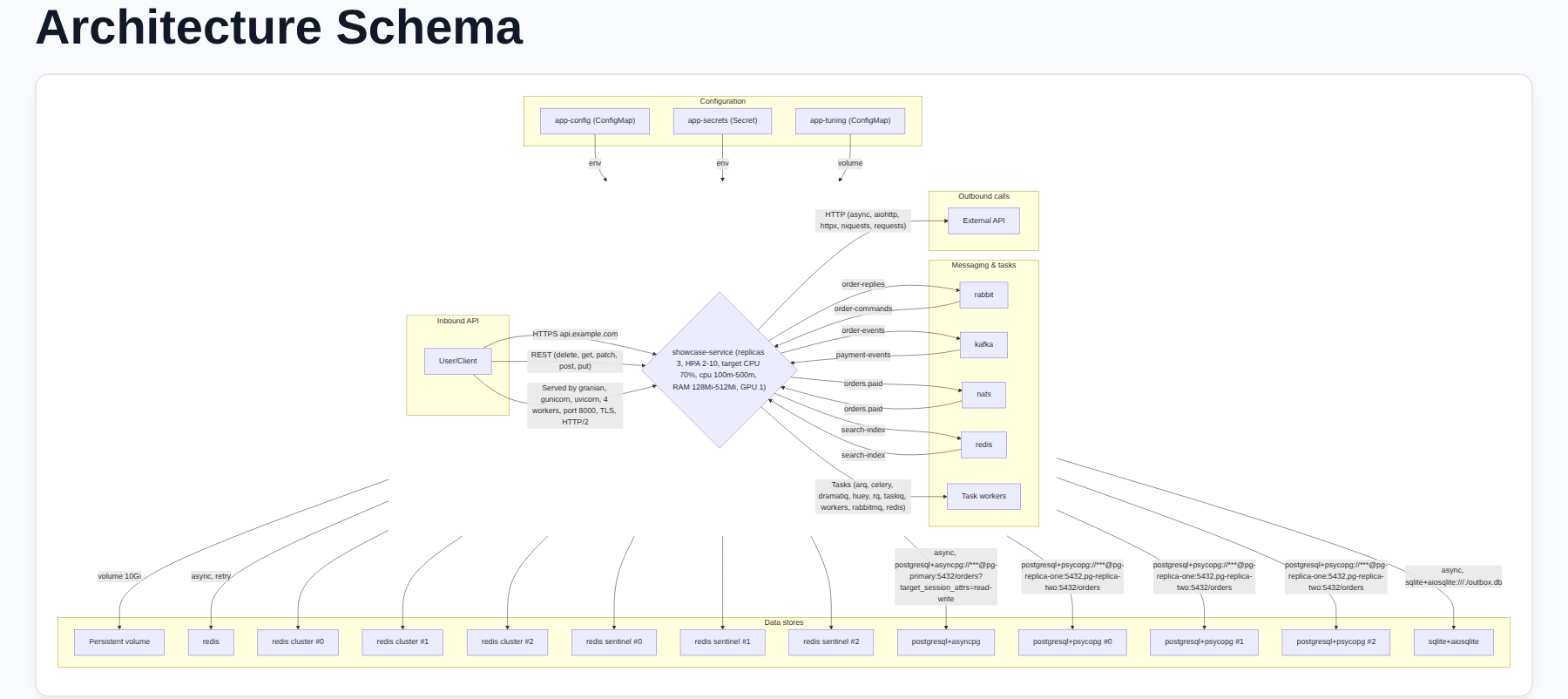
That page is tests/showcase, an example service that uses everything from the list above at
once. The playground serves it next to the fastapi and litestar examples, so you can click
through the same pages yourself:
just playground
It starts on 127.0.0.1:8000 and lists every example it serves.
1 maintainer

Release files for archdocs 1.0.2
For a detailed explanation of source distributions (sdists) and built distributions (wheels), please see the package formats documentation.
Source distribution (sdist)
| File | Size | Uploaded | |
|---|---|---|---|
| archdocs-1.0.2.tar.gz | 34.5 kB | Details |
Built distribution (wheel)
| File | Interpreter | ABI | Platform | Reset |
|---|---|---|---|---|
| archdocs-1.0.2-py3-none-any.whl | Python 3 | none | any | Details |
Total release size: 70.4 kB
Release files / archdocs-1.0.2.tar.gz
| Download URL | archdocs-1.0.2.tar.gz |
|---|---|
| Size | 34.5 kB |
| Tags | Source |
|
SHA-256 checksum How to use checksums |
786d0d10e360ef5ca8a6a45bc040e87ba40da134283ed764fb0a483de69012b1
|
|
BLAKE2b-256 checksum How to use checksums |
d8ede8695feb1855ea6a32d5c553ec97d7ced91611e771bb1a86528fbdd83f9c
|
| Upload date | |
|
Uploaded using Trusted Publishing? What is trusted publishing? |
Yes |
| Uploaded via |
uv/0.12.1 {"installer":{"name":"uv","version":"0.12.1","subcommand":["publish"]},"python":null,"implementation":{"name":null,"version":null},"distro":{"name":"Ubuntu","version":"24.04","id":"noble","libc":null},"system":{"name":null,"release":null},"cpu":null,"openssl_version":null,"setuptools_version":null,"rustc_version":null,"ci":true}
|
Release files / archdocs-1.0.2-py3-none-any.whl
| Download URL | archdocs-1.0.2-py3-none-any.whl |
|---|---|
| Size | 35.9 kB |
| Tags | Python 3 |
|
SHA-256 checksum How to use checksums |
441fa6ebf1c46423f307ab32bf7ca63784eb41498baa22376e92dfae9a677e5d
|
|
BLAKE2b-256 checksum How to use checksums |
b3eea976b3a9a88d87ad703b8c2819fcbe98637769947b405f2ce532a3ac5e7f
|
| Upload date | |
|
Uploaded using Trusted Publishing? What is trusted publishing? |
Yes |
| Uploaded via |
uv/0.12.1 {"installer":{"name":"uv","version":"0.12.1","subcommand":["publish"]},"python":null,"implementation":{"name":null,"version":null},"distro":{"name":"Ubuntu","version":"24.04","id":"noble","libc":null},"system":{"name":null,"release":null},"cpu":null,"openssl_version":null,"setuptools_version":null,"rustc_version":null,"ci":true}
|














