
Architecture as Code
Standardise and speed up application architecture and deployments
Architecture as Code is a Python package that allows you to standardise and speed up your application architecture design and deployments.
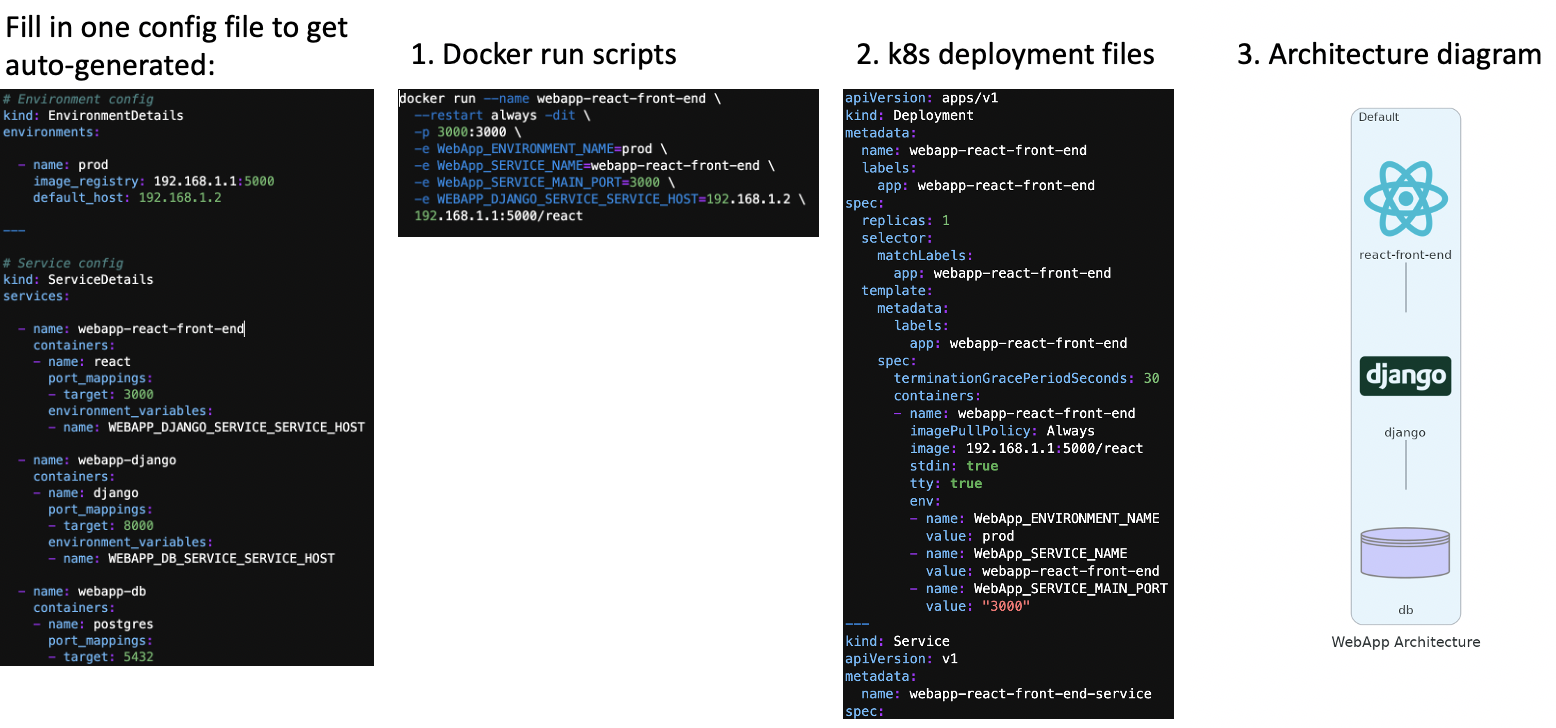
By populating a configuration file (in YAML format) that sets out each microservice in your application, you get 'three things for the price of one' - 1. automatically-generated docker run scripts, 2. automatically-generated Kubernetes deployment files, and 3. an automatically-generated architecture diagram.
Improve communication amongst your product team, make your devops folks happier, and shorten time-to-market!
Requirements
It requires Python 3.6 or higher, check your Python version first.
It uses Graphviz (via Diagrams) to render the diagram, so you first need to install Graphviz before using this package.
Installation
Using pip:
pip install architecture-as-code
Usage
Create a file called config_main.yaml, with the following example of a web application architecture comprising a front-end microservice, middleware microservice, and database:
# Environment config
kind: EnvironmentDetails
environments:

  - name: prod
    image_registry: 192.168.1.1:5000
    default_host: 192.168.1.2

---

# Service config
kind: ServiceDetails
services:

  - name: webapp-react-front-end
    containers:
    - name: react
      port_mappings:
      - target: 3000
      environment_variables:
      - name: WEBAPP_DJANGO_SERVICE_SERVICE_HOST

  - name: webapp-django
    containers:
    - name: django
      port_mappings:
      - target: 8000
      environment_variables:
      - name: WEBAPP_DB_SERVICE_SERVICE_HOST

  - name: webapp-db
    containers:
    - name: postgres
      port_mappings:
      - target: 5432
Next, run the following code in Jupyter / Python. If you're not using Jupyter, omit the second and last lines.
from architecture_as_code import ArchitectureAsCode
from IPython.display import Image
prefix='WebApp'
aac = ArchitectureAsCode(prefix)
aac(config_main_file_name='config_main.yaml')
aac.generate_architecture_diagram()
Image(filename=prefix.lower() + '_architecture.png')
You will then get three types of outputs:
- Docker run scripts for each microservice will be generated in the
deployment_files/<environment name>folder. - Kubernetes deployment files for each microservice will generated in the same folder above.
- An architecture diagram will be created in the file name
webapp_architecture.png
1 maintainer

Metadata
1 maintainer
Release files for architecture-as-code 0.0.14
For a detailed explanation of source distributions (sdists) and built distributions (wheels), please see the package formats documentation.
Source distribution (sdist)
| File | Size | Uploaded | |
|---|---|---|---|
| architecture-as-code-0.0.14.tar.gz | 11.8 kB | Details |
Built distribution (wheel)
| File | Interpreter | ABI | Platform | Reset |
|---|---|---|---|---|
| architecture_as_code-0.0.14-py3-none-any.whl | Python 3 | none | any | Details |
Total release size: 23.4 kB
Release files / architecture-as-code-0.0.14.tar.gz
| Download URL | architecture-as-code-0.0.14.tar.gz |
|---|---|
| Size | 11.8 kB |
| Tags | Source |
|
SHA-256 checksum How to use checksums |
b88a382a1245a42ddfe03b08c8ac8881ab2547dea00cc9598b13f396f2438e2f
|
|
BLAKE2b-256 checksum How to use checksums |
5d86c15f13edffed36b131fb6e0187f9016d69185d34b12be30345abee6126b5
|
| Upload date | |
|
Uploaded using Trusted Publishing? What is trusted publishing? |
No |
| Uploaded via |
twine/3.4.1 importlib_metadata/3.10.1 pkginfo/1.7.0 requests/2.25.1 requests-toolbelt/0.9.1 tqdm/4.56.2 CPython/3.8.6
|
Release files / architecture_as_code-0.0.14-py3-none-any.whl
| Download URL | architecture_as_code-0.0.14-py3-none-any.whl |
|---|---|
| Size | 11.6 kB |
| Tags | Python 3 |
|
SHA-256 checksum How to use checksums |
b064f7ece0cea7705aa50a8ab3df24efd601364883ecf71603f5fbef83599815
|
|
BLAKE2b-256 checksum How to use checksums |
e3784210f74d48d38c9a1bf9b79d032ea96c2f8a9869e1390cd827baeb7fa336
|
| Upload date | |
|
Uploaded using Trusted Publishing? What is trusted publishing? |
No |
| Uploaded via |
twine/3.4.1 importlib_metadata/3.10.1 pkginfo/1.7.0 requests/2.25.1 requests-toolbelt/0.9.1 tqdm/4.56.2 CPython/3.8.6
|














