
Project-based archive and trash manager for VFX pipelines

Project description
Archivator
A project-based storage and trash management tool designed for VFX pipelines.
Archivator provides a structured way to manage multiple projects, each with its own storage and dedicated trash system — enabling safe deletion, recovery, and future automation of cleanup workflows.

Overview
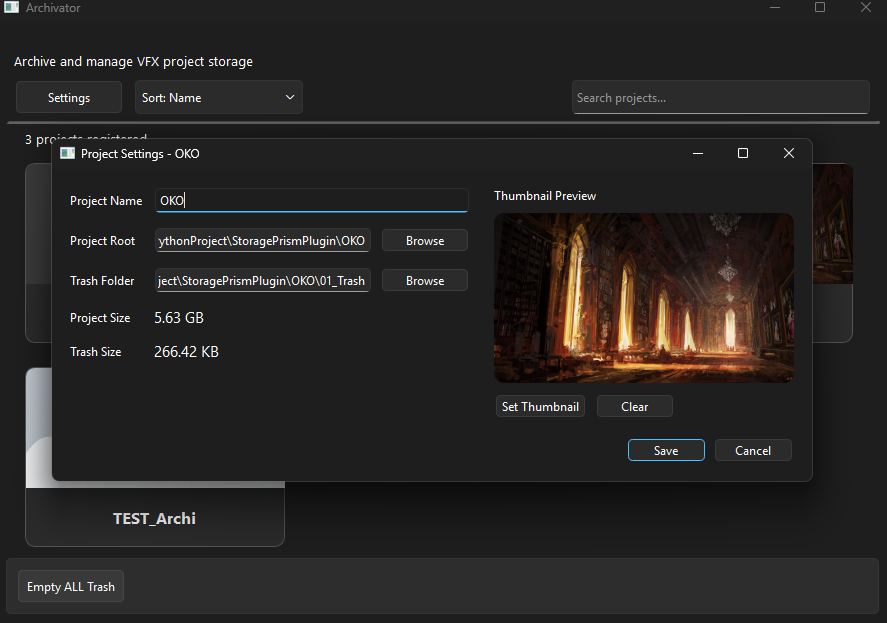
Archivator acts as a centralized storage manager where each project is defined by:
- A Project Root (active working directory)
- A Trash Directory (safe deletion zone)
Instead of permanently deleting files, tools can move them to a project-specific trash folder, allowing recovery and controlled cleanup.
Features
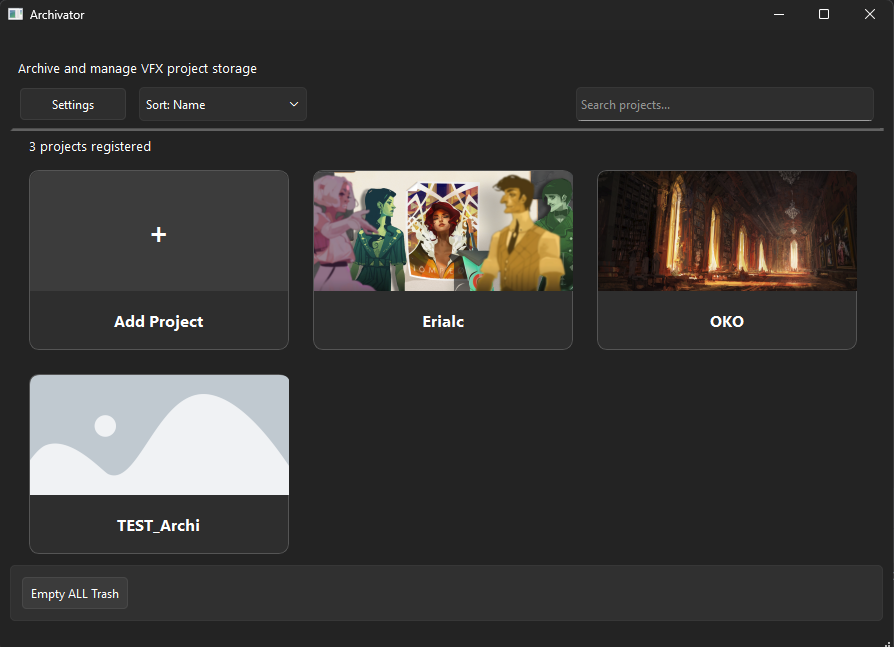
- Manage multiple projects
- Per-project trash directories
- Add, edit, and remove projects
- Search projects by name
- Custom project thumbnails
- Open project or trash in file explorer
- Empty trash safely per project
- Basic CLI support (work in progress)
Screenshots
Project Browser
Project Settings
Example Integration
Archivator is designed to integrate with production tools.
A reference implementation is available via the Prism plugin:
👉 https://github.com/ClaireBenes/PrismPlugin-TrashManager
This plugin demonstrates how Archivator can be used as a backend to:
- Redirect file deletion to a safe trash system
- Restore deleted files
- Provide direct access to project trash from within a DCC pipeline
Data & Architecture
Archivator relies on a lightweight, filesystem-based approach for managing data and state.
Persistence
The system maintains a persistent state through two main mechanisms:
-
Project Registry (JSON)
A central configuration file stores all registered projects, including their root paths, trash directories, and metadata. -
Per-File Metadata (.archivator.json)
When files are moved to trash, associated metadata files are created to store:- Original file path
- Deletion date
- Grouping information (for related files)
This approach keeps the system simple, transparent, and easy to inspect or modify without requiring a database.
Execution Model
Archivator currently operates in an on-demand mode:
- Actions such as move to trash and restore are executed immediately
- No background processing or job queue is implemented yet
This design keeps the tool lightweight while allowing future extension toward more advanced workflows.
Configuration Granularity (Planned)
Configuration is currently defined at the project level, but the system is designed to support more granular rules in the future.
Planned extensions include:
- Rules based on file types (e.g.
.exr,.ma,.abc) - Context-aware behavior (e.g. render vs compositing outputs)
- Department-specific configurations
Example use case:
- Limit the number of stored versions for heavy render outputs (EXR)
- Keep more history for lighter or critical files
Future Architecture
Archivator is currently a local application, but a client/server architecture is being considered for future development.
This would enable:
- Centralized file analysis and cleanup
- Background processing (scheduler-based tasks)
- Better permission and access management
- Integration via APIs (e.g. REST) with external tools such as Prism
This evolution would allow Archivator to scale from a local tool to a more production-ready pipeline service.
Roadmap
Planned improvements include:
Automated Cleanup System
- Detect unused or unreferenced files
- Move candidates to trash safely
- Configurable rules:
- Target directories
- Time-based thresholds
- Dependency validation
Pipeline Intelligence
- Non-destructive cleanup workflows
- Smarter file analysis to prevent breaking projects
Distribution
- Improve PyPI metadata and documentation
- Add release automation
Technical Details
- Python 3.11
- PySide6 (Qt-based UI)
- Windows (currently supported platform)
Installation
Archivator is available on PyPI:
pip install archivator
Project details


Download files
Download the file for your platform. If you're not sure which to choose, learn more about installing packages.
Source Distribution
Built Distribution
Filter files by name, interpreter, ABI, and platform.
If you're not sure about the file name format, learn more about wheel file names.
Copy a direct link to the current filters
File details
Details for the file archivator-0.1.3.tar.gz.
File metadata
- Download URL: archivator-0.1.3.tar.gz
- Upload date:
- Size: 36.7 kB
- Tags: Source
- Uploaded using Trusted Publishing? No
- Uploaded via: twine/6.2.0 CPython/3.11.9
File hashes
| Algorithm | Hash digest | |
|---|---|---|
| SHA256 |
e289778fb21ef4af666b009839d66e791b4ddea3b50f89f7b95b67ecbe2fe741
|
|
| MD5 |
c1ab4ca40981833dce69fb87d69fb075
|
|
| BLAKE2b-256 |
1923eef562985792c5bde586ac523f9ae4402db37acb786b0f329057c602ab5e
|
File details
Details for the file archivator-0.1.3-py3-none-any.whl.
File metadata
- Download URL: archivator-0.1.3-py3-none-any.whl
- Upload date:
- Size: 42.8 kB
- Tags: Python 3
- Uploaded using Trusted Publishing? No
- Uploaded via: twine/6.2.0 CPython/3.11.9
File hashes
| Algorithm | Hash digest | |
|---|---|---|
| SHA256 |
4717735e579d01d4506c572b10e22934690a3af79c9c345ca75baef9675beb1a
|
|
| MD5 |
7dd80351fb68c54d5252d0b621886901
|
|
| BLAKE2b-256 |
7633813016242d9c5c07a4c38e6de6137567d48c7aa62b5d9a9704afe995f207
|






