
Interactive live architecture viewer for Python projects

Project description
ArchView
See your codebase. Understand it. Then change it.
ArchView gives you a live, interactive map of any Python project's architecture — right in your browser. It parses real Python (via AST, not regex) and follows references into shell scripts and config files, watches for changes, and updates the graph in real time.
Built for developers who vibe-code and need to stay oriented, or anyone inheriting a codebase they didn't write.
Why
You're 200 files deep in someone else's project. Or you're building fast and your own code is getting tangled. You need to see the structure — what depends on what, where the entry points are, which modules are isolated.
ArchView shows you all of that in seconds, and keeps updating as you code.
Install
pip install archview
Available on PyPI. Pure Python, works anywhere with Python 3.9+.
Usage
archview /path/to/your/project
Open http://localhost:8080 — that's it. If 8080 is taken, ArchView scans the next 100 ports and prints the one it picked.
# Custom port and refresh interval
archview /path/to/project --port 9000 --interval 5
Tip: point ArchView at your project's import root — the directory your code imports relative to. An edge is only drawn when an import resolves to a file inside the scanned tree, so
from a import xconnects only ifa.pysits at the root you scanned. Scan a parent folder and those absolute imports won't resolve (the modules show up, just without arrows).
What you see
| Color | Meaning |
|---|---|
| Green | Entry point — modules that import but aren't imported |
| Blue | Connector — modules that both import and are imported |
| Red | Utility — leaf modules only imported by others |
| Gray | Isolated — no import relationships |
| Red (bright) | Error — files that failed to parse |
Features
Live refresh
Edit your code, save — the graph updates automatically. No restart needed.
Interactive exploration
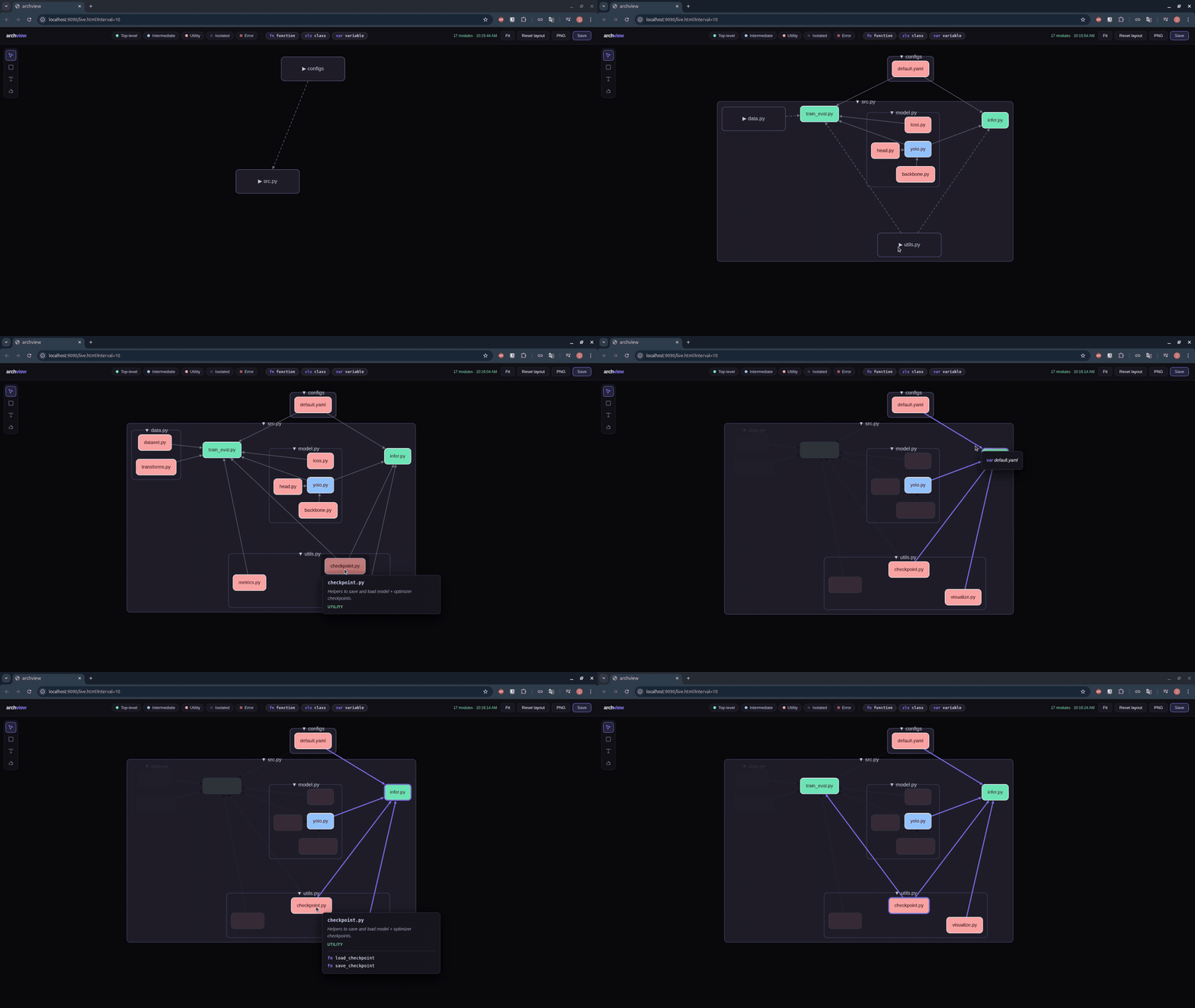
- Hover a node to see its docstring, type, and exported symbols
- Click a node to highlight its direct dependencies
- Double-click to open the file in VS Code
- Drag nodes to rearrange the layout
- Click folders to collapse/expand entire packages
Dependency highlighting
Click a node and it plus its direct dependencies light up — everything else fades. Then hover a highlighted edge to see exactly which symbols are imported across it.
Annotations
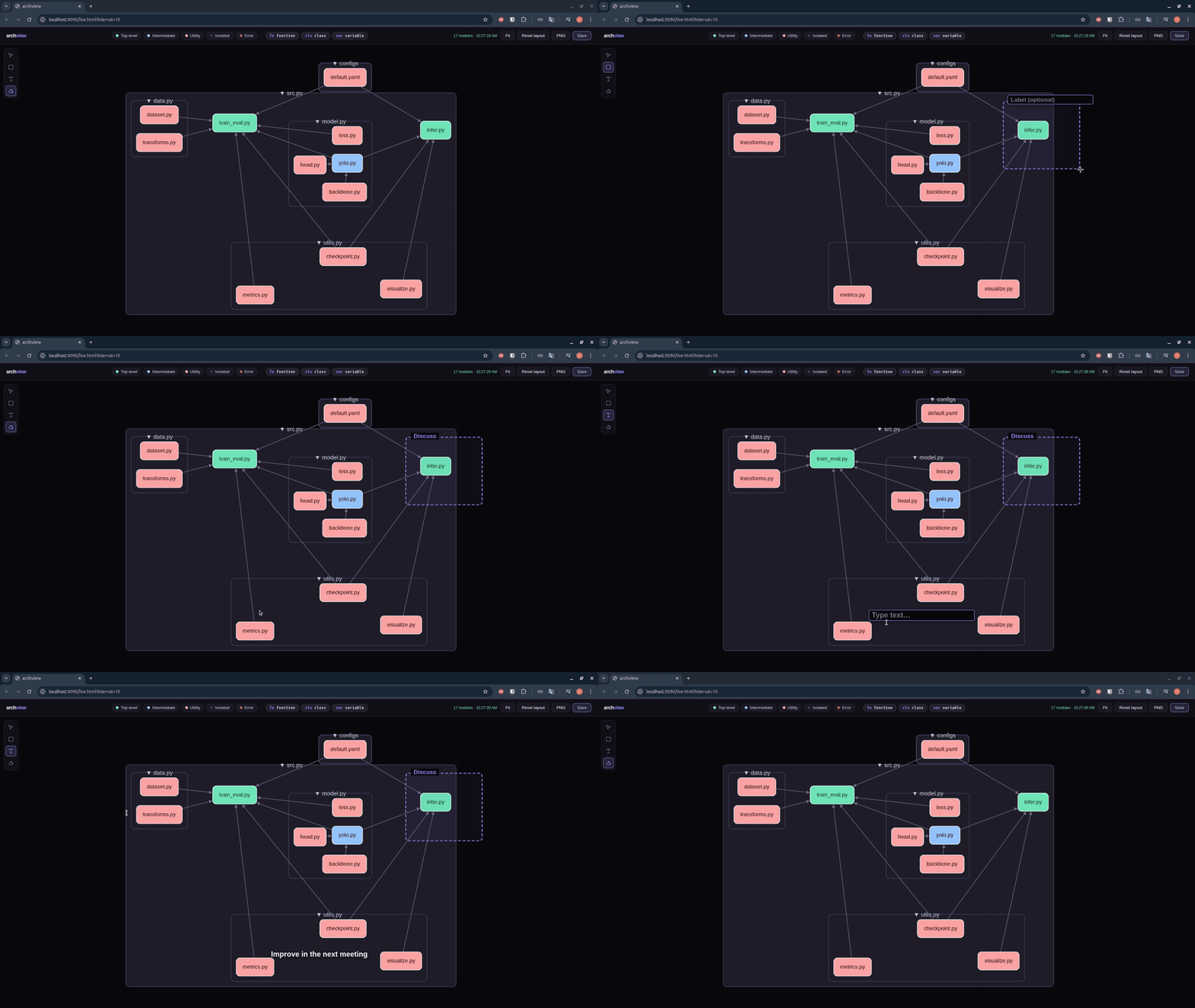
Sketch directly on the graph to explain it. Draw boxes, add text labels, erase — useful for walking a teammate through the architecture or marking up a review. Annotations persist across launches.
Export
- PNG — screenshot the current view
- Save — persist node positions (restored on next launch)
Ignore patterns
# Exclude directories from analysis
archview ignore tests __pycache__ venv

# List current patterns
archview ignore --list

# Remove a pattern
archview ignore --remove tests
Patterns match any path segment or a file's stem (so tests hides tests/ and tests.py). Add a trailing slash to match a directory only — build/ ignores the build/ folder but keeps a file named build.py. The defaults (build/, dist/, venv/, __pycache__/, …) are all directory-anchored.
How it works
- Collects source files —
.py, plus.shscripts and config files (.yaml/.json) — git-aware, respects.archviewignore - Parses Python via AST (imports, functions, classes); resolves shell-script and config references too
- Builds a dependency graph with classified nodes
- Renders it with Cytoscape.js + Dagre layout
- Watches for changes and re-generates every N seconds
Zero dependencies — pure Python stdlib. The frontend ships bundled.
Example
Try it on the example project (hosted on GitHub):
git clone https://github.com/lm17918/archview.git archview-demo
cd archview-demo
pip install archview
archview examples
License
MIT


Download files
Download the file for your platform. If you're not sure which to choose, learn more about installing packages.
Source Distribution
Built Distribution
Filter files by name, interpreter, ABI, and platform.
If you're not sure about the file name format, learn more about wheel file names.
Copy a direct link to the current filters
File details
Details for the file archview-0.2.6.tar.gz.
File metadata
- Download URL: archview-0.2.6.tar.gz
- Upload date:
- Size: 219.1 kB
- Tags: Source
- Uploaded using Trusted Publishing? No
- Uploaded via: twine/6.2.0 CPython/3.12.3
File hashes
| Algorithm | Hash digest | |
|---|---|---|
| SHA256 |
33af13f3ef2eb06363006f6584a4b97e9aeebc81e81341d7b45546be3fbd117d
|
|
| MD5 |
8c26f9d93f8adb0b09160e32ebd2caff
|
|
| BLAKE2b-256 |
20006d9ab92a4e2a98d77d2ddace547300f429e9439cd86c2569243e24ab4290
|
File details
Details for the file archview-0.2.6-py3-none-any.whl.
File metadata
- Download URL: archview-0.2.6-py3-none-any.whl
- Upload date:
- Size: 219.2 kB
- Tags: Python 3
- Uploaded using Trusted Publishing? No
- Uploaded via: twine/6.2.0 CPython/3.12.3
File hashes
| Algorithm | Hash digest | |
|---|---|---|
| SHA256 |
5b38ebe6ec10adbaf6498e039a5861f911a1bf3704caf677082caf498c61ab02
|
|
| MD5 |
e0993fa0b2ed2b9a1e3997650b06eb5d
|
|
| BLAKE2b-256 |
02ede7fb1a3d117303d493a88a6ddfd3741dc36cf625b3ca50496d84942ff9bc
|






