
Open source LangGraph Platform alternative - Self-hosted AI agent backend with FastAPI and PostgreSQL. Zero vendor lock-in, full control over your agent infrastructure.

Project description

Aegra - Open Source LangGraph Platform Alternative
Self-hosted AI agent backend. LangGraph power without vendor lock-in.





Replace LangGraph Platform with your own infrastructure. Built with FastAPI + PostgreSQL for developers who demand complete control over their agent orchestration.
🔌 Agent Protocol Compliant: Aegra implements the Agent Protocol specification, an open-source standard for serving LLM agents in production.
🎯 Perfect for: Teams escaping vendor lock-in • Data sovereignty requirements • Custom deployments • Cost optimization
🆕 What's New
- 🗂️ Semantic Store: Vector embeddings with pgvector for semantic similarity search in your agent memory
- 📦 Dependencies Config: Add shared utility modules to Python path for graph imports
- 🎨 LangGraph Studio Support: Full compatibility with LangGraph Studio for visual graph debugging and development
- 🤖 AG-UI / CopilotKit Support: Seamless integration with AG-UI and CopilotKit-based clients for enhanced user experiences
- ⬆️ LangGraph v1.0.0: Upgraded to LangGraph and LangChain v1.0.0 with latest features and improvements
- 🤝 Human-in-the-Loop: Interactive agent workflows with approval gates and user intervention points
- 📊 Langfuse Integration: Complete observability and tracing for your agent runs
🔥 Why Aegra vs LangGraph Platform?
| Feature | LangGraph Platform | Aegra (Self-Hosted) |
|---|---|---|
| Cost | $$$+ per month | Free (self-hosted), infra-cost only |
| Data Control | Third-party hosted | Your infrastructure |
| Vendor Lock-in | High dependency | Zero lock-in |
| Customization | Platform limitations | Full control |
| API Compatibility | LangGraph SDK | Same LangGraph SDK |
| Authentication | Lite: no custom auth | Custom auth (JWT/OAuth/Firebase/NoAuth) |
| Database Ownership | No bring-your-own database | BYO Postgres (you own credentials and schema) |
| Tracing/Telemetry | Forced LangSmith in SaaS | Your choice (Langfuse/None) |
✨ Core Benefits
- 🏠 Self-Hosted: Run on your infrastructure, your rules
- 🔄 Drop-in Replacement: Use existing LangGraph Client SDK without changes
- 🛡️ Production Ready: PostgreSQL persistence, streaming, authentication
- 📊 Zero Vendor Lock-in: Apache 2.0 license, open source, full control
- 🚀 Fast Setup: 5-minute deployment with Docker
- 🔌 Agent Protocol Compliant: Implements the open-source Agent Protocol specification
- 💬 Agent Chat UI Compatible: Works seamlessly with LangChain's Agent Chat UI
🚀 Quick Start (5 minutes)
Prerequisites
- Python 3.11+
- Docker (for PostgreSQL)
- uv (Python package manager)
Get Running
# Clone and setup
git clone https://github.com/ibbybuilds/aegra.git
cd aegra
# Install uv if missing
curl -LsSf https://astral.sh/uv/install.sh | sh

# Sync env and dependencies
uv sync

# Activate environment
source .venv/bin/activate  # Mac/Linux
# OR .venv/Scripts/activate  # Windows

# Environment
cp .env.example .env

# Start everything (database + migrations + server)
docker compose up aegra
Verify It Works
# Health check
curl http://localhost:8000/health

# Interactive API docs
open http://localhost:8000/docs
You now have a self-hosted LangGraph Platform alternative running locally.
💬 Agent Chat UI Compatible
Aegra works seamlessly with LangChain's Agent Chat UI. Simply set NEXT_PUBLIC_API_URL=http://localhost:8000 and NEXT_PUBLIC_ASSISTANT_ID=agent in your Agent Chat UI environment to connect to your Aegra backend.
👨💻 For Developers
New to database migrations? Check out our guides:
- 📚 Developer Guide - Complete setup, migrations, and development workflow
- ⚡ Migration Cheatsheet - Quick reference for common commands
Quick Development Commands:
# Docker development (recommended)
docker compose up aegra

# Local development
docker compose up postgres -d
python3 scripts/migrate.py upgrade
python3 run_server.py

# Create new migration
python3 scripts/migrate.py revision --autogenerate -m "Add new feature"
Note: The current
docker-compose.ymlis optimized for development with hot-reload, volume mounts, and debug settings. For production deployment considerations, see production-docker-setup.md.
🧪 Try the Example Agent
Use the same LangGraph Client SDK you're already familiar with:
import asyncio
from langgraph_sdk import get_client

async def main():
    # Connect to your self-hosted Aegra instance
    client = get_client(url="http://localhost:8000")

    # Create assistant (same API as LangGraph Platform)
    assistant = await client.assistants.create(
        graph_id="agent",
        if_exists="do_nothing",
        config={},
    )
    assistant_id = assistant["assistant_id"]

    # Create thread
    thread = await client.threads.create()
    thread_id = thread["thread_id"]

    # Stream responses (identical to LangGraph Platform)
    stream = client.runs.stream(
        thread_id=thread_id,
        assistant_id=assistant_id,
        input={
            "messages": [
                {"type": "human", "content": [{"type": "text", "text": "hello"}]}
            ]
        },
        stream_mode=["values", "messages-tuple", "custom"],
        on_disconnect="cancel",
    )

    async for chunk in stream:
        print(f"event: {getattr(chunk, 'event', None)}, data: {getattr(chunk, 'data', None)}")

asyncio.run(main())
Key Point: Your existing LangGraph applications work without modification! 🔄
🏗️ Architecture
Client → FastAPI → LangGraph SDK → PostgreSQL
 ↓         ↓           ↓             ↓
Agent    HTTP     State        Persistent
SDK      API    Management      Storage
Components
- FastAPI: Agent Protocol-compliant HTTP layer
- LangGraph: State management and graph execution
- PostgreSQL: Durable checkpoints and metadata
- Agent Protocol: Open-source specification for LLM agent APIs
- Config-driven:
aegra.jsonfor graph definitions
🛣️ Custom Routes
Aegra supports adding custom FastAPI endpoints to extend your server with additional functionality. This is useful for webhooks, admin panels, custom UI, or any other endpoints you need.
Configuration
Add custom routes by configuring the http.app field in your aegra.json or langgraph.json:
{
  "graphs": {
    "agent": "./graphs/react_agent/graph.py:graph"
  },
  "http": {
    "app": "./custom_routes.py:app",
    "enable_custom_route_auth": false,
    "cors": {
      "allow_origins": ["https://example.com"],
      "allow_credentials": true
    }
  }
}
Creating Custom Routes
Create a Python file (e.g., custom_routes.py) with your FastAPI app:
from fastapi import FastAPI

app = FastAPI()

@app.get("/custom/hello")
async def hello():
    return {"message": "Hello from custom route!"}

@app.post("/custom/webhook")
async def webhook(data: dict):
    return {"received": data, "status": "processed"}

# You can override shadowable routes like the root
@app.get("/")
async def custom_root():
    return {"message": "Custom Aegra Server", "custom": True}
Route Priority
Custom routes follow this priority order:
- Unshadowable routes:
/health,/ready,/live,/docs,/openapi.json- always accessible - Custom user routes: Your endpoints take precedence
- Shadowable routes:
/,/info- can be overridden by custom routes - Protected core routes:
/assistants,/threads,/runs,/store- cannot be overridden
Configuration Options
| Option | Type | Default | Description |
|---|---|---|---|
app |
string |
None |
Import path to custom FastAPI/Starlette app (format: "path/to/file.py:variable") |
enable_custom_route_auth |
boolean |
false |
Apply Aegra's authentication middleware to custom routes |
cors |
object |
None |
Custom CORS configuration |
Example Use Cases
- Webhooks: Add endpoints to receive external webhooks
- Admin Panel: Build custom admin interfaces
- Custom UI: Serve additional frontend applications
- Metrics: Add custom monitoring endpoints
- Integration: Connect with third-party services
See custom_routes_example.py for a complete example.
📁 Project Structure
aegra/
├── aegra.json           # Graph configuration
├── auth.py              # Authentication setup
├── custom_routes.py     # Custom FastAPI endpoints (optional)
├── graphs/              # Agent definitions
│   └── react_agent/     # Example ReAct agent
├── src/agent_server/    # FastAPI application
│   ├── main.py         # Application entrypoint
│   ├── core/           # Database & infrastructure
│   ├── models/         # Pydantic schemas
│   ├── services/       # Business logic
│   └── utils/          # Helper functions
├── tests/              # Test suite
└── deployments/        # Docker & K8s configs
⚙️ Configuration
Environment Variables
Copy .env.example to .env and configure values:
cp .env.example .env
# Database
DATABASE_URL=postgresql+asyncpg://user:password@localhost:5432/aegra

# Authentication (extensible)
AUTH_TYPE=noop  # noop, custom

# Server
HOST=0.0.0.0
PORT=8000
DEBUG=true

# Logging
LOG_LEVEL=INFO
ENV_MODE=LOCAL # DEVELOPMENT, PRODUCTION, LOCAL (PRODUCTION outputs JSON logs)
LOG_VERBOSITY=standard # standard, verbose (verbose outputs request-id for each request)

# LLM Providers
OPENAI_API_KEY=sk-...
# ANTHROPIC_API_KEY=...
# TOGETHER_API_KEY=...

LANGFUSE_LOGGING=true
LANGFUSE_SECRET_KEY=sk-...
LANGFUSE_PUBLIC_KEY=pk-...
LANGFUSE_HOST=https://cloud.langfuse.com
Graph Configuration
aegra.json defines your agent graphs:
{
  "graphs": {
    "agent": "./graphs/react_agent/graph.py:graph"
  }
}
Dependencies (Optional)
Add shared utility modules to the Python path for graph imports:
{
  "graphs": { ... },
  "dependencies": [
    "./shared",
    "./libs/common"
  ]
}
Paths are resolved relative to the config file. This matches LangGraph CLI behavior.
📚 Full Documentation - Path resolution, use cases, and examples.
Semantic Store (Optional)
Enable semantic similarity search for your agent's memory using pgvector:
{
  "graphs": { ... },
  "store": {
    "index": {
      "dims": 1536,
      "embed": "openai:text-embedding-3-small",
      "fields": ["$"]
    }
  }
}
Options: dims (required), embed (required), fields (optional, default ["$"])
Supported embedding providers:
openai:text-embedding-3-small(1536 dims)openai:text-embedding-3-large(3072 dims)bedrock:amazon.titan-embed-text-v2:0(1024 dims)cohere:embed-english-v3.0(1024 dims)
📚 Full Documentation - Configuration, usage examples, and troubleshooting.
🎯 What You Get
✅ Core Features
- Agent Protocol-compliant REST endpoints
- Persistent conversations with PostgreSQL checkpoints
- Streaming responses with network resilience
- Config-driven agent graph management
- Compatible with LangGraph Client SDK
- Human-in-the-loop support
- Langfuse integration for observability and tracing
✅ Production Ready
- Docker containerization (development-focused setup; production considerations documented)
- Database migrations with Alembic
- Comprehensive test suite
- Authentication framework (JWT/OAuth ready)
- Health checks and monitoring endpoints
Production Deployment: The included
docker-compose.ymlis optimized for development. For production deployment guidance, see production-docker-setup.md.
✅ Developer Experience
- Interactive API documentation (FastAPI)
- Hot reload in development
- Clear error messages and logging
- Extensible architecture
- 📚 Developer Guide - Complete setup, migrations, and development workflow
- ⚡ Migration Cheatsheet - Quick reference for common commands
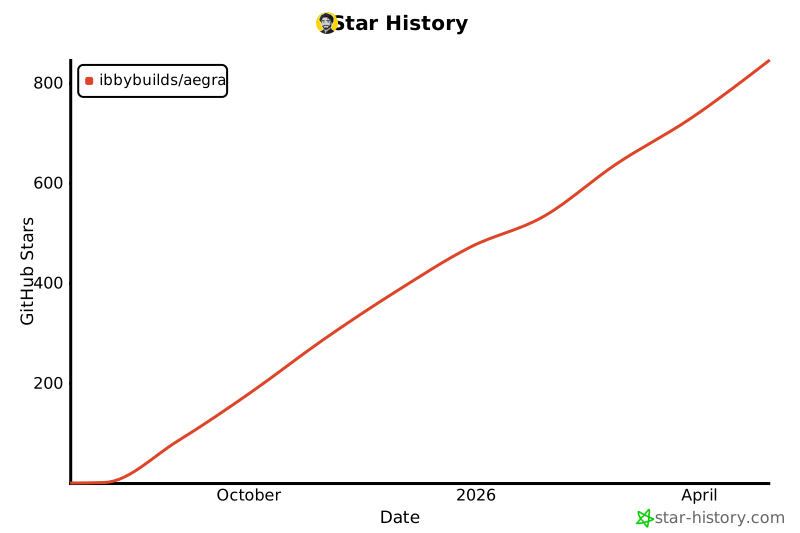
Star History
🛣️ Roadmap
✅ Completed
- Agent Chat UI compatibility
- Agent Protocol API implementation
- PostgreSQL persistence and streaming
- Authentication framework
- Human-in-the-loop support
- Langfuse integration
🎯 Next
- Custom HTTP endpoints support
- Generative user interfaces support
- Redis-backed streaming buffers
- Advanced deployment recipes
🚀 Future
- Performance optimizations
- Custom UI themes and branding
- Aegra CLI for migration and image building
🤝 Contributing
We welcome contributions! Here's how you can help:
🐛 Issues & Bugs
- Report bugs with detailed reproduction steps
- Suggest new features and improvements
- Help with documentation
💻 Code Contributions
- Improve Agent Protocol spec alignment
- Add authentication backends
- Enhance testing coverage
- Optimize performance
📚 Documentation
- Deployment guides
- Integration examples
- Best practices
Get Started: Check out CONTRIBUTING.md, our Developer Guide, and our good first issues.
📄 License
Apache 2.0 License - see LICENSE file for details.
⭐ If Aegra helps you escape vendor lock-in, please star the repo! ⭐
Built with ❤️ by developers who believe in infrastructure freedom
Release history Release notifications | RSS feed


Download files
Download the file for your platform. If you're not sure which to choose, learn more about installing packages.
Source Distribution
Built Distribution
Filter files by name, interpreter, ABI, and platform.
If you're not sure about the file name format, learn more about wheel file names.
Copy a direct link to the current filters
File details
Details for the file arcsitegraph-0.1.15.tar.gz.
File metadata
- Download URL: arcsitegraph-0.1.15.tar.gz
- Upload date:
- Size: 79.8 kB
- Tags: Source
- Uploaded using Trusted Publishing? No
- Uploaded via: uv/0.9.15 {"installer":{"name":"uv","version":"0.9.15","subcommand":["publish"]},"python":null,"implementation":{"name":null,"version":null},"distro":{"name":"macOS","version":null,"id":null,"libc":null},"system":{"name":null,"release":null},"cpu":null,"openssl_version":null,"setuptools_version":null,"rustc_version":null,"ci":null}
File hashes
| Algorithm | Hash digest | |
|---|---|---|
| SHA256 |
ff1fb77c7567b8b6a84d5fca62548b7e4d66b369c1bab5e4159ed4c429ee71f2
|
|
| MD5 |
ddb5dd337d342c3eacfa4409ede1fe58
|
|
| BLAKE2b-256 |
8034337761ed143b4506d3000978186c024eda4b526e791860b64ccbeb6890d3
|
File details
Details for the file arcsitegraph-0.1.15-py3-none-any.whl.
File metadata
- Download URL: arcsitegraph-0.1.15-py3-none-any.whl
- Upload date:
- Size: 104.9 kB
- Tags: Python 3
- Uploaded using Trusted Publishing? No
- Uploaded via: uv/0.9.15 {"installer":{"name":"uv","version":"0.9.15","subcommand":["publish"]},"python":null,"implementation":{"name":null,"version":null},"distro":{"name":"macOS","version":null,"id":null,"libc":null},"system":{"name":null,"release":null},"cpu":null,"openssl_version":null,"setuptools_version":null,"rustc_version":null,"ci":null}
File hashes
| Algorithm | Hash digest | |
|---|---|---|
| SHA256 |
c52982ec22e92065a560a48002147c74f945aa086e362c71ab12ecb2d93ec02b
|
|
| MD5 |
648d612f966aa228144d4d83adc59c3b
|
|
| BLAKE2b-256 |
3ac9ea8cd59d4d867aa8d380058a4b658216478e19b59c5b323d6e18b7ef4257
|






