
A replacement for SteelSeries GG software, to manage your Arctis device on Linux!

Project description
Arctis Sound Manager






A Linux GUI for SteelSeries Arctis headsets — device settings, 4-channel audio mixer (Game / Chat / Media / Output), automatic media routing, and a full Sonar EQ system powered by PipeWire filter-chain.
🎚️ ASM Presets — browse and share community EQ presets! 💬 Join the Discord — chat, share presets and get help from the community! 📝 Share your experience in Discussions — feedback helps improve compatibility for everyone! ☕ Buy me a coffee if you find it useful!
Table of contents
- Arctis Sound Manager
Features
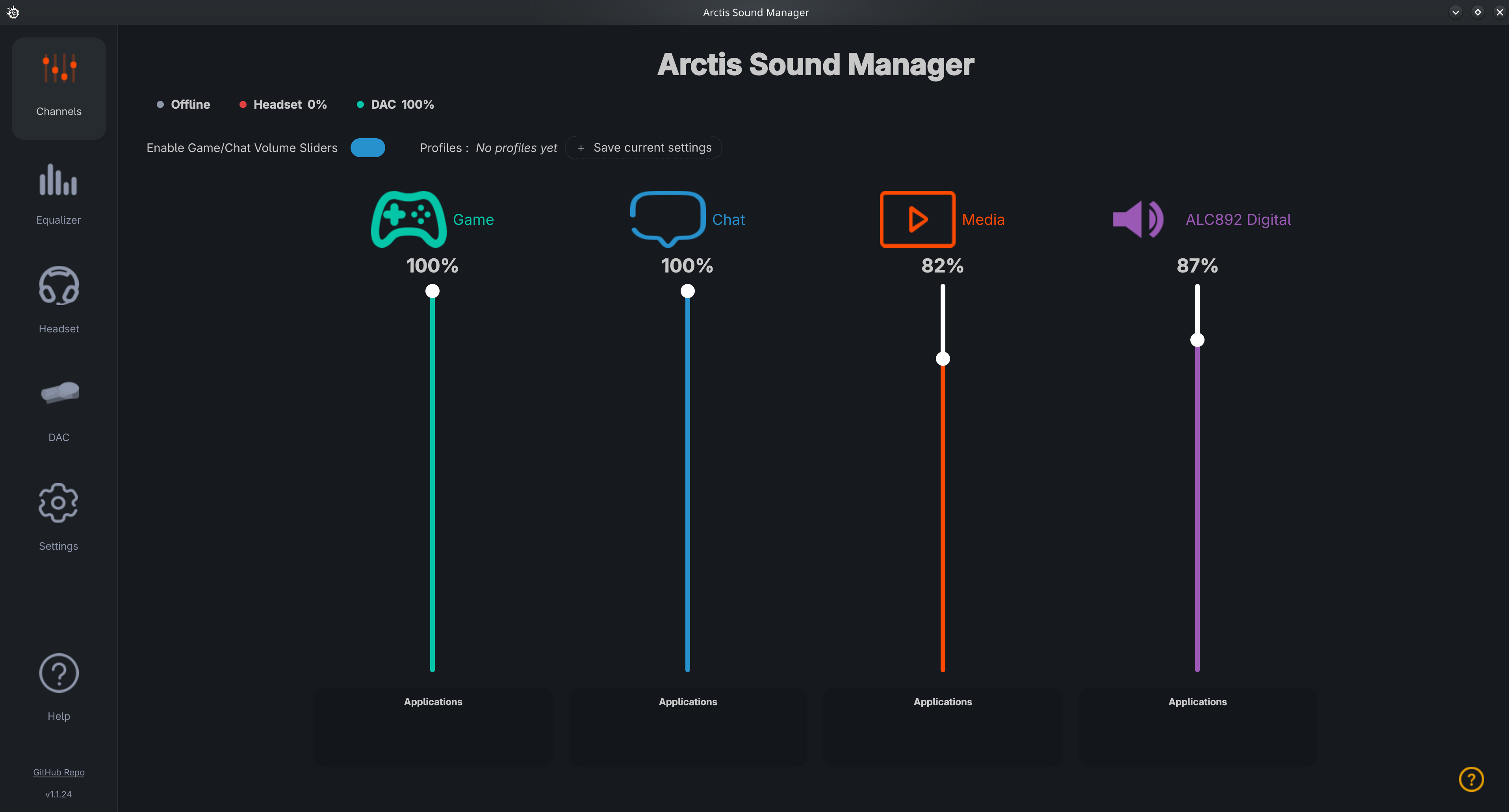
🎚️ Audio mixer
- 4-channel mixer — separate Game, Chat, Media and Output virtual sinks
- Automatic media routing — browsers and video players (Firefox, VLC, mpv…) are automatically routed to the Media sink
- Smart stream adoption — apps running when ASM starts are pulled into
Arctis_Mediainstead of staying on a non-Arctis sink - Manual stream control — move any audio stream between channels via G / C / M / O buttons; choices persist across restarts
- True multichannel output — route apps directly to HDMI or external output (5.1 / 7.1 native passthrough)
- Volume sliders per channel with live percentage display
- Native PipeWire support — detects apps that bypass PulseAudio (mpv, Haruna…)
🎛️ EQ & audio processing
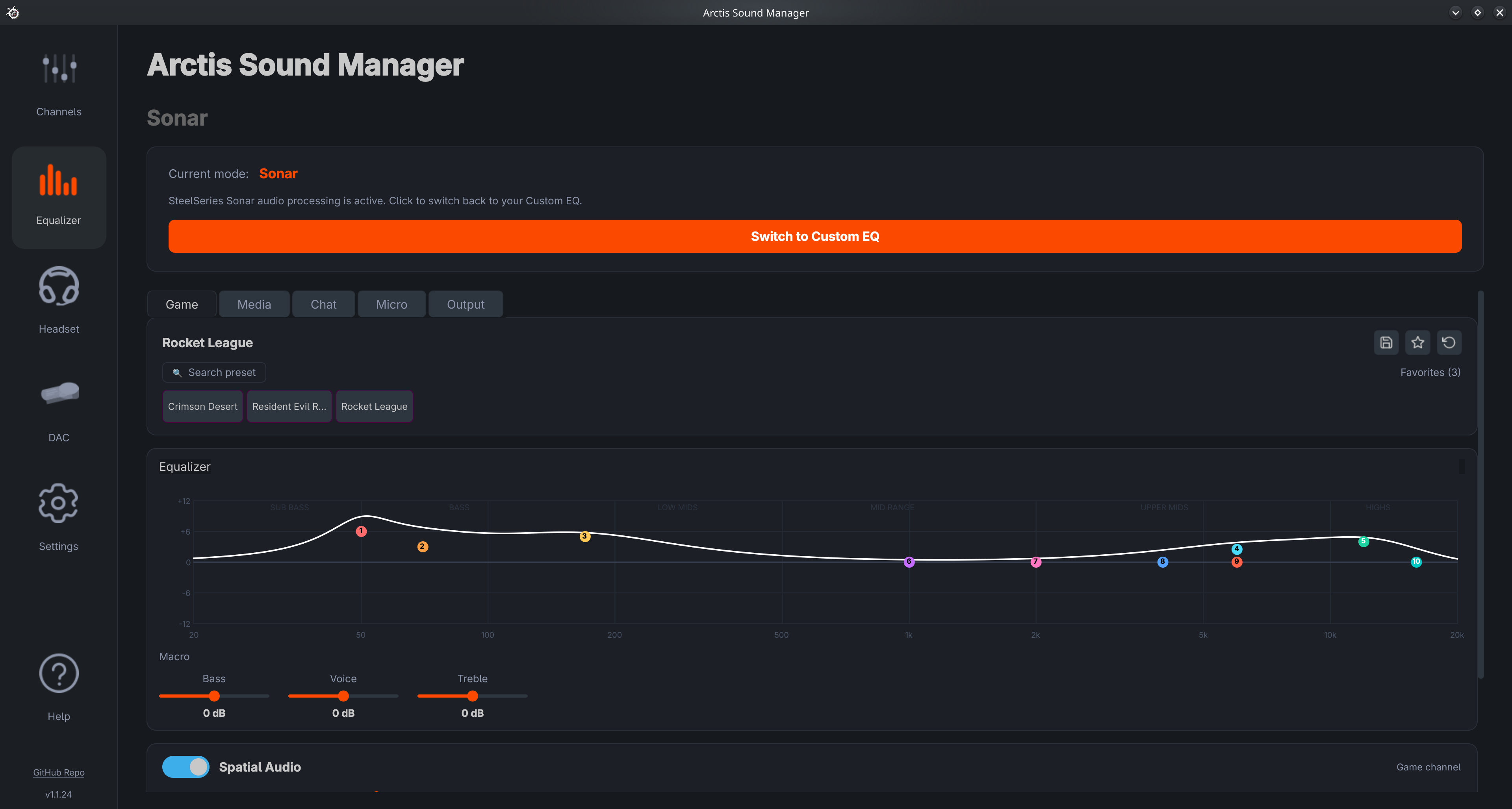
- Sonar EQ — full SteelSeries Sonar-style parametric EQ (Game / Chat / Micro channels):
- Interactive EQ curve, up to 10 bands per channel
- 312 Game presets, 8 Chat, 14 Mic — searchable, 9 favorite slots
- Macro sliders: Bass / Voice / Treble (±12 dB)
- Spatial Audio — HeSuVi virtual 7.1 surround with Immersion (0–12 dB) and Distance (reverb) sliders
- Volume Boost — up to +12 dB gain at the end of the filter chain
- Smart Volume — dynamic compressor (Quiet / Balanced / Loud)
- All changes applied live via PipeWire biquad nodes
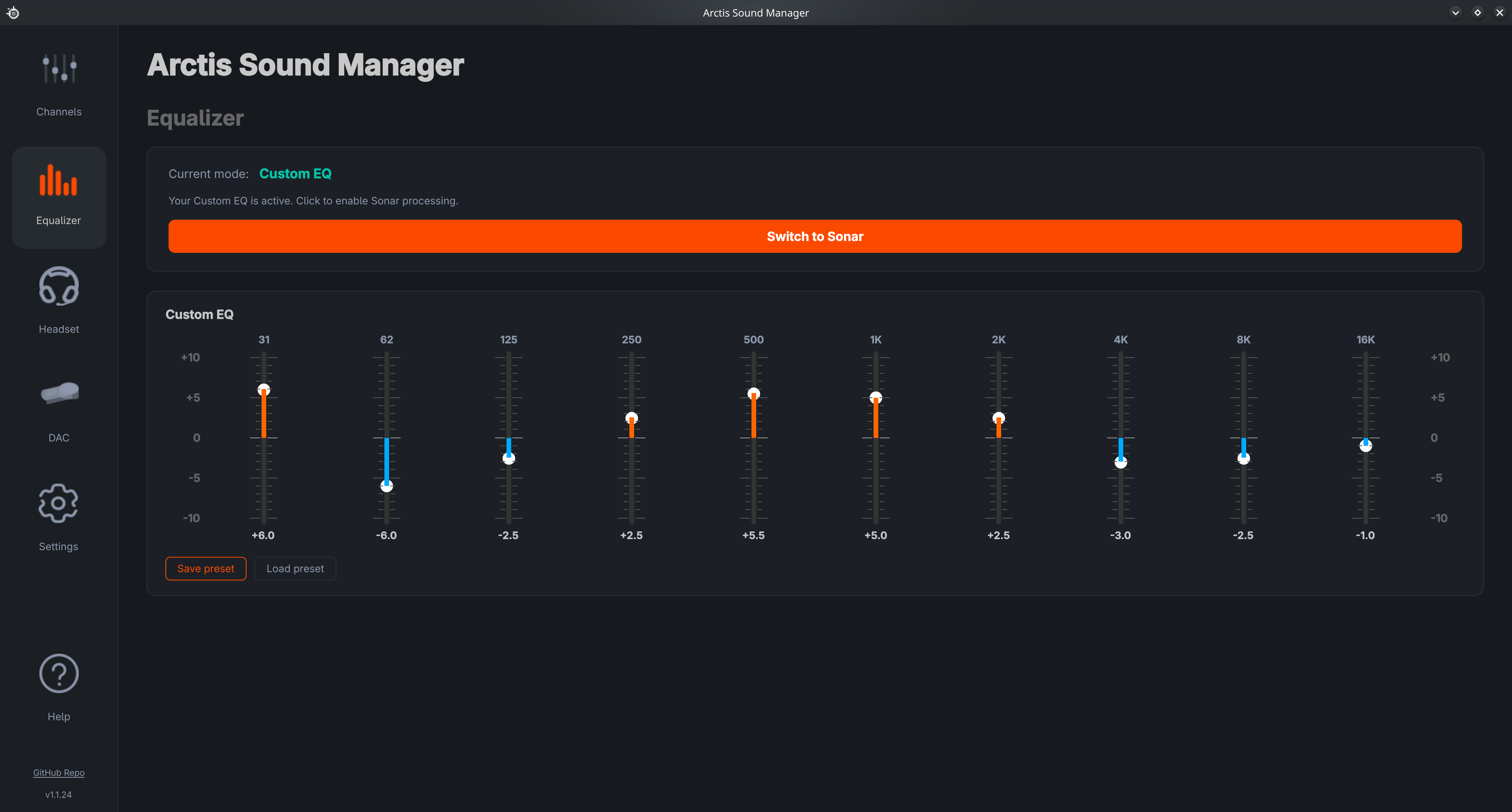
- Custom 10-band EQ — per-band gain (31 Hz – 16 kHz), save/load presets
- Audio Profiles — save and restore your complete configuration in one click (EQ mode, presets, macro values, Spatial Audio, volumes); instant switching from the Home page or system tray
🎧 Device control
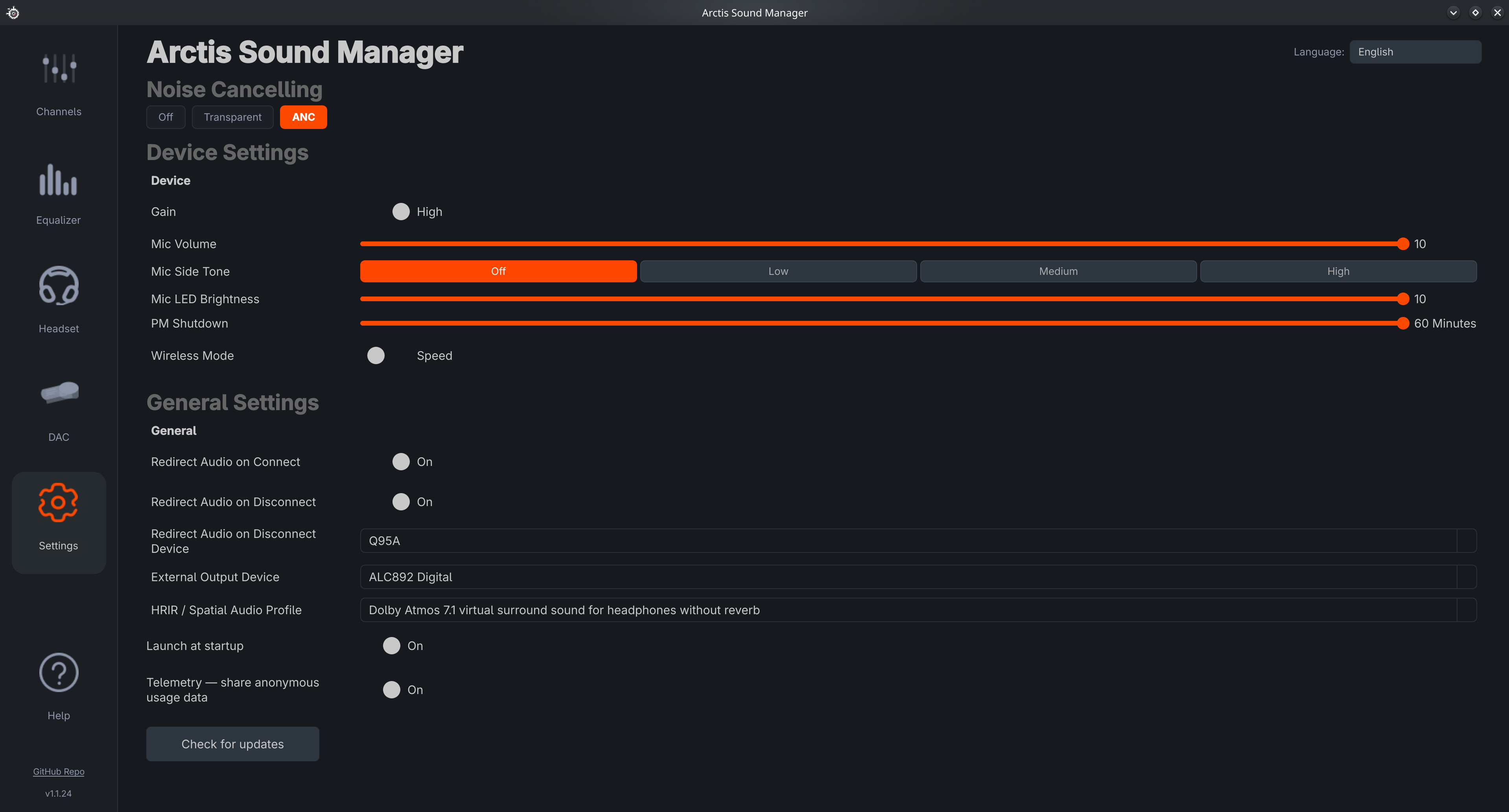
- ANC / Transparent mode — reflects the physical button state in real time
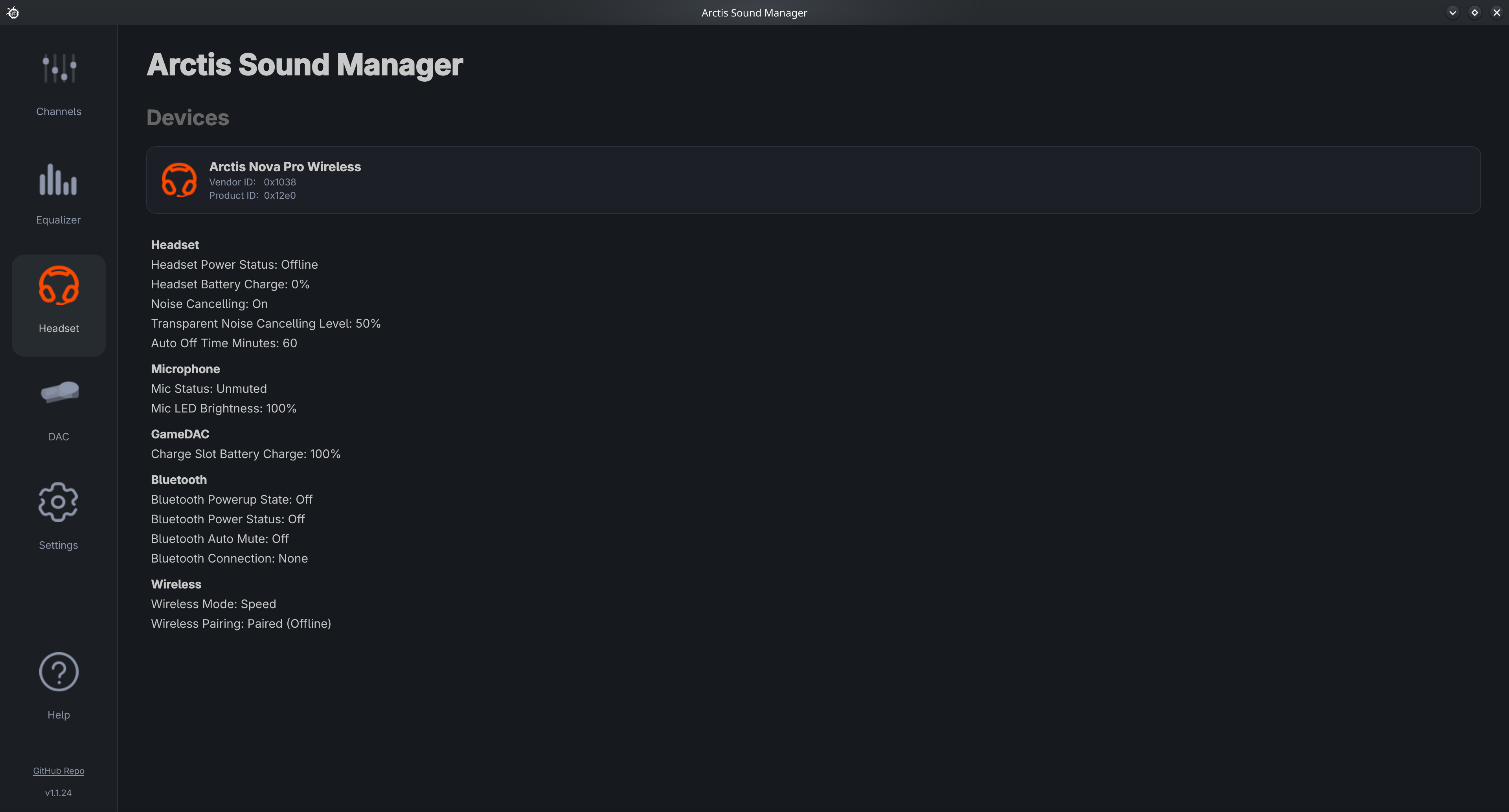
- Device status — battery, mic mute, sidetone, and more
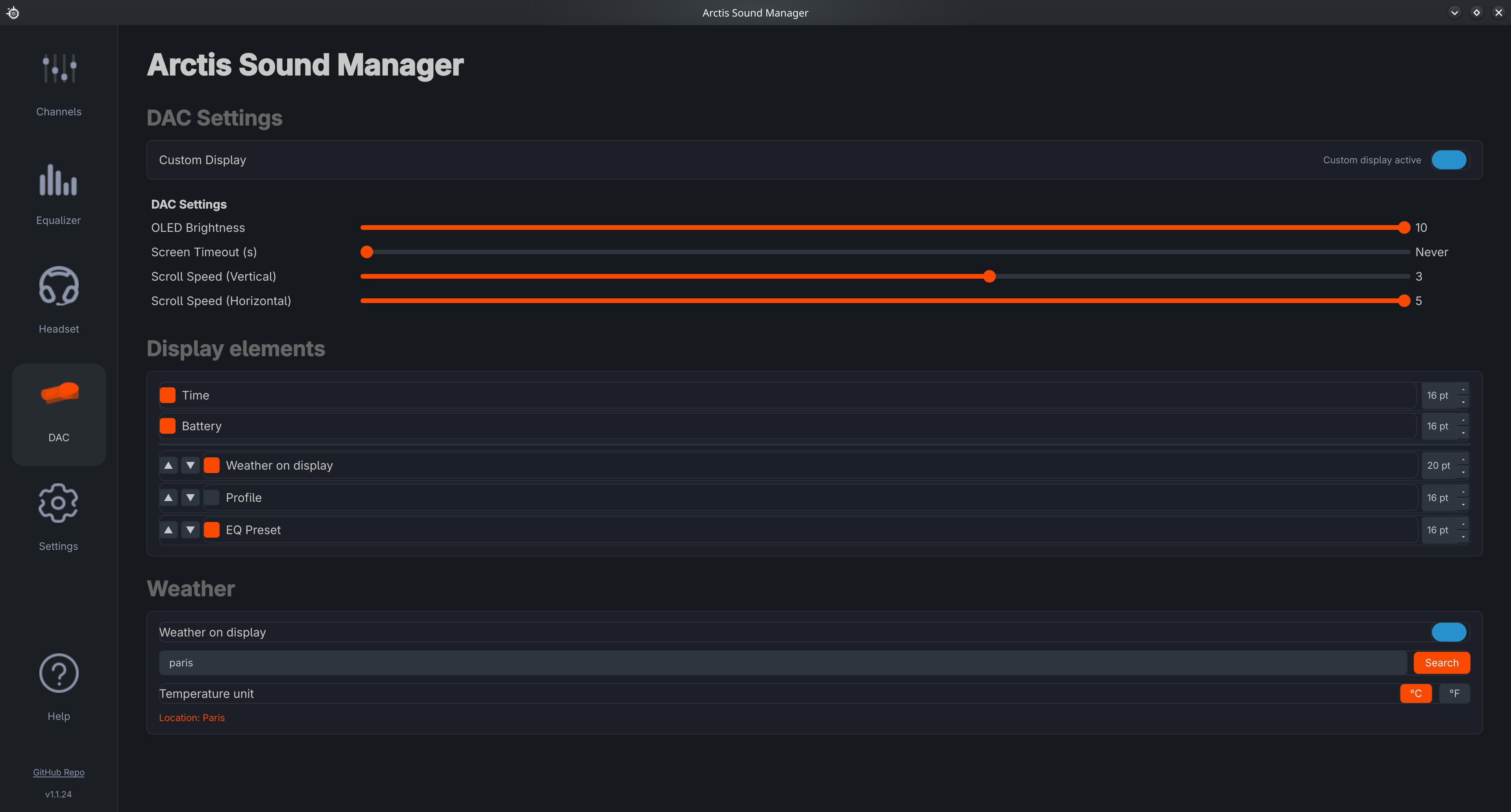
- DAC OLED display (Arctis Nova Pro Wireless / X):
- Toggle original vs custom display mode
- Brightness, screen timeout, scroll speed
- Choose and reorder elements: Time, Battery, Profile, EQ Preset, Weather
- Per-element font size (7–30 pt) · Built-in weather with °C / °F selector
⚙️ App & system
- Self-healing deps — at startup ASM checks every system component (LADSPA plugins, HRIR, PipeWire, wpctl, udev rules…); a one-click dialog installs anything missing with a single
pkexecprompt - Check for updates — in-app button forces an immediate GitHub check; installs via terminal (pacman / dnf / apt) or in-app wheel (pipx)
- One-click bug reports — auto-uploads a full diagnostic as a GitHub gist and opens a pre-filled issue
- Built-in diagnostics —
asm-daemon --verify-setupandasm-cli diagnose -o file.txt - Community translations — new languages from Crowdin download automatically on startup, no release needed
- Help page — built-in manual in English, French and Spanish
ARCTIS_LOG_LEVELenv var —debug/info/warning, honored by daemon, GUI and router
Screenshots
| Home — mixer | Sonar EQ |
|---|---|
 |
 |
| Custom EQ | Settings |
|---|---|
 |
 |
| Headset status | DAC — OLED display control |
|---|---|
 |
 |
Supported devices
| Device | Working | Users | Product ID(s) |
|---|---|---|---|
| Arctis 1 / 7X / 7P Wireless | ✅ | 1 | 12b3, 12b6, 12d5, $\color{royalblue}{\textbf{12d7}}$ |
| Arctis 7 / 7 2019 / Pro 2019 / Pro GameDAC | ✅ | 1 | 1260, $\color{royalblue}{\textbf{12ad}}$, 1252, 1280 |
| Arctis 7+ / PS5 / Xbox / Destiny | ✅ | 2 | $\color{royalblue}{\textbf{220e}}$, 2212, 2216, 2236 |
| Arctis 9 Wireless | ✅ | 2 | $\color{royalblue}{\textbf{12c2}}$ |
| Arctis Pro Wireless | ✅ | 3 | $\color{royalblue}{\textbf{1290}}$, $\color{royalblue}{\textbf{1294}}$ |
| Arctis Nova Pro Wireless / X | ✅ | 29 | $\color{royalblue}{\textbf{12e0}}$, $\color{royalblue}{\textbf{12e5}}$ |
| Arctis Nova Pro Wired / Xbox Wired | ✅ | 4 | $\color{royalblue}{\textbf{12cb}}$, 12cd |
| Arctis Nova 3 | ✅ | 4 | $\color{royalblue}{\textbf{12ec}}$ |
| Arctis Nova 3P / 3X Wireless | ✅ | 4 | $\color{royalblue}{\textbf{2269}}$, 226d |
| Arctis Nova 5 / 5X | ✅ | 6 | $\color{royalblue}{\textbf{2232}}$, 2253, $\color{royalblue}{\textbf{2255}}$ |
| Arctis Nova 7 Gen 1 | ✅ | 4 | $\color{royalblue}{\textbf{2202}}$, 2206, 223a, 227a, 22ab, 22a4 |
| Arctis Nova 7 Gen 2 | ✅ | 19 | $\color{royalblue}{\textbf{22a1}}$, $\color{royalblue}{\textbf{227e}}$, 2258, $\color{royalblue}{\textbf{229e}}$, 22a9, $\color{royalblue}{\textbf{22a5}}$ |
| Arctis Nova 7P | ✅ | 5 | 220a, $\color{royalblue}{\textbf{22a7}}$ |
| Arctis Nova Elite | ✅ | 1 | $\color{royalblue}{\textbf{2244}}$, 2249 |
| Arctis GameBuds X | ❌ | 1 | $\color{red}{\textbf{2317}}$ |
✅ Confirmed by at least one opted-in user 🔴 Seen in telemetry but not yet declared in a device YAML — support pending
Find your headset's Product ID (the 4 hex digits after 1038:):
lsusb -d 1038:
If your PID isn't listed above, open an issue with it so support can be added.
Installation
All native packages (AUR / COPR / PPA) pull in every dependency automatically. After installing, run asm-setup once — it configures udev rules, systemd services, PipeWire and downloads the HRIR file.
Arch Linux / CachyOS / Manjaro (AUR)
paru -S arctis-sound-manager
asm-setup
Fedora / Nobara (COPR)
sudo dnf copr enable loteran/arctis-sound-manager
sudo dnf install arctis-sound-manager
asm-setup
Debian / Ubuntu (PPA)
sudo add-apt-repository ppa:loteran/arctis-sound-manager
sudo apt update && sudo apt install arctis-sound-manager
asm-setup
Ubuntu 24.04 (Noble) is the currently supported series. Other series may work via the
.debin each GitHub release.
Immutable distros (Bazzite, SteamOS, Silverblue)
ASM runs inside a Distrobox container and is exported transparently to the host. Run the script for your distro directly — no need to clone:
Bazzite (full deps including noise-suppression-for-voice):
bash <(curl -fsSL https://raw.githubusercontent.com/loteran/Arctis-Sound-Manager/main/scripts/distrobox/bazzite.sh)
SteamOS / Steam Deck:
bash <(curl -fsSL https://raw.githubusercontent.com/loteran/Arctis-Sound-Manager/main/scripts/distrobox/steamos.sh)
udev rules in
/etc/udev/rules.d/are reset on major SteamOS updates — re-run the script after each upgrade.
Fedora Silverblue / Kinoite:
bash <(curl -fsSL https://raw.githubusercontent.com/loteran/Arctis-Sound-Manager/main/scripts/distrobox/silverblue.sh)
Each script is idempotent. Flags: --reinstall (rebuild container), --no-services (skip systemd).
Other distros (from source)
Install system deps first:
# Debian / Ubuntu
sudo apt install pipx libusb-1.0-0 libpulse0 libudev1 swh-plugins noise-suppression-for-voice curl

# Fedora / Nobara
sudo dnf install pipx libusb1 pulseaudio-libs systemd-libs ladspa-swh-plugins curl
sudo dnf copr enable uriesk/noise-suppression-for-voice
sudo dnf install noise-suppression-for-voice
Then install ASM:
git clone --branch main https://github.com/loteran/Arctis-Sound-Manager.git
cd Arctis-Sound-Manager
bash scripts/install.sh
PATH tip: if
asm-cliorasm-daemonare not found after install, run:echo 'export PATH="$HOME/.local/bin:$PATH"' >> ~/.bashrc && source ~/.bashrc
USB permissions: if the headset isn't detected, ASM shows a one-click Install rules dialog at startup. Manual fallback:
sudo asm-cli udev write-rules --force --reload
First launch
After asm-setup completes, launch the GUI with:
asm-gui
Or find Arctis Sound Manager in your application launcher (KDE, GNOME, etc.).
The daemon (
asm-manager.service) starts automatically at login — the GUI is separate and must be opened manually the first time.
System tray mode
asm-gui --systray
Starts minimised to the system tray. From there you can switch Audio Profiles, open the full window, or quit. This is the recommended mode for daily use.
Autostart at login
The easiest way is the in-app toggle: Settings → General → Start with system — ASM handles the correct setup for your desktop environment automatically.
If the toggle doesn't work for your DE, use the manual method:
KDE Plasma / GNOME (systemd user session)
systemctl --user enable --now asm-gui-tray.service
A asm-gui-tray.service unit is installed by asm-setup. If missing:
asm-cli desktop write
systemctl --user daemon-reload
systemctl --user enable --now asm-gui-tray.service
Hyprland / Sway / other wlroots compositors
Add to ~/.config/hypr/hyprland.conf (or your compositor's startup config):
exec-once = asm-gui --systray
i3 / bspwm / other X11 WMs
Add to your WM startup file (~/.config/i3/config, ~/.xinitrc, etc.):
asm-gui --systray &
Or create an XDG autostart entry:
asm-cli desktop write # writes ~/.config/autostart/arctis-sound-manager.desktop
Upgrading
Arch / CachyOS / Manjaro
paru -Syu arctis-sound-manager && asm-setup
Fedora (COPR)
sudo dnf upgrade arctis-sound-manager && asm-setup
Debian / Ubuntu (PPA)
sudo apt update && sudo apt upgrade arctis-sound-manager && asm-setup
From source
cd Arctis-Sound-Manager && git pull
pipx install --force .
asm-cli desktop write
asm-cli udev write-rules --force --reload
systemctl --user daemon-reload && systemctl --user restart arctis-manager.service
pipx upgrademay fail on wheel installs — usepipx install --force .instead.
How the mixer works
ASM creates 3 virtual sinks on top of your Arctis device plus one external output:
| Sink | Default use | Button |
|---|---|---|
| Arctis_Game | Games, general audio | G |
| Arctis_Chat | Voice apps (Discord, TeamSpeak…) | C |
| Arctis_Media | Browsers, video players | M |
| External Output | HDMI, USB speakers, sound card… (5.1 / 7.1 native) | O |
The media router (asm-router) automatically moves browsers and video players to Arctis_Media. Manual placements via G / C / M / O buttons are saved as persistent overrides.
The External Output card routes audio directly to the physical sink, bypassing virtual stereo sinks — this preserves true 5.1 / 7.1 passthrough. Configure it in Settings → Audio → External Output Device.
Sharing and downloading EQ presets
ASM lets you share any Sonar EQ preset with one click and import presets shared by the community.
Exporting a preset
- Open the Sonar EQ tab and select or create a preset.
- Click the Share button (export icon) next to the preset name.
- Choose how to share:
- Copy link — copies an
arctis-asm://import?data=…deep link to your clipboard. - Save as file — saves a
.jsonfile you can send directly. - Publish to community — opens a browser form pre-filled with your preset data; sign in with GitHub and submit.
- Copy link — copies an
Importing a preset
- Open the Sonar EQ tab.
- Click Import preset (import icon).
- Paste one of the supported link formats, then click Import:
- ASM deep link —
arctis-asm://import?data=…(generated by ASM's Share button) - SteelSeries community link —
https://www.steelseries.com/deeplink/gg/sonar/config/v1/import?url=…(links from the SteelSeries community or GG software)
- ASM deep link —
ASM automatically detects the link format, downloads the preset if needed, and saves it locally.
You can also double-click an
arctis-asm://link in a browser if you registered the URL handler withasm-setup.
Community site — ASM Presets
loteran.github.io/asm-presets — browse, vote for, and download EQ presets shared by the community.
| Action | How |
|---|---|
| Browse presets | Open the site — no login required |
| Filter by channel / device | Use the search bar and dropdowns |
| Import a preset into ASM | Click Import in ASM on any card |
| Vote for a preset | Click the ♡ button (requires GitHub login) |
| Publish a preset | Click Share a Preset, sign in with GitHub, fill in the form |
| Delete your preset | Click 🗑 on your own preset card (only visible when logged in) |
Virtual surround 7.1
Virtual 7.1 surround is included automatically with the install — it deploys a PipeWire HeSuVi filter-chain and downloads the HRIR file. 57 HRIR profiles are bundled and selectable from the Settings tab with instant apply.
                  ┌──────────────────────────┐
 7.1 audio source │  Virtual Surround Sink   │
 (game, movie…) ──►  (PipeWire filter-chain) ├──► Headset (stereo)
                  └──────────────────────────┘
Also available as a standalone repo: arctis-virtual-surround — install virtual surround independently with a single
bash install.sh.
Manual setup (alternative)
bash scripts/setup-surround.sh
This installs the filter-chain config in ~/.config/pipewire/filter-chain.conf.d/, downloads the HRIR file, and enables the filter-chain systemd user service.
Advanced: replace ~/.local/share/pipewire/hrir_hesuvi/hrir.wav with any 14-channel HeSuVi-compatible WAV and restart filter-chain manually.
Translations
ASM supports community translations via Crowdin. No release is needed — the app checks GitHub on every startup and silently downloads any updated .ini files.
| Language | Status |
|---|---|
| English | Source (always complete) |
| Français | Bundled |
| Español | Bundled |
| Your language? | Contribute on Crowdin ↗ |
How it works:
- Every day at 06:00 UTC, a GitHub Action pulls approved translations from Crowdin and opens a PR
- On each startup, ASM fetches updated files and saves them to
~/.config/arctis_manager/lang/ - The language selector in Settings updates immediately — no restart needed
- Languages below 80% coverage fall back string-by-string to English
To request a new language, open a GitHub issue. See CONTRIBUTING.md for full details.
Community stats
Based on 82 unique users (508 anonymous data points) — last updated 2026-06-02
Anonymous usage data shared voluntarily by opted-in users. View interactive dashboard →
Tested distributions
| Distribution | Install method | Users |
|---|---|---|
| CachyOS | 🎯 AUR | 👥 41 |
| Arch Linux | 🎯 AUR | 👥 9 |
| Nobara Linux 43 (KDE Plasma Desktop Edition) | 🎯 COPR | 👥 6 |
| Ubuntu 26.04 LTS | 🎯 PPA | 👥 3 |
| Ubuntu 24.04.4 LTS | 🎯 PPA | 👥 3 |
| Linux Mint 22.3 | 🎯 PPA | 👥 3 |
| Garuda Linux | 🎯 AUR | 👥 3 |
| Fedora Linux 44 (KDE Plasma Desktop Edition) | 🎯 COPR | 👥 3 |
| Artix Linux | 🎯 AUR | 👥 3 |
| Manjaro Linux | 🎯 AUR | 👥 2 |
| PikaOS 4 | 📦 Source | 👥 1 |
| NixOS 26.05 (Yarara) | 📦 Source | 👥 1 |
| Fedora Linux 44 (Workstation Edition) | 🎯 COPR | 👥 1 |
| Fedora Linux 43 (Workstation Edition) | 🎯 COPR | 👥 1 |
| Fedora Linux 43 (KDE Plasma Desktop Edition) | 🎯 COPR | 👥 1 |
| EndeavourOS | 🎯 AUR | 👥 1 |
Most used headsets & distros
| Headset | Installs |
|---|---|
| Arctis Nova Pro Wireless | 29 |
| Arctis Nova 7 (Gen 2) | 19 |
| Arctis Nova 5 Wireless | 5 |
| Arctis Nova 7P (Gen 2) | 5 |
| Arctis Nova 3 | 4 |
| Arctis Nova 7 (Gen 1) | 4 |
| Arctis Nova Pro Wired | 4 |
| Arctis Pro Wireless | 3 |
| Arctis 7+ | 2 |
| Arctis 9 Wireless | 2 |
| Arctis 1/7X/7P Wireless | 1 |
| Arctis 7/Pro Gaming | 1 |
| Arctis GameBuds X | 1 |
| Arctis Nova 5X (PID 2255) | 1 |
| Arctis Nova Elite | 1 |
| Distribution | Installs |
|---|---|
| CachyOS | 41 |
| Arch Linux | 9 |
| Nobara Linux 43 (KDE Plasma Desktop Edition) | 6 |
| Ubuntu 26.04 LTS | 3 |
| Ubuntu 24.04.4 LTS | 3 |
| Linux Mint 22.3 | 3 |
| Garuda Linux | 3 |
| Fedora Linux 44 (KDE Plasma Desktop Edition) | 3 |
| Artix Linux | 3 |
| Manjaro Linux | 2 |
| PikaOS 4 | 1 |
| NixOS 26.05 (Yarara) | 1 |
| Fedora Linux 44 (Workstation Edition) | 1 |
| Fedora Linux 43 (Workstation Edition) | 1 |
| Fedora Linux 43 (KDE Plasma Desktop Edition) | 1 |
Uninstall
Native packages ship a cleanup hook — paru -R / dnf remove / apt remove removes PipeWire configs and restarts pipewire automatically. Audio profiles in ~/.config/arctis_manager/profiles/ are preserved by default.
paru -R arctis-sound-manager        # Arch / CachyOS / Manjaro
sudo dnf remove arctis-sound-manager  # Fedora
sudo apt remove arctis-sound-manager  # Debian / Ubuntu
For source/pipx installs or a full wipe, use the standalone uninstaller:
bash scripts/uninstall.sh           # interactive, auto-detects install method
# or without cloning:
curl -fsSL https://raw.githubusercontent.com/loteran/Arctis-Sound-Manager/main/scripts/uninstall.sh | bash
Uninstall flags
--pipx          # only the pipx install
--pkg           # only the distro package
--all           # both (for duplicate installs)
--all --purge   # also wipe PipeWire configs, HRIR, systemd units, udev rules
--yes           # non-interactive
--purge still preserves ~/.config/arctis_manager/profiles/. A final prompt offers to delete them too for a true clean slate.
Reporting a bug
In-app reporter (recommended)
Open ASM → Help page → Report a Bug. The dialog collects a full diagnostic (version, libs, distro, PipeWire state, USB devices, udev rules, last 100 log lines) and either:
- Submits automatically via
ghCLI — uploads as a secret gist and opens a pre-filled issue - Opens GitHub manually — saves the report to
~/.cache/arctis-sound-manager/reports/for drag-and-drop
CLI equivalents
asm-daemon --verify-setup           # preflight checks, exits 0/1 with per-distro install hints
asm-cli diagnose -o /tmp/asm.txt    # full local diagnostic dump

ARCTIS_LOG_LEVEL=debug systemctl --user restart arctis-manager
journalctl --user -u arctis-manager -f
Tips for a good report
- Describe expected vs actual behaviour — "Game channel silent after switching to Sonar EQ" beats "audio broken"
- Include steps to reproduce
- One issue per report
Development
python src/arctis_sound_manager/scripts/daemon.py          # daemon
python src/arctis_sound_manager/scripts/gui.py --no-enforce-systemd  # GUI
python src/arctis_sound_manager/scripts/video_router.py    # media router
Project structure
src/arctis_sound_manager/
├── scripts/
│   ├── daemon.py          # asm-daemon: device manager service
│   ├── gui.py             # asm-gui: graphical interface
│   ├── video_router.py    # asm-router: media auto-routing service
│   ├── cli.py             # asm-cli: setup utilities (udev, desktop, tools)
│   └── setup.py           # asm-setup: post-install automation
├── gui/
│   ├── home_page.py            # Audio mixer (Game/Chat/Media/Output cards)
│   ├── headset_page.py         # Device info and live status
│   ├── device_page.py          # General settings (startup toggle, language)
│   ├── equalizer_page.py       # EQ mode toggle (Custom / Sonar) + 10-band sliders
│   ├── sonar_page.py           # Sonar EQ (Game/Chat/Micro tabs, presets, Spatial Audio, Boost)
│   ├── eq_curve_widget.py      # Interactive parametric EQ curve (biquad RBJ)
│   ├── anc_widget.py           # ANC / Transparent mode indicator
│   ├── settings_widget.py      # Per-device settings panel (D-Bus backed)
│   ├── profile_bar.py          # Profile chip bar + SaveProfileDialog
│   ├── help_page.py            # Built-in user manual (EN/FR/ES)
│   ├── presets/                # 334 bundled Sonar presets (312 Game, 8 Chat, 14 Mic)
│   └── theme.py                # Color constants
├── lang/                  # Translation files (.ini, one per language)
├── lang_updater.py        # Background GitHub translation checker
├── i18n.py                # Translation singleton with EN fallback
├── profile_manager.py     # Audio profile: snapshot, save/load/apply
├── sonar_to_pipewire.py   # PipeWire filter-chain config generator
├── oled_renderer.py       # OLED screen image renderer (PIL)
├── oled_manager.py        # OLED scroll/animation loop
└── devices/               # Per-device configuration YAMLs

scripts/
├── install.sh             # Main installer (source installs)
├── distrobox/             # Distrobox installers (Bazzite, SteamOS, Silverblue)
├── setup-surround.sh      # Standalone virtual surround setup
└── pipewire/              # PipeWire config templates
💬 Share your experience
Tried ASM on your headset or distro? Found a bug or have a feature idea?
Your feedback helps improve compatibility for everyone — especially for headsets not yet confirmed working.
License
This project is licensed under the GNU General Public License v3.0.
The majority of the source code is original work — Copyright (C) 2026 loteran.
25 files are partially derived from Linux Arctis Manager by Giacomo Furlan (elegos), used under GPL-3.0 — Copyright (C) 2022 Giacomo Furlan (elegos).
Release history Release notifications | RSS feed


Download files
Download the file for your platform. If you're not sure which to choose, learn more about installing packages.
Source Distribution
Built Distribution
Filter files by name, interpreter, ABI, and platform.
If you're not sure about the file name format, learn more about wheel file names.
Copy a direct link to the current filters
File details
Details for the file arctis_sound_manager-1.1.51.tar.gz.
File metadata
- Download URL: arctis_sound_manager-1.1.51.tar.gz
- Upload date:
- Size: 14.5 MB
- Tags: Source
- Uploaded using Trusted Publishing? Yes
- Uploaded via: twine/6.1.0 CPython/3.13.12
File hashes
| Algorithm | Hash digest | |
|---|---|---|
| SHA256 |
ecb133c04b4f93a84c60d4e17f239470709c9e7ea758eee7c210bcf0e9b201a3
|
|
| MD5 |
47e98530c3d25e0a553b5f9e2339eefc
|
|
| BLAKE2b-256 |
e5f38d0a1cbc837f28bb6c915b1e6f8552f3bbd36f3b576e851f821d65157a97
|
Provenance
The following attestation bundles were made for arctis_sound_manager-1.1.51.tar.gz:
Publisher:
pypi-publish.yaml on loteran/Arctis-Sound-Manager
-
Statement:
-
Statement type:
https://in-toto.io/Statement/v1 -
Predicate type:
https://docs.pypi.org/attestations/publish/v1 -
Subject name:
arctis_sound_manager-1.1.51.tar.gz -
Subject digest:
ecb133c04b4f93a84c60d4e17f239470709c9e7ea758eee7c210bcf0e9b201a3 - Sigstore transparency entry: 1704576849
- Sigstore integration time:
-
Permalink:
loteran/Arctis-Sound-Manager@c22f2b18ce0d56095a50d32964d0b6a63f9a7809 -
Branch / Tag:
refs/heads/main - Owner: https://github.com/loteran
-
Access:
public
-
Token Issuer:
https://token.actions.githubusercontent.com -
Runner Environment:
github-hosted -
Publication workflow:
pypi-publish.yaml@c22f2b18ce0d56095a50d32964d0b6a63f9a7809 -
Trigger Event:
workflow_dispatch
-
Statement type:
File details
Details for the file arctis_sound_manager-1.1.51-py3-none-any.whl.
File metadata
- Download URL: arctis_sound_manager-1.1.51-py3-none-any.whl
- Upload date:
- Size: 14.8 MB
- Tags: Python 3
- Uploaded using Trusted Publishing? Yes
- Uploaded via: twine/6.1.0 CPython/3.13.12
File hashes
| Algorithm | Hash digest | |
|---|---|---|
| SHA256 |
54586c324b9f15d85f737cbc4fd8311ac8ac797996f4d5679169f3322d14c4c1
|
|
| MD5 |
8ea2faad2cf1c5e75e1a7e0f5f3b8662
|
|
| BLAKE2b-256 |
75909adfd308524b1b339e2bdb8c2e9c4c09e14633220cfe3516a3a19ed8dc10
|
Provenance
The following attestation bundles were made for arctis_sound_manager-1.1.51-py3-none-any.whl:
Publisher:
pypi-publish.yaml on loteran/Arctis-Sound-Manager
-
Statement:
-
Statement type:
https://in-toto.io/Statement/v1 -
Predicate type:
https://docs.pypi.org/attestations/publish/v1 -
Subject name:
arctis_sound_manager-1.1.51-py3-none-any.whl -
Subject digest:
54586c324b9f15d85f737cbc4fd8311ac8ac797996f4d5679169f3322d14c4c1 - Sigstore transparency entry: 1704576856
- Sigstore integration time:
-
Permalink:
loteran/Arctis-Sound-Manager@c22f2b18ce0d56095a50d32964d0b6a63f9a7809 -
Branch / Tag:
refs/heads/main - Owner: https://github.com/loteran
-
Access:
public
-
Token Issuer:
https://token.actions.githubusercontent.com -
Runner Environment:
github-hosted -
Publication workflow:
pypi-publish.yaml@c22f2b18ce0d56095a50d32964d0b6a63f9a7809 -
Trigger Event:
workflow_dispatch
-
Statement type:






