
Run AI coding CLIs (OpenCode, Claude Code, aider) against the ANL Argo gateway from anywhere -- now a Python package that owns the runtime and adds a local web UI, wrapping the unchanged bash engine.
Verified details
These details have been verified by PyPIProject links
GitHub Statistics
Maintainers

Project description
argo-anywhere
For AI coding tools: read
AGENTS.mdfirst (project conventions + skill loading);PLAN.mdis the plan-of-record. This README is for humans.
argo-anywhere lets Argonne (ANL) users run AI coding CLI tools — OpenCode, Claude Code, and aider — against argo-proxy on an ANL compute node, from any laptop on any network, with one Duo prompt per session.
It is a pip-installable Python package that owns the runtime and drives a
single self-contained bash engine (vendored verbatim) which does the
orchestration: the SSH tunnel, the on-node argo-proxy bootstrap, and each
tool's config. On top of the command-line workflow it adds an optional
loopback-only web UI and a native desktop app, so you can connect,
monitor, and run tools from a browser window without touching a terminal.
New here, or upgrading? Start with the install & migrate guide — one short path each for new users, v2.x upgraders, and v1.x upgraders.
Contents
- Heads up before you start
- Install
- Quick start
- What this is
- Status
- Web UI and desktop app
- Supported AI CLI tools
- Prerequisites
- Known limitations (please read)
- Subcommands
- What it writes where
- Running the raw engine (fork mode)
- MFA / Duo handling
- Running on a compute node
- Sharing a compute node with other users
- Claude Code config scope (project vs. global)
- Port policy
- Tunnel monitoring and reconnect
- SSH failure protection (CSPO defense)
- Common operations
- Where to read more
- Upgrading
- Testing
- Contributing
- Related projects
- Authors
Heads up before you start
Two things worth knowing in the first thirty seconds:
-
Claude Code with
claude-opus-4-7is currently broken through the ANL Argo gateway: every request fails withAPI returned an empty or malformed response (HTTP 200). The bug is upstream — Anthropic's Vertex deployment rejectsthinking.type.enabledfor opus-4-7, and Claude Code 2.1.x mis-parses the resulting SSE error event — not in argo-anywhere or argo-proxy. Workaround: runclaude --model claude-sonnet-4-6(or any non-opus-4-7 model), or setANTHROPIC_MODEL=claude-sonnet-4-6in theenvblock of your~/.claude/settings.json. Full diagnosis indocs/LIMITATIONS.md"Upstream stack". -
Install with
pipx/pip. As of v3.0.0, argo-anywhere is a Python package;pipx install argo-anywhereis the supported install path. The old "curlone.shandbashit" route is retired as the primary route — though you can still inspect or fork the raw engine (see Running the raw engine).
Install
The recommended install is pipx — it puts the
argo-anywhere command on your PATH in its own isolated environment:
pipx install argo-anywhere            # command-line only
pipx install 'argo-anywhere[app]'     # + the native desktop window / web UI
Plain pip install argo-anywhere (ideally into a virtual environment) works
too. Requires Python 3.10+. See Prerequisites for the SSH /
jq / laptop tooling the engine needs at run time.
Until v3.0.0 is on PyPI, install from the
mainbranch:pipx install 'argo-anywhere[app] @ git+https://github.com/a-attia/argo-anywhere@main'. See Status.
Coming from a v1.x / v2.x .sh install? See Upgrading for the
clean-cutover steps.
Quick start
The all-in-one flow — open the channel, install and configure your tool, and hold the health monitor — is a single command:
# Pick a tool; the first run prompts for your ANL username + a compute node:
argo-anywhere --cli-tool opencode client       # OpenCode
argo-anywhere --cli-tool claudecode client     # Claude Code
argo-anywhere --cli-tool aider client          # aider

# Then, in another terminal once it reports ALL GREEN:
opencode    # or `claude`, or `aider` — whichever you configured
When the channel is up, the client prints an ALL GREEN status box — tunnel up, proxy healthy, models available:
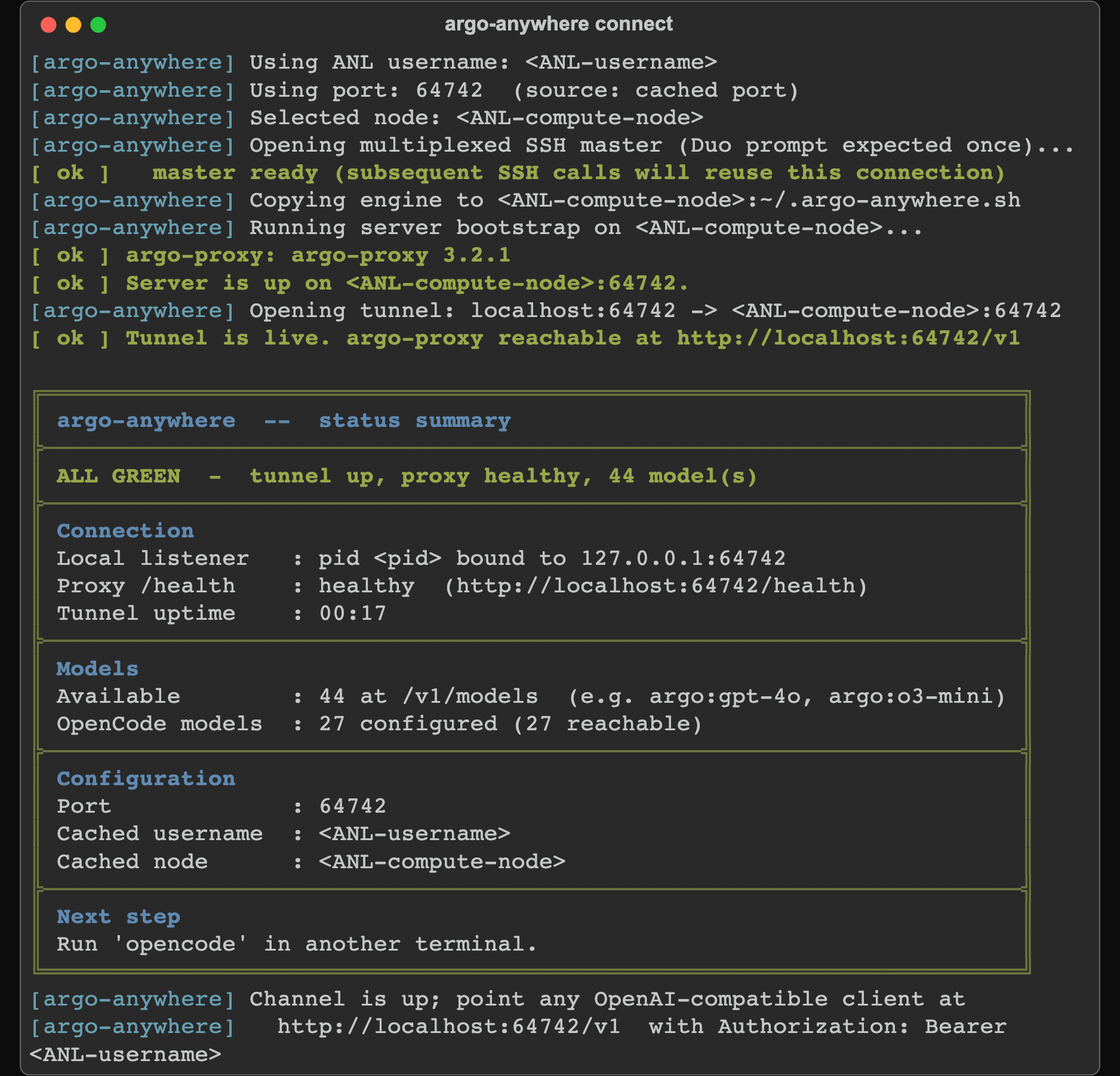
(Scrubbed demo data — no real username or node.)
If you configured Claude Code, remember the opus-4-7 workaround from
Heads up: claude --model claude-sonnet-4-6.
Prefer the split workflow? The SSH channel is a shared local endpoint that any number of tools can hit at once, so you can hold it in one window and configure or run tools in others:
# Window 1 — bring up the shared channel and keep it alive:
argo-anywhere connect

# Window 2+ — point tools at the existing channel (no new tunnel, no new Duo):
argo-anywhere configure opencode aider   # configure several at once
argo-anywhere run aider                  # configure one, then launch it
Not sure which tool? Let the picker choose:
argo-anywhere client          # picker fires when --cli-tool is omitted
argo-anywhere setup           # always shows the picker
argo-anywhere list-tools      # list the accepted --cli-tool values
Subsequent runs reuse the cached username, node, and port from
~/.config/argo_anywhere/, so you rarely re-answer the prompts.
What this is
argo-anywhere has two layers:
- The Python package is the runtime you install and the command you run
(
argo-anywhere). It also provides the web UI, the native app, and the install/uninstall lifecycle. - The bash engine (
argo-anywhere.sh) does all the orchestration. It is vendored inside the package verbatim and is the single source of truth for how the tunnel, bootstrap, and per-tool configs work. The package drives it; it never reimplements it.
The engine plays two roles:
- Client mode (laptop) — install the chosen AI CLI tool if needed, write
its config, push the engine to a chosen ANL compute node, start
argo-proxythere (insidescreen, falling back totmuxthennohup), open the SSH tunnel, and monitor its health. - Server mode (ANL compute node) — create a Python venv, install
argo-proxy, write~/.config/argoproxy/config.yaml, and startargo-proxy serve.
You normally only run the client flow; server mode is auto-invoked over SSH. Server mode is also a documented standalone workflow — see Running on a compute node.
The engine stays a single self-contained .sh file (design decision D-001,
which now governs the engine rather than the whole project). The package
vendors that one file, scps it to the compute node, and re-exec's it there as
server. What changed at v3.0.0 (D-026) is the distribution: the installable
unit is now the package, not a curled script. A local HTTP-shim transport
layer was evaluated against the single-engine-file rule and rejected — see
docs/AUDIT_2026-05-18_argo-shim-comparison.md
Section 4 for the rationale.
Status
v3.0.0 is on PyPI — pipx install argo-anywhere works. It is the
Python-package + web-UI rebuild (Model A; design decisions D-026..D-030): the
package owns the runtime, wraps the vendored bash engine, and adds the web UI /
native app. v3.0.1 (docs, screenshots, CI, packaging polish) is on main
and published from CI via PyPI Trusted Publishing on its version tag.
Older tags — v1.0.0–v1.2.0 and the v2.x line (v2.0.0, v2.1.0, v2.2.0,
the last .sh-era release) — still resolve, and legacy pinned .sh URLs keep
working.
The correctness story in one sentence: a 43-finding fresh-eyes audit
(docs/AUDIT_2026-05-12.md) covering CSPO defenses,
identity-handling, privacy posture, and multi-tool support drove the v2 cycle,
and 42 of 43 findings are closed (only L8, the unchecksummed curl | bash
from claude.ai, remains as a documented no-fix). For the phase-by-phase
history and the roadmap ahead, see PLAN.md Section 4 (Milestones);
for user-facing behavior changes across releases, see
docs/UPGRADING.md.
Web UI and desktop app

Alongside the CLI, argo-anywhere ships a loopback-only web UI you can drive
from a browser or a native desktop window — Duo, the live monitor, and the
interactive prompts all work without a terminal. It binds 127.0.0.1 only and
runs only allowlisted engine verbs; see
docs/SECURITY.md "Local web UI" for the threat model.
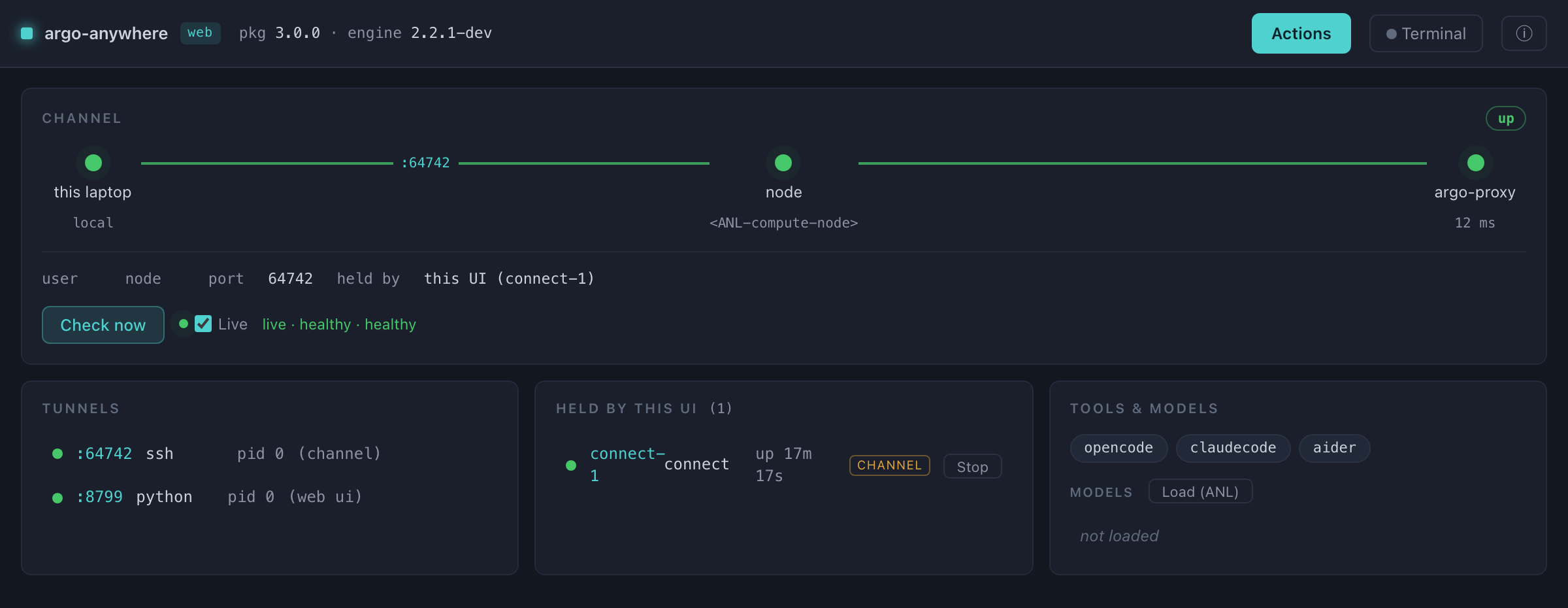
(The screenshot uses scrubbed demo data — no real username or credentials.)
pipx install 'argo-anywhere[app]'    # the [app] extra adds the native window

argo-anywhere app                 # open the web UI in a native desktop window
argo-anywhere web                 # ...or serve it to your browser
These verbs are handled by the package; everything else passes straight through to the engine (see Subcommands):
| Command | What it does |
|---|---|
argo-anywhere app |
Open the web UI in a native desktop window (needs [app]; browser fallback). |
argo-anywhere web |
Serve the web UI to your browser (loopback-only). |
argo-anywhere install-launcher |
Install a double-clickable launcher (see below). |
argo-anywhere info [--json] |
Local status: package + engine versions, loopback listeners, and argo-anywhere's on-disk footprint (no ANL contact). |
argo-anywhere uninstall [...] |
Remove argo-anywhere's footprint (manifest-driven config restore + the launchers), then print the pipx/pip command to remove the package itself. |
argo-anywhere --print-script |
Emit the raw bash engine to stdout (inspect-and-fork). |
argo-anywhere --version |
Print the package version. |
Everything the package puts on disk is listed by argo-anywhere info and
removed by argo-anywhere uninstall. Your AI-tool configs are only ever read
and restored — never argo-anywhere's to delete.
A double-clickable launcher (no terminal needed)
You don't have to type a command every time. After pipx install 'argo-anywhere[app]', one command installs a persistent, double-clickable
launcher that opens the web UI:
argo-anywhere install-launcher               # everything for your OS (default)
argo-anywhere install-launcher --desktop     # only the Desktop launcher
argo-anywhere install-launcher --app-bundle  # only the macOS ~/Applications/.app
With no flags it installs everything for your platform; the two flags let you
pick just one, and --dest <dir> places the artifacts elsewhere. What gets
created:
| Platform | Artifacts |
|---|---|
| macOS | ~/Desktop/argo-anywhere.command and a real ~/Applications/argo-anywhere.app bundle (with the constellation icon and a populated "About argo-anywhere" panel). |
| Linux | An application-menu entry (~/.local/share/applications/argo-anywhere.desktop) plus ~/Desktop/argo-anywhere.sh. |
(argo-anywhere targets macOS + Linux — its transport is SSH + Duo to ANL — so there is no Windows launcher.)
Each launcher bakes the absolute path of the Python interpreter that installed
argo-anywhere, because GUI/Finder launches run with a minimal PATH that
would not find the console script. Double-clicking runs argo-anywhere app — a
native window via pywebview when it's available, falling back to your browser
otherwise. The launchers are part of argo-anywhere's footprint: they show up in
argo-anywhere info and are removed by argo-anywhere uninstall.
Launching from the web UI (v3.1.0+)
The launcher popover in the web UI has five fields; the last two are new in
v3.1.0 (design decision D-031 in PLAN.md):
- command — the engine verb (
run,configure,setup,connect,tunnel).clientis CLI-only (the web UI teaches the split-verb story). - cli tool — which AI tool the verb targets (
opencode/claudecode/aider), or— default —to fire the picker. - scope — a dropdown (
— auto —/global/project). Per-tool default when auto;globalwrites a config that applies anywhere,projectwrites it under the current working directory (target file differs per tool — see the scope table). - working directory (new) — an absolute path where the launched process
starts (i.e. where
projectscope resolves against, and where the AI tool runs from). Pre-filled with the most-recently-used entry from~/.argo_anywhere/web_state.json(or~on first run); type or paste any absolute path, or click Browse… in the desktop app for a native folder picker. Missing directories trigger an explicit "Create + Launch" confirmation — never silentmkdir. - where to run —
In-browser terminal(routes to the Channel or Utility panel automatically per verb) OR a native terminal window.runalways goes to a native terminal so closing the browser tab can't kill the tool.
The embedded-terminal area now shows two panels side-by-side:
- Channel (left) — persistent; owns
connect; survives a browser tab close so the SSH master + tunnel keep running (no repeat Duo). - Utility (right) — ephemeral; runs
configure/setup/tunnel; free to relaunch without disturbing the Channel.
Both panels share the container-level Terminal / Hide toggle. Drag the
divider to resize; the position is persisted.
Light/dark theme. A top-bar toggle cycles auto → dark → light → auto.
auto follows the OS preference; explicit choices persist across sessions.
The two embedded terminals re-color on toggle.
Forbid-list. When scope is project, argo-anywhere refuses working
directories that would litter dotfiles in $HOME or touch system dirs
($HOME exact; /, /etc, /usr, /tmp, /var, /opt, /System,
/Library, /private, ...). --scope global is unrestricted — beginners who
launch a client from $HOME just to chat with the agent take the happy path.
Same guarantees from the CLI: --cwd
The engine gained a --cwd PATH flag in v3.1.0 so CLI users on remote
nodes (via screen / tmux) get identical behavior to web-UI users. It
changes to PATH before dispatching the verb, and — under --scope project
— applies the same forbid-list. Absolute path required; ~ is expanded.
argo-anywhere --cwd /path/to/my-project --scope project run --cli-tool opencode
Supported AI CLI tools
Pass one to --cli-tool (or pick it interactively):
opencode— OpenCode, an OpenAI-compatible client. Supports--scope project|global(defaultglobal). Project scope writes<git-root>/opencode.json(or<cwd>/opencode.jsonoutside a git repo); global writes~/.config/opencode/config.json.claudecode— Claude Code (usesANTHROPIC_BASE_URL). Supports--scope project|global; default is hybrid per PLAN.md D-017 (project when~/.claude.jsonis present, for OAuth safety; global otherwise). See Claude Code config scope. ⚠️ Subject to the opus-4-7 issue in Heads up.aider— aider via its OpenAI-compatible endpoint. Writes~/.aider.conf.ymlplus a sibling.aider.model.settings.ymlthat disablestemperaturefor reasoning / opus / gpt-5 models (which otherwise return an empty stream). Global vs. project per--scope.
Roadmap. Cursor is not planned as an integrated tool (upstream guidance
discourages routing it through an LLM gateway); the workaround is
argo-anywhere tunnel and pointing cursor's OpenAI-compatible endpoint at
http://localhost:<port>/v1 manually. A generic OpenAI-compatible
--cli-tool is under consideration for a later release.
Prerequisites
Laptop:
- Python 3.10+ to install and run the package.
- bash 3.2+,
ssh,scp,curl,lsoffor the engine. macOS ships all of these; minimal Linux images (Alpine, slim Docker) sometimes lacklsof— install it first. - SSH key-based auth to
logins.cels.anl.gov. The engine refuses to proceed (with exact instructions) if password auth is required. jq— required forupdate-models; strongly recommended forstatus(without it the model-count math is approximate and the[m]ergeconfig-handling option is unavailable for JSON files).- Optional: ANL VPN if your local network policy needs it off-site.
ANL compute node (auto-handled by server mode): Python 3.10+, and screen
or tmux (falls back to nohup).
Known limitations (please read)
The most common foot-guns are surfaced here; docs/LIMITATIONS.md
is the canonical reference with full rationale and roadmap for each.
Upstream stack
- Claude Code +
claude-opus-4-7⚠️ — fails with "API returned an empty or malformed response (HTTP 200)". Root cause is Anthropic Vertex's per-modelthinking.typevalidation plus Claude Code 2.1.x's SSE error-event parsing; not actionable at our layer. Workaround:claude --model claude-sonnet-4-6, or persist viaenv.ANTHROPIC_MODEL=claude-sonnet-4-6insettings.json. Auto-default fix queued for a later release. - Vertex HTTP 500 on large non-streaming requests — already mitigated
upstream by
argo-proxyv3.x'santhropic_stream_mode: forcedefault. Just keep the on-node proxy current:argo-anywhere update argoproxy. No action needed in normal use.
Architectural
- Single-instance constraint — one
argo-proxyper user per compute node; one SSH tunnel per local port. The engine refuses to overwrite someone else's argo-proxy and prompts on local re-runs. See Sharing a compute node. - Load-balanced compute-node aliases can leak orphan argo-proxy processes across physical hosts. See the caveat.
- The bash engine stays a single self-contained file (D-001, engine-only
now). We reject engine features that require splitting it — most notably a
local HTTP-shim transport layer (see
docs/AUDIT_2026-05-18_argo-shim-comparison.mdSection 4).
Operational
- Two-layer testing. The Python package (driver / CLI / web) has an
automated
pytestsuite that runs with no ANL infra. The bash engine keeps live-only verification — mocking real SSH + Duo + argo-proxy on a real compute node costs more than it delivers — so its "tests" are smoke checks plusdocs/TESTING.mdfor end-to-end live verification. bash 3.2+target (macOS default) limits the engine: nomapfile, nodeclare -A, no${var,,}. Inline Python heredocs absorb the gap for structured-data work.
Subcommands
Everything below is an engine verb: run it as argo-anywhere <verb> and the
package passes it through to the engine on your real terminal (full-fidelity Duo
and prompts). The package-only verbs (app, web, install-launcher, info,
uninstall, --print-script, --version) are in
Web UI and desktop app.
| Subcommand | What it does |
|---|---|
client (default) |
Full laptop-side flow: install the chosen CLI tool + write its config + tunnel + monitor. Tool via --cli-tool <name>; without it, the picker fires. |
setup |
Like client but ALWAYS shows the picker, even with --cli-tool set. Handy for a one-off install of a different tool. |
tunnel |
Like client but installs/configures nothing — just brings up the tunnel + monitor. For power users managing their own configs. |
connect |
Bring up the shared channel (SSH tunnel + remote argo-proxy) and hold it in the foreground monitor. The friendlier name for tunnel: run it in one window, then use configure / run in others. |
configure TOOL... |
Install + write config for one or more tools against an existing channel (e.g. configure opencode aider). Detects the channel via /health; fails with a hint if none is up (or pass --ensure). Does not block. |
run TOOL |
Configure one tool, then launch it (e.g. run aider). Brings the channel up if missing (prompts; --ensure / -y auto-confirm). |
server |
Auto-invoked on the compute node by client. Also a standalone workflow ("leave a proxy on this node for any client to reach"). |
status |
Show local tunnel state + probe the proxy (ALL GREEN / DEGRADED / FAIL). Reports cross-client port disagreements (D-021) as warnings without changing the exit code. |
update |
Lossless in-place upgrade of installed components (argoproxy, opencode, claudecode). --all updates everything; a positional list restricts it; bare update lists the registry. --check is report-only; --yes auto-confirms install prompts. After update argoproxy it auto-POSTs /refresh so the proxy pulls fresh models without a restart. (The package itself is upgraded with pipx upgrade argo-anywhere, not this verb — see the note below.) |
update-models |
Refresh a client's in-config model list from the live /v1/models. Tool-aware via --cli-tool (default opencode); only OpenCode enumerates models in config, so the others print a "not applicable" note and point at list-models. |
list-models |
Tabulate the models the proxy serves on /v1/models (read-only). Columns: internal_name, id, provider, modalities, configured. `--format tsv |
stop |
Kill the local SSH tunnel. Does NOT touch the remote argo-proxy (see docs/LIMITATIONS.md "Single-instance constraint"). |
clean |
Remove every artifact the engine created (local + remote, with risk-tiered prompts). |
list-tools |
Print the registry of supported --cli-tool values. |
help |
Long-form guide (paths, troubleshooting, customization). The package appends a note on its own extra verbs. |
updateand the package. Under the package,argo-anywhereupgrades itself throughpipx upgrade argo-anywhere(orpip); the engine's ownupdate argo-anywhereself-update is dormant and simply points you at pipx (design decision D-030a). The other components (argoproxy,opencode,claudecode) are upgraded by theupdateverb as usual.
The engine also has install / uninstall verbs for the canonical .sh
install, but under the package those are handled differently — see
Running the raw engine. To remove the
package itself, use argo-anywhere uninstall (which restores your configs) then
pipx uninstall argo-anywhere.
For the long help text:
argo-anywhere help | less
What it writes where
The paths below assume the package install (the common case). Files under
~/.argo_anywhere/ are written only in engine (fork) mode — see the note after
the tables and Running the raw engine.
Laptop (package mode):
| Path | Purpose |
|---|---|
~/.config/argo_anywhere/user |
Cached ANL username |
~/.config/argo_anywhere/node |
Last-used compute node |
~/.config/argo_anywhere/port |
Cached proxy port (transport-layer state per D-020) |
~/.config/argo_anywhere/manifest.json |
Install manifest (D-025): records, at first touch, whether each client config pre-existed (so uninstall can restore originals) and which tool binaries argo-anywhere installed (so it only removes its own) |
~/.config/argo_anywhere/ssh-fail-lock, …-count |
SSH-failure-tracker state (created only after a lock fires); see SSH failure protection |
~/.config/opencode/config.json |
OpenCode global config (global scope) |
<git-root>/opencode.json or <cwd>/opencode.json |
OpenCode project-scope config |
~/.claude/settings.json or ./.claude/settings.local.json |
Claude Code config; see Claude Code config scope |
~/.aider.conf.yml (+ .aider.model.settings.yml) or <git-root>/.aider.conf.yml |
aider config; the sibling settings file disables temperature for reasoning/opus/gpt-5 models |
~/.ssh/sockets/argo-anywhere-<user>-<host>-<port> |
SSH multiplex master socket (Duo fires once per session) |
~/Desktop/argo-anywhere.command, ~/Applications/argo-anywhere.app (macOS) |
Launchers, only if you ran install-launcher |
ANL compute node (after first run):
| Path | Purpose |
|---|---|
~/.argo-anywhere.sh |
Pushed copy of the engine |
~/.argo-anywhere.server.log |
Server-mode bootstrap log |
~/argovenv/ |
Python venv with argo-proxy installed |
~/.config/argoproxy/config.yaml |
argo-proxy config (port + user; preserves any other keys you've added, e.g. argo_base_url, anthropic_stream_mode) |
Package vs. engine mode. Under the package, argo-anywhere does not create a
~/.argo_anywhere/canonical install — the package (pipx/pip) is the install (D-030a). If you instead run a forked engine.shdirectly, it bootstraps a rustup-style canonical install at~/.argo_anywhere/bin/on first use; that path is covered in Running the raw engine.
See examples/ for sanitized config templates. The full
inventory of where prompt + identity data may persist (with sensitivity
classifications) is in docs/SECURITY.md "What gets logged
where".
Running the raw engine (fork mode)
The package is the supported way to install and run argo-anywhere. But because
the engine is a single self-contained .sh, you can also inspect it, audit it,
or run it without the package — the D-026/D-027 escape hatch:
argo-anywhere --print-script > argo-anywhere.sh   # emit the engine verbatim
bash argo-anywhere.sh --cli-tool opencode client  # run it directly
When you run a forked engine .sh directly (rather than through the package),
its self-management machinery is active — the parts the package deliberately
keeps dormant:
- On first
client/setup, the engine bootstraps a canonical install at~/.argo_anywhere/bin/(a rustup/cargo-style PATH directory holding the script,install/uninstallwrappers, and a sourceableenvhelper), then prints one-shot instructions for addingenvto your shell rc. Opt out withARGO_ANYWHERE_SKIP_BOOTSTRAP=1. argo-anywhere.sh installmaterializes that canonical install explicitly;argo-anywhere.sh uninstalltears it down (tiered, manifest-driven config restore).argo-anywhere.sh update argo-anywhereself-updates the canonical copy from the latest GitHub release tag.
Under the package these three become no-ops that point you at pipx instead
(D-030a), because pipx already owns the runtime and a second self-updating copy
would drift from it (D-029). Forks predate the marker, so they behave exactly as
the pre-v3 .sh did. See PLAN.md decisions D-023, D-025, D-029,
D-030 for the full design.
MFA / Duo handling
ANL CELS hosts use Duo. The engine defaults to MFA-aware mode using SSH
ControlMaster connection multiplexing — one Duo prompt per session, not
per SSH call. The mux master is opened against the chosen compute node, not the
jump host (logins.cels.anl.gov is shell-restricted and rejects command
execution, so the master can't live there).
Socket paths use literal %r-%h-%p tokens (user-host-port) rather than %C
(the OpenSSH hash); %C proved fragile when ~/.ssh/config rewrites jump-host
names, producing two different socket paths for one logical connection. See
AGENTS.md "MFA-aware by default" for the full rationale.
Turn this off for non-Duo hosts with --no-mfa or ARGO_ANYWHERE_NO_MFA=1.
Running on a compute node
The default client flow assumes you run from a laptop outside the ANL
network. If the engine detects it is itself running on an ANL compute node (the
FQDN ends in .cels.anl.gov), it adjusts:
--no-jumpand--no-mfaare auto-enabled (intra-site SSH needs neither).- If the picked node is the local host, the SSH tunnel is skipped entirely:
clientinvokes the server-mode bootstrap inline and points the local tool config athttp://localhost:<port>/v1directly. argo-proxy keeps running underscreen/tmux/nohupafterclientreturns; usecleanto stop it.
Override either default with ARGO_ANYWHERE_NO_JUMP=0 or
ARGO_ANYWHERE_NO_MFA=0 if your setup needs the slow path.
To leave argo-proxy running on a node with no client install or tunnel, use
server directly. Note the node won't have the package installed — run the
pushed engine copy there:
ssh <user>@compute-XX.cels.anl.gov
bash ~/.argo-anywhere.sh server   # starts argo-proxy under screen, then returns
Other machines can then reach that proxy via their own SSH -L forward, or via
argo-anywhere --cli-tool <name> client --node compute-XX from those machines.
Sharing a compute node with other users
Each user runs their own argo-proxy on the node — it is per-user, listening on
127.0.0.1:<port>, with your config and auth traveling with it. Two users can
share a node but not a port: whoever binds first wins, and the other is refused.
The single-instance constraint is documented in
docs/LIMITATIONS.md.
To handle this gracefully, the engine:
-
Detects port collisions before bootstrap. Before SSHing in to start argo-proxy, it probes
127.0.0.1:<port>on the node and identifies the owner. If it's you, it reuses the proxy after positively verifying identity (cfg_usermust equalwant_user); if it's someone else, you're prompted:[warn] Port 64742 on compute-01 is in use by another user (pid 12345, owned by 'alice'; you are 'aattia'). Two users can't share an argo-proxy on the same port; each needs their own. Options: [n] next free port -- probe a range and use the first free one [p] pick a port -- I'll type a number (1024-65535) [r] retry -- maybe 'alice' just stopped; check again [a] abort Your choice [n/p/r/a, default=n]: -
--auto-port(orARGO_ANYWHERE_AUTO_PORT=1) skips the prompt and picks the next free port; the port-cache-migration prompt then lets you make it sticky or one-shot. -
--port-range LO-HIoverrides the default search range (64742–64842). The remote scan is clamped to ≤200 ports per call regardless of the requested width. -
Local self-collision — re-running
clientwhile your own tunnel is already up: the engine detects the healthy tunnel and reuses it, then proceeds to client setup. This makes "add another tool to my running tunnel" a natural workflow.
Caveat: load-balanced node aliases and orphan argo-proxies
The user-facing node names (compute-01.cels.anl.gov, etc.) are DNS aliases
that CELS resolves to one of several physical hosts (compute-XXX-Y). Two
consequences:
-
Successive runs may land on different physical hosts. If today's
compute-01resolves tocompute-386-01and tomorrow's tocompute-742-03, yesterday's argo-proxy keeps running oncompute-386-01— orphaned but harmless. These accumulate; the engine can't reliably clean them up because it doesn't know the alias-to-physical mapping. -
Periodic manual cleanup is the mitigation. From a shell on the physical host you're on:
ssh <user>@<physical-host> 'pkill -u <user> -f "argo-proxy serve"'
Or
argo-anywhere cleanwhen you're done with a node — that handles the current physical host's argo-proxy via its screen session. Orphans on other physical hosts remain. -
The on-node short-circuit recognizes load-balanced aliases by resolving the picked hostname to its IPs and intersecting with the local interface IPs — so picking
compute-01while logged intocompute-386-01(which the alias includes) correctly skips the SSH tunnel.
Claude Code config scope (project vs. global)
Claude Code reads its config from up to three files (more-specific wins, but the
env block is replaced wholesale across scopes — Anthropic chose not to
deep-merge it):
| File | Scope |
|---|---|
~/.claude/settings.json |
global (all projects, all directories) |
./.claude/settings.json |
per-project, committed (visible to collaborators) |
./.claude/settings.local.json |
per-project, gitignored by default |
argo-anywhere writes EITHER the global file OR the project-local file — never the committed file (which would force collaborators onto your proxy). Since v2.2 the default is hybrid (design decision D-017), chosen in this order:
--scope project|global(orARGO_ANYWHERE_SCOPE; the oldCLAUDECODE_SCOPEis deprecated but honored with a one-time WARN) — explicit override wins. Conflict detection still fires: you're prompted[k]eep / [s]witch / [a]bortif the chosen scope would shadow an existing config or OAuth state.~/.claude.jsonexists — Claude Code's auth-state file, meaning you have a personal Anthropic subscription. WritingANTHROPIC_AUTH_TOKENto the global file would shadow your OAuth token and break non-proxy usage → project scope automatically (safety wins).~/.claude/settings.jsonalready has anenvblock — clobbering it would silently drop those vars → project scope automatically.- None of the above → global scope (convenient for fresh installs; no
OAuth-precedence risk without a
~/.claude.json). If you later runclaude auth login, the next run hits branch 2 and switches to project scope, informing you via the[k/s/a]prompt.
This revises the pre-v2.2 "always project" default (audit recommendation H6, closed by D-017): strictly safer, but it penalized the common fresh-install case; the hybrid restores convenience while preserving the safety guarantees for users with OAuth state.
To force one or the other:
argo-anywhere --cli-tool claudecode client --scope global
argo-anywhere --cli-tool claudecode client --scope project
When the project scope is written, run claude from that same directory to
pick it up; the engine prints which directory at the end of setup. If you opt
into --scope global after ~/.claude.json exists, do NOT run
claude auth login from that machine — the OAuth precedence rule will silently
neutralize the proxy config. The conflict-detection prompt warns you about this.
argo-anywhere always preserves non-Argo keys in the target env block (and the
file's other top-level keys: model, permissions, hooks, …). It owns only
ANTHROPIC_BASE_URL and ANTHROPIC_AUTH_TOKEN. After writing, it prints a
privacy reminder that the config now contains your ANL username (used as the
bearer token) and should be gitignored if ~/.claude/ is in a dotfiles repo.
See docs/SECURITY.md for the full privacy posture.
Port policy
Pre-v2.2 the port was derived from the OpenCode config's baseURL. v2.2
promotes the port to transport-layer state owned by the engine (design
decision D-020): the source of truth is ~/.config/argo_anywhere/port, and each
tool's config (baseURL, ANTHROPIC_BASE_URL) is a downstream rendering. This
closed audit finding M4 ("port resolution is OpenCode-specific in a multi-client
world").
Resolution precedence:
--port Nflag (one-shot override)ARGO_ANYWHERE_PORTenv var (one-shot override)~/.config/argo_anywhere/portcache (the source of truth)- First-run migration from an existing client config's baseURL
- Built-in default
64742
The cache is write-through: resolving a port via anything other than the cache writes the new value back, so subsequent runs use it.
Cross-client coherence (D-021) sits on top: status passively reports when
an installed client config disagrees with the resolved port, and client
proactively prompts to reconcile at startup:
argo-anywhere --port 64999 --cli-tool opencode client
# Prompts whether to:
#   [m] migrate config to port 64999 (writes config file),
#   [u] use 64999 for THIS run only (config keeps its port),
#   [k] keep config's port (use it instead),
#   [a] abort.
Non-client subcommands warn on a mismatch but don't prompt (e.g.
argo-anywhere --port 1234 status warns and runs against :1234). status
reports multi-config disagreement non-fatally (the exit code is unchanged — it's
a pure health check).
Tunnel monitoring and reconnect
While client is in the foreground, a background loop polls
http://localhost:<port>/health every 15s and notifies you on sustained
failure. If the foreground SSH process exits but /health still responds
(common on macOS, where the multiplex master takes over the forward and the
foreground client exits immediately), the engine recognizes the no-op and stays
quiet — the master keeps the tunnel alive.
If a real reconnect is needed and the mux master is still alive, the engine
attempts a silent reconnect (no Duo). If reconnects fire too rapidly (≥3 within
60s — typically a flapping network), it escalates: pauses 5 minutes after each
burst, and gives up after 3 bursts (~9 attempts over ~30 minutes). It then
notifies you and exits the loop; the mux master stays alive holding its forward,
and you decide when to re-run client.
This burst-cap escalation (audit finding C7) prevents CSPO IP blocks from
sustained reconnect loops; see SSH failure protection
and docs/SECURITY.md for the threat-model context.
SSH failure protection (CSPO defense)
ANL/CELS networks are monitored for repeated failed SSH authentications; too many failures from one IP trigger a CSPO (Cyber Security Program Office) block on that IP. On a shared compute node where many users share one outbound IP, one user's broken SSH agent can lock out everyone.
The engine defends against this with three layered mechanisms (design decision D-012):
- Persistent on-disk failure lock. After 3 consecutive SSH auth failures,
the engine writes
~/.config/argo_anywhere/ssh-fail-lockand refuses further SSH attempts. The lock survives restarts, so re-running immediately doesn't silently accumulate more failures. First lock TTL: 30 minutes. - Exponential backoff on repeat locks. Each successive lock doubles the TTL
(30m → 60m → 120m → … capped at 24h), tracked in
ssh-fail-lock-count. A successful SSH clears both files, so well-behaved users are never permanently penalized. - Wide tracker scope. Every authenticating SSH call goes through the
tracker — reachability check, mux open, the
scp+ bootstrap ssh, port probing, the clean-mode ssh, and the reconnect path in the monitor loop.
Sample lock message:
[err ] SSH has failed 3 consecutive times.
[err ] Disabling further SSH attempts to prevent CSPO from blocking your IP
[err ]   (and locking out everyone else sharing this compute node).
[err ]   Lock event #1; TTL 1800s (~30min).
[err ]   Lock will auto-expire after that, or delete it manually:
[err ]     rm ~/.config/argo_anywhere/ssh-fail-lock
[err ]
[err ] Common causes:
[err ]   * Closed laptop while SSH agent forwarding was active (kills the forwarded key)
[err ]   * Expired Kerberos tickets
[err ]   * SSH key removed from the agent ('ssh-add -D' earlier)
[err ]   * Wrong username (--user / ARGO_ANYWHERE_USER mismatch)
[err ]
[err ] Recovery:
[err ]   1. Verify your SSH works manually first:
[err ]        ssh -o ConnectTimeout=5 <user>@logins.cels.anl.gov true
[err ]      (one Duo prompt is fine; what we want is a clean exit.)
[err ]   2. If that fails, fix your auth (ssh-add, reconnect agent forwarding,
[err ]      renew tickets, correct the username, etc.).
[err ]   3. Re-run -- the lock will have expired by then, or delete it immediately.
Recovery is what the message says: verify SSH manually, fix what's broken,
then wait for the lock to expire or rm ~/.config/argo_anywhere/ssh-fail-lock
to clear it immediately.
Common operations
# Check what's happening (includes the D-021 cross-client coherence report)
argo-anywhere status

# See the full /v1/models list (raw JSON dump)
ARGO_ANYWHERE_SHOW_MODELS=1 argo-anywhere status

# Tabulate served models (read-only; cross-references the OpenCode config)
argo-anywhere list-models                              # pretty text table
argo-anywhere list-models --include-embeddings         # include embedding rows
argo-anywhere list-models --format tsv > models.tsv    # script-friendly
argo-anywhere list-models --format json | jq '.[] | select(.provider=="claude")'

# Refresh the OpenCode model list from the live proxy
argo-anywhere update-models                  # interactive: prompts per orphan
argo-anywhere update-models --keep-orphans   # add new; keep stale entries
argo-anywhere update-models --drop-orphans   # add new; drop stale entries

# Upgrade installed components in place (lossless; preserves configs + venv)
argo-anywhere update --all                   # argoproxy + opencode + claudecode
argo-anywhere update argoproxy               # just the on-node proxy (+ auto /refresh)
argo-anywhere update --check --all           # report-only: installed vs latest
# (the package itself: pipx upgrade argo-anywhere)

# Tear down only the local tunnel (remote argo-proxy survives)
argo-anywhere stop

# Remove everything the engine created (preview first)
argo-anywhere clean --dry-run                # safe enumeration; no changes
argo-anywhere clean                          # interactive (per-file prompts for risky items)
argo-anywhere clean -y                       # non-interactive; deletes safe items, KEEPS configs
argo-anywhere clean -y --purge-backups       # also drop accumulated .bak.* files
argo-anywhere clean -y --purge               # delete EVERYTHING, including configs
clean separates artifacts into three risk tiers:
- safe (state dir incl. port cache, mux sockets, our SSH tunnel, the remote venv) — removed on confirmation.
- risky (
~/.config/opencode/config.json,~/.config/argoproxy/config.yaml, and their.bak.*files) — per-file[k]eep / [r]estore-from-backup / [d]elete / [b]ackups-onlyprompt, or--purge/--purge-backupsfor the non-interactive paths. - never touched — tool binaries, the engine itself, system tools.
To remove argo-anywhere the package (as opposed to a channel's artifacts),
use argo-anywhere uninstall (restores your client configs via the manifest,
sweeps the launchers) then pipx uninstall argo-anywhere.
For the full troubleshooting guide (env vars, security notes, escape hatches),
run argo-anywhere help.
Where to read more
| Doc | When to read |
|---|---|
docs/UPGRADING.md |
Upgrading from a v1.x/v2.x .sh install, or between releases; covers v1 → v2 → the v2 → v3 hard cutover. |
docs/SECURITY.md |
Threat model + privacy posture (incl. the local web UI); for security-conscious users and ANL admins. |
docs/LIMITATIONS.md |
Known limitations + rationale before you adopt; includes the "Upstream stack" section (opus-4-7 etc.). |
docs/TESTING.md |
Maintainers/contributors: live-verify the client path before tagging. |
docs/AUDIT_2026-05-12.md |
The fix trail across v2.0 → v2.2 (43 findings; 42 closed). |
docs/AUDIT_2026-05-18_argo-shim-comparison.md |
Comparative audit vs. argo-shim, the Phase-C-rejection rationale, slide-ready summary. |
PLAN.md |
Maintainers/co-authors: plan-of-record + design decisions D-001..D-030 + roadmap. |
AGENTS.md |
AI coding tools working on this codebase: conventions + skill loading. |
Upgrading
The canonical filename was argo_opencode.sh before v2.0; v2.0 renamed it to
argo-anywhere and replaced the per-client symlinks with --cli-tool <name>
(or the picker).
v3.0.0 is a clean break (design decision D-027): the supported install is
now pipx install argo-anywhere, and the single-.sh curl route is retired as
primary (the raw engine is still reachable via argo-anywhere --print-script).
The v2 → v3 hard-cutover steps — uninstall the old .sh install, then
pipx install — are in
docs/UPGRADING.md.
Cumulative behavior changes through v2.2 are documented in
docs/UPGRADING.md: env-var renames (ARGO_OPENCODE_* →
ARGO_ANYWHERE_*), the CLAUDECODE_SCOPE → ARGO_ANYWHERE_SCOPE deprecation
(still honored with a WARN), the port cache + cross-client coherence prompts, and
the D-017 claudecode hybrid default. The engine also auto-detects v1.x state on
first run and prints exact cleanup commands.
Old curl URLs against the previous repo name (a-attia/argo-opencode) keep
working forever — GitHub auto-redirects them — and pinning old release tags still
works.
Testing
docs/TESTING.md is a step-by-step live-verification guide
for the client end-to-end path (~5–10 min, one Duo prompt); use it after
non-trivial changes or before tagging a release.
The Python package has an automated pytest suite (no ANL infra needed) — see
Contributing. For the engine, lighter smoke checks after edits
(these operate on the raw .sh, so they're contributor-facing):
bash -n argo-anywhere.sh                              # syntax
argo-anywhere -h                                      # short usage
argo-anywhere status                                  # exit 1 if no tunnel
argo-anywhere clean --dry-run -y --local-only         # safe enumeration
Per-phase and live-test plans (used across the development cycle) are indexed in
notes/README.md.
Contributing
This project follows the scicomp-research-skills framework's conventions.
Set up a development environment and run the checks:
pip install -e '.[dev]'    # package + web + pytest + ruff (or: uv pip install -e '.[dev]')
pytest -q                  # the package test suite (no ANL infra)
ruff check src tests       # lint
Key project files:
AGENTS.md— canonical project conventions for AI coding tools.CLAUDE.mdis a symlink to it for Claude Code's discovery.PLAN.md— plan-of-record (scope, architecture, milestones, design decisions D-001..D-030).docs/AUDIT_2026-05-12.md— active fresh-eyes audit (43 findings; 42 closed). New closures append a STATUS block in place.docs/AUDIT_2026-05-18_argo-shim-comparison.md— comparative audit; SH-* items and their per-release dispositions.docs/LIMITATIONS.md— known limitations (read before adding features that bump the single-instance constraint or the bash 3.2 target).notes/agent_feedback.md— per-project feedback channel into the upstream framework.CONTRIBUTORS.md— authorship + AI-collaborator acknowledgment + commit-trailer convention.
For the commit convention (Conventional Commits + the Co-Authored-By: Claude
trailer for AI-assisted commits), activate the project's template after cloning:
git config --local commit.template .gitmessage
Related projects
- argo-proxy — the on-node proxy this project orchestrates. Authored + maintained by Peng Ding (Argonne CELS).
argo-shim— an alternative project solving the same problem from the opposite layer of the stack (a Python local HTTP proxy on the laptop). Seedocs/AUDIT_2026-05-18_argo-shim-comparison.mdfor the full comparison.- OpenCode, Claude Code, aider — the supported AI coding CLI tools.
- ANL AI4Dev notes — the internal reference this project is built around.
- scicomp-research-skills — the framework providing this project's agent conventions.
Authors
- Primary: Ahmed Attia (aattia@anl.gov)
- AI collaborator: Claude (Anthropic), used substantially across the v2.0 →
v3.0 development cycle. Per-commit attribution via the
Co-Authored-By:trailer; seeCONTRIBUTORS.md.
Created 2025 (project inception); rewritten 2026-05-14 to follow the
scicomp-research-skills
human-facing-doc-authoring conventions; revised through v2.2.0 (Phase 4).
Rewritten 2026-07-12 for v3.0.0: re-grounded in the Python package as it exists
in code (package-first, engine as a vendored/forkable component), added the
Install and "Running the raw engine" sections, and corrected the .sh-era
descriptions of bootstrap, self-update, and on-disk paths. Maintained by Ahmed
Attia.
Project details
Verified details
These details have been verified by PyPIProject links
GitHub Statistics
Maintainers


Download files
Download the file for your platform. If you're not sure which to choose, learn more about installing packages.
Source Distribution
Built Distribution
Filter files by name, interpreter, ABI, and platform.
If you're not sure about the file name format, learn more about wheel file names.
Copy a direct link to the current filters
File details
Details for the file argo_anywhere-3.1.1.tar.gz.
File metadata
- Download URL: argo_anywhere-3.1.1.tar.gz
- Upload date:
- Size: 852.3 kB
- Tags: Source
- Uploaded using Trusted Publishing? Yes
- Uploaded via: twine/6.1.0 CPython/3.13.12
File hashes
| Algorithm | Hash digest | |
|---|---|---|
| SHA256 |
bd4aec18d461a6c08c063d4cb8e76b68d5810d3af341985eb9add8b9f2c23a81
|
|
| MD5 |
6533f445a0abde5b676c2300cf478049
|
|
| BLAKE2b-256 |
b925cb02110f8efb1393aea565325f39d5207ce3eb8046a2e5b25c4438c27c47
|
Provenance
The following attestation bundles were made for argo_anywhere-3.1.1.tar.gz:
Publisher:
publish.yml on a-attia/argo-anywhere
-
Statement:
-
Statement type:
https://in-toto.io/Statement/v1 -
Predicate type:
https://docs.pypi.org/attestations/publish/v1 -
Subject name:
argo_anywhere-3.1.1.tar.gz -
Subject digest:
bd4aec18d461a6c08c063d4cb8e76b68d5810d3af341985eb9add8b9f2c23a81 - Sigstore transparency entry: 2164787038
- Sigstore integration time:
-
Permalink:
a-attia/argo-anywhere@704e11e4f77d9930ff0ecd50701263bf3c8bbd63 -
Branch / Tag:
refs/tags/v3.1.1 - Owner: https://github.com/a-attia
-
Access:
public
-
Token Issuer:
https://token.actions.githubusercontent.com -
Runner Environment:
github-hosted -
Publication workflow:
publish.yml@704e11e4f77d9930ff0ecd50701263bf3c8bbd63 -
Trigger Event:
push
-
Statement type:
File details
Details for the file argo_anywhere-3.1.1-py3-none-any.whl.
File metadata
- Download URL: argo_anywhere-3.1.1-py3-none-any.whl
- Upload date:
- Size: 787.5 kB
- Tags: Python 3
- Uploaded using Trusted Publishing? Yes
- Uploaded via: twine/6.1.0 CPython/3.13.12
File hashes
| Algorithm | Hash digest | |
|---|---|---|
| SHA256 |
c7071d5ba0c425fb9bf2890f3f2df04b0fdf810d32e8215d5e7970220d271fbc
|
|
| MD5 |
b97d3e46be95a745b603103b014e971f
|
|
| BLAKE2b-256 |
4180d7f9018f48c70110e133824a99951d5c5d5aef507aceaadb381af55b29ac
|
Provenance
The following attestation bundles were made for argo_anywhere-3.1.1-py3-none-any.whl:
Publisher:
publish.yml on a-attia/argo-anywhere
-
Statement:
-
Statement type:
https://in-toto.io/Statement/v1 -
Predicate type:
https://docs.pypi.org/attestations/publish/v1 -
Subject name:
argo_anywhere-3.1.1-py3-none-any.whl -
Subject digest:
c7071d5ba0c425fb9bf2890f3f2df04b0fdf810d32e8215d5e7970220d271fbc - Sigstore transparency entry: 2164787094
- Sigstore integration time:
-
Permalink:
a-attia/argo-anywhere@704e11e4f77d9930ff0ecd50701263bf3c8bbd63 -
Branch / Tag:
refs/tags/v3.1.1 - Owner: https://github.com/a-attia
-
Access:
public
-
Token Issuer:
https://token.actions.githubusercontent.com -
Runner Environment:
github-hosted -
Publication workflow:
publish.yml@704e11e4f77d9930ff0ecd50701263bf3c8bbd63 -
Trigger Event:
push
-
Statement type:






