
aria2c-for-wget-curl
Stubs of wget and curl for aria2c to download large files using Debian alternatives subsystem instead of changing the shell scripts. aria2c is better when compareed to wget/curl because it tries to utilize your maximum download bandwidth. Since, changing shell scripts from wget/curl to equivalent aria2c cli takes time, this stub translates the wget/curl command to equivalent aria2c command and executes it. If not possible to do so, it executes the original command.
Instructions for setup
- Install aria2c
- Install wget and(or) curl
Wget
- Copy original wget to wget-orig
$ sudo cp /usr/bin/wget /usr/bin/wget-orig
- Install the aria2stub package.
$ pip3 install aria2stub
Now wget command runs the stub as default for the current user.
(BELOW STEPS ARE OPTIONAL) Make all users execute the stub by default.
- Move the installed binary(default=/usr/local/bin/) to /usr/bin/.
$ sudo mv /usr/local/bin/wget /usr/bin/wget-stub
- Use update-alternatives to set default binary.
$ sudo update-alternatives --install /usr/bin/wget wget /usr/bin/wget-orig 30
update-alternatives: using /usr/bin/wget-orig to provide /usr/bin/wget (wget) in auto mode
$ sudo update-alternatives --install /usr/bin/wget wget /usr/bin/wget-stub 40
update-alternatives: using /usr/bin/wget-stub to provide /usr/bin/wget (wget) in auto mode
- Verify that wget-stub is default
$ sudo update-alternatives --config wget
There are 2 choices for the alternative wget (providing /usr/bin/wget).

   Selection Path Priority Status

 ------------------------------------------------------------

 * 0 /usr/bin/wget-stub 40 auto mode

   1 /usr/bin/wget-orig 30 manual mode

   2 /usr/bin/wget-stub 40 manual mode
Press <enter> to keep the current choice[*], or type selection number:
- The setup is ready, try using wget now.
Curl
- Copy original curl to curl-orig
$ sudo cp /usr/bin/curl /usr/bin/curl-orig
- Install the aria2stub package.
$ pip3 install aria2stub
Now curl command runs the stub as default for the current user.
(BELOW STEPS ARE OPTIONAL) Make all users to execute the stub by default.
- Move the installed binary(default=/usr/local/bin/) to /usr/bin/.
$ sudo cp /usr/local/bin/curl /usr/bin/curl-stub
- Use update-alternatives to set default binary
$ sudo update-alternatives --install /usr/bin/curl curl /usr/bin/curl-orig 30
update-alternatives: using /usr/bin/curl-orig to provide /usr/bin/curl (curl) in auto mode
$ sudo update-alternatives --install /usr/bin/curl curl /usr/bin/curl-stub 40
update-alternatives: using /usr/bin/curl-stub to provide /usr/bin/curl (curl) in auto mode
- Verify that curl-stub is default
$ sudo update-alternatives --config curl
There are 2 choices for the alternative curl (providing /usr/bin/curl).

   Selection Path Priority Status

 ------------------------------------------------------------

 * 0 /usr/bin/curl-stub 40 auto mode

   1 /usr/bin/curl-orig 30 manual mode

   2 /usr/bin/curl-stub 40 manual mode
Press <enter> to keep the current choice[*], or type selection number:
- The setup is ready, try using curl now.
Note
- If command cannot be translated to aria2c equivalent, then it falls back to the corresponding program.
- Use --orig flag to use the original program.
- .curlrc is not supported as of now
- To revert back to using the original command(if followed optional approach), run the following command for wget(similarly for curl):
$ sudo update-alternatives --config wget
Curl
- only files are supported for --cookie flag
Screenshots
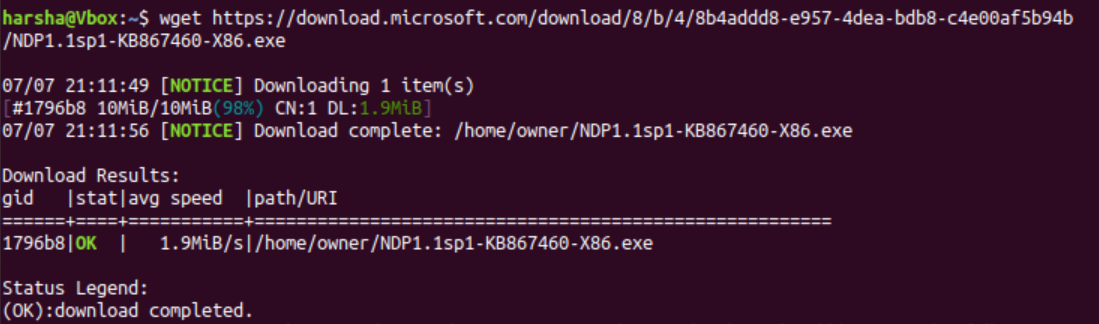
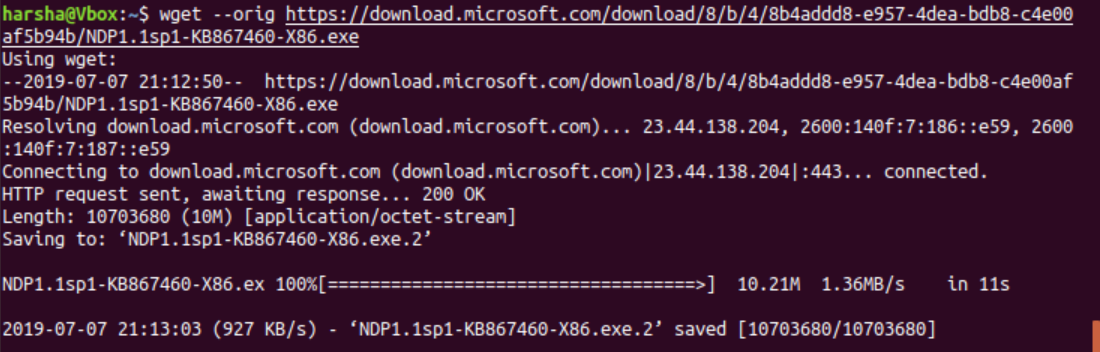
1 maintainer

Metadata
1 maintainer
Release files for aria2stub 0.9.1
For a detailed explanation of source distributions (sdists) and built distributions (wheels), please see the package formats documentation.
Source distribution (sdist)
| File | Size | Uploaded | Provenance | |
|---|---|---|---|---|
| aria2stub-0.9.1.tar.gz | 7.1 kB | Without provenance | Details |
Built distribution (wheel)
| File | Interpreter | ABI | Platform | Reset |
|---|---|---|---|---|
| aria2stub-0.9.1-py3-none-any.whl | Python 3 | none | any | Details |
Total release size: 22.0 kB
Release files / aria2stub-0.9.1.tar.gz
| Download URL | aria2stub-0.9.1.tar.gz |
|---|---|
| Size | 7.1 kB |
| Tags | Source |
|
SHA-256 checksum How to use checksums |
b427d015b0db472d5dac0acfde27884468e264fa93192a04369faa128161cfe2
|
|
BLAKE2b-256 checksum How to use checksums |
d6295d77742fe5bdf751864e4f0270b16b0d87bfca42ce2bb5d1e6453f77b42e
|
| Upload date | |
|
Uploaded using Trusted Publishing? What is trusted publishing? |
No |
| Uploaded via |
twine/3.1.1 pkginfo/1.5.0.1 requests/2.21.0 setuptools/47.3.1 requests-toolbelt/0.9.1 tqdm/4.46.1 CPython/3.7.5
|
Release files / aria2stub-0.9.1-py3-none-any.whl
| Download URL | aria2stub-0.9.1-py3-none-any.whl |
|---|---|
| Size | 14.9 kB |
| Tags | Python 3 |
|
SHA-256 checksum How to use checksums |
d99c78d8e7b5de0c3c694f9a4ef5f2ec1f822c2e1d7b891510c083e18c19abb2
|
|
BLAKE2b-256 checksum How to use checksums |
9fc351ada694695fc491994488982a9b0a92cc69c4e903547b2b0021de0357a8
|
| Upload date | |
|
Uploaded using Trusted Publishing? What is trusted publishing? |
No |
| Uploaded via |
twine/3.1.1 pkginfo/1.5.0.1 requests/2.21.0 setuptools/47.3.1 requests-toolbelt/0.9.1 tqdm/4.46.1 CPython/3.7.5
|
Security for aria2stub 0.9.1
Provenance
Provenance describes where a file came from. On PyPI, provenance is shared via attestations, which provide a verifiable record of the build or publishing details. View details, limitations and caveats.
No provenance found
None of the files in this release were uploaded with provenance metadata.
A note on package security
PyPI is a repository for distributing packages, not a service for auditing them. While third-party security researchers and our staff do their best to detect and remove malicious packages, PyPI cannot guarantee the quality, security or suitability of any given package.













