
arin-log
A lightweight, cross-platform logging package for long-running pipelines. A virtual assistant for the user. A clean archive for the developer.
What is arin_log?
arin_log combines two roles in one package:
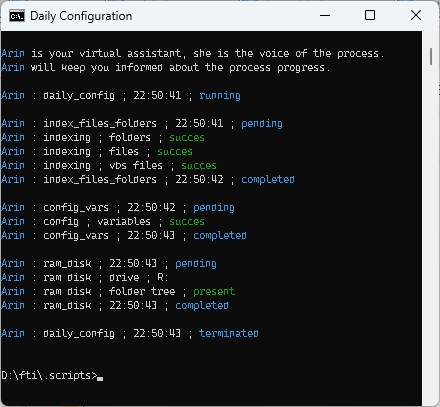
- A virtual assistant (Arin) who talks to the user on the console and keeps them informed about what the script is doing.
- A clean, technical log file that contains only the beacons: start, exception, exit. Meant for the developer who has to reconstruct later what happened.
The user sees a story. The developer sees a trail. That is the core.
Arin is not an AI. She is a voice — a smart logger with a character. This is a deliberate choice not to abuse the AI hype.
In production
The console — Arin talks to the user, step by step:
The log file — the trail of a full trading day, 13 hours, with exceptions and recovery, ending with a report:
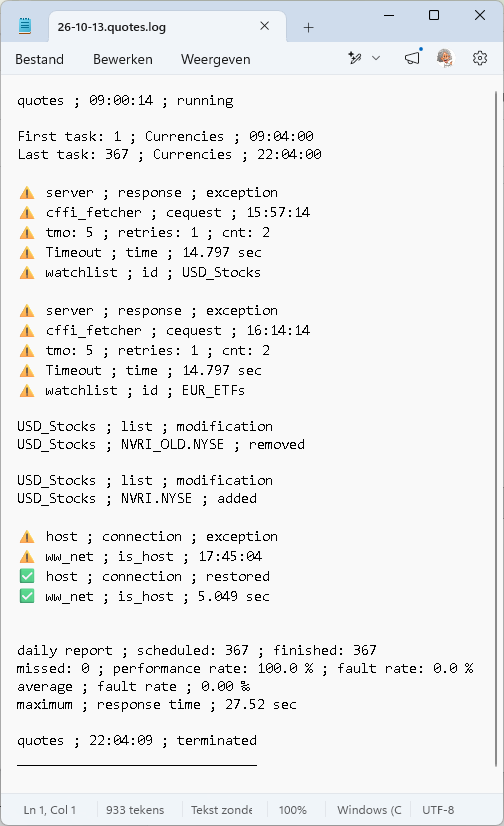
The user sees a story. The developer sees a trail. Both from the same call, to two different destinations.
Installation
pip install arin-log
On first import, a folder dialog appears asking where you want to store your log files. The choice, together with the default colors, is saved in:
- Windows:
%APPDATA%\arin_log\config_log.json - Linux/macOS:
~/.arin_log/config_log.json
The dialog appears only once. On every next run, arin_log reads
this file and skips the dialog.
If you want to change the log folder later:
from arin_log import change_folder
change_folder()
Quick example
from arin_log import log_start, log_notes, log_except, log_exit
from sys import _getframe

log_start("my_pipeline", logloc="pipeline")

try:
    log_notes("startup ; loading data", logloc="pipeline")
    # ... your work ...
    log_notes("success ; data loaded", logloc="pipeline")
except Exception:
    log_except(_getframe(), "data ; loading ; fail", logloc="pipeline")
    log_exit("my_pipeline", imp=False, logloc="pipeline")

log_exit("my_pipeline", imp=True, logloc="pipeline")
What the user sees on the console:
Arin : startup ; loading data
Arin : success ; data loaded
Arin my_pipeline ; 14:32:11 ; completed
What ends up in the log file:
26-10-04.pipeline.log

my_pipeline ; 14:32:11 ; running

startup ; loading data
success ; data loaded

my_pipeline ; 14:32:11 ; completed
------------------------------------------------------------
Public API
All functions and helpers below are available directly from the package:
from arin_log import (
    # Logger
    log_start, log_notes, log_except, log_exit,
    config_logs, file_exist,
    # Helpers
    tijd, tas, cls,
    load_json, save_json,
    # Folder
    change_folder, get_folder,
    # Console
    cons_menu,
)
| Name | Purpose |
|---|---|
log_start |
Mark the start of a run and refresh the daily log date |
log_notes |
Write notes to the console and/or the log file |
log_except |
Log an exception with module.function.line info |
log_exit |
Mark the end of a run (and optionally exit the process) |
config_logs |
Load the colors from config_log.json |
file_exist |
Check if a file exists, with an optional wait time |
tijd |
Return the current time as HH:MM:SS |
tas |
Today as string (YYYY-MM-DD), set at import |
cls |
Clear the console (Windows: cls, otherwise clear) |
load_json |
Read a JSON file, return {} if missing or corrupt |
save_json |
Write data as JSON, return True or False |
change_folder |
Open the folder dialog and update the config |
get_folder |
Return the current log folder |
cons_menu |
Show a console menu and return the chosen command |
JSON helpers
arin_log ships with two JSON helpers, available directly from the
package:
from arin_log import load_json, save_json

data = load_json("myfile.json")
save_json("myfile.json", data, indent=4)
load_json returns {} if the file is missing or corrupt.
save_json returns True on success, False on failure.
These helpers come with arin_log because most modules already
import the package — so they are available wherever you need them,
without an extra dependency.
What makes arin_log different?
| Aspect | arin_log |
Loguru / stdlib / structlog |
|---|---|---|
| Context propagation | One parameter logloc travels through the whole call chain; every submodule becomes part of the same log file |
LoggerAdapter, contextvars, or manual config |
| Console vs. log file | Deliberately separated: console = everything (with Arin as a voice), log file = only the beacons | Everything goes to the same handlers |
| Archive | One log file per main module per day, with automatic section separation per subtask | Scattered files or one big file |
| Arin as virtual assistant | A character who guides the user, not a log-level prefix | No equivalent |
| Exception notation | module.function.linenumber ; time ; exception — compact and directly usable |
Full traceback or exc_info=True |
Core USP: logloc + daily grouping per main module + separation of
console and archive + Arin.
How it works
The package consists of three modules, each with a clear task:
logger.py— the heart:log_start,log_notes,log_except,log_exit, plus the helperstijd,tas,cls,load_json,save_json, andconfig_logs.folder.py— manages the config folder and the log folder.console.py— console interaction: menus.
utils.py remains as an internal helper for folder.py only.
It is not part of the public API.
Configuration
log_cnfg.jsonships with the package as a template: the default color words and color codes for the console.config_log.jsonlives in%APPDATA%\arin_log\(Windows) or~/.arin_log/(Linux/macOS). On first run it is created by copying the colors fromlog_cnfg.jsonand adding your chosen log folder.
To customize colors, edit config_log.json in the config folder
above. Your changes survive pip install --upgrade arin-log, because
the file is never touched by pip.
The log folder
arin_log stores its files in a folder of your choice. On first use,
a folder dialog appears. The choice is saved in config_log.json
(see Configuration), so it survives across sessions and is never
overwritten by a pip install --upgrade.
If config_log.json is missing or corrupt, the dialog appears again —
the package has no fallback folder. The user is expected to choose.
Requirements
- Python 3.9 or higher
No external dependencies.
License
MIT — see LICENSE.
Status
Alpha (0.2.3). The core works. Tests are still in development.
1 maintainer

Metadata
1 maintainer
Release files for arin-log 0.2.4
For a detailed explanation of source distributions (sdists) and built distributions (wheels), please see the package formats documentation.
Source distribution (sdist)
| File | Size | Uploaded | Provenance | |
|---|---|---|---|---|
| arin_log-0.2.4.tar.gz | 16.5 kB | Without provenance | Details |
Built distribution (wheel)
| File | Interpreter | ABI | Platform | Reset |
|---|---|---|---|---|
| arin_log-0.2.4-py3-none-any.whl | Python 3 | none | any | Details |
Total release size: 32.0 kB
Release files / arin_log-0.2.4.tar.gz
| Download URL | arin_log-0.2.4.tar.gz |
|---|---|
| Size | 16.5 kB |
| Tags | Source |
|
SHA-256 checksum How to use checksums |
1572950e2dbd16504415377196af4fba2601f3659cebc0add65733418a868e98
|
|
BLAKE2b-256 checksum How to use checksums |
5304475188c6e9d89be9fc2f6ee9c7e01b3bc31029908e4cf0dc4e053aab3d8c
|
| Upload date | |
|
Uploaded using Trusted Publishing? What is trusted publishing? |
No |
| Uploaded via |
twine/7.0.0 CPython/3.11.9
|
Release files / arin_log-0.2.4-py3-none-any.whl
| Download URL | arin_log-0.2.4-py3-none-any.whl |
|---|---|
| Size | 15.5 kB |
| Tags | Python 3 |
|
SHA-256 checksum How to use checksums |
7fcc25663af397e561a784dae6f6b0469e85801950078674e9207a1ff5c78fe1
|
|
BLAKE2b-256 checksum How to use checksums |
08b5fef4467aa23cbdc43d975afda4dc25a219e018531922b8d6e6f3632becea
|
| Upload date | |
|
Uploaded using Trusted Publishing? What is trusted publishing? |
No |
| Uploaded via |
twine/7.0.0 CPython/3.11.9
|
Security for arin-log 0.2.4
Provenance
Provenance describes where a file came from. On PyPI, provenance is shared via attestations, which provide a verifiable record of the build or publishing details. View details, limitations and caveats.
No provenance found
None of the files in this release were uploaded with provenance metadata.
A note on package security
PyPI is a repository for distributing packages, not a service for auditing them. While third-party security researchers and our staff do their best to detect and remove malicious packages, PyPI cannot guarantee the quality, security or suitability of any given package.
To learn more about protecting yourself from malicious actors, visit our package security documentation.














