
HTTP Parameter Discovery Suite

Project description

Arjun Cli
Professional Grade HTTP Parameter Discovery Suite
Note: This is the enhanced Arjun-X edition. It has been re-architected for professional use, featuring a modern codebase, type safety, improved stealth capabilities, and smart risk scoring.


What is Arjun-X?
Arjun-X is a specialized tool designed to discover hidden HTTP query parameters in URL endpoints. Web applications often use invisible parameters (debug, admin, test, id) that can open vectors for specific attacks like XSS, SQL Injection, or Privilege Escalation.
Arjun-X automates the discovery process by sending requests with huge lists of parameter names, but it does so intelligently—compressing thousands of attempts into just a few dozen requests using a specialized divide-and-conquer algorithm.
Key Features
Professional Grade Core
- Modern Architecture: Completely refactored codebase using modular design patterns.
- Type Safety: Fully type-hinted execution flow for maximum stability.
- Robust Logging: Specialized logging system replaces basic print statements for better debugging.
- Modern Packaging: Compliant with PEP 517/518 using
pyproject.toml.
Advanced Stealth & Evasion
- Stealth Mode (
--stealth): Bypasses WAFs/Cloudflare by introducing random jitter and intelligent User-Agent rotation. - Heuristic Scanning: Passively extracts parameters from JavaScript files and other sources before active probing.
Stability & Resilience
- Smart Error Recovery: Automatically detects and recovers from transient network failures (DNS, connection resets) with intelligent retries.
- Adaptive Execution: Prevents scan failures by handling temporary connectivity drops gracefully without interrupting the workflow.
Smart Intelligence
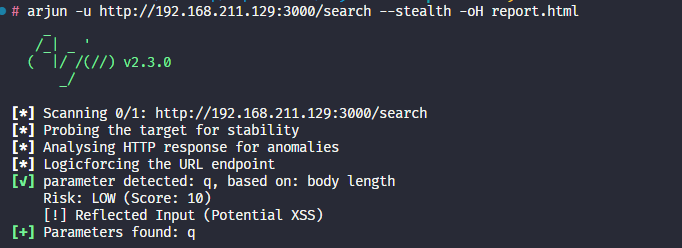
- Risk Scoring: Automatically scores discovered parameters based on sensitivity (e.g.,
admin>utm_source) and behavior. - Auto-Vulnerability Checks: Performs lightweight verification for Reflection (XSS) and Errors (SQLi) on discovered parameters.
Reporting
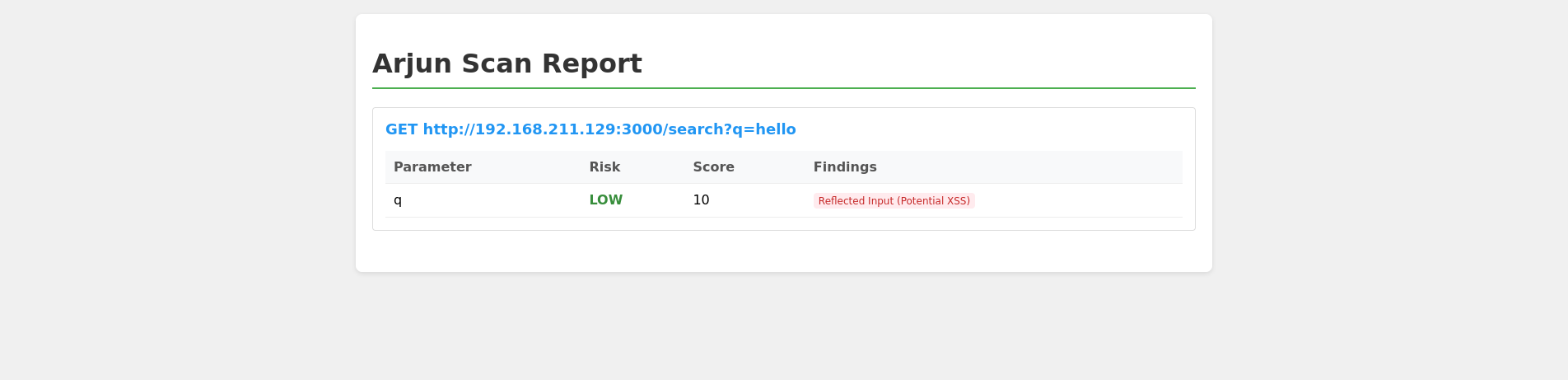
- HTML Reports: Generates rich, color-coded HTML reports for clients/managers.
- Burp Suite Integration: Export results directly to Burp Proxy.
- JSON/Text Support: Flexible output formats for pipeline integration.
Installation
Prerequisites: Python 3.8+
Standard Installation
git clone https://github.com/your-repo/Arjun-X.git
cd Arjun-X
pip install .
Development Installation
For developers who want to modify the core:
pip install -e .
Usage
Basic Scan
Find parameters for a single URL:
arjun -u https://api.example.com/v1/user
Stealth Scan (Recommended for WAFs)
Enable jitter and random User-Agents:
arjun -u https://api.example.com/v1/user --stealth
Generate Professional Report
Save the output to an HTML file for review:
arjun -u https://api.example.com/v1/user -oH report.html
JSON Output with POST Method
Send JSON payloads instead of GET parameters:
arjun -u https://api.example.com/login -m JSON -o result.json
Command Line Options
| Option | Argument | Description |
|---|---|---|
-h, --help |
— | Show this help message and exit |
-u |
URL |
Target URL |
-o, -oJ |
JSON_FILE |
Path for JSON output file |
-oT |
TEXT_FILE |
Path for text output file |
-oB |
[BURP_PROXY] |
Output to Burp Suite Proxy (default: 127.0.0.1:8080) |
-d |
DELAY |
Delay between requests in seconds (default: 0) |
-t |
THREADS |
Number of concurrent threads (default: 5) |
-w |
WORDLIST |
Wordlist file path (default: {arjundir}/db/large.txt) |
-m |
METHOD |
Request method: GET, POST, XML, JSON (default: GET) |
-i |
[IMPORT_FILE] |
Import target URLs from file |
-T |
TIMEOUT |
HTTP request timeout in seconds (default: 15) |
-c |
CHUNKS |
Chunk size (number of parameters sent at once) |
-q |
— | Quiet mode (no output) |
--rate-limit |
RATE_LIMIT |
Max requests per second (default: 9999) |
--headers |
[HEADERS] |
Add headers (separate multiple headers with a new line) |
--passive |
[PASSIVE] |
Collect parameter names from passive sources (wayback, commoncrawl, otx) |
--stable |
— | Prefer stability over speed |
--include |
INCLUDE |
Include this data in every request |
--disable-redirects |
— | Disable redirects |
--casing |
CASING |
Casing style for params (e.g. like_this, likeThis, likethis) |
--stealth |
— | Enable stealth mode (jitter, random User-Agent) |
-oH |
HTML_FILE |
Path for HTML output file |
Screenshots
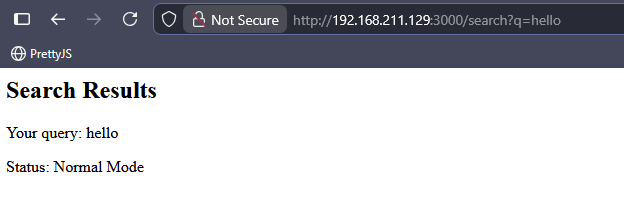
CLI Output with Risk Scoring
Report HTML
Video
https://github.com/user-attachments/assets/614394c2-1363-4d01-b014-263b42059690
Credits
Based on the original work by s0md3v.
- Wordlists: Merged from CommonCrawl, SecLists, and Param-Miner.
- Special Payloads: Adapted from data-payloads.
License: MIT
Release history Release notifications | RSS feed

Download files
Download the file for your platform. If you're not sure which to choose, learn more about installing packages.
Source Distribution
Built Distribution
Filter files by name, interpreter, ABI, and platform.
If you're not sure about the file name format, learn more about wheel file names.
Copy a direct link to the current filters
File details
Details for the file arjun_cli-0.1.0.tar.gz.
File metadata
- Download URL: arjun_cli-0.1.0.tar.gz
- Upload date:
- Size: 26.4 kB
- Tags: Source
- Uploaded using Trusted Publishing? No
- Uploaded via: twine/6.2.0 CPython/3.13.11
File hashes
| Algorithm | Hash digest | |
|---|---|---|
| SHA256 |
718fc8fb6a223b7fd054bae7803942e9effca34f03e64474f9e8045ad092c150
|
|
| MD5 |
12c6d5d7dcb71c2bc8a3d820b764b88b
|
|
| BLAKE2b-256 |
089375e0dc645e706eff937675d65f1c362263ba0155ea767dbc3155699ca37a
|
File details
Details for the file arjun_cli-0.1.0-py3-none-any.whl.
File metadata
- Download URL: arjun_cli-0.1.0-py3-none-any.whl
- Upload date:
- Size: 29.3 kB
- Tags: Python 3
- Uploaded using Trusted Publishing? No
- Uploaded via: twine/6.2.0 CPython/3.13.11
File hashes
| Algorithm | Hash digest | |
|---|---|---|
| SHA256 |
e3143e0fbc088a78eadb48d3e919ce4e5dc69e9486c20365775e0f3bea038221
|
|
| MD5 |
38964fcd32fe8747fc63eed4ee74a123
|
|
| BLAKE2b-256 |
e210fc7417d25848bd4dc84a15d083538053c3b74a00fcee03203df26f766fd8
|






