
armdoc




Why isn't my arm moving? Attach to a running ros2_control / MoveIt 2 arm and get a one-line cause. Read-only: it subscribes to topics and lists controllers, and never publishes or changes anything.
Part of ros2-doctor-tools, an index of my ROS 2 diagnosis, fault injection and evaluation tools.
Try it in 30 seconds
With your robot or sim running, in a terminal:
source /opt/ros/$ROS_DISTRO/setup.bash          # or your distro's path
python3 -m venv --system-site-packages ~/doctor-venv && source ~/doctor-venv/bin/activate
pip install armdoc
armdoc --once 10                               # add --moveit to check move_group, --ns /name for a namespace
It only reads from the running system. Exit code 1 means it found an error.
How it compares
| Tool | Use it when |
|---|---|
| armdoc | a ros2_control / MoveIt 2 arm is not moving and you want a likely cause, with no code changes |
ros2 control CLI |
you want to list or switch controllers and hardware interfaces yourself |
| ros/diagnostics | your own nodes report their health on /diagnostics and you want it collected |
| ros2_medkit | you want a diagnostics REST API with tracked faults, history and rosbag snapshots |
armdoc is a small command-line check, tested mostly in simulation and on fake arms. It keeps no fault history, and a report with no errors does not prove the arm is healthy. It publishes to /diagnostics only with --diagnostics. |
Quick start
ros2 run armdoc armdoc --ready                              # pre-flight check: READY / NOT READY, with a next step for each problem
ros2 launch armdoc armdoc.launch.py ns:=/ur3 moveit:=true   # live: a report every 2 s (drop ns / moveit if you don't use them)
docker run --rm armdoc                                      # no robot? try it on a fake arm (build it first, see below)
Install into a ROS 2 workspace (Humble tested; the C++ package also builds in CI on Jazzy and Lyrical):
cd ~/ros2_ws/src && git clone https://github.com/darshmenon/armdoc.git
cd .. && colcon build --packages-select armdoc && source install/setup.bash
Or with pip (the launch file example above needs the colcon build):
# ROS 2 sourced; if you use a venv, create it with --system-site-packages
pip install armdoc      # latest main instead: pip install git+https://github.com/darshmenon/armdoc
armdoc --help
A pip install puts the armdoc command on your PATH; run it directly. The ros2 run form needs the colcon build.
Docker (nothing else to install; the demo runs a healthy fake arm, then a stalled one, then a fake MoveIt with no planning scene):
docker build -t armdoc https://github.com/darshmenon/armdoc.git
docker run --rm armdoc                                                  # the demo
docker run --rm --net=host -e ROS_DOMAIN_ID=0 armdoc armdoc --ready     # check a running arm on this machine
More ways to run it:
ros2 run armdoc armdoc --ns /ur3 --moveit   # namespaced arm, also check move_group and the planning scene
ros2 run armdoc armdoc --once 10            # watch 10 s, print one report, exit 1 on any ERROR (for CI)
ros2 run armdoc armdoc --diagnostics        # also publish findings to /diagnostics (opt-in, see below)
ERROR [CTRL_INACTIVE] controller arm_controller (joint_trajectory_controller/JointTrajectoryController) is inactive, not active
ERROR [TRAJ_STALLED] a trajectory goal has been active for 10s but the joints moved 0.0000 rad
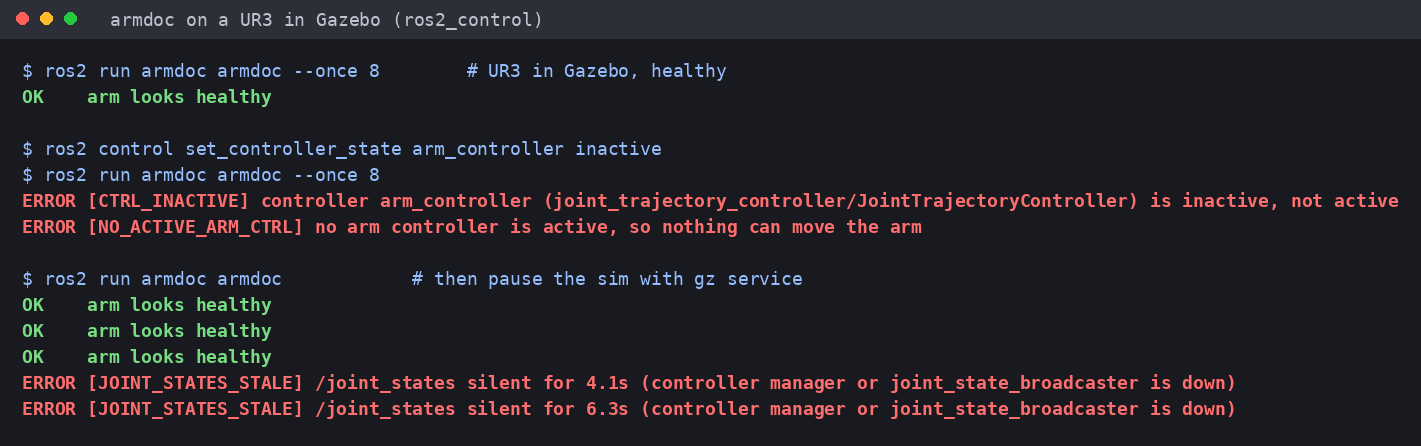
Real output from a UR3 in Gazebo: healthy, then the arm controller deactivated, then the sim paused while armdoc was attached. Source: docs/ur3_gazebo_demo.txt, docs/make_screenshot.py.
What it checks
| Code | Level | Means |
|---|---|---|
JOINT_STATES_NONE / JOINT_STATES_STALE |
error | no /joint_states, or it went silent (broadcaster or controller manager down) |
JOINT_NAN |
error | a joint position is NaN/inf (diverged controller) |
NEAR_LIMIT / LIMIT_POS |
warn / error | within 1% of a URDF joint limit, or outside it |
LIMIT_VEL |
warn | joint faster than its URDF velocity limit |
EFFORT_SAT |
warn | a joint pinned at its effort limit for 2 s (contact or payload) |
NO_CONTROLLER_MANAGER |
warn | list_controllers does not answer |
CTRL_INACTIVE / NO_ACTIVE_ARM_CTRL |
error | an arm controller is not active, or none is |
NO_MOVE_GROUP |
error | --moveit and no move_group node |
NO_PLANNING_SCENE |
warn | --moveit, move_group is up, but nothing publishes /monitored_planning_scene and /get_planning_scene is not served |
MOVEIT_PLAN_FAILED |
warn | --moveit and a /move_action goal was aborted in the last 30 s |
TRACKING_ERROR |
warn | trajectory controller error above 0.05 rad for 3 s |
TRAJ_STALLED |
error | a follow_joint_trajectory goal is executing but the joints are not moving |
NOISY_JOINTS |
warn | position jitter above 0.002 rad (estimated over 1 s, at 20 Hz or faster): encoder or driver noise |
STREAM_LAG |
warn | /joint_states arrive more than 0.5 s after their header stamp, so the controller and planner see old data |
GOAL_ABORTS |
warn | 3 or more trajectory goals aborted or cancelled within 30 s |
LOG_PLAN_GOAL_INVALID / LOG_START_STATE_BAD / LOG_START_DEVIATES |
warn | move_group logged that the goal cannot be sampled (in collision, unreachable), the start state is in collision, or the trajectory starts away from the real arm |
LOG_NO_CONTROLLER / LOG_ACTION_NOT_CONNECTED |
warn | move_group logged that no controller covers the joints, or cannot reach a controller's follow_joint_trajectory action |
LOG_ROBOT_STATE_STALE |
warn | move_group logged that it gets no fresh joint state |
LOG_TOLERANCE_VIOLATED / LOG_EXEC_ABORTED |
warn | a trajectory controller logged a path or goal tolerance violation, or move_group logged an aborted or rejected execution |
How the new checks work, and what they cannot see:
NOISY_JOINTStakes the fourth difference of each arm joint's positions (white noise of sigma s gives a standard deviation of about 8.4 s; smooth motion cancels out, even a fast sine). It treats samples as evenly spaced, so heavy timing jitter at high joint speed can raise the estimate, and it stays silent below 20 Hz. A sudden step in the data (for example a stream that was delayed catching up) shows up as one report. Tune with--noise-rad.STREAM_LAGcompares a message's header stamp with the time it arrives, using the median of the last 2 s. When the stamps are simulation time, run armdoc with--ros-args -p use_sim_time:=true, otherwise the two clocks differ by years and the check stays silent on purpose. A source that restamps old data is invisible to it. Tune with--lag-max.MOVEIT_PLAN_FAILEDcounts goals that went to ABORTED on/move_action/_action/statusafter armdoc attached; goals that finished before that are history, judged by the goal's own timestamp. It cannot tell you why planning failed, only that it did.NO_PLANNING_SCENElooks for a publisher on/monitored_planning_sceneor a/get_planning_sceneservice rather than waiting for a message, because MoveIt publishes the scene only when it changes.
The LOG_* rows read WARN and ERROR lines on /rosout from move_group, controller_manager and the controllers, counted over 30 s, each with a hint. The patterns follow the MoveIt 2 and joint_trajectory_controller sources and are tested on the message text and with a fake move_group log line; they have not yet been run against a real stack that emits each one.
Limits come from /robot_description, and are checked only for joints that arm controllers claim (grippers and broadcasters are skipped). Missing-thing checks wait out a startup grace (--grace, 20 s).
Per-arm baselines
A 50 Hz /joint_states is normal on one arm and a sign of trouble on another. Record normal once, then get warned on drift:
armdoc --learn 60 --baseline-file my_arm.json        # on a healthy arm: writes the normal /joint_states rate
armdoc --baseline --baseline-file my_arm.json        # later: RATE_DROP / RATE_SPIKE below half or above double normal
The rate is the median messages per second: plain statistics, no model. A silent stream is still JOINT_STATES_STALE, not a rate finding.
Parameters and launch
ros2 launch armdoc armdoc.launch.py takes ns, moveit, diagnostics, use_sim_time and params_file (default config/armdoc.yaml). The thresholds in that file are ROS parameters of the armdoc node: period, hints, stale, grace, track_err, stall_time, noise_rad, lag_max. They also work without the launch file:
ros2 run armdoc armdoc --ros-args --params-file my_thresholds.yaml
Parameters win over the matching command-line flags. --once, --ready, --json and --record are command-line only.
/diagnostics (opt-in)
armdoc never publishes anything unless you pass --diagnostics. Then each report goes to /diagnostics as a diagnostic_msgs/DiagnosticArray: one status per finding (armdoc: <CODE>, level WARN or ERROR, the message), or a single OK status when the arm looks healthy. It publishes nothing else, and never commands or reconfigures the arm.
Timeline report (visualization)
Record a run, then turn it into a timeline: joint positions with shaded bands where findings were active, a controller lane, and a findings table.
ros2 run armdoc armdoc --record run.jsonl                       # Ctrl-C to stop; logs joints (10 Hz) + findings (1 Hz)
armdoc report run.jsonl --html report.html --png report.png     # no ROS needed for this step
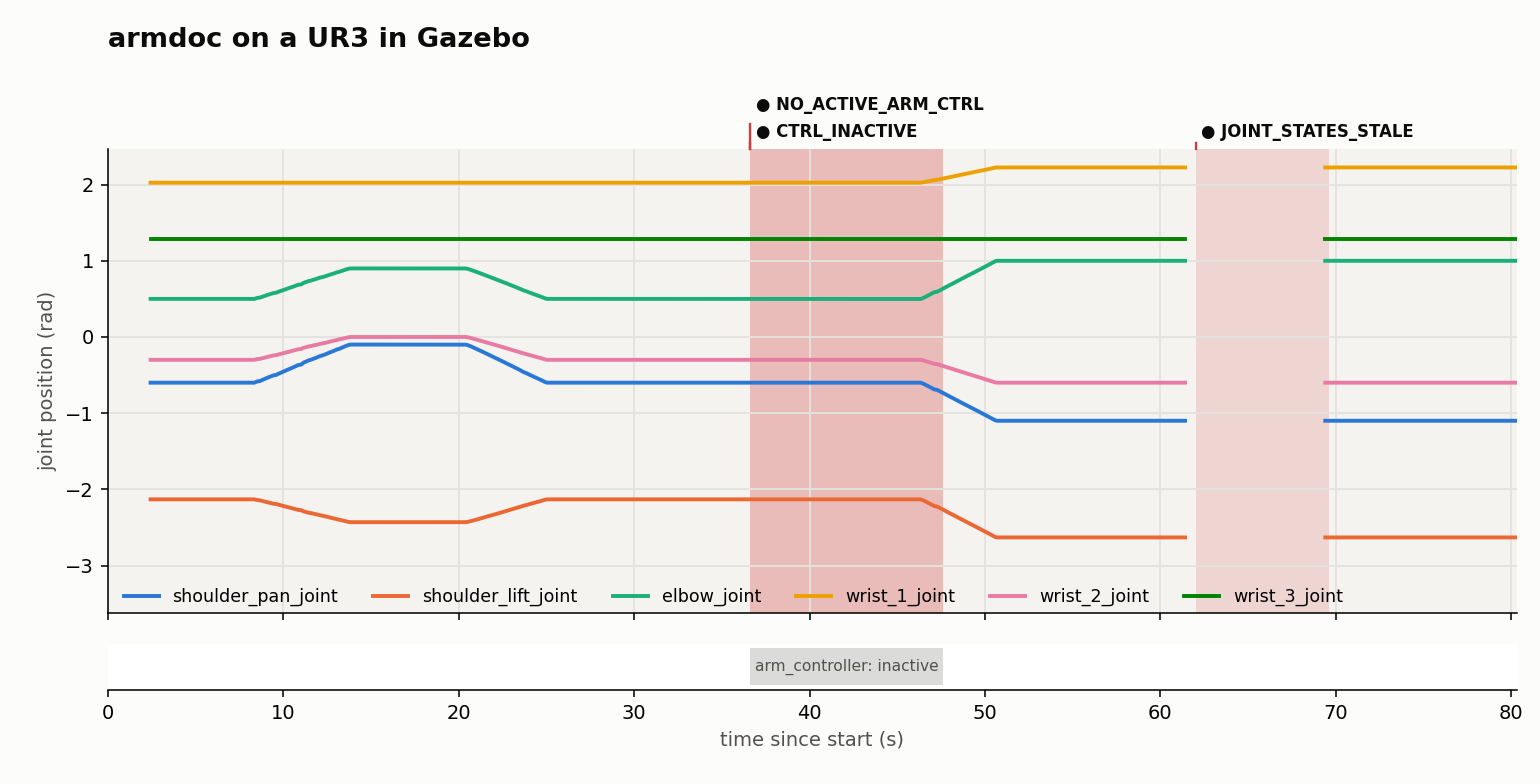
Real recording of a UR3 in Gazebo (80 s): two moves, then arm_controller deactivated (the move commanded meanwhile is ignored, and the arm only follows after reactivation), then the sim paused until /joint_states went silent. Source: docs/ur3_run.jsonl; open docs/ur3_report.html for the interactive version.
- HTML: one self-contained file (inline SVG + a little JS, no network). Hover for a crosshair with every joint value and the findings active at that moment, click a legend entry to hide a joint, light/dark follows the OS. A 1 Hz table of the joint positions is folded under the findings table.
- PNG: the same timeline via matplotlib.
- Lines break where
/joint_stateswas silent, so a gap is shown as a gap. The controller lane shows only controllers that had been active and then dropped out.
The same report runs in the browser: web/index.html loads your --record log and builds the page with Pyodide, nothing uploaded (no ROS, no numpy needed). Serve the folder with any static host (python3 -m http.server -d web, or GitHub Pages); web/build.sh refreshes the copied module. Tested in headless Chrome with the bundled UR3 example (same findings as the command line) and a garbage file (clear error).
Try it without a robot
test/fake_arm.py publishes a fake ros2_control graph: healthy, or --freeze, --inactive, --stall, and with --moveit a fake move_group (--no-scene, --plan-fail).
python3 test/fake_arm.py --stall &
ros2 run armdoc armdoc --once 12 --stall-time 4      # TRAJ_STALLED, exit 1
python3 -m pytest test                               # the diagnosis rules, no ROS needed
Checked with armchaos
armchaos injects noise and lag into a stream; armdoc named both. Raw runs: docs/e2e_noise_lag.txt, docs/e2e_lag_timeline.txt, docs/e2e_moveit.txt.
| Fault | armdoc | After the fault started | After it ended |
|---|---|---|---|
| noise, sigma 0.02 rad | NOISY_JOINTS (estimated 0.018 to 0.025 rad) |
+0.5 s | OK in 1.6 s |
| lag, 3 s | JOINT_STATES_STALE, then STREAM_LAG |
+2.4 s, then +3.5 s | OK in 1.5 s |
C++ node (low overhead)
armdoc_cpp is a sibling colcon package with a C++ port of the live joint-state checks, for leaving on next to a fast controller:
colcon build --packages-select armdoc_cpp && source install/setup.bash
ros2 run armdoc_cpp armdoc_fast --ros-args -p ns:=/ur3 -p once:=10.0     # one report, exit 1 on ERROR
It covers JOINT_STATES_NONE/STALE, JOINT_NAN, LIMIT_POS, NEAR_LIMIT, LIMIT_VEL, EFFORT_SAT, NOISY_JOINTS and STREAM_LAG, with the same thresholds (grace, stale, noise_rad, lag_max). It learns the arm's joints from the controller manager (or the arm_joints parameter), so a gripper at its closed limit is not judged. -p json:=true prints the findings as the same JSON list as armdoc --json. Trajectory goals, MoveIt, --record and /diagnostics stay in the Python tool. Run against a live UR3 Gazebo sim, it reports the arm healthy like the Python tool. A test feeds the same randomized streams to both and requires identical findings. Measured on a 50 Hz fake arm (one 20 s run, busy machine): 0.9% of a core and 22 MB for C++, 5.5% and 65 MB for Python.
Checked on other arms
Besides UR3 and UR5e in Gazebo, armdoc was run (through armchaos) against FANUC (6 joints) and Franka Panda (7 joints, separate gripper controller) on the real ros2_control controller manager with mock hardware: every injected fault was named by the right code. The Fanuc URDF has no effort limit, so EFFORT_SAT cannot fire there. Not a real arm; see armchaos docs/e2e_fanuc_ros2_control.txt and docs/e2e_panda_ros2_control.txt.
Limits
- Verified on Humble against live Gazebo sims of a UR3 and a UR5e (ros2_control,
arm_controller; the UR3 also withgripper_controller): healthy, a deactivated controller and a paused sim gave the expected verdicts on both. Both are Universal Robots arms in simulation; no real robot and no non-UR arm has been tested yet. Controller state topics assume<controller>/state(JointTrajectoryControllerState). - The Docker image and demo were built and run on Docker 29 with
ros:humble; the GitHub Actions workflow itself has not been seen running. - One arm per run; use
--nsfor each. - Text or
--jsonoutput;/diagnosticsonly with--diagnostics.
1 maintainer

Metadata
1 maintainer
Release files for armdoc 0.6.3
For a detailed explanation of source distributions (sdists) and built distributions (wheels), please see the package formats documentation.
Source distribution (sdist)
| File | Size | Uploaded | Provenance | Actions |
|---|---|---|---|---|
| armdoc-0.6.3.tar.gz | 50.7 kB | With provenance | Details for armdoc-0.6.3.tar.gz |
Built distribution (wheel)
| File | Interpreter | ABI | Platform | Actions Reset |
|---|---|---|---|---|
| armdoc-0.6.3-py3-none-any.whl | Python 3 | none | any | Details for armdoc-0.6.3-py3-none-any.whl |
Total release size: 88.7 kB
Release files / armdoc-0.6.3.tar.gz
| Download URL | armdoc-0.6.3.tar.gz |
|---|---|
| Size | 50.7 kB |
| Tags | Source |
|
SHA-256 checksum How to use checksums |
ec604a11be92b529c5f60f3a6e5c927541c4fa87e47d75dc1f6ee451f3e2cf63
|
|
BLAKE2b-256 checksum How to use checksums |
59cdfee7f67e7808ea3be00540042004f8bf33a086a795bac38ed804bcdd5146
|
| Upload date | |
|
Uploaded using Trusted Publishing? What is trusted publishing? |
Yes |
| Uploaded via |
twine/7.0.0 CPython/3.13.16
|
Provenance
Provenance describes where a file came from. On PyPI, provenance is shared via attestations, which provide a verifiable record of the build or publishing details. View details, limitations and caveats.


PyPI Publish Attestation
PyPI verified that this artifact, at this checksum, originated from the publisher listed below.
Signed by GitHub Actions, verified by PyPI on Nov 29, 2026.
Transparency logRelease files / armdoc-0.6.3-py3-none-any.whl
| Download URL | armdoc-0.6.3-py3-none-any.whl |
|---|---|
| Size | 37.9 kB |
| Tags | Python 3 |
|
SHA-256 checksum How to use checksums |
63ebdce76a5a9093bc51cbf1bc3ee9ba60149e72da7ef45709c54b5a4a8e291c
|
|
BLAKE2b-256 checksum How to use checksums |
8ca358ee11ca0a736bad5227f13533468a0def0414fb2548a38b62679b4ccb68
|
| Upload date | |
|
Uploaded using Trusted Publishing? What is trusted publishing? |
Yes |
| Uploaded via |
twine/7.0.0 CPython/3.13.16
|
Provenance
Provenance describes where a file came from. On PyPI, provenance is shared via attestations, which provide a verifiable record of the build or publishing details. View details, limitations and caveats.
PyPI Publish Attestation
PyPI verified that this artifact, at this checksum, originated from the publisher listed below.
Signed by GitHub Actions, verified by PyPI on Nov 29, 2026.
Transparency logSecurity for armdoc 0.6.3
Provenance
Provenance describes where a file came from. On PyPI, provenance is shared via attestations, which provide a verifiable record of the build or publishing details. View details, limitations and caveats.
Full provenance
Both files in this release have been uploaded with provenance metadata.
Attestation for armdoc-0.6.3.tar.gz
PyPI Publish Attestation
PyPI verified that this artifact, at this checksum, originated from the publisher listed below.
Signed by GitHub Actions, verified by PyPI on Nov 29, 2026.
Transparency logA note on package security
PyPI is a repository for distributing packages, not a service for auditing them. While third-party security researchers and our staff do their best to detect and remove malicious packages, PyPI cannot guarantee the quality, security or suitability of any given package.
To learn more about protecting yourself from malicious actors, visit our package security documentation.














