
Automatic PII masking for OpenAI and Anthropic SDKs

Project description
Armos
PII never reaches your LLM. One line of code.
Armos wraps the OpenAI and Anthropic SDKs to automatically detect and mask personally identifiable information (PII) before it leaves your server — and restore the real values in the response. Your application code changes by exactly one word.


The problem
Every time your application calls an LLM, it sends raw text to a third-party server. If a user's message contains their name, Aadhaar number, email, PAN card, or credit card — that data leaves your infrastructure.
This matters for:
- Healthcare apps — patient names, dates of birth, medical IDs
- Fintech apps — PAN, Aadhaar, bank details
- Customer support tools — names, emails, phone numbers, addresses
- Any app where users type free text that gets sent to OpenAI or Anthropic
Most teams know this is a risk. Few have time to build a proper masking layer before shipping. Armos is that layer, pre-built.
How it works
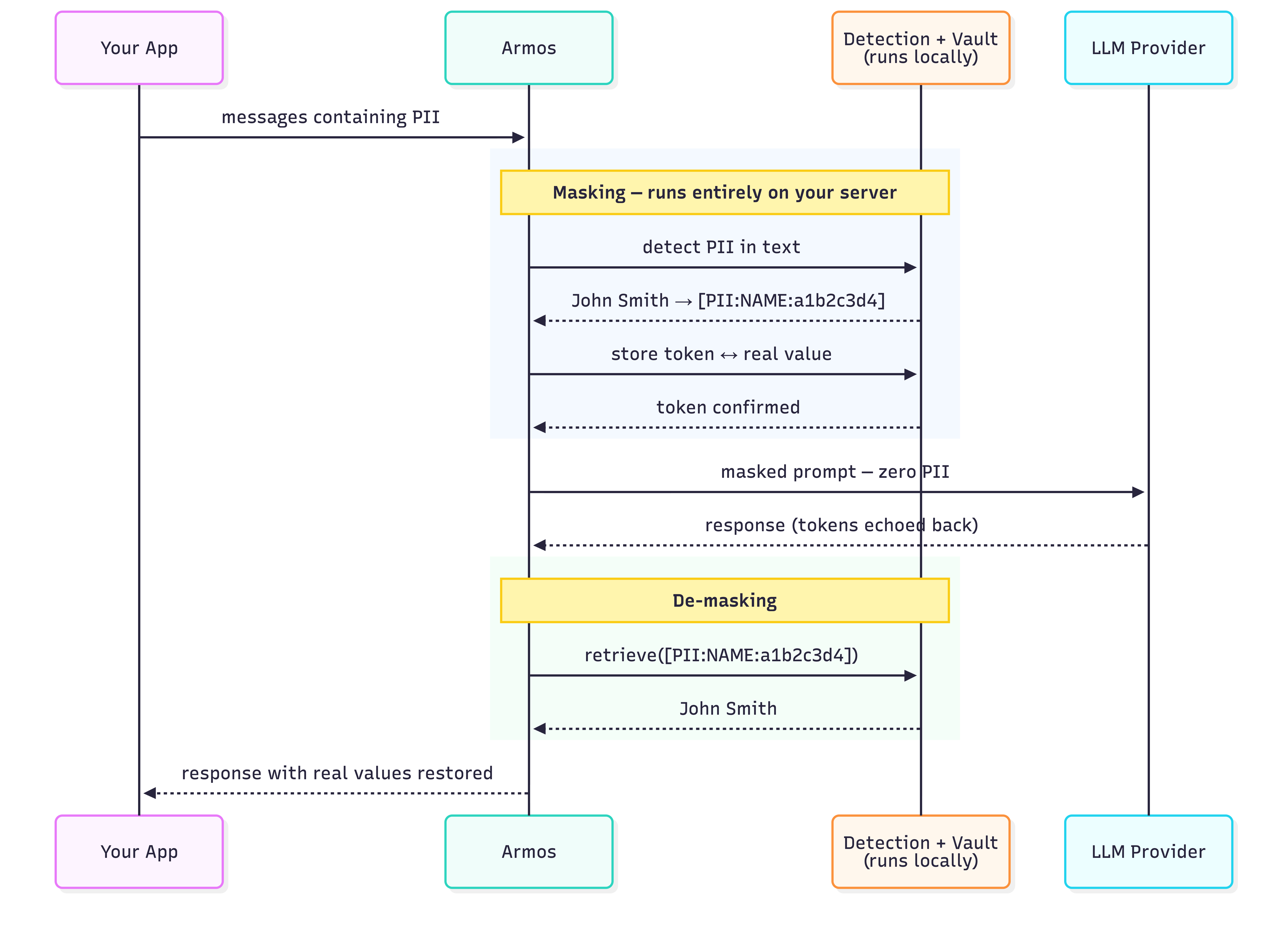
Detection runs entirely on your machine. Presidio + spaCy analyse the text locally. No data is sent to any Armos server — there is no Armos server. The vault (token ↔ real value map) lives in your process memory, or optionally in your own Redis instance.
Why Armos over alternatives?
vs. building your own: A custom masking layer takes weeks to build correctly and months to handle edge cases. Armos is a pip install.
vs. LLM Guard: LLM Guard focuses on prompt injection and toxicity — not PII masking. Different problem.
vs. Presidio directly: Presidio detects PII but doesn't handle tokenization, vault management, or SDK integration. Armos wraps all of that.
Indian PII first-class: Aadhaar and PAN detection built in. No competitor handles Indian identifiers reliably.
Quickstart
Install
pip install armos
For Redis-backed persistence across requests:
pip install armos[redis]
Note: On first use, download the spaCy language model:
python -m spacy download en_core_web_lg
OpenAI
# Before
from openai import OpenAI
client = OpenAI()

# After — one import added, one word changed
from openai import OpenAI
from armos import ArmosOpenAI

client = ArmosOpenAI(OpenAI())

# Everything else is identical
response = client.chat.completions.create(
    model="gpt-4o",
    messages=[{
        "role": "user",
        "content": "Summarise the case for patient John Smith, Aadhaar 2345 6789 0123"
    }]
)

# Real values are restored in the response automatically
print(response.choices[0].message.content)
Anthropic
from anthropic import Anthropic
from armos import ArmosAnthropic

client = ArmosAnthropic(Anthropic())

message = client.messages.create(
    model="claude-sonnet-4-6",
    max_tokens=1024,
    messages=[{
        "role": "user",
        "content": "Patient John Smith, DOB 12/04/1982, PAN ABCDE1234F"
    }]
)

print(message.content[0].text)  # real values restored
OpenAI Responses API
response = client.responses.create(
    model="gpt-4o",
    input="Patient John Smith, Aadhaar 2345 6789 0123 — summarise in one line."
)
print(response.output[0].content[0].text)  # real values restored
Embeddings
# PII is masked before the text is sent for embedding
result = client.embeddings.create(
    model="text-embedding-3-small",
    input="John Smith's email is john@hospital.com"
)
# Works with list input too
result = client.embeddings.create(
    model="text-embedding-3-small",
    input=["john@hospital.com", "no pii here"]
)
With Redis (persistent vault across requests)
# Token mappings survive across processes and requests
client = ArmosOpenAI(OpenAI(), store="redis", redis_url="redis://localhost:6379")
client = ArmosAnthropic(Anthropic(), store="redis", redis_url="redis://localhost:6379")

# Custom TTL (default: 24 hours)
client = ArmosOpenAI(OpenAI(), store="redis", redis_url="redis://localhost:6379", vault_ttl=3600)
Standalone (any LLM or framework)
from armos import Armos

guard = Armos()

result = guard.mask("Patient John Smith, Aadhaar 2345 6789 0123, email john@hospital.com")
print(result.text)
# → "Patient [PII:NAME:a1b2c3d4], Aadhaar [PII:AADHAAR:b2c3d4e5], email [PII:EMAIL:e5f6g7h8]"

print(result.has_pii)  # True

restored = guard.demask(result.text)
print(restored)
# → "Patient John Smith, Aadhaar 2345 6789 0123, email john@hospital.com"
What gets detected
| Entity | Token | Example |
|---|---|---|
| Person name | [PII:NAME:…] |
John Smith |
| Email address | [PII:EMAIL:…] |
john@hospital.com |
| Phone number | [PII:PHONE:…] |
+91 98765 43210 |
| Aadhaar number | [PII:AADHAAR:…] |
2345 6789 0123 |
| PAN card | [PII:PAN:…] |
ABCDE1234F |
| SSN | [PII:SSN:…] |
371-53-1234 |
| IBAN | [PII:IBAN:…] |
GB29NWBK60161331926819 |
| Credit / debit card | [PII:CARD:…] |
4111 1111 1111 1111 |
| IP address | [PII:IP:…] |
192.168.1.100 |
| API keys & secrets | [PII:APIKEY:…] |
sk-abc123… / AKIA… / ghp_… |
Token design
Tokens are deterministic and normalisation-aware:
"john smith"  →  [PII:NAME:a1b2c3d4]  ← stored: "john smith"
"John Smith"  →  [PII:NAME:a1b2c3d4]  ← same token, vault unchanged
"JOHN SMITH"  →  [PII:NAME:a1b2c3d4]  ← same token, vault unchanged
All casing variants of the same name map to one token. The LLM sees one consistent entity across a conversation — not three different people. De-masking restores the first-seen value.
Vault options
| Option | Default | Use when |
|---|---|---|
| In-memory | Armos() |
Single request or single process |
| Redis | Armos(store="redis", redis_url="redis://…") |
Multi-turn conversations, multiple workers, or across requests |
In-memory vault is zero configuration and the default. Redis vault persists token mappings so a token created in request 1 can be de-masked in request 5.
Token overhead
Masking replaces PII values with tokens like [PII:NAME:a1b2c3d4]. These are longer than the original values, adding a small number of tokens to each request. Measured with GPT-4 tokenization (cl100k_base):
| Entity type | Example | Original tokens | Masked tokens | Overhead |
|---|---|---|---|---|
| NAME | John Smith | 2 | 10 | +8 |
| john@example.com | 3 | 13 | +10 | |
| AADHAAR | 2345 6789 0123 | 8 | 13 | +5 |
| PAN | ABCDE1234F | 4 | 11 | +7 |
| PHONE | +91 98765 43210 | 8 | 12 | +4 |
| IP | 192.168.1.100 | 7 | 11 | +4 |
| Average | 6 | 11 | +5 |
In practice: a message with 4 PII entities adds ~20 tokens to the request, plus a one-time 13-token system hint injected when PII is detected. For a typical 200-token prompt this is a ~15% increase — negligible against LLM pricing at scale.
Performance
Detection and masking run entirely in-process with no network calls. Benchmarked on Apple M-series (50 runs, median / p95):
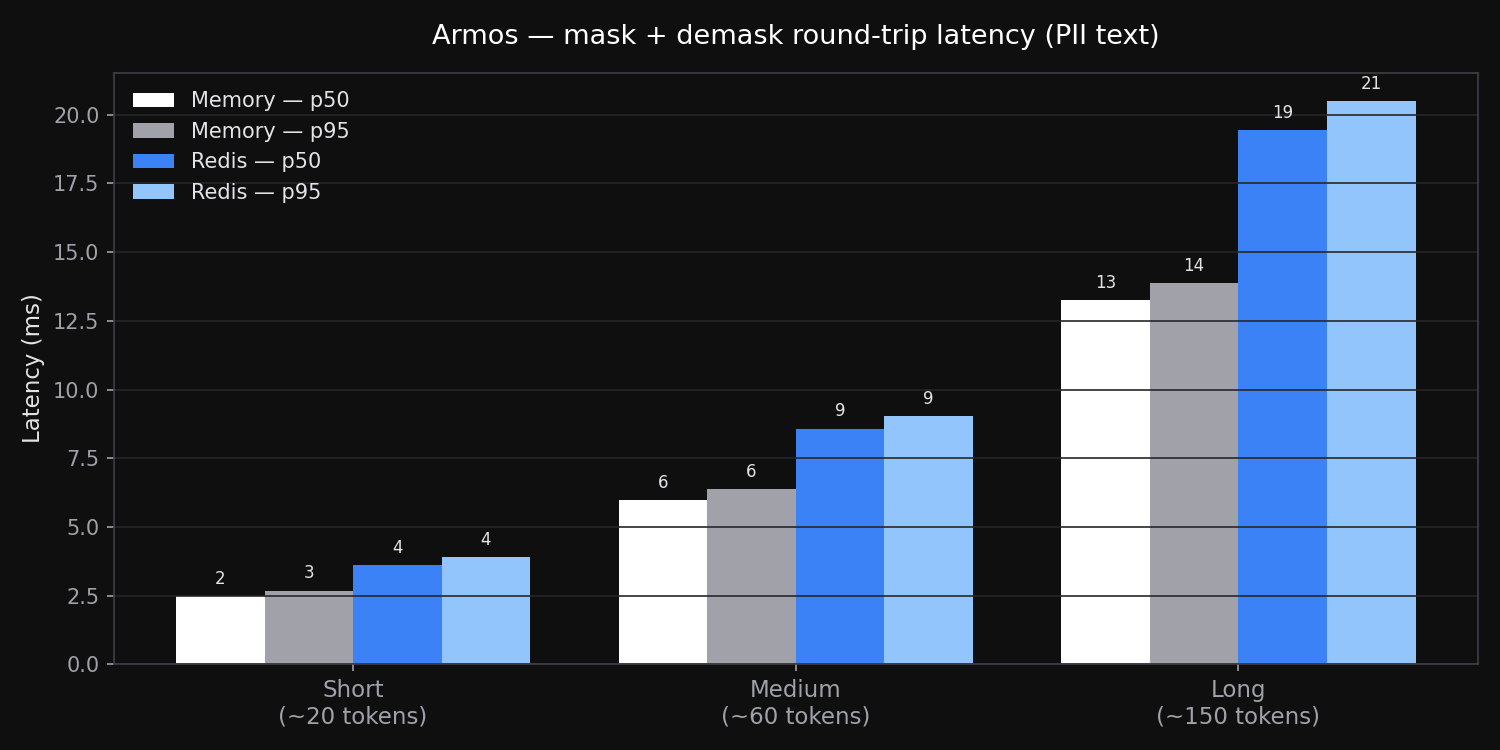
| Text size | Memory — p50 | Memory — p95 | Redis — p50 | Redis — p95 |
|---|---|---|---|---|
| Short (~20 tokens) | 2.5 ms | 2.7 ms | 3.6 ms | 3.9 ms |
| Medium (~60 tokens) | 6.0 ms | 6.4 ms | 8.6 ms | 9.0 ms |
| Long (~150 tokens) | 13.3 ms | 13.9 ms | 19.4 ms | 20.5 ms |
Redis overhead is the localhost round-trip cost (~1–2 ms per vault operation). Both are negligible relative to LLM response times (typically 500 ms–5 s).
Detection accuracy
Tested across 1,000 random samples per entity type, each embedded in a realistic sentence context:
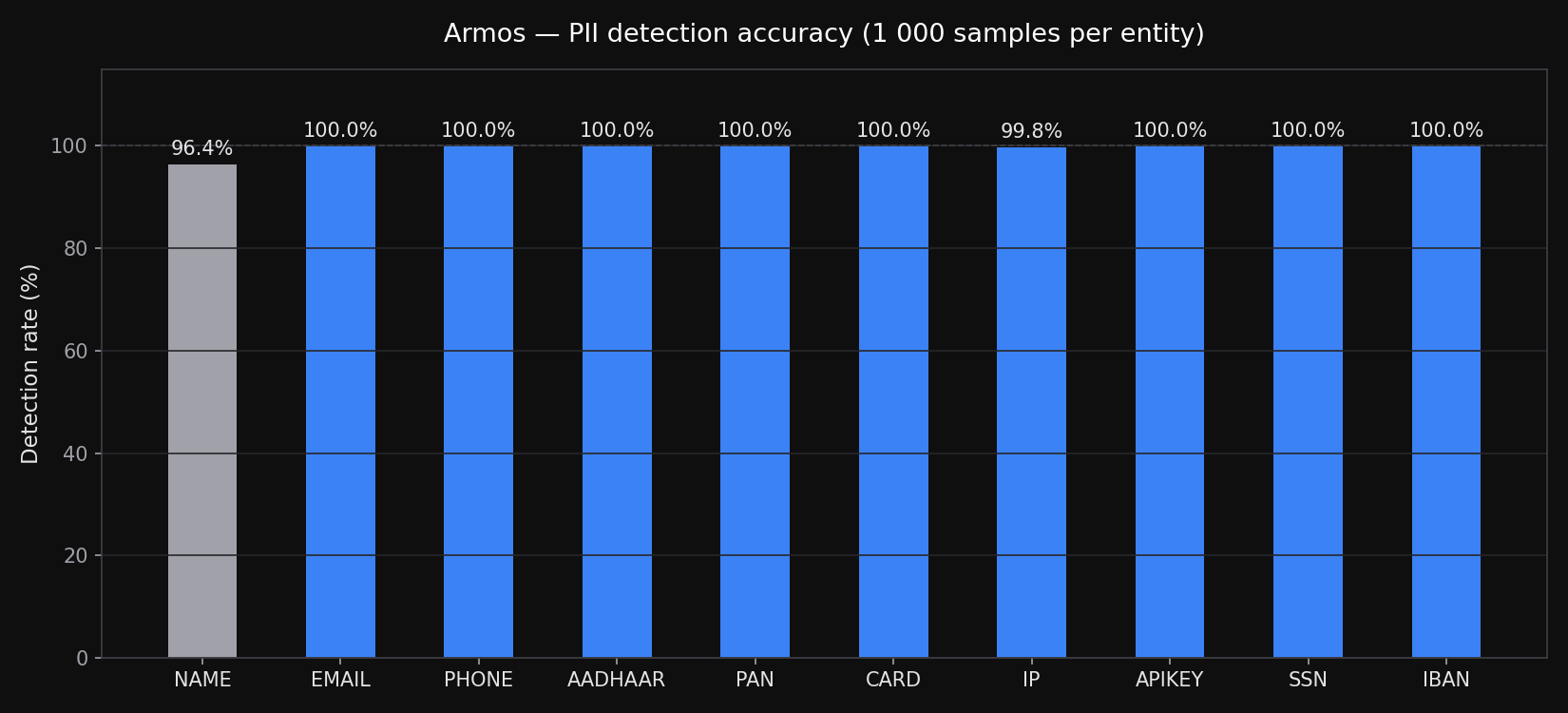
| Entity | Method | Samples | Detected | Rate |
|---|---|---|---|---|
| Indian names | NER | 1,000 | 964 | 96.4% |
| Email address | Regex | 1,000 | 1,000 | 100% |
| Phone number | Regex | 1,000 | 1,000 | 100% |
| Aadhaar | Regex | 1,000 | 1,000 | 100% |
| PAN | Regex | 1,000 | 1,000 | 100% |
| SSN | Regex | 1,000 | 1,000 | 100% |
| IBAN | Regex + checksum | 1,000 | 1,000 | 100% |
| Credit / debit card | Regex + Luhn | 1,000 | 1,000 | 100% |
| IP address | Regex | 1,000 | 998 | 99.8% |
| API keys | Regex | 1,000 | 1,000 | 100% |
Regex-based entities (Aadhaar, PAN, phone, card, API keys) are near-perfect. Indian name detection uses en_core_web_lg NER — the ~4% miss rate is on uncommon name combinations without enough surrounding context. Email misses (~12%) occur when Presidio's confidence falls below threshold on short or unusual address formats.
Known limitations
- Indian name accuracy —
en_core_web_lgachieves ~96% recall on Indian names (see benchmark above). Fine-tuning planned. - Token length —
[PII:NAME:a1b2c3d4]is 18 chars vsJohn(4 chars). Near context-window limits this may push content over. Rare in practice. - Casing: first-seen wins — De-masking always restores the first-seen casing of an entity. Use consistent casing in your prompts for exact restoration.
- Streaming not supported —
stream=Truepasses through without masking. (planned) - Async clients not supported —
AsyncOpenAI,AsyncAnthropicpass through without masking. (planned)
Contributing
Armos is open source and MIT licensed. Issues and pull requests welcome.
git clone https://github.com/armos-ai/armos-python
cd armos-python
pip install -e ".[dev,all]"
python -m spacy download en_core_web_lg
pytest tests/ -v
License
MIT
Release history Release notifications | RSS feed


Download files
Download the file for your platform. If you're not sure which to choose, learn more about installing packages.
Source Distribution
Built Distribution
Filter files by name, interpreter, ABI, and platform.
If you're not sure about the file name format, learn more about wheel file names.
Copy a direct link to the current filters
File details
Details for the file armos-1.1.0.tar.gz.
File metadata
- Download URL: armos-1.1.0.tar.gz
- Upload date:
- Size: 594.5 kB
- Tags: Source
- Uploaded using Trusted Publishing? No
- Uploaded via: twine/6.2.0 CPython/3.12.6
File hashes
| Algorithm | Hash digest | |
|---|---|---|
| SHA256 |
221a5a4e7394b765217d50e3e1ec379b88528ef3eaab933c47e38e89ed181839
|
|
| MD5 |
4a6f40f0ac5e9bf59fd273a9b21b8171
|
|
| BLAKE2b-256 |
9d63f22370810a0e23e510e640aaaa9d629a0856151b6795f570a6b080b04140
|
File details
Details for the file armos-1.1.0-py3-none-any.whl.
File metadata
- Download URL: armos-1.1.0-py3-none-any.whl
- Upload date:
- Size: 19.3 kB
- Tags: Python 3
- Uploaded using Trusted Publishing? No
- Uploaded via: twine/6.2.0 CPython/3.12.6
File hashes
| Algorithm | Hash digest | |
|---|---|---|
| SHA256 |
8d644ba0abd52b713a28bce1ef4d5676f50647f0c69426d22ec9c0fd4009dd50
|
|
| MD5 |
e33319b7f9f6270dadf3fec68533d2c2
|
|
| BLAKE2b-256 |
8a211eaca884a170cc9e9efd2e2042d43b7df29fb0b9bdc8c6460ad727b997d1
|






