
Python package for generation of RPI configuration/build

Project description
Generate RPI project configuration/build setup

armpicom is toolset for generation of RPI PICO project configuration/build setup.
Developed in python code.
The README is used to introduce the modules and provide instructions on how to install the modules, any machine dependencies it may have and any other information that should be provided before the modules are installed.




Table of Contents
- Installation
- Dependencies
- Tool structure
- Code coverage
- Usage
- Docs
- Contributing
- Copyright and licence
Installation
Used next development environment
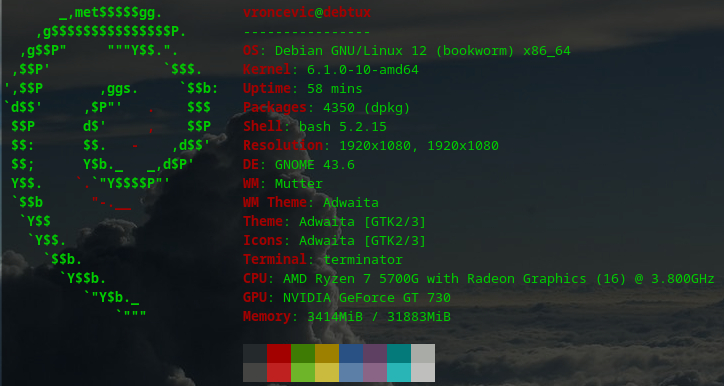

Currently there are three ways to install package
- Install process based on using pip mechanism
- Install process based on build mechanism
- Install process based on setup.py mechanism
- Install process based on docker mechanism
Install using pip
armpicom is located at pypi.org.
You can install by using pip
# python3
pip3 install armpicom
Install using build
Navigate to release page download and extract release archive.
To install armpicom type the following
tar xvzf armpicom-x.y.z.tar.gz
cd armpicom-x.y.z/
# python3
wget https://bootstrap.pypa.io/get-pip.py
python3 get-pip.py
python3 -m pip install --upgrade setuptools
python3 -m pip install --upgrade pip
python3 -m pip install --upgrade build
pip3 install -r requirements.txt
python3 -m build --no-isolation --wheel
pip3 install ./dist/armpicom-*-py3-none-any.whl
rm -f get-pip.py
chmod 755 /usr/local/lib/python3.10/dist-packages/usr/local/bin/armpicom_run.py
ln -s /usr/local/lib/python3.10/dist-packages/usr/local/bin/armpicom_run.py /usr/local/bin/armpicom_run.py
Install using py setup
Navigate to release page download and extract release archive.
To install armpicom locate and run setup.py with arguments
tar xvzf armpicom-x.y.z.tar.gz
cd armpicom-x.y.z
# python3
pip3 install -r requirements.txt
python3 setup.py install_lib
python3 setup.py install_egg_info
Install using docker
You can use Dockerfile to create image/container.
Dependencies
armpicom requires next modules and libraries
Tool structure
armpicom is based on OOP.
Tool structure
Click to expand framework structure
    armpicom/
         ├── armpicom_bundle.py
         ├── engine.py
         ├── infrastructure/
         │   ├── cli.py
         │   ├── cli_bundle.py
         │   ├── config/
         │   │   ├── armpicom.cfg
         │   │   ├── armpicom.logo
         │   │   ├── scheme.json
         │   │   └── templates.tgz
         │   ├── gen_picom_command.py
         │   ├── icli.py
         │   ├── icli_command.py
         │   ├── __init__.py
         │   └── subprocessor.py
         ├── __init__.py
         ├── model/
         │   ├── generate_project.py
         │   └── __init__.py
         ├── py.typed
         └── service/
             ├── engine.py
             ├── __init__.py
             ├── iservice.py
             └── isubprocessor.py

     5 directories, 21 files
Code coverage
Click to expand code coverage
| Name | Stmts | Miss | Cover |
|---|---|---|---|
armpicom/__init__.py |
9 | 0 | 100% |
armpicom/armpicom_bundle.py |
45 | 0 | 100% |
armpicom/engine.py |
77 | 0 | 100% |
armpicom/infrastructure/__init__.py |
8 | 0 | 100% |
armpicom/infrastructure/cli.py |
42 | 0 | 100% |
armpicom/infrastructure/cli_bundle.py |
38 | 0 | 100% |
armpicom/infrastructure/gen_picom_command.py |
34 | 0 | 100% |
armpicom/infrastructure/icli.py |
13 | 0 | 100% |
armpicom/infrastructure/icli_command.py |
16 | 0 | 100% |
armpicom/infrastructure/subprocessor.py |
55 | 0 | 100% |
armpicom/model/__init__.py |
9 | 0 | 100% |
armpicom/model/generate_project.py |
22 | 0 | 100% |
armpicom/service/__init__.py |
9 | 0 | 100% |
armpicom/service/engine.py |
26 | 0 | 100% |
armpicom/service/iservice.py |
13 | 0 | 100% |
armpicom/service/isubprocessor.py |
13 | 0 | 100% |
| Total | 429 | 0 | 100% |
Usage
Install package
pip3 install armpicom
Prepare main entry point by downloading main.py or create your own.
wget -O main.py https://raw.githubusercontent.com/vroncevic/armpicom/main/main.py
Running tool for creating new ARM Pico M project
python3 main.py create --name mytool --output ./demo/
Docs

More documentation and info at
Contributing
Copyright and licence


Copyright (C) 2021 - 2026 by vroncevic.github.io/armpicom
armpicom is free software; you can redistribute it and/or modify it under the same terms as Python itself, either Python version 3.x or, at your option, any later version of Python 3 you may have available.
Lets help and support PSF.

Release history Release notifications | RSS feed

Download files
Download the file for your platform. If you're not sure which to choose, learn more about installing packages.
Source Distribution
Built Distribution
Filter files by name, interpreter, ABI, and platform.
If you're not sure about the file name format, learn more about wheel file names.
Copy a direct link to the current filters
File details
Details for the file armpicom-1.9.6.tar.gz.
File metadata
- Download URL: armpicom-1.9.6.tar.gz
- Upload date:
- Size: 32.5 kB
- Tags: Source
- Uploaded using Trusted Publishing? No
- Uploaded via: twine/6.0.0 CPython/3.12.3
File hashes
| Algorithm | Hash digest | |
|---|---|---|
| SHA256 |
f95f2e25f8e322fc87ef45bbdd79d7485f8819998f92633fcbf18ea95f8e106d
|
|
| MD5 |
eda438cddb68939cf6a662c618445002
|
|
| BLAKE2b-256 |
4123fe4e44c5f2824f2e09165f80368875be8675112365a480706e74d5f55b0c
|
File details
Details for the file armpicom-1.9.6-py3-none-any.whl.
File metadata
- Download URL: armpicom-1.9.6-py3-none-any.whl
- Upload date:
- Size: 43.2 kB
- Tags: Python 3
- Uploaded using Trusted Publishing? No
- Uploaded via: twine/6.0.0 CPython/3.12.3
File hashes
| Algorithm | Hash digest | |
|---|---|---|
| SHA256 |
43eb6c200f766e1dd6e4b66783f38ad72eaee73027725e6fce9947f65ecffc04
|
|
| MD5 |
3a33a7e3af0e249fcac7a73cd1cb7ceb
|
|
| BLAKE2b-256 |
fd89be6eee282a93e33f981922e828a0e67491d9908e4ece293c85b2b8f61715
|






