
The repository or configuration that created this release differ from a previous release. View details.
ARPES viewer



Version 1.2.3 (last modified 30 October 2026) — see
CHANGELOG.md for what changed. The version is in
arpes_viewer/version.py and is shown in the main window's title bar and at its foot,
with a link to this repository for bug reports and the latest version
(https://github.com/DingPei1995/ARPES-viewer). Please quote it when
reporting a bug, and upload the error log with the report (below).
Terms of use. This program is for non-commercial use only (academic research and teaching); any commercial use is not permitted. New and updated loaders cover data from public large-scale facilities (synchrotrons and similar user facilities), formats of individual laboratories' own set-ups can be added by the user him/herself. If you use this program for a paper on ARPES experiments, please cite it in its references: Ding Pei, ARPES viewer, Zenodo, https://doi.org/10.5281/zenodo.23771647 (GitHub's Cite this repository gives the reference in other formats). If you write a paper related to AI that uses this program or its code, please discuss it with the author by e-mail first. For collaborations, or questions about the details, contact ding.pei@synchrotron-soleil.fr.
Licence and authorship. Copyright (c) 2026 Ding Pei. Licensed under the PolyForm Noncommercial License 1.0.0; see also NOTICE. This is the author's personal work, developed from the author's own earlier code; no institution funded it. Some of its ideas were inspired by the ARPES data-processing programs of the author's former group, the Chen Group at the University of Oxford. The requirements, design decisions, trade-offs, physics, the testing on real experimental data and the feedback from it (drawing on Phys. Rev. B 103, 245121 (2021) and Phys. Rev. B 95, 125126 (2017)), and the review and acceptance of every change are Ding Pei's; the implementation was assisted by Claude (Anthropic), credited as co-author in the commits.
A Python/PyQt5 program for ARPES data: browse the measurements of a beamtime, open them in their own windows, convert to momentum, cut, fit, process, compare with a band-structure calculation, and lay the results out as a publication figure.
From raw data to a publication figure -- and an AI agent can drive it
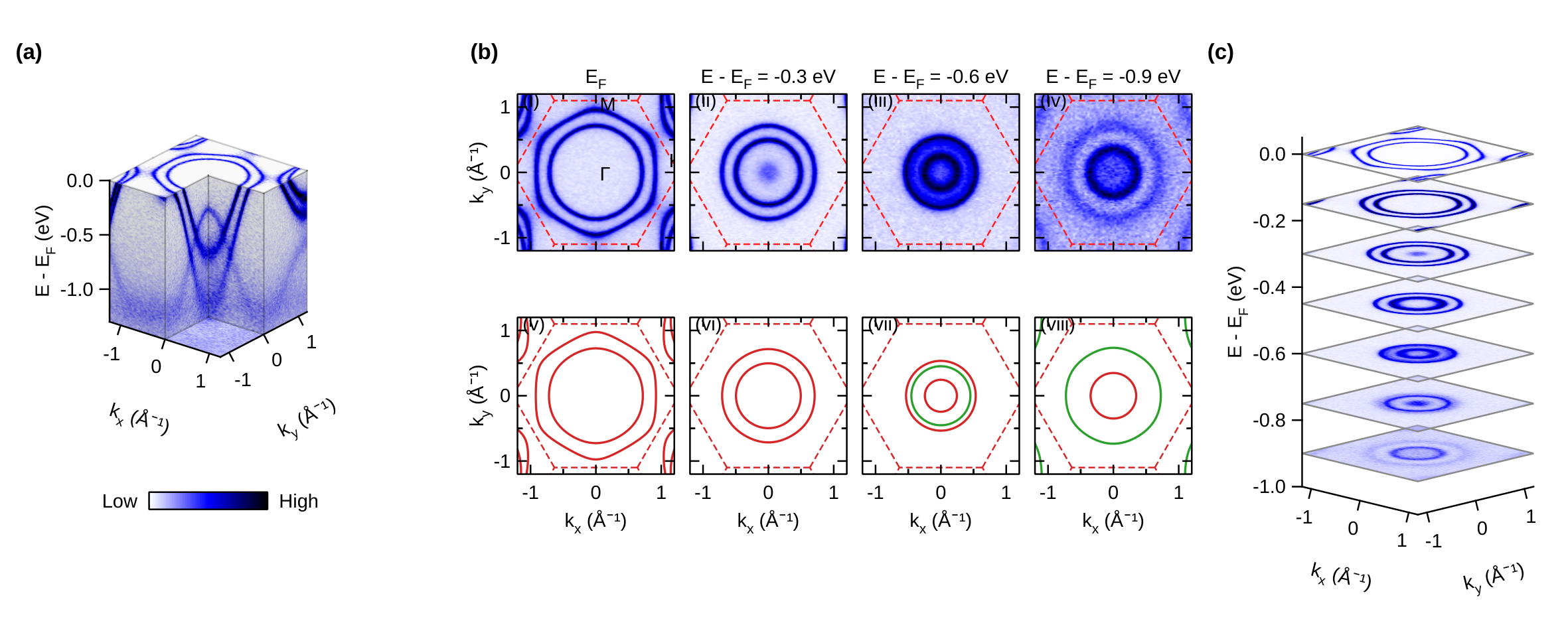
These are not real experimental data. Every panel above is made from the program's synthetic demo data (
devtools/demo_data.py): an invented tight-binding toy model -- a triangular lattice, a = 3.3 Å, stacked with c = 6 Å, a few bands with orbital labels and a k_z dispersion -- turned into spectra with a Fermi-Dirac cut-off, the analyser resolution and Poisson counting noise, and written as beamline files. The "calculation" in panel (b) is the same toy Hamiltonian made deliberately 1/0.8 times wider and 50 meV higher, so that comparing it with the "measurement" has something to find. No published data or literature were used to generate them: the model and its parameters are invented, and names such as "Se-pxy" or "1T-TiSe₂-like" are labels for the toy, not a description of a real material. (The only tabulated values in the demo set are the X-ray line energies of its synthetic EDS spectrum, standard emission energies as listed in the X-ray Data Booklet; that spectrum is not part of this figure.)
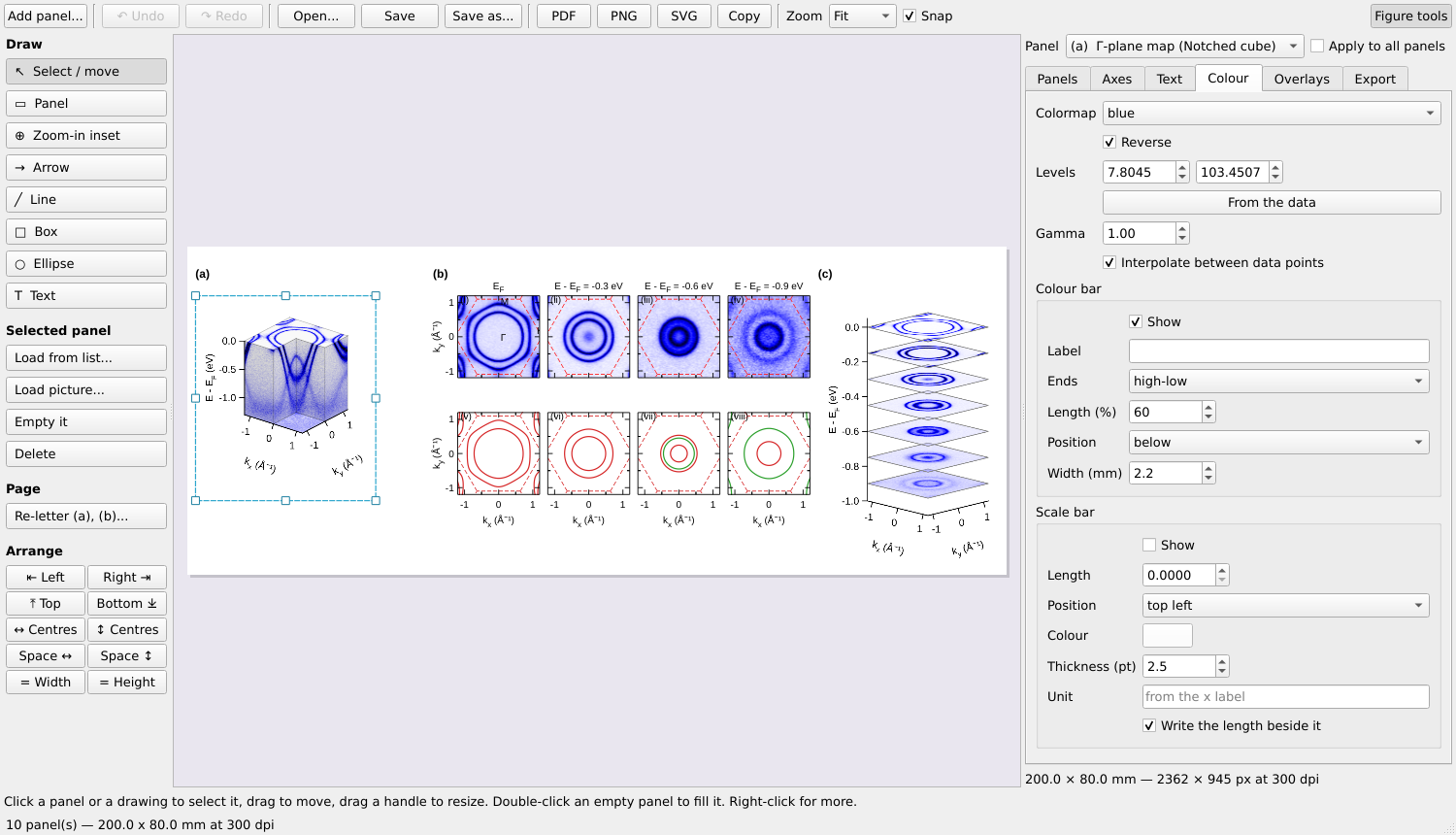
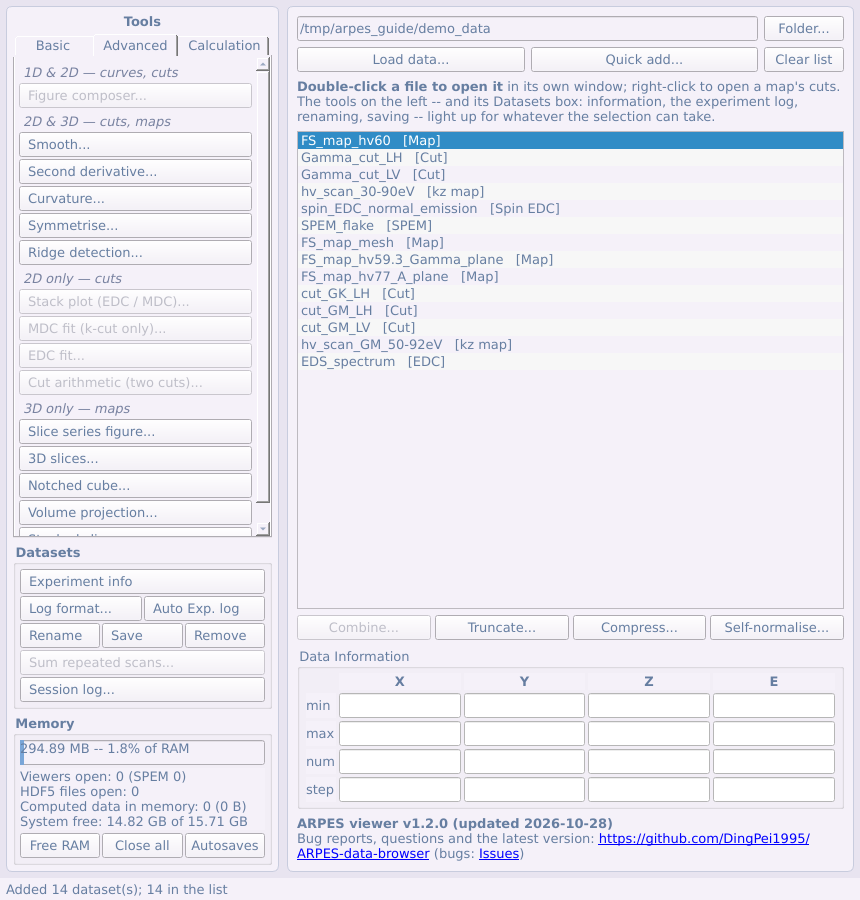
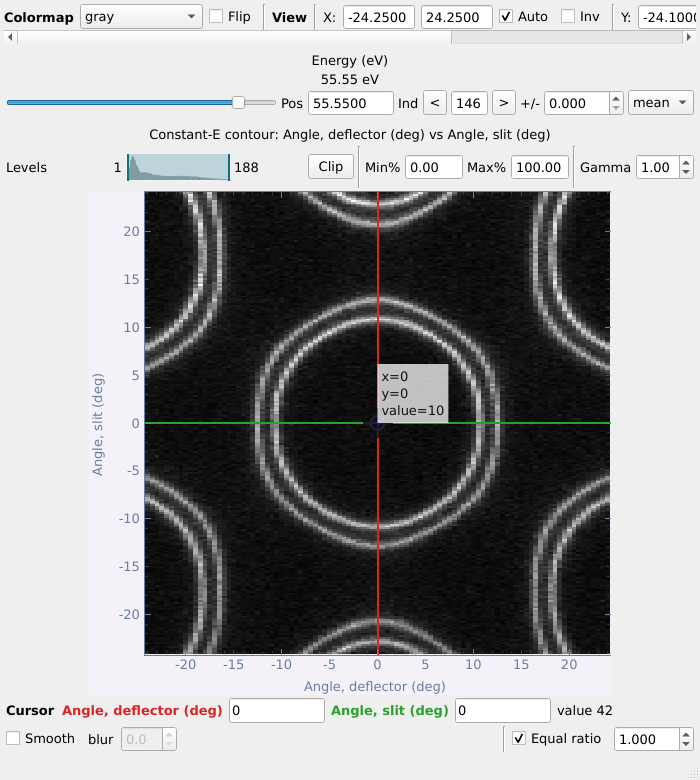
Example figure 1 in the figure composer (top); the main panel and a Fermi-surface map in momentum, in its viewer (bottom) -- also on the synthetic demo data.
Every step from the files to the finished figure is the program's own, and every step is plain Python that a script -- or an AI agent -- can run, without a screen:
| Step | In the program | In code |
|---|---|---|
| 1. Raw data | the beamline files, as the main panel lists them | arpes_viewer.loader.registry.load(path, entry) |
| 2. To momentum | the Γ-plane Fermi-surface map → k-map | arpes_viewer.tools.momentum.kspace.convert_map(...) |
| 3. The calculation | Calculated bands: a Wannier Hamiltonian; Z and the shift fitted on a cut | BandsDialog.open_file(...), .fit_alignment() |
| 4. Measured vs calculated | constant-energy maps over the calculated contours, coloured by orbital weight (b) | BandsDialog.series_panels(...) |
| 5. 3-D views | the notched cube (a), the stacked contours (c) | VolumeWindow(...).figure_panel() |
| 6. The figure | the figure composer: arranged, lettered, exported as PNG / PDF, saved as .afig with the data and the files it came from |
FigureWindow(...), .arrange(...), .write(...) |
devtools/figure_tests.py is exactly this script -- it writes the demo
files, reads them back, and builds this figure (and its companion, example
figure 2) in under a minute:
python devtools/figure_tests.py out_png/ out_afig/
In the step 3 fit it recovers what was built into the demo calculation (Z = 0.798 ± 0.001 and a shift of −49.8 ± 0.4 meV, against 0.8 and −50 meV).
Why an AI agent can drive it. The computations live in arpes_viewer/tools/,
free of any user interface; the windows can run off-screen
(QT_QPA_PLATFORM=offscreen) and be driven call by call as a user drives
them; each step is documented in the user guide
and in the technical references beside the code; and a saved figure records
the data and the original files behind every panel. So a coding agent given
this repository and a folder of data can be asked in plain words -- "convert
the Γ-plane map to momentum, compare it with the Wannier calculation in
calc/, and make a figure like example figure 1, with constant-energy maps
at E_F, −0.3, −0.6 and −0.9 eV" -- write and run the script, look at the
PNG it made, and refine it, through to a figure ready for a manuscript. The
user guide's worked example
does the same by hand, step by step. As with any analysis, check what an
agent produced before you publish it -- and see the terms of use above for
papers related to AI.
What it does
- Reads SOLEIL ANTARES and CASSIOPEE (including whole folders and the spin end station), ALS MAESTRO, ALBA LOREA, Diamond I05 and I05-1, MAX IV Bloch, Elettra APE, BESSY One Cube / One Square, SOLARIS URANOS, ASTRID2 SGM4, and its own saved format (loading data).
- Shows cuts, Fermi-surface maps, photon-energy scans, spatially resolved scans and spin-resolved curves, each in its own window with linked cursors (the viewers).
- Converts maps and cuts to momentum, photon-energy scans to k_z, with the Brillouin zone drawn over them (§13, §14, §15).
- Analyses: Fermi-edge fits, Fermi-surface correction, MDC / EDC fits, ridge detection, curvature and second derivatives, dichroism, core levels, spin, de-gridding, detector corrections (§7–§24).
- Compares with theory: crystal structures, tight-binding fits, and calculated bands from Wien2k, VASP, Quantum ESPRESSO, Wannier90 and the FPLO + Wannier tools -- along a path, as constant-energy contours on any (hkl) plane, or as a 3-D Fermi surface (§25–§27).
- Makes figures: the figure composer, laid out like a manuscript page, exported as PNG, PDF or SVG, and saved with its data (§28–§30).
- Loses nothing: every derived dataset is autosaved, a crash is recovered from, and long steps show a progress bar (§31).
Installing and starting
Needs Python 3.9+. With pip, which installs PyQt5, pyqtgraph, numpy, h5py and scipy with it:
pip install arpes-viewer
arpes-viewer
(python -m arpes_viewer does the same; for the latest, unreleased
version: pip install git+https://github.com/DingPei1995/ARPES-viewer.)
Installed this way, the error logs go to ~/.arpes_viewer/error_logs/.
From a downloaded copy of this repository, with those packages installed:
python ARPES_viewer.py
- Windows: double-click
ARPES viewer.pywin this folder: no console window to close by mistake (the output goes to~/.arpes_viewer/launcher.log). - macOS: double-click
ARPES viewer.appin this folder. It finds a Python that has the packages (conda included), remembers it, and says what to install if none has. The first time, if macOS calls it an app from an unidentified developer: System Settings → Privacy & Security → Open Anyway. - No beamtime at hand?
python devtools/demo_data.pywrites the synthetic demo data above todemo_data/(trying it with demo data).
Bug reports
The program saves what went wrong by itself, in
error_logs/errors_<date>_<time>.txt in its folder (in ~/.arpes_viewer/ when installed with pip), and keeps running. With
a bug report on GitHub Issues,
upload that file (drag it into the text box) or paste its text -- the
main panel's foot has Copy the newest error log and Open the error
logs -- and give the version number.
Documentation
- User guide, with screenshots: English · 中文 · Français; as PDF: English · 中文 · Français.
- Agentic workflow (an AI agent driving the viewer on your own machine, no data uploaded): guide and the
agentic/scripts and recipes. - What changed, and why: CHANGELOG.md.
- Technical references, beside the code they describe -- the formulas,
the file layouts, the assumptions and the tests behind each step:
- Reading data -- every facility's files, the data kinds, adding a beamline, the assumptions the formats force;
- The windows -- the main panel, the viewers, autosave and recovery, long operations;
- Analysis -- what each tool does and what it assumes; the tools ported from the MATLAB programs;
- Momentum conversion -- k conversion, k_z maps;
- Spectra -- core levels, curves, curve fits, spin;
- Processing -- de-gridding, cut arithmetic;
- Figures, export and the experiment log;
- For developers -- the layout of the code, and the
tests (
python -m pytest).
1 maintainer

Metadata
1 maintainer
Release files for arpes-viewer 1.2.3
For a detailed explanation of source distributions (sdists) and built distributions (wheels), please see the package formats documentation.
Change of provenance
The repository or configuration that created these release files differ from that of a previous release.
We recommend inspecting the repository and configuration before proceeding. View details.
Source distribution (sdist)
| File | Size | Uploaded | Provenance | Actions |
|---|---|---|---|---|
| arpes_viewer-1.2.3.tar.gz | 928.3 kB | With provenance | Details for arpes_viewer-1.2.3.tar.gz |
Built distribution (wheel)
| File | Interpreter | ABI | Platform | Actions Reset |
|---|---|---|---|---|
| arpes_viewer-1.2.3-py3-none-any.whl | Python 3 | none | any | Details for arpes_viewer-1.2.3-py3-none-any.whl |
Total release size: 1.9 MB
Release files / arpes_viewer-1.2.3.tar.gz
Change of provenance
This file belongs to a release with changed provenance: the repository or configuration that created the release files differ from that of a previous release.
We recommend inspecting the repository and configuration before proceeding. View details.
| Download URL | arpes_viewer-1.2.3.tar.gz |
|---|---|
| Size | 928.3 kB |
| Tags | Source |
|
SHA-256 checksum How to use checksums |
921b3ef574417bd072fbafd583894e6930205926395c6a84c159f4803d318c18
|
|
BLAKE2b-256 checksum How to use checksums |
c66d0e1a6a695524be6d3659ef0105b9a6b9ff21afca5f43d18193879f306be0
|
| Upload date | |
|
Uploaded using Trusted Publishing? What is trusted publishing? |
Yes |
| Uploaded via |
twine/7.0.0 CPython/3.13.16
|
Provenance
Provenance describes where a file came from. On PyPI, provenance is shared via attestations, which provide a verifiable record of the build or publishing details. View details, limitations and caveats.


PyPI Publish Attestation
PyPI verified that this artifact, at this checksum, originated from the publisher listed below.
Signed by GitHub Actions, verified by PyPI on Oct 30, 2026.
Transparency logRelease files / arpes_viewer-1.2.3-py3-none-any.whl
Change of provenance
This file belongs to a release with changed provenance: the repository or configuration that created the release files differ from that of a previous release.
We recommend inspecting the repository and configuration before proceeding. View details.
| Download URL | arpes_viewer-1.2.3-py3-none-any.whl |
|---|---|
| Size | 995.5 kB |
| Tags | Python 3 |
|
SHA-256 checksum How to use checksums |
2079440e85a939d31041958048e0db13e96f654b79f57db5ea4821f85ecec4dc
|
|
BLAKE2b-256 checksum How to use checksums |
200d9e2dc97eb4d699b698a2b9090b44f1e4c4f061dbacd0cbd17386a50ec8a8
|
| Upload date | |
|
Uploaded using Trusted Publishing? What is trusted publishing? |
Yes |
| Uploaded via |
twine/7.0.0 CPython/3.13.16
|
Provenance
Provenance describes where a file came from. On PyPI, provenance is shared via attestations, which provide a verifiable record of the build or publishing details. View details, limitations and caveats.
PyPI Publish Attestation
PyPI verified that this artifact, at this checksum, originated from the publisher listed below.
Signed by GitHub Actions, verified by PyPI on Oct 30, 2026.
Transparency logSecurity for arpes-viewer 1.2.3
Provenance
Provenance describes where a file came from. On PyPI, provenance is shared via attestations, which provide a verifiable record of the build or publishing details. View details, limitations and caveats.
Change of provenance
The repository and configuration that created this release differ from a previous release.
While this could reflect a routine change by the project maintainers, it may also indicate that the release files have been compromised.
Repository
- Removed 1.2.2 github.com/DingPei1995/ARPES-data-browser
- Added 1.2.3 github.com/DingPei1995/ARPES-viewer
Attestation for arpes_viewer-1.2.3.tar.gz
PyPI Publish Attestation
PyPI verified that this artifact, at this checksum, originated from the publisher listed below.
Signed by GitHub Actions, verified by PyPI on Oct 30, 2026.
Transparency logA note on package security
PyPI is a repository for distributing packages, not a service for auditing them. While third-party security researchers and our staff do their best to detect and remove malicious packages, PyPI cannot guarantee the quality, security or suitability of any given package.
To learn more about protecting yourself from malicious actors, visit our package security documentation.














