
ArrayDebug




ArrayDebug generates human-friendly debug information for array-like objects.
- Free software: MIT license
- Support python 3.6+
Installation
$ pip install arraydebug
Get Started
All you need is to import arraydebug after numpy, torch, pandas, etc.
import numpy as np
import torch
import pandas as pd
...
import arraydebug # import at last
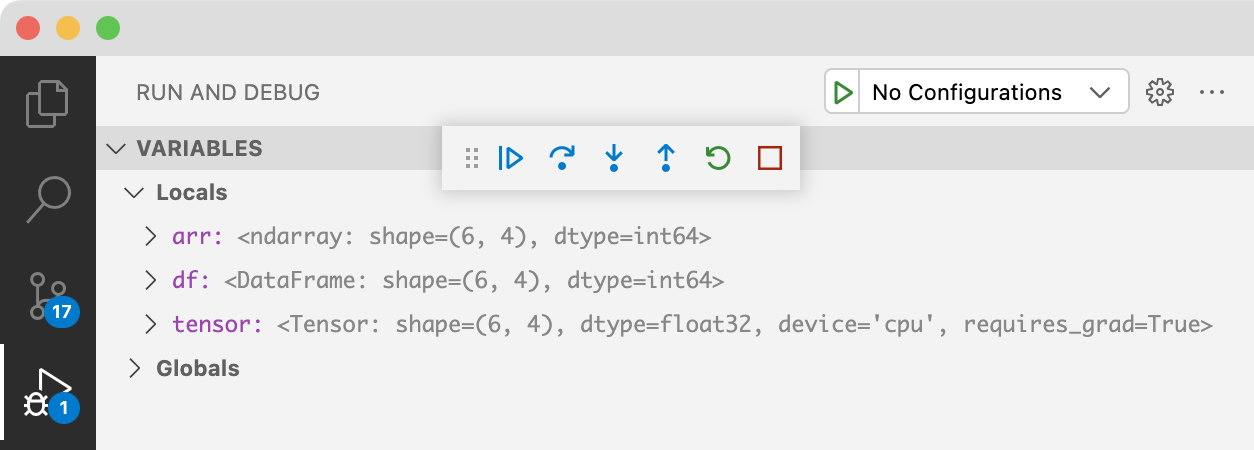
Then you will get information of the array-like object shown in the debugger, like:
<Tensor: shape=(6, 4), dtype=float32, device='cpu', requires_grad=True>
It works with all debuggers which rely on repr function to display variable information.
- VSCode
- IPython
- pdb
- etc.
VSCode
IPython
In [1]: import torch

In [2]: import arraydebug

In [3]: torch.ones(6, 4, requires_grad=True)
Out[3]:
<Tensor: shape=(6, 4), dtype=float32, device='cpu', requires_grad=True>
tensor([[1., 1., 1., 1.],
        [1., 1., 1., 1.],
        [1., 1., 1., 1.],
        [1., 1., 1., 1.],
        [1., 1., 1., 1.],
        [1., 1., 1., 1.]], requires_grad=True)
pdb
$ python -m pdb examples/example.py
...
...
...
(Pdb) tensor
<Tensor: shape=(6, 4), dtype=float32, device='cpu', requires_grad=True>
tensor([[0.0833, 0.2675, 0.4372, 0.5344],
        [0.9977, 0.6844, 0.1404, 0.2646],
        [0.7211, 0.7529, 0.1239, 0.2511],
        [0.1717, 0.6611, 0.6598, 0.9705],
        [0.5230, 0.3439, 0.0459, 0.9937],
        [0.8603, 0.6598, 0.0652, 0.1235]], requires_grad=True)
Usage
Import arraydebug after numpy, torch, pandas, etc.
import torch
import arraydebug # import at last
Then you will get information of the array-like object shown in the debugger, like:
<Tensor: shape=(6, 4), dtype=float32, device='cpu', requires_grad=True>
ArrayDebug searches imported packages for array_like objects, and provides debug information for them. So, it important to import arraydebug after them.
How does it work?
Behind the hood, this is achieved by modifying behavior of repr(). So, all debuggers that relies on repr() will display the debug information.
>>> import torch
>>> import arraydebug
>>> tensor = torch.ones(3, requires_grad=True)
>>> print(repr(tensor))
<Tensor: shape=(3,), dtype=float32, device='cpu', requires_grad=True>
tensor([1., 1., 1.], requires_grad=True)
Enable and disable
To recover the vanilla repr(), you may disable ArrayDebug by disable(),
>>> arraydebug.disable()
>>> print(repr(tensor))
tensor([1., 1., 1.], requires_grad=True)
or enable ArrayDebug again by enable().
>>> arraydebug.enable()
>>> print(repr(tensor))
<Tensor: shape=(3,), dtype=float32, device='cpu', requires_grad=True>
tensor([1., 1., 1.], requires_grad=True)
This is also useful when you import some modules after ArrayDebug, and want to enable ArrayDebug for them:
>>> import arraydebug
>>> import torch
>>> print(repr(torch.ones(3, requires_grad=True)))
<Tensor: shape=(3,), dtype=float32, device='cpu', requires_grad=True>
tensor([1., 1., 1.], requires_grad=True)
Customize
You can register your own debug info by register_repr().
>>> class A:
...     def __init__(self, x):
...         self.x = x
...
>>> info_fn = lambda a: f'<class A object with x={a.x}>'
>>> arraydebug.register_repr(A, info_fn)
>>> print(repr(A(5)))
<class A object with x=5>
Credits
This package was created with Cookiecutter and the audreyr/cookiecutter-pypackage project template.
History
0.1.2 (2022-03-29)
- Allows
array_like.__array__()to throw exceptions.- Now,
array_like_info(obj)degrades to vanillarepr(obj)ifobj.__array__()throws exception. Before, it did nothing, but let caller to handle the exception.
- Now,
- rename
arraydebug.recover_repr()toarraydebug.disable(). - rename
arraydebug.inject_repr()toarraydebug.enable().enable()also refresharraydebug.repr_fn_tablenow.
0.1.0 (2022-03-27)
- First release on PyPI.
- Support numpy.ndarray, torch.Tensor.
- Support objects with
__array__method. - Setup github CI workflow.
1 maintainer

Release files for arraydebug 0.1.2
For a detailed explanation of source distributions (sdists) and built distributions (wheels), please see the package formats documentation.
Source distribution (sdist)
| File | Size | Uploaded | |
|---|---|---|---|
| arraydebug-0.1.2.tar.gz | 83.0 kB | Details |
Built distribution (wheel)
| File | Interpreter | ABI | Platform | Reset |
|---|---|---|---|---|
| arraydebug-0.1.2-py2.py3-none-any.whl | Python 2, Python 3 | none | any | Details |
Total release size: 90.3 kB
Release files / arraydebug-0.1.2.tar.gz
| Download URL | arraydebug-0.1.2.tar.gz |
|---|---|
| Size | 83.0 kB |
| Tags | Source |
|
SHA-256 checksum How to use checksums |
23ddc7a068f9f5020b34d04141b17b09a519fec49d7c925f24e5d7116dc061f6
|
|
BLAKE2b-256 checksum How to use checksums |
82ff718eba30b45af5cfaefb6878f5a578cc2fd583d7fa5175261790414cf317
|
| Upload date | |
|
Uploaded using Trusted Publishing? What is trusted publishing? |
No |
| Uploaded via |
twine/3.8.0 pkginfo/1.8.2 readme-renderer/34.0 requests/2.27.1 requests-toolbelt/0.9.1 urllib3/1.26.9 tqdm/4.63.1 importlib-metadata/4.11.3 keyring/23.5.0 rfc3986/2.0.0 colorama/0.4.4 CPython/3.9.12
|
Release files / arraydebug-0.1.2-py2.py3-none-any.whl
| Download URL | arraydebug-0.1.2-py2.py3-none-any.whl |
|---|---|
| Size | 7.3 kB |
| Tags | Python 2 Python 3 |
|
SHA-256 checksum How to use checksums |
f639d78cd8f7844e62f4603092f19baa024e9e82f9f4ae901b54deccb1e2e436
|
|
BLAKE2b-256 checksum How to use checksums |
3880ad08270ba681b71b55ae0ea482435a3df674d0daaa88dacd851ab12e2bcd
|
| Upload date | |
|
Uploaded using Trusted Publishing? What is trusted publishing? |
No |
| Uploaded via |
twine/3.8.0 pkginfo/1.8.2 readme-renderer/34.0 requests/2.27.1 requests-toolbelt/0.9.1 urllib3/1.26.9 tqdm/4.63.1 importlib-metadata/4.11.3 keyring/23.5.0 rfc3986/2.0.0 colorama/0.4.4 CPython/3.9.12
|














