
articat


Minimal metadata catalog to store and retrieve metadata about data artifacts.
Getting started
At a high level, articat is simply a key-value store. Value being the Artifact metadata. Key a.k.a. "Artifact Spec" being:
- globally unique
id - optional timestamp:
partition - optional arbitrary string:
version
To publish a file system Artifact (FSArtifact):
from articat import FSArtifact
from pathlib import Path
from datetime import date

# Apart from being a metadata containers, Artifact classes have optional
# convenience methods to help in data publishing flow:

with FSArtifact.partitioned("foo", partition=date(1643, 1, 4)) as fsa:
    # To create a new Artifact, always use `with` statement, and
    # either `partitioned` or `versioned` methods. Use:
    # * `partitioned(...)`, for Artifacts with explicit `datetime` partition
    # * `versioned(...)`, for Artifacts with explicit `str` version

    # Next we produce some local data, this could be a Spark job,
    # ML model etc.
    data_path = Path("/tmp/data")
    data_path.write_text("42")

    # Now let's stage that data, temporary and final data directories/buckets
    # are configurable (see below)
    fsa.stage(data_path)

    # Additionally let's provide some description, here we could also
    # save some extra arbitrary metadata like model metrics, hyperparameters etc.
    fsa.metadata.description = "Answer to the Ultimate Question of Life, the Universe, and Everything"
To retrieve the metadata about the Artifact above:
from articat.fs_artifact import FSArtifact
from datetime import date
from pathlib import Path

# To retrieve the metadata, use Artifact object, and `fetch` method:
fsa = FSArtifact.partitioned("foo", partition=date(1643, 1, 4)).fetch()

fsa.id # "foo"
fsa.created # <CREATION-TIMESTAMP>
fsa.partition # <CREATION-TIMESTAMP>
fsa.metadata.description # "Answer to the Ultimate Question of Life, the Universe, and Everything"
fsa.main_dir # Data directory, this is where the data was stored after staging
Path(fsa.joinpath("data")).read_text() # 42
Features
- store and retrieve metadata about your data artifacts
- no long running services (low maintenance)
- data publishing utils builtin
- IO/data format agnostic
- immutable metadata
- development mode
Artifact flavours
Currently available Artifact flavours:
FSArtifact: metadata/utils for files or objects (supports: local FS, GCS, S3 and more)BQArtifact: metadata/utils for BigQuery tablesNotebookArtifact: metadata/utils for Jupyter Notebooks
Development mode
To ease development of Artifacts, articat supports development/dev mode.
Development Artifact can be indicated by dev parameter (preferred), or
_dev prefix in the Artifact id. Dev mode supports:
- overwriting Artifact metadata
- configure separate locations (e.g.
dev_prefixforFSArtifact), with potentially different retention periods etc
Backend
local: mostly for testing/demo, metadata is stored locally (configurable, default:~/.config/articat/local)gcp_datastore: metadata is stored in the Google Cloud Datastore
Configuration
articat configuration can be provided in the API, or configuration files. By default configuration
is loaded from ~/.config/articat/articat.cfg and articat.cfg in current working directory. You
can also point at the configuration file via environment variable ARTICAT_CONFIG.
You use local mode without configuration file. Available options:
[main]
# local or gcp_datastore, default: local
# mode =

# local DB directory, default: ~/.config/articat/local
# local_db_dir =

[fs]
# temporary directory/prefix
# tmp_prefix =
# development data directory/prefix
# dev_prefix =
# production data directory/prefix
# prod_prefix =

[gcp]
# GCP project
# project =

[bq]
# development data BigQuery dataset
# dev_dataset =
# production data BigQuery dataset
# prod_dataset =
Our/example setup
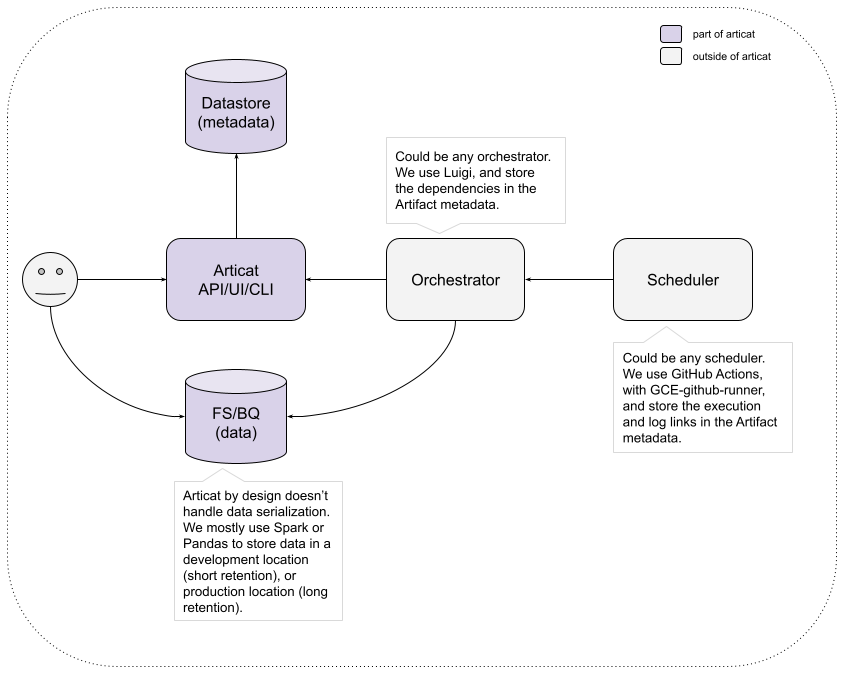
Below you can see a diagram of our setup, Articat is just one piece of our system, and solves a specific problem. This should give you an idea where it might fit into your environment:
1 maintainer

Metadata
1 maintainer
Release files for articat 0.2.0
For a detailed explanation of source distributions (sdists) and built distributions (wheels), please see the package formats documentation.
Source distribution (sdist)
| File | Size | Uploaded | |
|---|---|---|---|
| articat-0.2.0.tar.gz | 43.4 kB | Details |
Built distribution (wheel)
| File | Interpreter | ABI | Platform | Reset |
|---|---|---|---|---|
| articat-0.2.0-py3-none-any.whl | Python 3 | none | any | Details |
Total release size: 95.4 kB
Release files / articat-0.2.0.tar.gz
| Download URL | articat-0.2.0.tar.gz |
|---|---|
| Size | 43.4 kB |
| Tags | Source |
|
SHA-256 checksum How to use checksums |
61ce471cd65e57ed1e77b9d87b0a72922e33860e7a1c9ff41e8a017201b87c9c
|
|
BLAKE2b-256 checksum How to use checksums |
ecd780582120af4b142b406fda29f9bd1f17762e01e5a44f8af5d33776cdb155
|
| Upload date | |
|
Uploaded using Trusted Publishing? What is trusted publishing? |
No |
| Uploaded via |
twine/6.1.0 CPython/3.12.8
|
Release files / articat-0.2.0-py3-none-any.whl
| Download URL | articat-0.2.0-py3-none-any.whl |
|---|---|
| Size | 52.0 kB |
| Tags | Python 3 |
|
SHA-256 checksum How to use checksums |
3a16e5e91413069c8a67d2b0055cf7029663c818784cce5f398f9e2d03fd3733
|
|
BLAKE2b-256 checksum How to use checksums |
65f71fcd347f549c13f3bfc0754c022a2e6542ac67da50b0747b79009d0c82d2
|
| Upload date | |
|
Uploaded using Trusted Publishing? What is trusted publishing? |
No |
| Uploaded via |
twine/6.1.0 CPython/3.12.8
|














