
Artifold


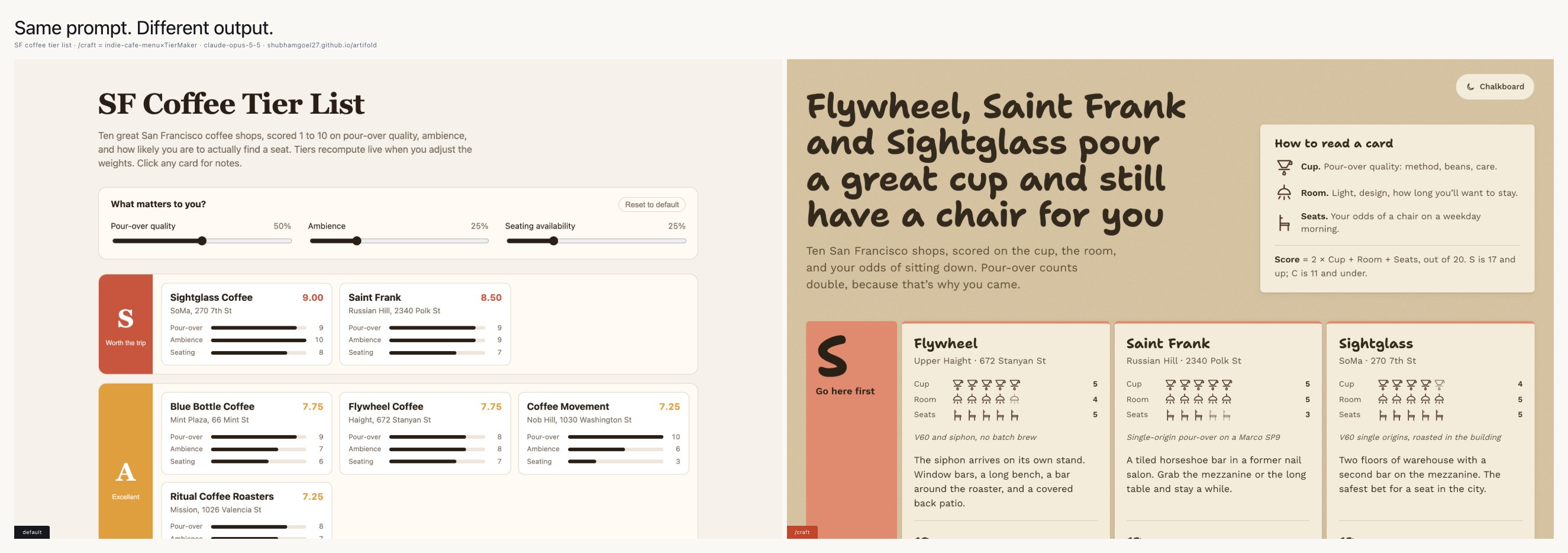
Ask Claude Code for a coffee tier list and you get a tidy page with
sliders, cards and score bars, built from the same parts it uses for
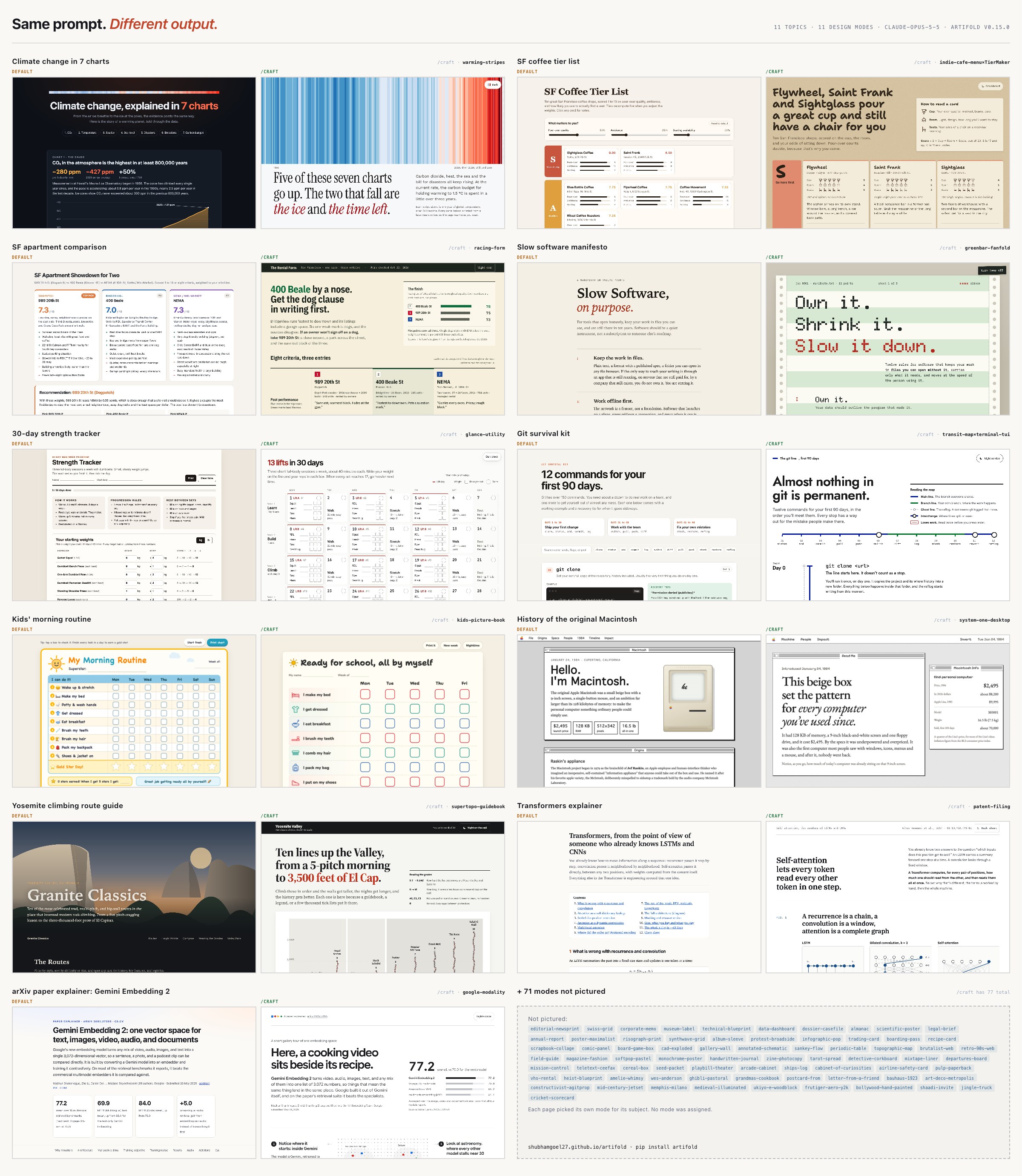
everything. Ask with /craft and it designs for the subject: the one on
the right reads like the menu board in a café.
Then Artifold keeps it. Every HTML page your agent has ever written lives in one local dashboard, where you can search it, see every version, and share it with one click.
Works with Claude Code and Codex.
A designer at Figma, engineers at OpenAI and Meta, and a data engineer at
DoorDash have praised pages made with craft.
Why this exists
I made a 30-day workout tracker for my partner with Claude. A few weeks later I couldn't find it. It was somewhere in a pile of project folders and downloads, so I asked for it again. The new one was worse, and it looked like most AI pages do: a purple gradient and a row of identical cards.
Thariq on the Claude Code team ended up doing the same search by hand:
"I asked Claude Code to read through my code folder and find all the HTML files I've generated, group and categorize them …"
So I built craft for the generic look and the library for the lost
pages. The two share data. Before craft picks a layout, it looks at your
last few pages so it doesn't repeat them. Each page it saves arrives in
the library with a title and a description already filled in.
Making pages: craft
Type /craft a 30-day strength tracker for a beginner in Claude Code, or
$craft ... in Codex, and it:
- decides how much design the job needs. A daily checklist gets clean type and nothing more. A deck or a public page gets its own layout and a font pairing.
- edits the content before styling it: what the reader should remember, what to cut, and what belongs in a table or chart instead of prose
- picks a layout, a visual style and a tone for this subject, plus one detail built for it, such as a custom chart, a running margin note, or progress shown as passport stamps
- checks the page against 15 named AI-design habits (purple gradient hero, identical icon cards, emoji bullets, glass panels, everything centered) and removes them
- renders the page at desktop and phone widths in a headless browser, and fixes what it finds
- saves it to
~/artifold-inbox/, where it shows up in the library within seconds
You can also point it at something you made before: /craft a poker odds explainer, like dobble starts from that page's actual CSS.
Keeping pages: the library
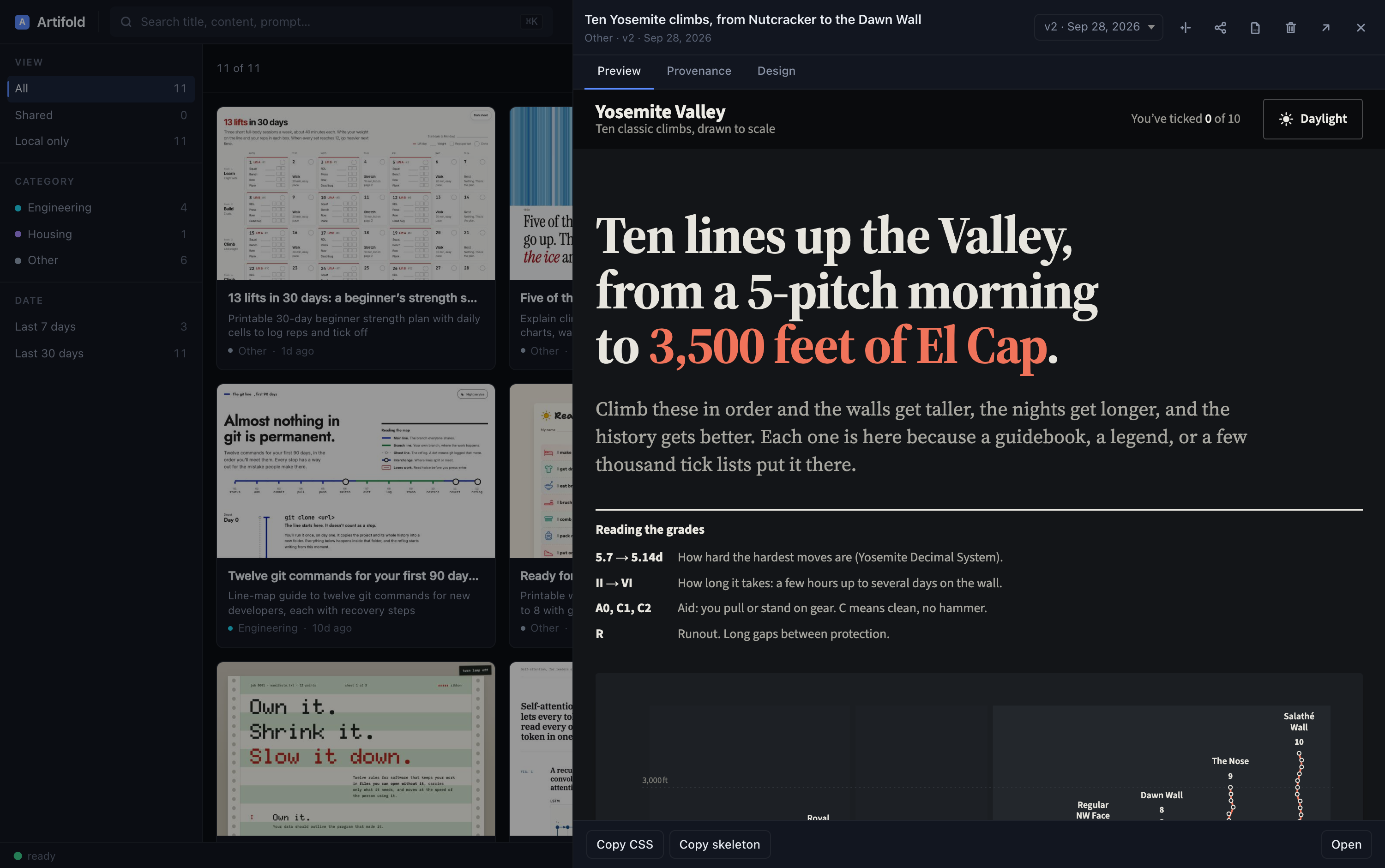
Finds everything
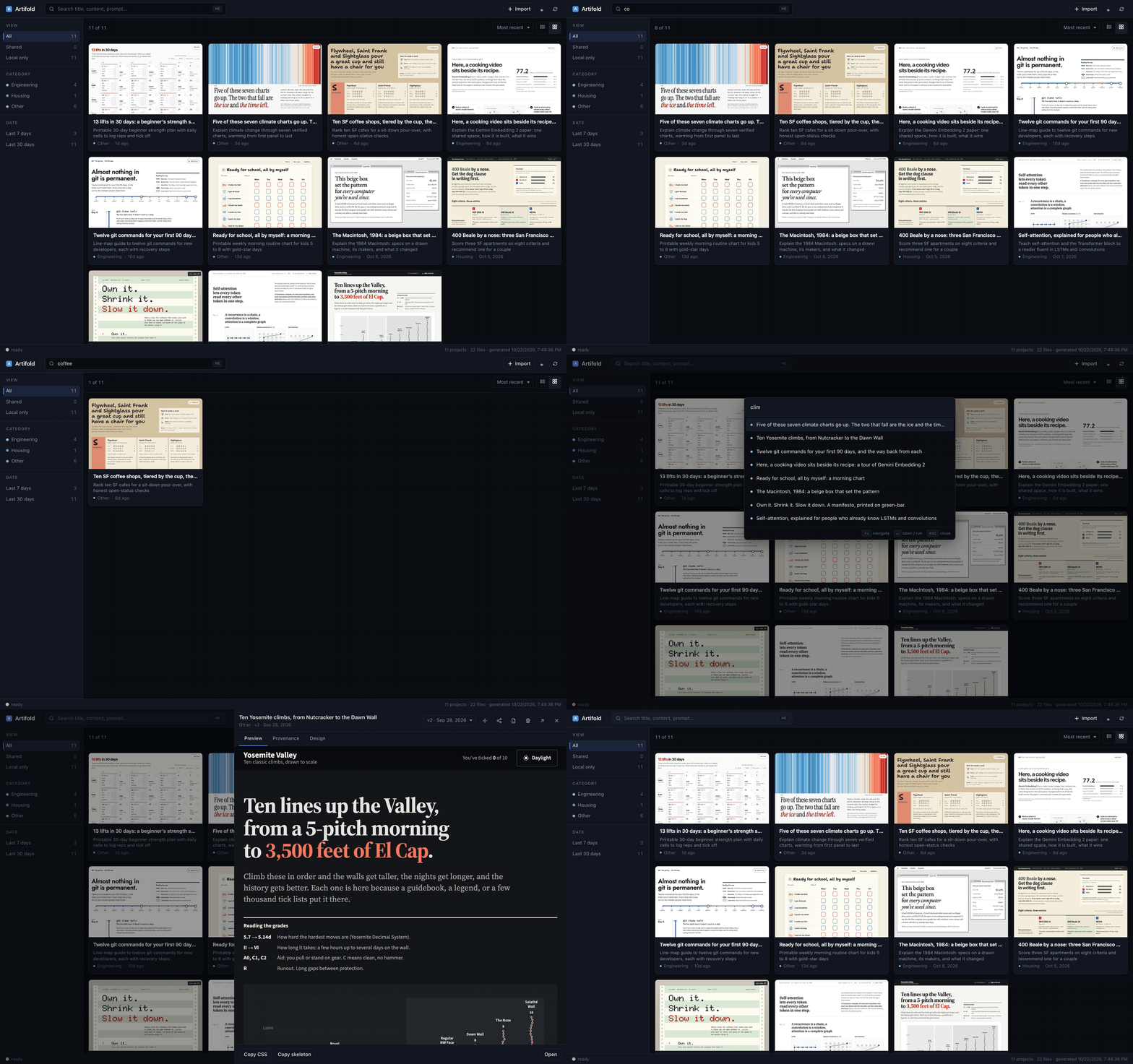
Point it at a few folders and it indexes every HTML file in them. Each
artifact gets a screenshot thumbnail, a category, and a one-line
description of what it is for, so two similar cheat sheets are easy to
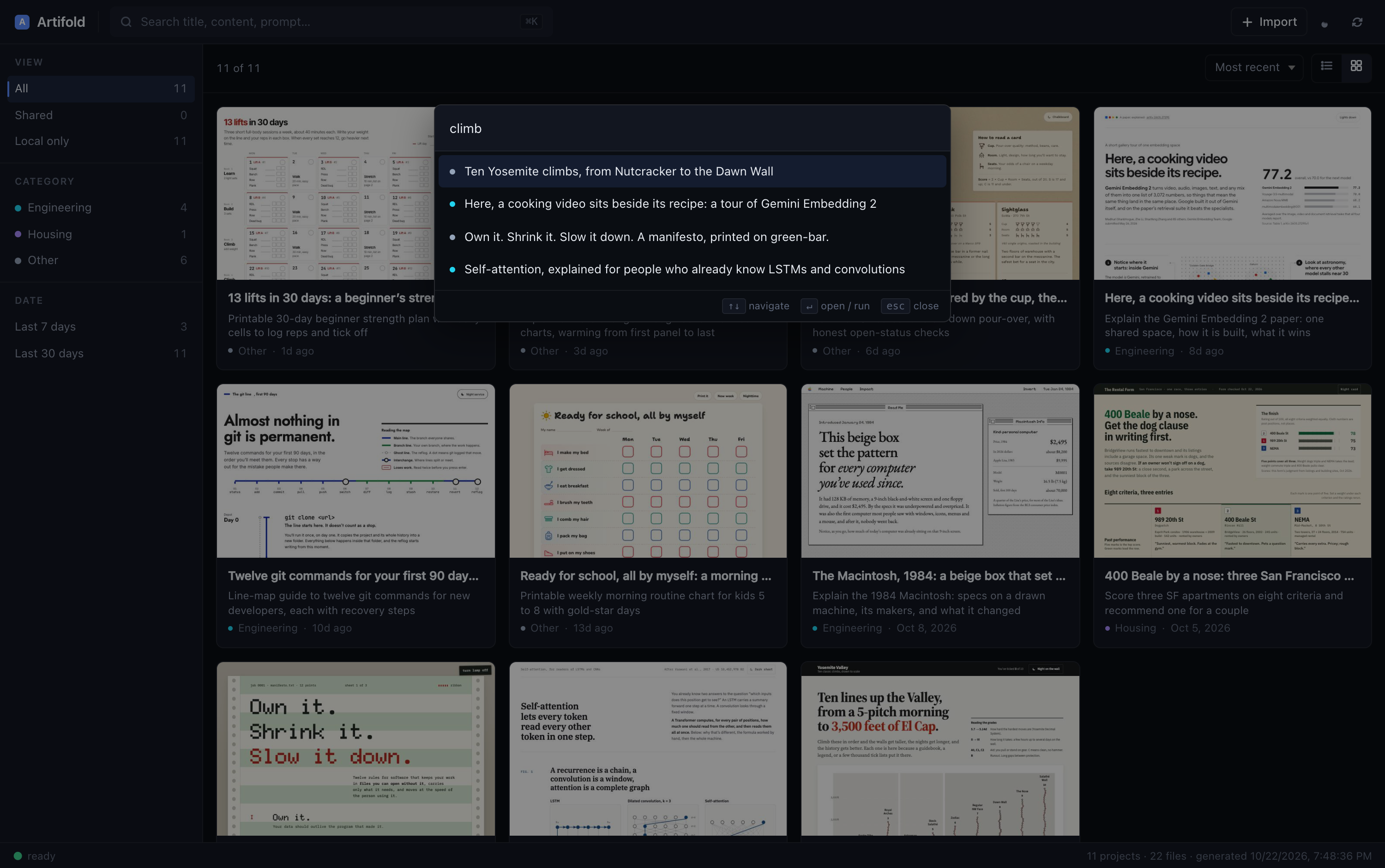
tell apart at a glance. Search covers titles, headings, opening text,
prompts and intents. ⌘K jumps to anything.
It skips node_modules, build output, cloned git repos, server
templates, and anything nested deeper than max_depth (3 by default).
Keeps the history
Files named report-v2.html or report (1).html, or dated copies of the
same page, collapse into one card with a version picker and a diff view.
Pages you edit in place keep a revision history too, and a card shows
how many times you have revised or opened it. "Most used" sorts by that,
so the trackers you open every day stay near the top instead of sinking
under last week's one-offs.
Shares in one click
Click share on any card and, usually within a minute, you get a permanent link
like https://you.github.io/artifold-share/abc12345.html, copied to your
clipboard. It publishes to your own GitHub Pages: free, no expiry, and
the person you send it to needs nothing installed. It uses the
gh CLI, so you need to be logged in to GitHub
there. You can also export any artifact to PDF.
The shared copy gets one small line at the bottom, "Made with craft" or
"Shared with Artifold", linking here. Your own file is not changed. Turn
it off with artifold share --no-credit, or for good with
artifold config share_credit off.
Works with other design skills too
The library indexes any HTML, whatever wrote it: Claude, ChatGPT Canvas, v0, Cursor, or another design skill. What differs is how much it can learn about each page.
| Made with | Artifold knows |
|---|---|
craft |
intent, the layout and style chosen, and the history of those choices |
| Hallmark | layout, theme and brief, read from Hallmark's own stamp and log |
| taste-skill, huashu-design, anything else | palette, fonts, design tokens, page structure, thumbnail, full-text search |
The last row needs nothing from the page and covers most of what the
library does. The first two rows exist because a page can say what it is
in a few lines of <head>. If you build a design skill, that format is
documented in docs/ARTIFACT-METADATA.md, and
nothing in it is specific to Artifold. Skills with their own format are
read through adapters; pull requests for new ones
are welcome.
Run artifold skills to see which of these you have installed.
Stays out of the way
A running artifold serve uses about 30 MB of memory and no CPU while
nothing changes. When a file changes, a rescan of my library (about 300
pages) takes 0.7 seconds, because unchanged files are recognized from
their size and modification time and never reread. While you are iterating on a page, its thumbnail
waits until you stop editing, so a burst of saves launches the headless
browser once instead of once per save.
Install
Everything: let your agent do it
Paste this into Claude Code or Codex:
Just the skill
If you only want better-looking pages and no library, install craft as a
Claude Code plugin. Type this inside Claude Code:
/plugin install craft --marketplace shubhamgoel27/artifold
That needs Claude Code 2.1.275 or later. On older versions, run
/plugin marketplace add shubhamgoel27/artifold, then
/plugin install craft@artifold. Updates come through /plugin as well.
For Codex, copy the skill into ~/.agents/skills/ with one command:
mkdir -p ~/.agents/skills && curl -sL https://github.com/shubhamgoel27/artifold/archive/main.tar.gz \
  | tar -xz -C ~/.agents/skills --strip-components=3 artifold-main/artifold/skills/craft
The skill works without the library. It just can't look at your past
pages, so it has less to go on when it avoids repeating itself. If you
install the library later, the skill starts using it on the next run. In
that case, skip artifold install-skill in Claude Code, or you will have
two copies of /craft.
Everything, by hand
pipx install artifold        # or: pip install artifold
artifold init                # pick folders to watch, install craft
artifold                     # scan, then open the dashboard
No pipx? brew install pipx on a Mac, or python -m pip install --user pipx anywhere. init installs craft for every agent it finds
(~/.claude/skills/ for Claude Code, ~/.agents/skills/ for Codex);
restart your agent once afterwards so it picks up the skill.
The first scan downloads a headless Chromium (about 170 MB) for thumbnails. After that only new or changed pages are captured.
Commands
artifold                     # serve the dashboard and open it
artifold init                # setup wizard
artifold add <dir>           # watch another folder
artifold remove <dir>        # stop watching one
artifold roots               # list watched folders
artifold allow-repo <name>   # include a folder that is its own git repo
artifold scan                # rescan and rebuild the dashboard
artifold serve --no-open     # dashboard with live rescans, no browser tab
artifold open                # open the dashboard
artifold search <words>      # search from the terminal
artifold doctor              # check the setup and say what to fix

artifold share <file>        # publish to your GitHub Pages (--no-credit: no footer line)
artifold share --list        # everything you have shared
artifold share --revoke <id> # take a share down
artifold share --reconcile   # rebuild share records from what is published
artifold export-pdf <file>   # render an artifact to PDF
artifold trash <file>        # move an artifact to the system Trash

artifold import <url>        # save a public share (Claude, ChatGPT, v0, Lovable, …)
artifold link <file> --tool claude --source URL --prompt "..."
artifold info <file>         # show what Artifold knows about a file

artifold designs             # list design fingerprints
artifold designs <id> --template   # a page's CSS and structure, to reuse
artifold skills              # design skills, and what Artifold reads from each
artifold install-skill       # install craft for Claude Code and/or Codex
artifold inbox [topic]       # the path where a new artifact should go
artifold config [key] [value]  # read or change a setting
Settings
artifold config lists them; artifold config <key> <value> changes one.
The file lives at ~/Library/Application Support/artifold/config.json on
macOS and ~/.config/artifold/config.json on Linux:
{
  "roots": ["/Users/me/Downloads", "/Users/me/work"],
  "allow_repos": [],        // folders with their own .git to include anyway
  "max_depth": 3,           // how deep to look inside each watched folder
  "enable_intent": false,   // optional AI descriptions, see below
  "categories": {           // add your own category keywords
    "Research": ["paper", "experiment", "ablation"]
  }
}
Thumbnails, the dashboard and the browser live in
~/Library/Caches/artifold/. Deleting that folder is safe; the next scan
rebuilds it from your files.
Keyboard
| Key | Does |
|---|---|
⌘K / Ctrl+K |
open the palette: search artifacts and run actions |
/ |
focus the search box |
↑ ↓ then ↵ |
pick a result in the palette |
Esc |
close the palette or the preview |
Optional: AI descriptions
Indexing and search work offline, with no AI. Pages made with craft
or Hallmark already describe themselves. For everything else, you can have
Claude Haiku write a one-line description of each artifact:
pipx install 'artifold[intent]'
export ANTHROPIC_API_KEY=sk-ant-...
artifold scan --intent
Each artifact costs under half a cent, and runs once: the result is stored by content, so later scans reuse it until the page changes.
What leaves your machine
Artifold has no hosted service and no account. The dashboard runs on localhost, and the CLI holds no credentials. It reads your files where they are and never moves or rewrites one unless you ask it to.
The only thing that sends an artifact anywhere is artifold share, which
publishes the one artifact you pick to your own GitHub Pages.
Status
Version 0.14, alpha. I use it every day on macOS; Linux should work; Windows is untested. There are 178 tests and CI on Python 3.10 to 3.13. It is a one-person project, so I build what I need first, but issues and pull requests are welcome. If something is confusing, open an issue; one line is enough.
Roadmap
- A dashboard layout that works on a phone
-
artifold adopt <file>to move existing files into the inbox - Cloudflare Pages as a sharing option for people without the
ghCLI - First-class Markdown files
- Search by meaning, for when you remember the gist but not the title
Made by
@shubhamgoel27, because I needed it.
If it's useful to you, a star helps other people find it. If you make
something good with craft, I'd like to see it.
License
MIT
1 maintainer

Metadata
1 maintainer
Release files for artifold 0.15.0
For a detailed explanation of source distributions (sdists) and built distributions (wheels), please see the package formats documentation.
Source distribution (sdist)
| File | Size | Uploaded | Provenance | |
|---|---|---|---|---|
| artifold-0.15.0.tar.gz | 139.7 kB | Without provenance | Details |
Built distribution (wheel)
| File | Interpreter | ABI | Platform | Reset |
|---|---|---|---|---|
| artifold-0.15.0-py3-none-any.whl | Python 3 | none | any | Details |
Total release size: 297.3 kB
Release files / artifold-0.15.0.tar.gz
| Download URL | artifold-0.15.0.tar.gz |
|---|---|
| Size | 139.7 kB |
| Tags | Source |
|
SHA-256 checksum How to use checksums |
4f0344d79cd4695b026cc5096ec5b61fde6c50ab6ec1a737666835b1f4e2b16d
|
|
BLAKE2b-256 checksum How to use checksums |
979598f5ef59d19ea90e4645afe7afc2701e59e326675a83cd76ebfe74f1acbb
|
| Upload date | |
|
Uploaded using Trusted Publishing? What is trusted publishing? |
No |
| Uploaded via |
uv/0.5.14
|
Release files / artifold-0.15.0-py3-none-any.whl
| Download URL | artifold-0.15.0-py3-none-any.whl |
|---|---|
| Size | 157.7 kB |
| Tags | Python 3 |
|
SHA-256 checksum How to use checksums |
478de78d2941c50b61b974d64a581087ca6bd82d96667b92141aa97290b567d2
|
|
BLAKE2b-256 checksum How to use checksums |
4130bd62121faa27a451b8a234f0a17d7cd3d5765e7dd4b4310028c7d50d0821
|
| Upload date | |
|
Uploaded using Trusted Publishing? What is trusted publishing? |
No |
| Uploaded via |
uv/0.5.14
|
Security for artifold 0.15.0
Provenance
Provenance describes where a file came from. On PyPI, provenance is shared via attestations, which provide a verifiable record of the build or publishing details. View details, limitations and caveats.
No provenance found
None of the files in this release were uploaded with provenance metadata.
A note on package security
PyPI is a repository for distributing packages, not a service for auditing them. While third-party security researchers and our staff do their best to detect and remove malicious packages, PyPI cannot guarantee the quality, security or suitability of any given package.














