
artikeep
Never lose what your AI agents make.
English · Русский





Agents publish pages, canvases and documents to places you don't control: a hosted artifact link, a chat you can lose access to, a temp folder that gets cleaned. artikeep keeps a copy of each one on your disk the moment it is made. Every change becomes a version, a gallery lets you browse and compare versions, and an MCP server lets any agent search what you already have.
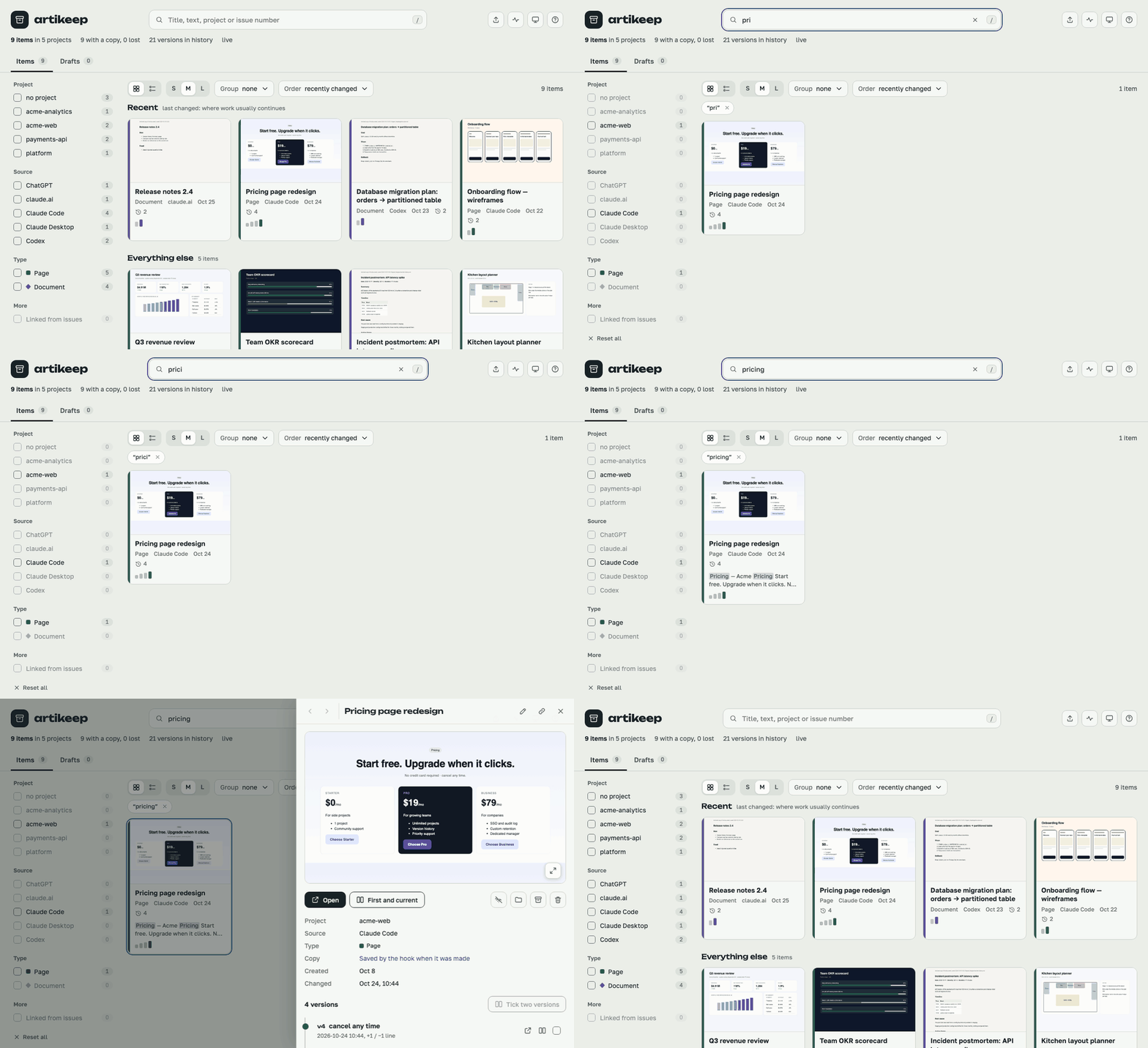
- Automatic where it can be. Hooks in Claude Code and Codex capture without the model having to remember anything.
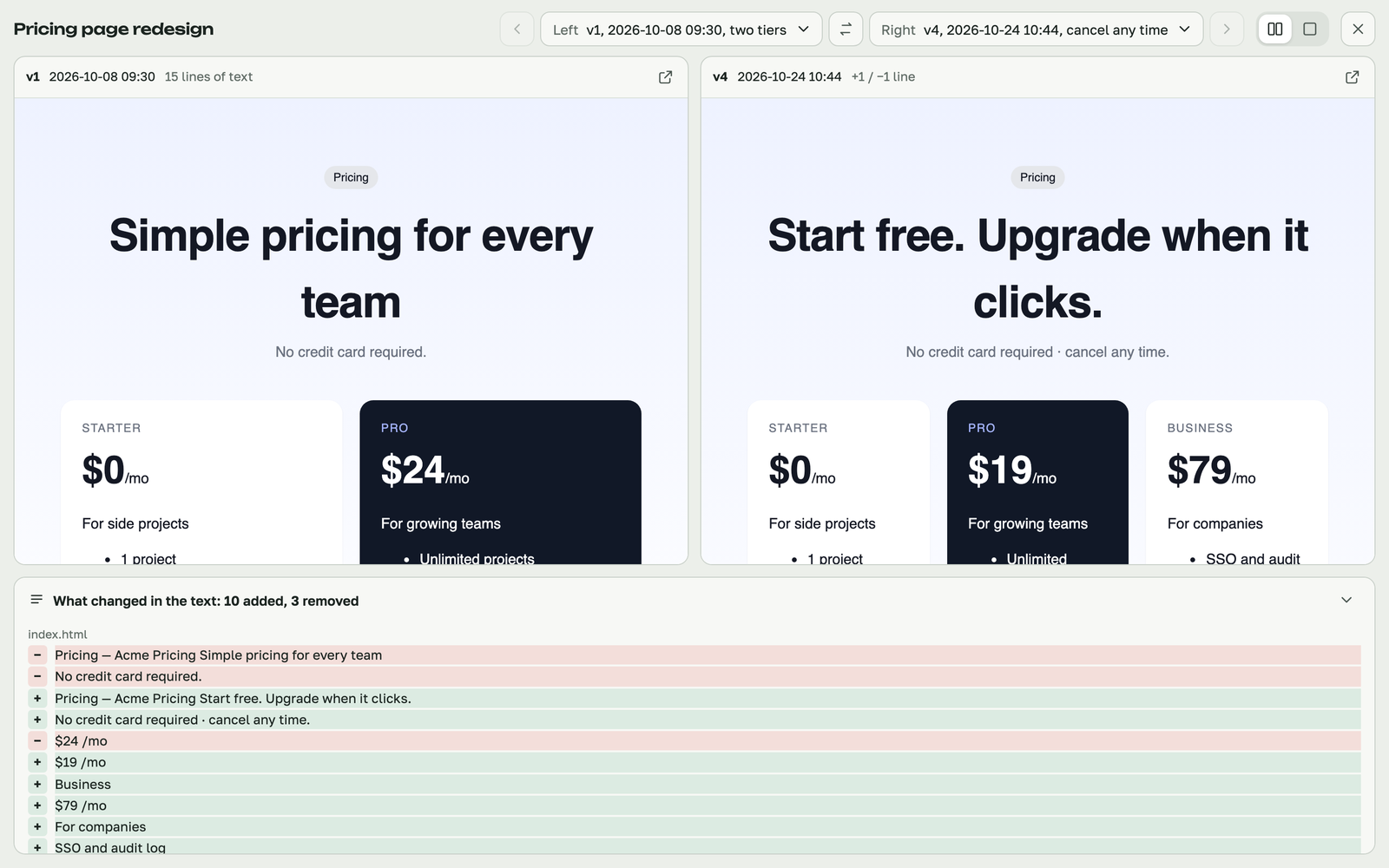
- Every change is a version. Compare any two side by side, with the changed text lines.
- Plain files, in git. The archive is a folder of HTML, Markdown and JSON. It opens without artikeep, and syncs between machines through a private git remote.
- Agents can look it up. Before rebuilding a report from scratch, an agent searches the archive through MCP.
- No dependencies. Python 3.9+ standard library. Nothing to
pip installfor capture.
Quick start
uv tool install git+https://github.com/aquahitt/artikeep   # or: pipx install git+https://github.com/aquahitt/artikeep
artikeep init ~/artikeep        # the archive folder (a git repo)
artikeep install                # hooks + MCP for the agents found
artikeep doctor                 # check
From now on, whatever Claude Code or Codex makes lands in ~/artikeep. Open the
gallery with artikeep open, or artikeep serve --open for the local app.
No package manager? A clone works as is, with no install step:
git clone https://github.com/aquahitt/artikeep ~/artikeep-src, then
python3 ~/artikeep-src/bin/artikeep init ~/artikeep and so on.
Claude Code only? Use the plugin instead of install:
/plugin marketplace add aquahitt/artikeep, then /plugin install artikeep@artikeep
(details below).
What gets captured
| Source | How | What |
|---|---|---|
| Claude Code | hooks, automatic | pages published with the Artifact tool (with all their files), Claude Design canvases, Claude Docs documents (exported tab by tab), unpublished pages in the session scratchpad |
| Codex | hooks, automatic | documents a session writes that git does not keep — reports, pages, tables in temp folders, untracked or ignored files — plus the session's visualizations |
| Claude Desktop chat | MCP, on request | ask Claude to save what it made; the chat has no hooks, so this is the only live way in (the Code tab of Desktop is Claude Code and is captured automatically) |
| ChatGPT | artikeep import chatgpt <export.zip> |
canvas documents, with every edit replayed as a version |
| claude.ai | artikeep import claude-ai <export.zip> |
artifacts from chats, with every update as a version; React components open as live pages, offline too |
| Anything else | artikeep add <file or folder>, or the MCP save_artifact tool |
whatever you point it at |
Files git already tracks are skipped: they are safe where they are.
The gallery
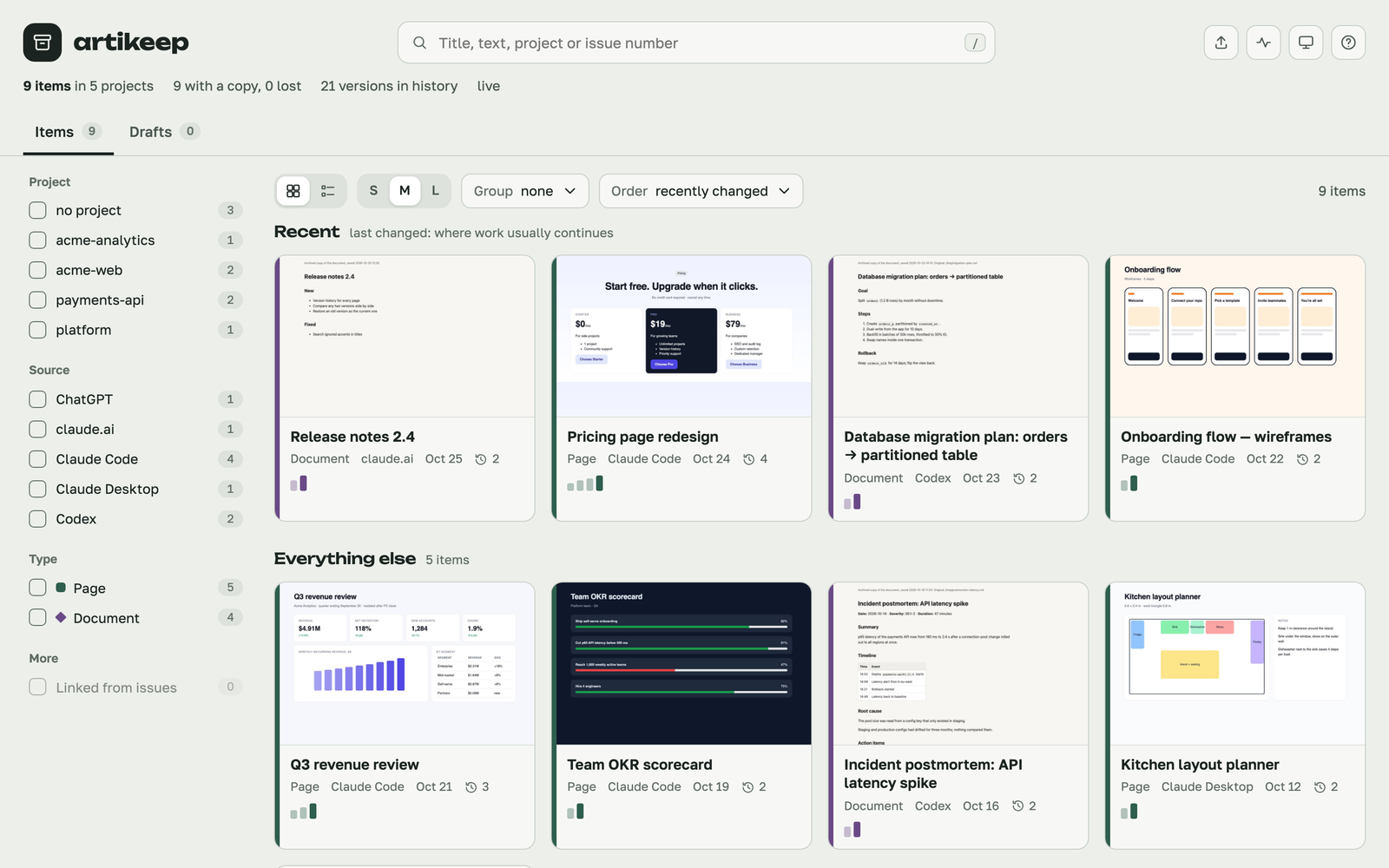
index.html at the archive root: a static page that works from disk. Grid or list,
filters (project, source, type, how the copy was made), groups, full-text search,
a panel per item with its version history, side-by-side comparison of any two versions
with the changed text lines. Light and dark, English and Russian, usable on a phone.
|
|
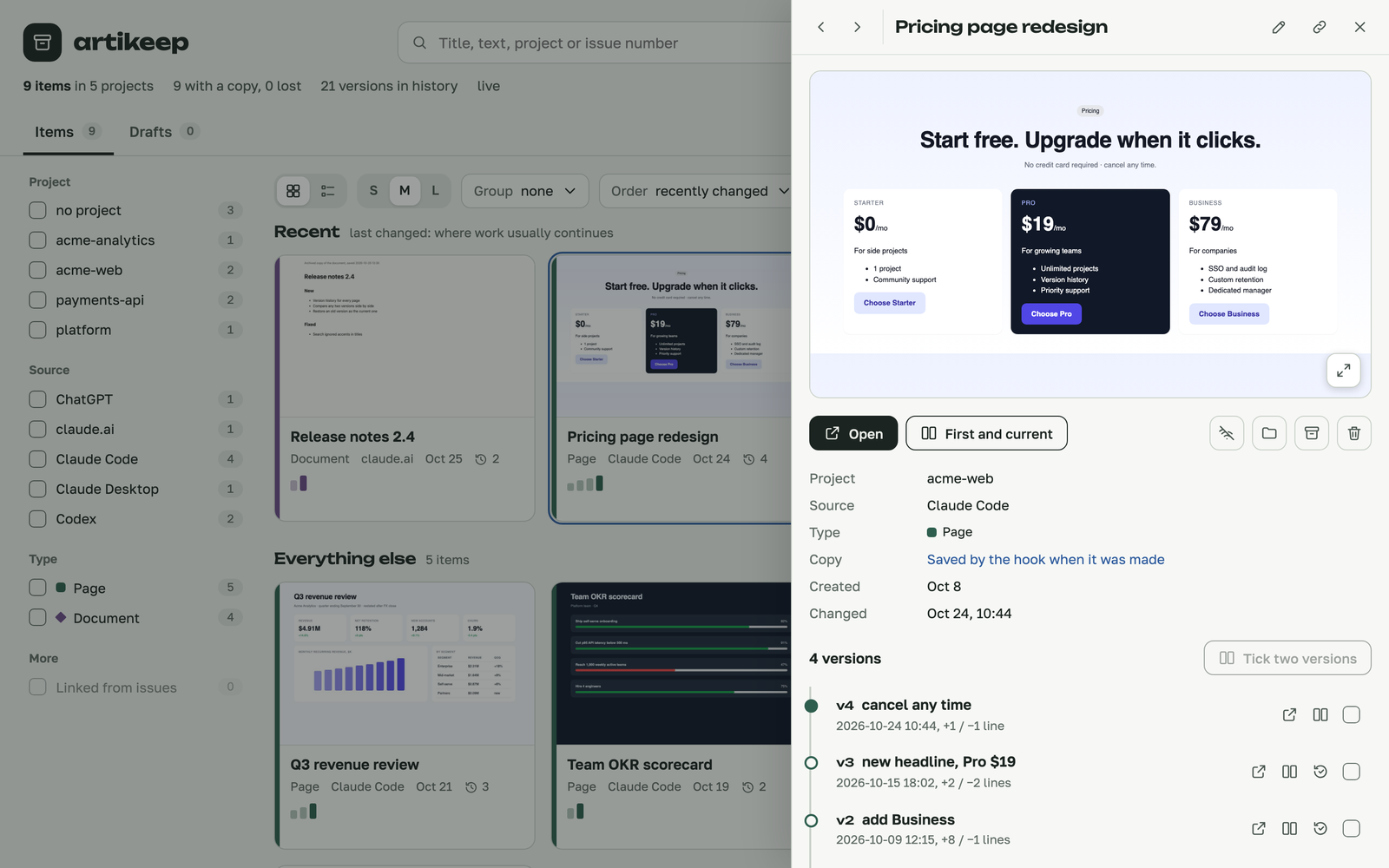
| Every save that changes something is a version, with its time, label and size of change. | Compare any two versions: both pages live, plus what changed in the text. |
 |
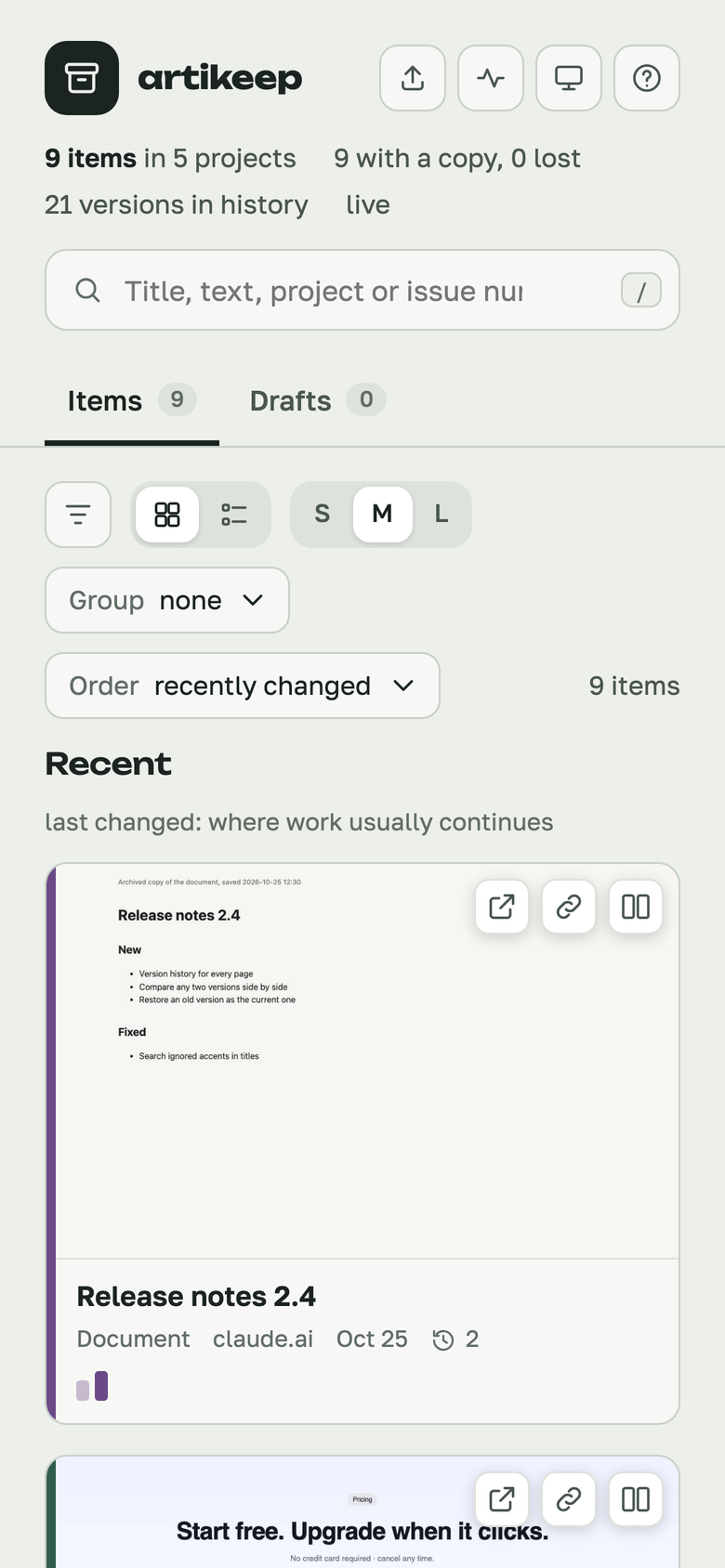 |
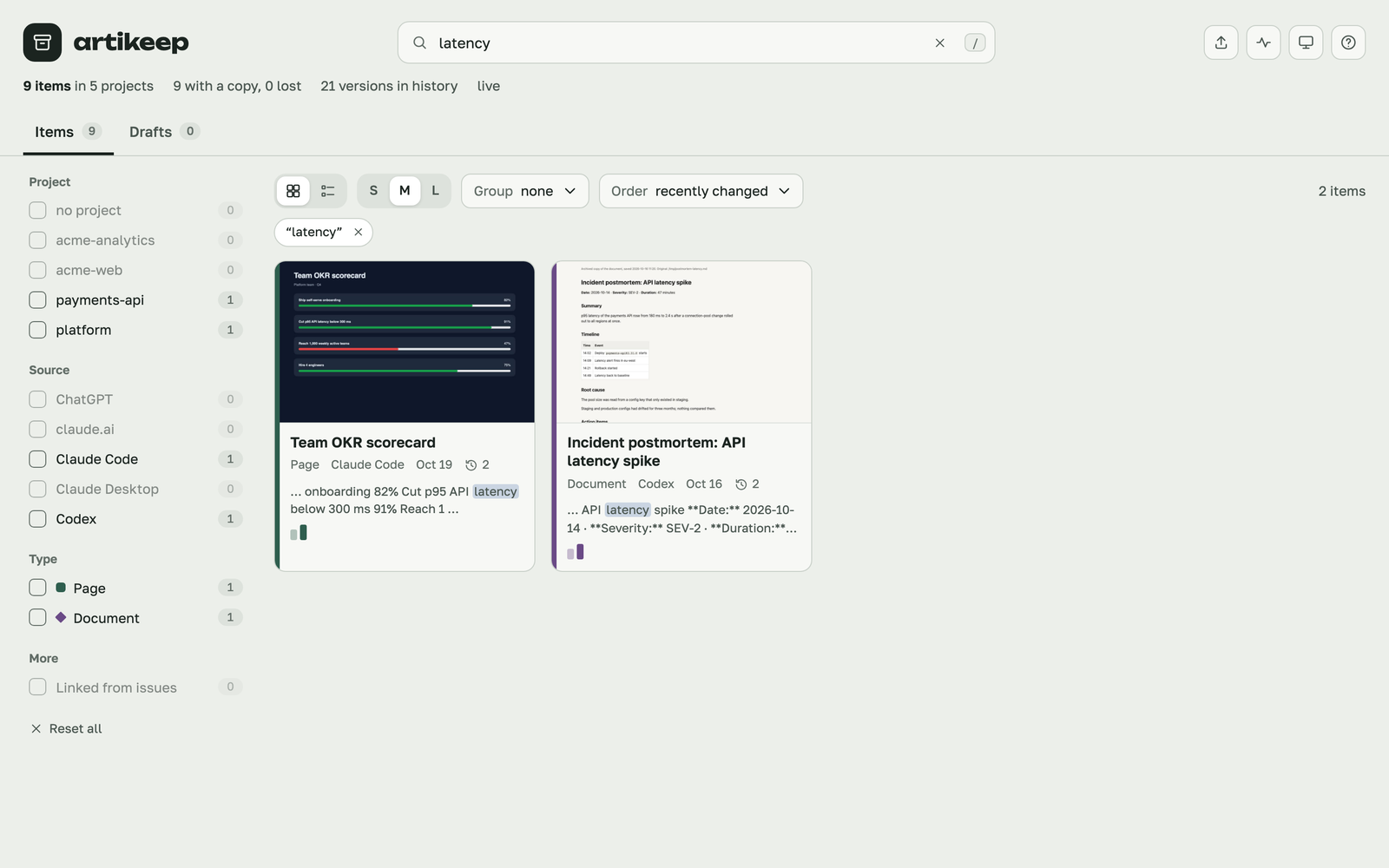
| Full-text search across every item and source, in any language. | Works on a phone too. |
Keyboard: / search, G / L grid or list, ← → previous and next item, C compare
first and current versions, Esc close, ? all shortcuts.
As a local app
artikeep serve runs the gallery on http://127.0.0.1:8765 (archived files on the next
port; --port changes both). On top of the file version it searches the full text of every
item and highlights the match, updates by itself when an agent saves something, lets you
rename and describe an item, make an old version current (as a new version: nothing is
overwritten), delete an item (it stays in the archive's git history), show it in Finder, and
add files or chat exports by dropping them on the page. Pages that load their own files with
fetch() or ES modules, which browsers refuse over file://, work here. In Chrome, "Install
as app" gives it its own window and dock icon.
When capturing fails, artikeep also says so on the desktop (macOS notification, or
notify-send on Linux), at most once an hour per kind of failure; "notify": false turns it off.
Install, in detail
install finds Claude Code (~/.claude), Codex (~/.codex) and Claude Desktop, adds its
hooks next to yours (nothing else is touched; every edited file is backed up first),
registers the MCP server with each agent's own mcp add (for Desktop, in
claude_desktop_config.json; reopen Desktop after), and puts a short rules block into
~/.claude/CLAUDE.md and ~/.codex/AGENTS.md. If ~/.local/bin is on your PATH, it also
links the artikeep command there. --agents claude-code,codex,claude-desktop limits it,
--dry-run shows the changes, --uninstall removes them.
To sync across machines, give the archive a private remote:
artikeep init ~/artikeep --remote git@github.com:you/my-artifacts.git. The background
pass commits after each capture and pushes.
Claude Code deletes session transcripts after 30 days by default. install raises
cleanupPeriodDays to ten years: transcripts are the last place a lost artifact can be
recovered from.
Claude Code plugin
Instead of install, Claude Code users can add the plugin:
/plugin marketplace add aquahitt/artikeep, then /plugin install artikeep@artikeep.
It brings the same hooks and MCP server; Codex still needs artikeep install --agents codex.
Use one or the other for Claude Code, not both (artikeep doctor flags it). The plugin
keeps copies in ~/artikeep from the first artifact on; run artikeep init (with
--remote if you want sync) to give that folder git history, and set
"cleanupPeriodDays": 3650 in ~/.claude/settings.json yourself — a plugin cannot change
it, and doctor reminds you.
Use
artikeep open                      # the gallery as a file: filters, versions, compare
artikeep serve --open              # the same gallery as a local app
artikeep search kitchen layout     # full-text, any language; --agent, --type, --project, --json
artikeep add ~/Downloads/report.pdf --title "Q3 report"
artikeep import chatgpt ~/Downloads/chatgpt-export.zip
artikeep scan codex --all          # archive deliverables from past Codex sessions
artikeep scan claude-code          # recover publishes missed in the last 30 days (--days N, --all)
artikeep rebuild                   # rebuild gallery and search index, commit and push
(artikeep here is the command uv tool or pipx installed, the one install linked into
~/.local/bin for a clone, or python3 <clone>/bin/artikeep.)
From any agent, through MCP:
| Tool | Does |
|---|---|
search_artifacts |
find items by words, source, type |
read_artifact |
metadata, file list and text of an item or one of its versions |
list_versions |
versions with time, label and size of change |
diff_versions |
changed text lines between two versions |
save_artifact |
keep a page or document (off unless --mcp-save) |
By default an agent sees only items made in the repository it works in. See SECURITY.md for why, and how to widen it.
Settings
The archive is ~/artikeep unless artikeep init <path> chose another folder (remembered in
~/.config/artikeep/config.json) or $ARTIKEEP_HOME is set. Behaviour lives in
artikeep.json at the archive root, so it travels with the archive:
| Key | Default | Does |
|---|---|---|
git_push |
true |
push to the archive's remote after each commit |
thumbnails |
"auto" |
gallery thumbnails, if Playwright is importable by python3; "off" disables |
issue_links |
true |
link items to GitHub issues that mention them (needs gh), once a day |
lang |
"auto" |
gallery and hook messages: "en", "ru", or follow the browser / locale |
notify |
true |
desktop notification when capturing fails |
mcp_scope |
"project" |
"all" lets agents see every project's items |
mcp_save |
false |
let agents save through MCP |
codex_extensions |
.html .htm .svg .md .pdf .docx .pptx .xlsx .csv |
which files a Codex session made count as deliverables |
How it works
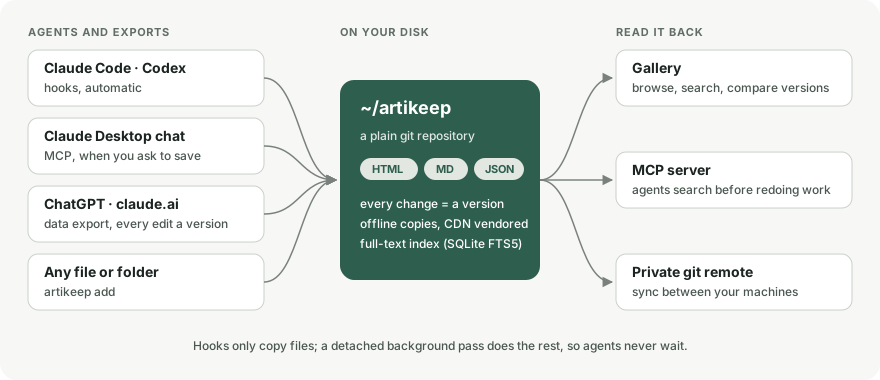
Hooks only copy files and start a detached background pass, so an agent never waits on disk or network. The background pass renders viewers (Design canvases, Markdown documents, React components with the libraries claude.ai artifacts may import: React, Tailwind, recharts, lucide-react, lodash, d3, mathjs, PapaParse, SheetJS, three, Tone, Chart.js, and stand-ins for shadcn/ui), makes offline copies with CDN scripts and fonts vendored, updates the search index (SQLite FTS5) and the gallery, then commits and pushes. The on-disk layout is specified in FORMAT.md; any tool can write into it.
Limits, honestly
- macOS and Linux. Windows is not supported (file locking uses
fcntl). - Host formats are undocumented. The hook inputs of Claude Code's
Artifacttool, Codex rollouts and the Claude Docs export can change with any release. artikeep logs every raw hook input to.hooklog/payloads.jsonl, and on session start checks recent transcripts for publishes it missed and archives them late.artikeep doctorshows when each source last saved something. - Importers are checked against documented shapes and synthetic exports, not yet against many real ones. Anything they do not recognise is counted and reported, not guessed. Please open an issue with an anonymised sample if an import comes out wrong.
- Codex has no artifact tool. artikeep recognises deliverables by extension, by being outside git, and by being named in the final answer. A file a script wrote and the answer never mentioned is missed.
- Web chats are not captured live. ChatGPT and claude.ai come in through their data exports, which you request by hand.
Development
python3 -m unittest discover -s tests -t .     # the test suite, no dependencies
scripts/e2e-codex.sh                           # live check of the Codex adapter: one real Codex request
scripts/readme-media/make.sh                   # rebuild the README screenshots and GIF
The screenshots come from a synthetic archive (scripts/readme-media/seed.py), not from
anyone's real one; rebuilding them needs Playwright with Chromium and Pillow.
License
MIT. Changes are listed in CHANGELOG.md.
1 maintainer

Metadata
1 maintainer
Release files for artikeep 0.2.0
For a detailed explanation of source distributions (sdists) and built distributions (wheels), please see the package formats documentation.
Source distribution (sdist)
| File | Size | Uploaded | Provenance | Actions |
|---|---|---|---|---|
| artikeep-0.2.0.tar.gz | 101.0 kB | With provenance | Details for artikeep-0.2.0.tar.gz |
Built distribution (wheel)
| File | Interpreter | ABI | Platform | Actions Reset |
|---|---|---|---|---|
| artikeep-0.2.0-py3-none-any.whl | Python 3 | none | any | Details for artikeep-0.2.0-py3-none-any.whl |
Total release size: 198.2 kB
Release files / artikeep-0.2.0.tar.gz
| Download URL | artikeep-0.2.0.tar.gz |
|---|---|
| Size | 101.0 kB |
| Tags | Source |
|
SHA-256 checksum How to use checksums |
85e323cfd26892722aa634ae47ac92959fc038ef8229c1b60ae52691bf0487d1
|
|
BLAKE2b-256 checksum How to use checksums |
ade735938bc54a856b7695ffff4fde1dad5b526de0c7d1f2ac9a86d3d01f4466
|
| Upload date | |
|
Uploaded using Trusted Publishing? What is trusted publishing? |
Yes |
| Uploaded via |
twine/7.0.0 CPython/3.13.16
|
Provenance
Provenance describes where a file came from. On PyPI, provenance is shared via attestations, which provide a verifiable record of the build or publishing details. View details, limitations and caveats.


PyPI Publish Attestation
PyPI verified that this artifact, at this checksum, originated from the publisher listed below.
Signed by GitHub Actions, verified by PyPI on Oct 25, 2026.
Transparency logRelease files / artikeep-0.2.0-py3-none-any.whl
| Download URL | artikeep-0.2.0-py3-none-any.whl |
|---|---|
| Size | 97.2 kB |
| Tags | Python 3 |
|
SHA-256 checksum How to use checksums |
b178a9e3871489d72f5ac113ffa07eb0529ca7501577f5690b4566bf24decd3a
|
|
BLAKE2b-256 checksum How to use checksums |
c66d41a46be364d6890f95ef7a182e87f86e25f44deb88aa7151f95d91b5cc97
|
| Upload date | |
|
Uploaded using Trusted Publishing? What is trusted publishing? |
Yes |
| Uploaded via |
twine/7.0.0 CPython/3.13.16
|
Provenance
Provenance describes where a file came from. On PyPI, provenance is shared via attestations, which provide a verifiable record of the build or publishing details. View details, limitations and caveats.
PyPI Publish Attestation
PyPI verified that this artifact, at this checksum, originated from the publisher listed below.
Signed by GitHub Actions, verified by PyPI on Oct 25, 2026.
Transparency logSecurity for artikeep 0.2.0
Provenance
Provenance describes where a file came from. On PyPI, provenance is shared via attestations, which provide a verifiable record of the build or publishing details. View details, limitations and caveats.
Full provenance
All 2 files in this release have been uploaded with provenance metadata.
Attestation for artikeep-0.2.0.tar.gz
PyPI Publish Attestation
PyPI verified that this artifact, at this checksum, originated from the publisher listed below.
Signed by GitHub Actions, verified by PyPI on Oct 25, 2026.
Transparency logA note on package security
PyPI is a repository for distributing packages, not a service for auditing them. While third-party security researchers and our staff do their best to detect and remove malicious packages, PyPI cannot guarantee the quality, security or suitability of any given package.
To learn more about protecting yourself from malicious actors, visit our package security documentation.













