
artistools





Artistools is collection of plotting, analysis, and file format conversion tools for the ARTIS radiative transfer code.
Installation
Requires Python >= 3.13. A free-threaded Python requires version 3.15 or later, e.g. Python 3.15t.
The artistools command can be invoked with uvx artistools (after installing uv), installed globally with uv tool install artistools, or installed into your environment with pip install artistools.
Development (editable installation)
For development, you will need a rust compiler and a clone of the repository:
git clone https://github.com/artis-mcrt/artistools.git
cd artistools
To make a uv virtual environment in the clone, with the development tools, run:
uv sync --all-extras
uv run -- prek install
uv run -- artistools then runs the command of the clone. To make the artistools command available outside the clone, also run uv tool install --editable .[extras].
Alternatively, to avoid uv and install into the system environment with pip:
pip install --group dev --editable .[extras]
prek install
To enable tab completion, run artistools completions. The command detects your shell and gives the
steps for it.
Citing artistools
If you use artistools for a paper or a presentation, please cite it. For details, see https://zenodo.org/badge/latestdoi/53433932.
Usage
Run "artistools" (or the short alias "at") at the command-line to get a full list of subcommands, and "artistools --version" to check the installed version. Some common commands are:
- artistools plotspectra (alias: at spec)
- artistools plotlightcurves (alias: at lc)
- artistools plotestimators (alias: at estimators)
- artistools plotnltepops
- artistools inputmodel describe
Use the -h option to get a list of command-line arguments for each subcommand. Set ARTISTOOLS_TRACEBACK=1 to get the full traceback of an error. Run a command in a model folder, or give the path of the model folder. A command that reads a model takes the model path with -modelpath, e.g. artistools timesteps -modelpath mymodel. Most of these commands also take the model path as the last positional argument, e.g. artistools plotspectra -t 300 mymodel.
A model on a different host
These commands accept a model path of the form host:path, where host is a name that ssh knows:
- plotestimators and its
--interactiveviewer; - plotlightcurves and its
--interactiveviewer; - plotspectra and its
--interactiveviewer; at.scan_estimatorsin a Python script.
artistools plotspectra -t 300 vae26:~/scratch/mymodel
The rule of rsync decides whether a path is remote: a colon before the first slash makes a remote path. A local folder with such a colon in its name needs "./" at the start, e.g. ./model:2.
artistools starts the server on that host through ssh, and it prints the command and the reason for it. A release of artistools starts uvx artistools@<version> server, with the versions of the local artistools and polars. Thus the host needs only uv.
The server and the client must have the same server protocol, which is a number. It changes when a reader changes its arguments or its results, or when the format of a message changes. A clone with the server protocol of the release also starts the release. A clone with a different server protocol starts its git commit with uvx. The host then also needs git and Rust. The host cannot get a commit that is only in the clone, thus such a commit must have the server protocol of the release.
The server protocol does not change when the code of a reader changes. Thus a release on the host can give a different result from the clone. If the package files of the clone differ from the release, artistools prints a warning with the number of these files and the name of one file. The warning also gives the command that starts the git commit on the host.
The command sets POLARS_MAX_THREADS=16, because a login node can have hundreds of cores, and other users share them. The server reads the files and makes the data of each plot, e.g. it puts the packets into bins. Only the data to draw comes back, and the parquet caches stay beside the data on the host. A script sends the filter and the columns of each query to the host, and only the rows of the query come back.
An option that reads its files on the local host stops with an error. To start the server with a different command on the host, e.g. an artistools in a clone, set ARTISTOOLS_REMOTE_COMMAND:
export ARTISTOOLS_REMOTE_COMMAND='POLARS_MAX_THREADS=16 ~/artistools/.venv/bin/artistools server'
The environment of such a command must have the same version of polars as the client. The filter of a query goes to the host as a polars expression, and the format of an expression changes between two versions. If the versions differ, the client stops with an error that gives the uvx option.
Use from Python
artistools is mainly a set of commands, but a script or a notebook can call the same functions. import artistools as at gives a small set of names at the top level. Each package holds the other names, e.g. at.spectra and at.inputmodel.
from pathlib import Path

import artistools as at
import polars as pl

modelpath = Path("mymodel")
dfmodel, modelmeta = at.get_modeldata(modelpath)
times_days = at.get_timestep_times(modelpath, loc="mid")
dftemperature = at.scan_estimators(modelpath).filter(pl.col("timestep") == 40).select("modelgridindex", "Te").collect()
dfspectrum = at.spectra.get_spectra(modelpath, timestepmin=40, timestepmax=45)[-1].collect()
A function with the prefix scan_ returns a polars LazyFrame, or one LazyFrame for each direction bin, and reads nothing until .collect(). A function with the prefix read_ reads at once. A function with the prefix get_ can do either, and the tables below say which one returns a LazyFrame. The direction bin -1 is the average over all directions.
Names at the top level
| Name | Purpose |
|---|---|
at.get_modeldata |
Read model.txt. Return the cells as a LazyFrame, and the model parameters as a dictionary. |
at.add_derived_cols_to_modeldata |
Add columns that follow from the model file, e.g. the volume and the mass of each cell. |
at.get_inputparams |
Return the parameters of input.txt. |
at.get_model_name |
Return the name of the model that holds a path. |
at.get_nprocs |
Return the number of MPI processes of the run. |
at.get_timestep_times |
Return the time in days of each timestep (loc is "start", "mid", "end", or "delta"). |
at.get_timestep_of_timedays |
Return the timestep that holds a time in days. |
at.scan_estimators |
Read the estimators of a full run as a LazyFrame, with a row for each timestep and cell. |
at.get_deposition |
Return deposition.out as a LazyFrame. |
at.get_composition_data |
Return the elements and the ion stages of compositiondata.txt as a DataFrame. |
at.get_ionstring |
Return a text such as Fe II for an atomic number and an ion stage. |
at.get_ion_tuple |
Return (26, 2) for a text such as FeII, Fe II, or 26_2. |
at.get_elsymbol |
Return the element symbol of an atomic number. |
at.get_atomic_number |
Return the atomic number of an element symbol. |
at.get_z_a_nucname |
Return the atomic number and the mass number of a text such as Pb208. |
at.decode_roman_numeral |
Return the integer of a Roman numeral. |
at.get_path |
Return a known path by name, e.g. the package folder. |
at.firstexisting |
Return the first file of a list that exists, with a compressed copy as an alternative. |
at.zopen |
Open a file, or its .zst, .gz, or .xz copy. |
Main readers in the packages
| Name | Purpose |
|---|---|
at.estimators.read_estimators |
Read the estimators of a few cells into a dictionary. This is slow for many cells, thus prefer at.scan_estimators. |
at.spectra.get_spectra |
Return a dictionary with a LazyFrame of the spectrum of each direction bin, as an average over a range of timesteps. |
at.spectra.get_from_packets |
Return a dictionary with a LazyFrame of the spectrum of each direction bin from the packets files, for a range of arrival times. |
at.lightcurve.scan_lightcurve |
Read a light curve file. Return one LazyFrame for each direction bin. |
at.lightcurve.get_from_packets |
Return a dictionary with a LazyFrame of the luminosity against time of each direction bin, from the packets files. |
at.packets.get_packets |
Return the number of ranks and a LazyFrame of the packets of a run. |
at.nltepops.read_nltepops |
Read the NLTE populations of a timestep and of one or more cells. |
at.atomic.get_levels |
Return the energy levels of each ion, with the transitions as an option. |
at.inputmodel.save_modeldata |
Write model.txt.zst from a dataframe of the cells. |
at.plottools.set_mpl_style |
Apply the matplotlib style of artistools. |
The command of a package
A package that has a plot command gives it as plot, e.g. at.spectra.plot, at.lightcurve.plot, at.estimators.plot, at.nltepops.plot, at.packets.plot, at.nonthermal.plot, and at.gsinetwork.plot. This function is the command itself. Each keyword is one command-line argument, and argsraw gives more arguments as text, e.g. argsraw=["-t", "300"]:
at.spectra.plot(argsraw=[], specpath=[modelpath], timedays="300", outputfile="spectrum.pdf")
Example output
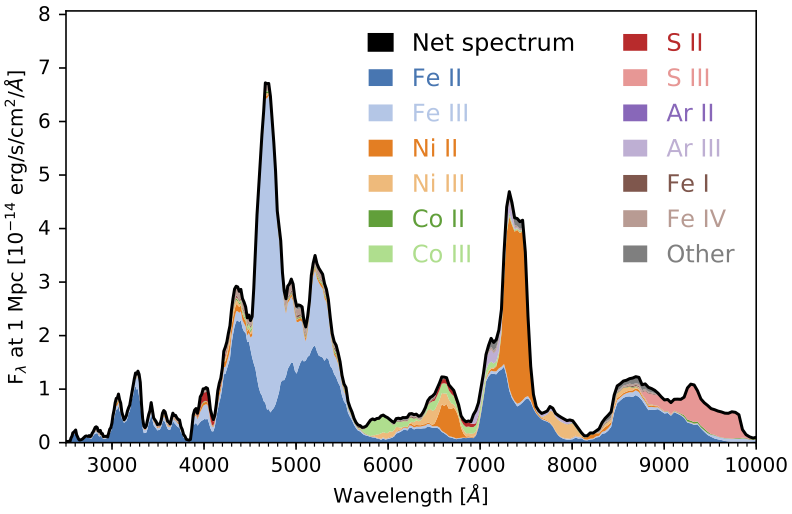
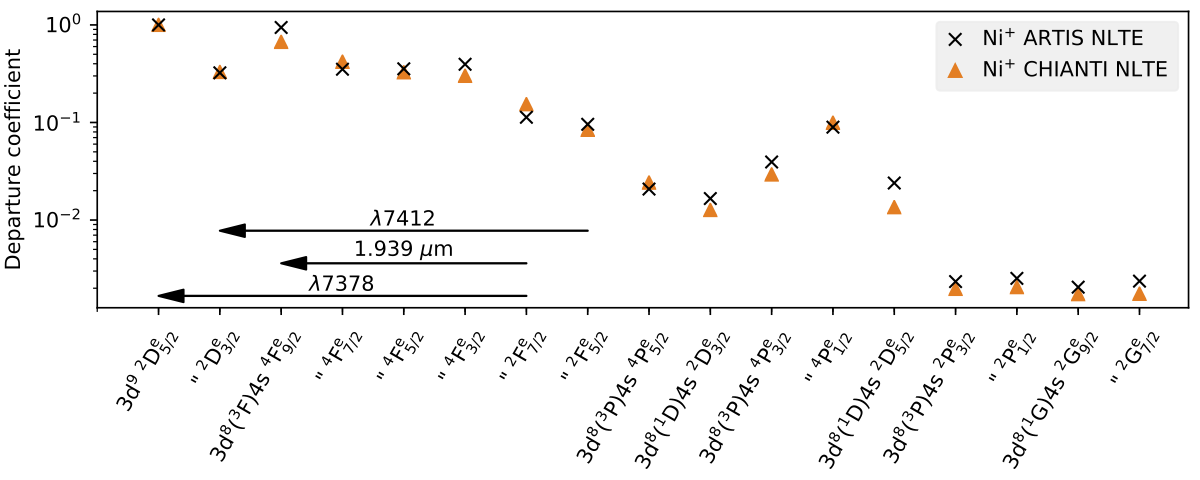
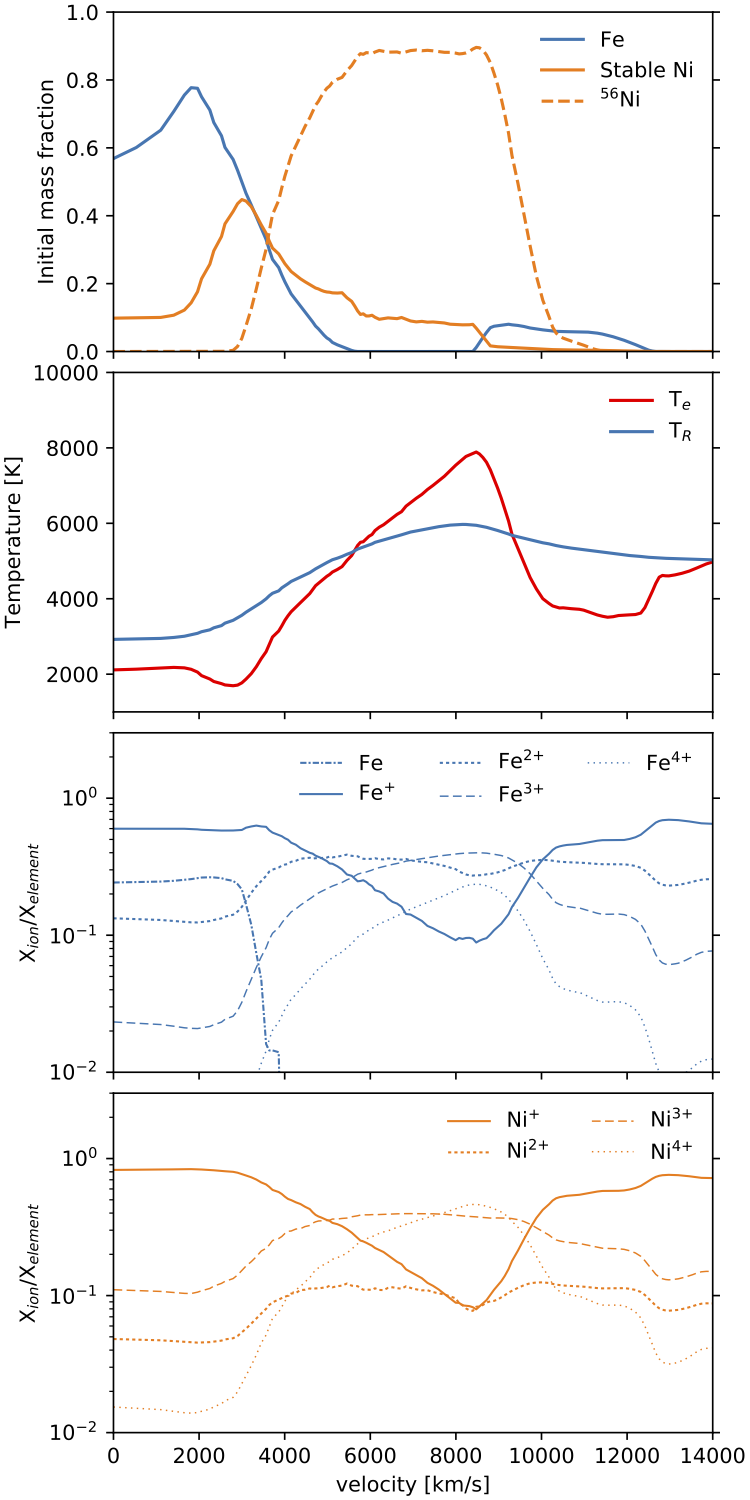
License
Distributed under the MIT license. See LICENSE for more information.
1 maintainer

Metadata
1 maintainer
Release files for artistools 2026.10.15
For a detailed explanation of source distributions (sdists) and built distributions (wheels), please see the package formats documentation.
Source distribution (sdist)
| File | Size | Uploaded | |
|---|---|---|---|
| artistools-2026.10.15.tar.gz | 9.0 MB | Details |
Built distributions (wheels)
| File | Reset | |||
|---|---|---|---|---|
| artistools-2026.10.15-cp315-abi3.abi3t-manylinux_2_28_x86_64.whl | CPython 3.15 | abi3t, abi3 | Linux glibc 2.28+ x86-64 | Details |
| artistools-2026.10.15-cp315-abi3.abi3t-manylinux_2_28_aarch64.whl | CPython 3.15 | abi3, abi3t | Linux glibc 2.28+ ARM64 | Details |
| artistools-2026.10.15-cp315-abi3.abi3t-macosx_14_0_arm64.whl | CPython 3.15 | abi3t, abi3 | macOS 14.0+ ARM64 | Details |
| artistools-2026.10.15-cp313-abi3-manylinux_2_28_x86_64.whl | CPython 3.13 | abi3 | Linux glibc 2.28+ x86-64 | Details |
| artistools-2026.10.15-cp313-abi3-manylinux_2_28_aarch64.whl | CPython 3.13 | abi3 | Linux glibc 2.28+ ARM64 | Details |
| artistools-2026.10.15-cp313-abi3-macosx_14_0_arm64.whl | CPython 3.13 | abi3 | macOS 14.0+ ARM64 | Details |
Total release size: 100.8 MB
Release files / artistools-2026.10.15.tar.gz
| Download URL | artistools-2026.10.15.tar.gz |
|---|---|
| Size | 9.0 MB |
| Tags | Source |
|
SHA-256 checksum How to use checksums |
499ceee59c25f3028c35215bcf90b94099098a953e6f0cc8130dc96ef21b4abc
|
|
BLAKE2b-256 checksum How to use checksums |
102629f596691a021960b22a02dc77777db22fb3ebeee3fe07b6298858bedc3e
|
| Upload date | |
|
Uploaded using Trusted Publishing? What is trusted publishing? |
Yes |
| Uploaded via |
twine/7.0.0 CPython/3.13.14
|
Provenance
Provenance describes where a file came from. On PyPI, provenance is shared via attestations, which provide a verifiable record of the build or publishing details. View details, limitations and caveats.


PyPI Publish Attestation
PyPI verified that this artifact, at this checksum, originated from the publisher listed below.
Signed by GitHub Actions, verified by PyPI on Oct 15, 2026.
Transparency logRelease files / artistools-2026.10.15-cp315-abi3.abi3t-manylinux_2_28_x86_64.whl
| Download URL | artistools-2026.10.15-cp315-abi3.abi3t-manylinux_2_28_x86_64.whl |
|---|---|
| Size | 16.0 MB |
| Tags | CPython 3.15 Linux glibc 2.28+ x86-64 abi3 abi3t |
|
SHA-256 checksum How to use checksums |
9fa503e8cdc293b03e56eabaee945e1d7beccf043b47c92f8378ee8839ce6480
|
|
BLAKE2b-256 checksum How to use checksums |
1c5000f6d533116513cae8a7c4006f17e8c3cf7e41822d569ac2df093e5a0ada
|
| Upload date | |
|
Uploaded using Trusted Publishing? What is trusted publishing? |
Yes |
| Uploaded via |
twine/7.0.0 CPython/3.13.14
|
Provenance
Provenance describes where a file came from. On PyPI, provenance is shared via attestations, which provide a verifiable record of the build or publishing details. View details, limitations and caveats.
PyPI Publish Attestation
PyPI verified that this artifact, at this checksum, originated from the publisher listed below.
Signed by GitHub Actions, verified by PyPI on Oct 15, 2026.
Transparency logRelease files / artistools-2026.10.15-cp315-abi3.abi3t-manylinux_2_28_aarch64.whl
| Download URL | artistools-2026.10.15-cp315-abi3.abi3t-manylinux_2_28_aarch64.whl |
|---|---|
| Size | 16.0 MB |
| Tags | CPython 3.15 Linux glibc 2.28+ ARM64 abi3 abi3t |
|
SHA-256 checksum How to use checksums |
7a3d768d49479147f506a420b5fa241012333a4ed416d92b263f5ff36737aadd
|
|
BLAKE2b-256 checksum How to use checksums |
4cdb9794d537b5423264bd9bdebe15344d28a4fd0aea97bcc3dc295010e1710d
|
| Upload date | |
|
Uploaded using Trusted Publishing? What is trusted publishing? |
Yes |
| Uploaded via |
twine/7.0.0 CPython/3.13.14
|
Provenance
Provenance describes where a file came from. On PyPI, provenance is shared via attestations, which provide a verifiable record of the build or publishing details. View details, limitations and caveats.
PyPI Publish Attestation
PyPI verified that this artifact, at this checksum, originated from the publisher listed below.
Signed by GitHub Actions, verified by PyPI on Oct 15, 2026.
Transparency logRelease files / artistools-2026.10.15-cp315-abi3.abi3t-macosx_14_0_arm64.whl
| Download URL | artistools-2026.10.15-cp315-abi3.abi3t-macosx_14_0_arm64.whl |
|---|---|
| Size | 13.9 MB |
| Tags | CPython 3.15 abi3 abi3t macOS 14.0+ ARM64 |
|
SHA-256 checksum How to use checksums |
5e60212b44a65d48b808dce7fdcae292dac9c52f7f6e1efd571ee889029701ee
|
|
BLAKE2b-256 checksum How to use checksums |
58f00b7c0774ebdc6c0c81f873319f28a3dbb87a845c52e3c0e1cc3f7df509a9
|
| Upload date | |
|
Uploaded using Trusted Publishing? What is trusted publishing? |
Yes |
| Uploaded via |
twine/7.0.0 CPython/3.13.14
|
Provenance
Provenance describes where a file came from. On PyPI, provenance is shared via attestations, which provide a verifiable record of the build or publishing details. View details, limitations and caveats.
PyPI Publish Attestation
PyPI verified that this artifact, at this checksum, originated from the publisher listed below.
Signed by GitHub Actions, verified by PyPI on Oct 15, 2026.
Transparency logRelease files / artistools-2026.10.15-cp313-abi3-manylinux_2_28_x86_64.whl
| Download URL | artistools-2026.10.15-cp313-abi3-manylinux_2_28_x86_64.whl |
|---|---|
| Size | 16.0 MB |
| Tags | CPython 3.13 Linux glibc 2.28+ x86-64 abi3 |
|
SHA-256 checksum How to use checksums |
4edba7a7a023c5286233d4ce29851a74d3332f4050c5938efe953f97d33394d6
|
|
BLAKE2b-256 checksum How to use checksums |
d2e07c8d118a95e10f468608584d449542fb6f7ef66fd58325a9c1b7687de829
|
| Upload date | |
|
Uploaded using Trusted Publishing? What is trusted publishing? |
Yes |
| Uploaded via |
twine/7.0.0 CPython/3.13.14
|
Provenance
Provenance describes where a file came from. On PyPI, provenance is shared via attestations, which provide a verifiable record of the build or publishing details. View details, limitations and caveats.
PyPI Publish Attestation
PyPI verified that this artifact, at this checksum, originated from the publisher listed below.
Signed by GitHub Actions, verified by PyPI on Oct 15, 2026.
Transparency logRelease files / artistools-2026.10.15-cp313-abi3-manylinux_2_28_aarch64.whl
| Download URL | artistools-2026.10.15-cp313-abi3-manylinux_2_28_aarch64.whl |
|---|---|
| Size | 16.1 MB |
| Tags | CPython 3.13 Linux glibc 2.28+ ARM64 abi3 |
|
SHA-256 checksum How to use checksums |
9e6b29fb06483545111dab88b4530e1984ce51d60a345cdc72a6169071b2d0db
|
|
BLAKE2b-256 checksum How to use checksums |
04ae89be5bafa0b28ec60fc9ff7e23872f55ee46d55a63d04a49ae6e68d8b8f4
|
| Upload date | |
|
Uploaded using Trusted Publishing? What is trusted publishing? |
Yes |
| Uploaded via |
twine/7.0.0 CPython/3.13.14
|
Provenance
Provenance describes where a file came from. On PyPI, provenance is shared via attestations, which provide a verifiable record of the build or publishing details. View details, limitations and caveats.
PyPI Publish Attestation
PyPI verified that this artifact, at this checksum, originated from the publisher listed below.
Signed by GitHub Actions, verified by PyPI on Oct 15, 2026.
Transparency logRelease files / artistools-2026.10.15-cp313-abi3-macosx_14_0_arm64.whl
| Download URL | artistools-2026.10.15-cp313-abi3-macosx_14_0_arm64.whl |
|---|---|
| Size | 13.9 MB |
| Tags | CPython 3.13 abi3 macOS 14.0+ ARM64 |
|
SHA-256 checksum How to use checksums |
a7fa253b258aa0b806a3daf5e177271185e375076a02d068359e081d3305ae21
|
|
BLAKE2b-256 checksum How to use checksums |
08d02ab41f7e77f619ad86c017b31e21023890ba933a0df892c2511e06ef756b
|
| Upload date | |
|
Uploaded using Trusted Publishing? What is trusted publishing? |
Yes |
| Uploaded via |
twine/7.0.0 CPython/3.13.14
|
Provenance
Provenance describes where a file came from. On PyPI, provenance is shared via attestations, which provide a verifiable record of the build or publishing details. View details, limitations and caveats.
PyPI Publish Attestation
PyPI verified that this artifact, at this checksum, originated from the publisher listed below.
Signed by GitHub Actions, verified by PyPI on Oct 15, 2026.
Transparency log













