
aruco-pose



Turn printed markers into a useful reference frame.
Print a target, calibrate a camera, and track its position and orientation through one shared Python API. Use CSV for experiments or the optional ROS 2 example for stamped poses, TF and tracking status. Start with a synthetic replay if you have no camera handy.
Project page & demos · API guide · ROS 2 guide · 0.3.0 changelog
| Start here | What you get |
|---|---|
| Camera-free starter | Calibration video, four-marker board, tracking and CSV |
| Dodecahedron kit | A4 print sheet, assembly guide, matching model and 3D replay |
| Python API | Rigid-target pose, outlier rejection and explicit ambiguity/loss |
| ROS 2 Jazzy | Raw or rectified Image/CameraInfo, acquisition-time pose, TF and diagnostics |
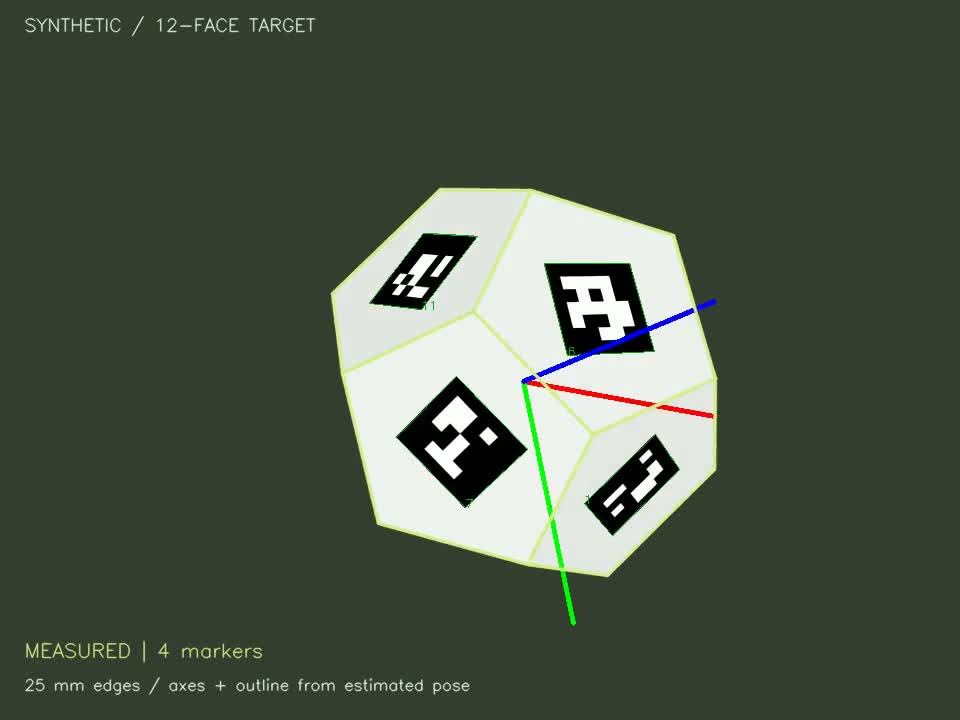
Synthetic software demo, not a physical accuracy benchmark. Source release: 0.3.0; the PyPI badge above shows the version currently published.
The core requires Python 3.9+. CI exercises Windows/Linux with Python 3.11; ROS integration uses Jazzy's system Python 3.12 on Ubuntu 24.04. Physical camera accuracy and all GUI/platform combinations have not been validated.
Install
For the core CLI and Python API:
python -m pip install aruco-pose
For the repository's examples, assets and optional ROS node, clone
Jshulgach/aruco-pose and run from its
root using a working Python installation. ROS itself is installed separately;
the core PyPI package has no ROS dependency.
python -m venv .venv
# Windows PowerShell (activation is optional):
.venv\Scripts\python.exe -m pip install -e .
# Optional activation, so the remaining commands can use `python`:
.venv\Scripts\Activate.ps1
On macOS/Linux, use .venv/bin/python instead. In the commands below, python
means that environment's interpreter. You can activate it, or substitute its full
path. The installed aruco-pose command is equivalent to python -m aruco_pose.
aruco-cli remains a compatibility alias. The distribution is named aruco-pose
and the import package is aruco_pose; publishing instructions are in the release guide.
Use a fresh environment: install only opencv-contrib-python, not both OpenCV
wheel variants, because they share the same cv2 module. A graphical desktop is
needed only for --preview or printing SVGs through a browser.
Try it without a camera
For ROS 2, see the optional target pose + TF example. It runs the dodecahedron replay or raw/rectified Image/CameraInfo topics on ROS 2 Jazzy, publishes measured poses and tracking diagnostics, and includes acquisition-time and calibration rules, frame conventions, camera-topic instructions and an RViz view.
For a 3D target, try the dodecahedron print + replay kit:
an A4 PDF/SVG with glue tabs and paired edge labels, a matching 25 mm-edge model,
and a ten-second raw synthetic replay. Download the complete kit
to use it with the published package, or use assets/dodecahedron/ in this checkout.
The guide covers both camera-free tracking and assembling/calibrating a physical
target. The printable model is a prototype; physical accuracy is not yet validated.
The repository includes a 30-view checkerboard clip and a six-second tracking clip
under assets/starter/. They are explicitly synthetic perspective renders,
not evidence of real-world accuracy. No downloads or camera calibration files from
your own machine are needed after installation.
python -m aruco_pose kit calibrate --source assets/starter/calibration.mp4 --stride 1 --output output/sample_calibration.json
python -m aruco_pose kit track --source assets/starter/tracking.mp4 --model assets/starter/board.json --calibration output/sample_calibration.json --csv output/sample_poses.csv --output-video output/sample_tracked.mp4
Expected: 120 CSV rows, 110 measured poses and 10 lost frames. Frames 50-59 hide the
whole board; frames 85-99 hide two markers while tracking continues with the other
two. Add --preview to see the overlay while processing, or open
output/sample_tracked.mp4 afterward. Defaults are headless.
Outputs:
output/sample_calibration.json: estimated camera matrix, distortion, resolution, calibration RMS and view count.output/sample_poses.csv: one row per decoded frame, including explicit losses.output/sample_poses.summary.json: counts, model/calibration snapshots, units, coordinate conventions, time basis and quality thresholds.output/sample_tracked.mp4: annotated video.
assets/starter/reference_camera.json and ground_truth.csv describe the known
synthetic camera and motion. The quick start deliberately estimates calibration
from the checkerboard clip instead of using the reference values. Regenerate all
sample inputs with python -m aruco_pose kit sample --output output/new_sample.
Use a real camera: print -> calibrate -> track -> CSV
1. Print and mount the targets
python -m aruco_pose kit print --output output/print
Open the SVGs in a browser and print at 100% / actual size, with fit-to-page, headers and footers disabled. Targets are A4. Verify the 50 mm reference line and measure the black marker squares: they must be 40 mm wide, with 20 mm gaps. Mount the entire marker board flat on rigid backing; do not rearrange the markers. The checkerboard is a separate target with 9 x 6 inner corners and 20 mm squares. Keep it flat too. Inspect the print for clipping or smudged black/white cells.
The generated board.json defines the exact four-marker layout, IDs 0-3 in
DICT_5X5_100. Keep it with its printed target. Never use a model with a different
printed scale or arrangement.
2. Calibrate at your tracking resolution
python -m aruco_pose kit calibrate --source 0 --preview --output output/my_camera.json
Show the complete checkerboard and press SPACE to capture each view. Move and tilt it between captures: near/far, left/right, top/bottom, with varied angles. Use at least 8 distinct observations; aim for 20-30. Press Q to solve, or let capture stop at 40 accepted views. Keep camera resolution, focus and zoom fixed between calibration and tracking. The command reports RMS reprojection error; values above 1 pixel prompt a warning. Low RMS alone does not establish accuracy.
For a checkerboard video instead, pass its path and choose --stride 10 (or a
suitable interval). Change --cols, --rows and --square-size only when using a
different measured calibration target. Camera indexes such as 0 and 1 are
supported. If you need a particular capture resolution, configure the camera
beforehand and confirm it remains unchanged for both steps.
3. Track and export
python -m aruco_pose kit track --source 0 --model output/print/board.json --calibration output/my_camera.json --csv output/my_poses.csv --preview --output-video output/my_tracking.mp4
Press Q to stop. For a recorded board video, replace 0 with its path. At least
two recognized board markers are required by default. --min-markers 1 permits
single-marker estimates but increases planar-pose ambiguity. Unknown IDs are
ignored. The shared solver rejects corner/marker outliers before fitting. A pose is
rejected without majority support, when inlier reprojection RMSE exceeds
--max-error (default 3 pixels), or when accepted points have invalid depth.
Close planar alternatives are reported as ambiguous unless a recent compatible
measurement resolves the choice. No prediction is substituted
for a missing measurement. The entire CSV remains available after a normal quit.
Understand the CSV
| Columns | Meaning |
|---|---|
frame, time_s |
Zero-based frame and elapsed seconds; video time is frame/FPS, camera time is monotonic host receipt time. |
object_id, status |
starter_board; measured, lost, rejected, or ambiguous. |
marker_ids, marker_count |
Accepted inlier marker IDs separated by semicolons, and their count. |
tx_m, ty_m, tz_m |
Board origin in camera coordinates, in meters. |
qx, qy, qz, qw |
Unit quaternion rotating board coordinates into camera coordinates. |
reprojection_rmse_px |
Root mean squared 2D corner-distance residual; not a physical accuracy estimate. |
Transform: p_camera = R_object_to_camera @ p_object + t_object_to_camera.
Camera axes: x right, y down, z forward. Board origin: center of the four-marker
layout, x printed right, y printed down, z into the paper. This is not a robot's
world-frame pose. Lost/rejected/ambiguous rows have blank position/quaternion fields. Do not
replace blanks with zeros or carry forward old poses without labeling them.
File timestamps assume constant frame rate. Camera timestamps describe host frame receipt, not hardware exposure time. The calibration resolution is checked against every frame; mismatches fail rather than silently scaling camera intrinsics.
Troubleshooting
- No detections: verify print scale/dictionary, lighting, focus, full black borders and white margins; move closer until the markers occupy more pixels.
- Not enough calibration views: show the complete checkerboard, use inner-corner counts, and vary its position/tilt. Reduce video stride for short clips.
- Wrong physical distance: measure the print and verify the matching model. Calibration square size and marker positions must be in meters.
- Pose flips/jitter: planar boards have ambiguous poses in difficult views; improve viewing angle, resolution and lighting. The shared solver rejects corner/marker outliers and flags close planar alternatives; a recent compatible measurement may resolve them. It does not smooth poses or substitute predictions for missing observations.
- Video cannot open/write: confirm the path and codec. Output
.aviuses MJPG; other output extensions use mp4v (use.mp4). - Python command fails: choose an installed interpreter explicitly; do not reuse an old virtual environment pointing at a removed Python installation.
Shared Python pose API
The CLI and updated tracking examples now share Tracker and PoseResult:
from aruco_pose import Tracker, TrackerConfig
# model is an explicit-corner model dict; K/D are camera intrinsics/distortion.
tracker = Tracker(model, K, D, config=TrackerConfig(min_markers=2))
result = tracker.process(frame, timestamp_s=timestamp_s, previous=previous_result)
if result.pose is not None:
    position_m = result.pose.translation_m
    quaternion_xyzw = result.pose.quaternion_xyzw
See the complete API guide for a runnable example, transform
conventions, outlier/ambiguity policies and legacy adapters. Run
python examples/pose_api_demo.py --preview for a looping camera-free Python
example. It writes no data files unless --csv PATH is passed. Stop with Q, Escape,
window close or Ctrl+C; use --seconds 20 for a time limit, or --once for one pass. The CSV/summary
schema is version 2: old columns are preserved, with support, reason, candidate and
frame diagnostics appended. Read fields by name and handle ambiguous rows.
See package migration notes when updating an existing
installation or imports from the old src namespace.
Development and other examples
python -m pip install -e ".[dev]"
python -m pytest -q
The starter kit commands are the supported end-to-end path. Older top-level CLI
commands and examples are experimental and have different formats. Dodecahedron
tracking remains available under examples/04_custom_models/; see
model scaling before using the saved 17 mm and 25 mm models.
The flat starter board uses a separate explicit-corner model, not those legacy JSON
formats. Roadmap describes remaining target tooling and robotics integrations.
Sample assets are generated by this repository and covered by its Apache 2.0 license.
Acknowledgements
Built on OpenCV ArUco and inspired by the original GSNCodes ArUco examples. See LICENSE for the existing Apache 2.0 terms.
The release review records verification evidence, packaging/media scope and remaining physical-validation limits.
1 maintainer

Metadata
1 maintainer
Release files for aruco-pose 0.3.0
For a detailed explanation of source distributions (sdists) and built distributions (wheels), please see the package formats documentation.
Source distribution (sdist)
| File | Size | Uploaded | Provenance | Actions |
|---|---|---|---|---|
| aruco_pose-0.3.0.tar.gz | 3.8 MB | Without provenance | Details for aruco_pose-0.3.0.tar.gz |
Built distribution (wheel)
| File | Interpreter | ABI | Platform | Actions Reset |
|---|---|---|---|---|
| aruco_pose-0.3.0-py3-none-any.whl | Python 3 | none | any | Details for aruco_pose-0.3.0-py3-none-any.whl |
Total release size: 3.9 MB
Release files / aruco_pose-0.3.0.tar.gz
| Download URL | aruco_pose-0.3.0.tar.gz |
|---|---|
| Size | 3.8 MB |
| Tags | Source |
|
SHA-256 checksum How to use checksums |
79a913e58cea2889c8c70090f3c28430520a4f4e500a08c369aec2cfbc4814e0
|
|
BLAKE2b-256 checksum How to use checksums |
e4e01d8342dcf5e0fc18373cecc4498696efe02e54bf1500fbcc04a87fbff0c7
|
| Upload date | |
|
Uploaded using Trusted Publishing? What is trusted publishing? |
No |
| Uploaded via |
twine/7.0.0 CPython/3.11.4
|
Release files / aruco_pose-0.3.0-py3-none-any.whl
| Download URL | aruco_pose-0.3.0-py3-none-any.whl |
|---|---|
| Size | 60.9 kB |
| Tags | Python 3 |
|
SHA-256 checksum How to use checksums |
7d7578142574415cc4d46cd37a8e2e7fd0adacd6b38573ab53adcce77a407dea
|
|
BLAKE2b-256 checksum How to use checksums |
c4a03d5cc1dbf9e99de5530682d3521b8b8e45a8b71e8695de8e39b06b694056
|
| Upload date | |
|
Uploaded using Trusted Publishing? What is trusted publishing? |
No |
| Uploaded via |
twine/7.0.0 CPython/3.11.4
|
Security for aruco-pose 0.3.0
Provenance
Provenance describes where a file came from. On PyPI, provenance is shared via attestations, which provide a verifiable record of the build or publishing details. View details, limitations and caveats.
No provenance found
None of the files in this release were uploaded with provenance metadata.
A note on package security
PyPI is a repository for distributing packages, not a service for auditing them. While third-party security researchers and our staff do their best to detect and remove malicious packages, PyPI cannot guarantee the quality, security or suitability of any given package.
To learn more about protecting yourself from malicious actors, visit our package security documentation.














