
arXiv Pulse
Intelligent arXiv Literature Tracking System



🌐 Language: 中文文档
arXiv Pulse is a Python package for automated crawling, summarizing, and tracking of the latest research papers from arXiv. It supports all arXiv categories and provides a modern web interface for a professional literature management experience.
📸 Screenshots
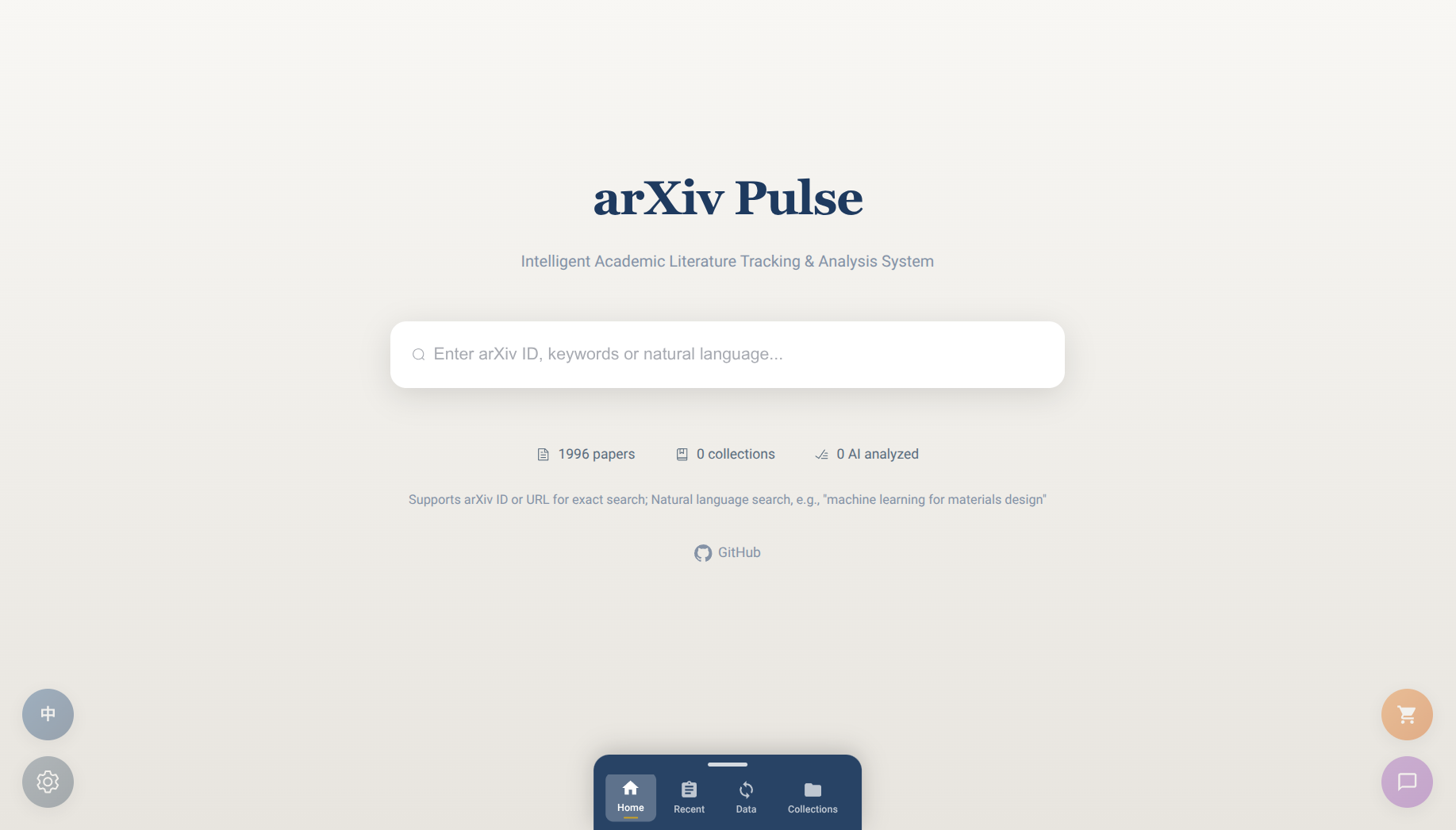
✨ Key Features
- 🌐 Web Interface: Modern FastAPI + Vue 3 + Element Plus interface with real-time SSE streaming
- 🚀 One-Command Start: Simply run
pulse serveto start the service - 📝 Web Configuration: First-time setup wizard, all settings stored in database
- 🤖 AI Auto-Processing: Automatic translation, AI summarization, and figure extraction
- 💬 AI Chat Assistant: Ask questions about papers with context-aware AI assistant
- 🔍 Smart Search: Natural language queries with AI-powered keyword parsing
- 📁 Paper Collections: Create, edit, and delete collections to organize important papers
- 🛒 Paper Basket: Select multiple papers for batch operations
- 🔒 Secure by Default: Localhost-only binding, explicit confirmation for remote access
- 🌍 Multilingual Support: UI in Chinese/English, translation to multiple languages
🆕 What's New in 1.2.0
- Enhanced UI Components: Redesigned buttons, switches, selects, dialogs with refined shadows and transitions
- Paper Index Numbers: Visual index numbers on paper cards for easy reference
- Back-to-Top Button: Quick navigation with scroll-aware floating button
- Tooltips for Floating Buttons: Helpful labels on hover for all floating action buttons
- Recent Papers AI Search: Search within recent papers using natural language
- Sync Page Improvements: Better spacing, help icons with tooltips
- SQLite WAL Mode: Concurrent read/write operations for better performance
- Bug Fixes: Form submission, pagination visibility, index preservation during search
🚀 Quick Start
Installation
pip install arxiv-pulse
Start Service
# Create data directory
mkdir my_papers && cd my_papers

# Start web service (background mode by default)
pulse serve .

# Or specify port
pulse serve . --port 3000

# Foreground mode (see logs in terminal)
pulse serve . -f
Then visit http://localhost:8000
Service Management
pulse status .          # Check service status
pulse stop .            # Stop service
pulse restart .         # Restart service
pulse stop . --force    # Force stop (SIGKILL)
Remote Access (SSH Tunnel)
By default, the service only accepts localhost connections for security. For remote access, use SSH tunnel:
# On server
pulse serve .

# On your computer
ssh -L 8000:localhost:8000 user@server

# Then visit http://localhost:8000
This provides encrypted connection without exposing your API keys.
First-Time Setup
- Visit http://localhost:8000
- Follow the setup wizard:
- Step 1: Configure AI API (OpenAI/DeepSeek key, model, endpoint)
- Step 2: Select research fields
- Step 3: Set sync parameters
- Step 4: Start initial sync
🔒 Security
arXiv Pulse is designed with security in mind:
- Localhost-only by default: Service binds to 127.0.0.1, inaccessible from external networks
- No plaintext credentials: API keys stored in local SQLite database, never transmitted
- Explicit remote access: Opening to non-localhost requires a flag with security warning
For remote access, we recommend:
- SSH Tunnel (easiest):
ssh -L 8000:localhost:8000 user@server - VPN: WireGuard, OpenVPN, or Tailscale
- Reverse Proxy: Nginx/Caddy with HTTPS
# If you must open to network (not recommended)
pulse serve . --host 0.0.0.0 --allow-non-localhost-access-with-plaintext-transmission-risk
📖 Daily Usage
Pages
| Page | Description |
|---|---|
| Home | Statistics overview, search by natural language |
| Recent | Papers from last N days, filter by field |
| Sync | Sync status, field management, manual sync |
| Collections | Organize important papers into collections |
Features
- Search: Use natural language like "DFT calculations for battery materials"
- Filter: Click "Filter Fields" to select research areas
- AI Chat: Click the chat icon (bottom-right) to ask questions
- Paper Basket: Click basket icon on cards to collect papers for batch operations
- Settings: Click gear icon to modify API key, language, and sync options
📁 Project Structure
arxiv_pulse/
├── core/                   # Core infrastructure (Config, Database, Lock)
├── models/                 # SQLAlchemy ORM models
├── services/               # Business logic (AI, translation, papers)
├── crawler/                # ArXiv API crawler
├── ai/                     # Paper summarizer, report generator
├── search/                 # AI-powered search engine
├── cli/                    # Command-line interface
├── web/                    # FastAPI web application
│   ├── app.py             # FastAPI app
│   ├── api/               # API endpoints
│   └── static/            # Vue 3 frontend (components, stores, i18n)
└── i18n/                   # Backend translations

Data Directory/
├── data/arxiv_papers.db    # SQLite database
└── web.log                 # Service log
For detailed architecture, see DEV.md.
🔧 API Endpoints
| Endpoint | Method | Description |
|---|---|---|
/api/config |
GET/PUT | Get/update configuration |
/api/config/status |
GET | Get initialization status |
/api/papers/search/stream |
GET (SSE) | AI-powered search |
/api/papers/recent/update |
POST (SSE) | Update recent papers |
/api/collections |
GET/POST | List/create collections |
/api/stats |
GET | Database statistics |
/api/chat/sessions/{id}/send |
POST (SSE) | Send message to AI |
🧪 Research Fields
arXiv Pulse supports all arXiv categories. Simply select your fields of interest in the Settings page. Pre-configured options include:
| Category | Example Fields |
|---|---|
| Physics | Condensed Matter, Quantum Physics, High Energy, Nuclear, Astrophysics |
| Computation | DFT, First-Principles, MD, Force Fields, Computational Physics |
| AI/ML | Machine Learning, Artificial Intelligence, Computer Vision, NLP |
| Chemistry | Quantum Chemistry, Chemical Physics |
| Math | Mathematical Physics, Numerical Analysis, Statistics |
| Others | Quantitative Biology, Electrical Engineering, Economics |
You can also add custom search queries for any topic on arXiv.
🐛 Troubleshooting
Q: Port already in use?
pulse serve . --port 3000
Q: Service shows "not running" but port is occupied?
pulse stop . --force
# Or remove stale lock
rm .pulse.lock
Q: How to reinitialize?
rm data/arxiv_papers.db
pulse serve .
Q: AI not responding?
- Check API key in Settings
- Check console for errors (F12 → Console)
- Try foreground mode to see logs:
pulse serve . -f
📄 License
GPL-3.0 - see LICENSE for details.
🙏 Acknowledgments
This project was developed by OpenCode, an AI coding agent.
- Yang Li - For 500+ iterations of requirements discussions, design decisions, and testing feedback. This project would not exist without your patience and vision.
- GLM-5 - For providing the core intelligence that powers OpenCode. ~200 million tokens consumed in bringing this project to life.
- arXiv.org - For the open API
- Computational materials science community - For inspiration and use cases
arXiv Pulse - Making arXiv literature tracking simple and efficient!
1 maintainer

Metadata
1 maintainer
Release files for arxiv-pulse 1.3.2
For a detailed explanation of source distributions (sdists) and built distributions (wheels), please see the package formats documentation.
Built distribution (wheel)
| File | Interpreter | ABI | Platform | Reset |
|---|---|---|---|---|
| arxiv_pulse-1.3.2-py3-none-any.whl | Python 3 | none | any | Details |
Release files / arxiv_pulse-1.3.2-py3-none-any.whl
| Download URL | arxiv_pulse-1.3.2-py3-none-any.whl |
|---|---|
| Size | 1.6 MB |
| Tags | Python 3 |
|
SHA-256 checksum How to use checksums |
1a6f7acb51ceb70bc78d3105ec8494edd3803d184b4ebe040a25d04b9c119c79
|
|
BLAKE2b-256 checksum How to use checksums |
a264328475f57a8baac9a272d570b7bd18542ce10d5055d8bedfa4eaf7df23ab
|
| Upload date | |
|
Uploaded using Trusted Publishing? What is trusted publishing? |
Yes |
| Uploaded via |
twine/6.1.0 CPython/3.13.7
|
Provenance
Provenance describes where a file came from. On PyPI, provenance is shared via attestations, which provide a verifiable record of the build or publishing details. View details, limitations and caveats.


PyPI Publish Attestation
PyPI verified that this artifact, at this checksum, originated from the publisher listed below.
Signed by GitHub Actions, verified by PyPI on Feb 24, 2026.
Transparency log













