
arXiv Subscription Viewer
Review arXiv papers from your terminal. Keep a reading queue you can return to.
For researchers who follow a field or work through a literature search: scan abstracts, star promising papers, add notes, and export citations. Start with live arXiv search or browse saved subscription emails. Your review state stays on your machine; AI services are optional.
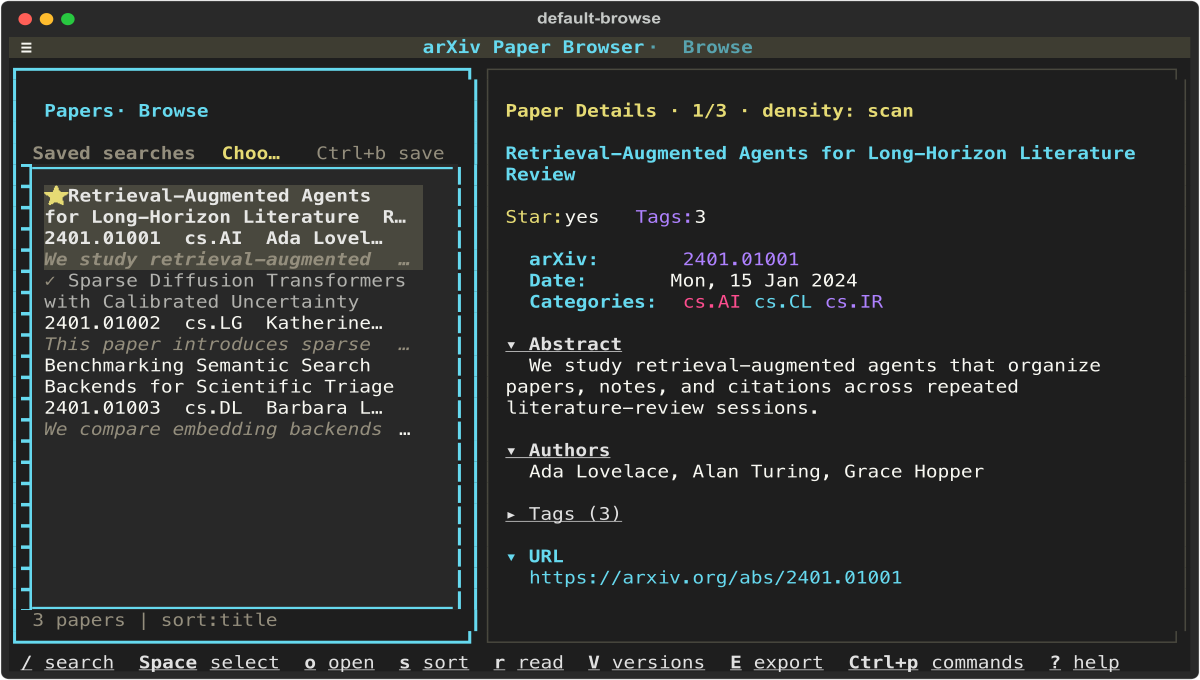
Application capture from the development checkout, using fictional paper fixtures. The released interface may differ.
Website · Guides · PyPI · Changelog
Getting started
Install
Use uv to install the published package in an isolated tool environment. The application requires Python 3.13+; this command lets uv provision Python 3.13 if needed.
uv tool install --python 3.13 arxiv-subscription-viewer
First run
Open a terminal and load a small page of recent papers in artificial intelligence:
arxiv-viewer search --category cs.AI --mode page --max-results 20
Dismiss the first-run welcome with Enter. You should see up to 20 papers and the selected paper's details. This uses the arXiv API and needs an internet connection, but no account, API key, or local files. Replace cs.AI with your category. Omitting --mode page collects the newest matching submission day, which can take longer.
Already saving arXiv emails? Open arxiv-viewer browse from the directory containing your populated history/ folder. The history guide includes a complete input example.
If the command is missing or results do not load, follow first-run troubleshooting. arxiv-viewer doctor diagnoses your setup; warnings about optional features are not prerequisites for live search.
Install with pip instead
With Python 3.13+ installed, create and activate a virtual environment:
python3.13 -m venv .venv
source .venv/bin/activate
python -m pip install arxiv-subscription-viewer
On Windows, use py -3.13 -m venv .venv, then .venv\Scripts\Activate.ps1 in PowerShell. Run the same first-run command above.
Typical flow
- Scan. Move with
j/kor the arrow keys. Read the selected abstract in the details pane. - Keep what matters. Press
xto star a paper,nto add a note, andrto mark it read. - Narrow the list. Press
/and enterstarredorunread. This filters the papers already loaded;Astarts a new arXiv search. - Take it into your work. Select papers with
Space, then pressEfor the export menu. Save BibTeX, RIS, or CSV to a file, or copy Markdown to the clipboard.
Press ? for help, Ctrl+p for the command palette, and q to quit. Stars and notes persist when the same papers are loaded again. See export and collections for saved reading lists and metadata backups.
Choose a workflow
- Find papers now: live searches and local filters.
- Review saved emails by date: local history and ingestion.
- Make a recurring reading brief: daily or weekly Markdown digests. Email delivery and scheduling use your own tools.
Highlights
- A durable reading queue: stars, read state, tags, notes, collections, and scheduled reviews.
- Fast review: keyboard navigation, structured filters, saved searches, and a quick-triage mode.
- Portable results: citation exports, metadata backup, and PDF downloads and previews.
- Optional research tools: citation context from Semantic Scholar, Hugging Face paper signals, and summaries or chat through a configured language-model provider.
- Reading preferences: 11 themes, compact lists, and adjustable detail views. See the configuration reference.
Key bindings
The cheat sheet covers navigation, organization, research, and export. For the exact keys in your installed version:
arxiv-viewer keybindings
Reading layouts and named paper marks are covered in the cheat sheet.
Local data and optional services
Run arxiv-viewer config-path to find config.json, which stores preferences, review metadata, and session state. Caches normally live in cache.db beside it; existing installations may retain separate legacy cache files. Exports default to ~/arxiv-exports/ and PDFs to ~/arxiv-pdfs/. See storage and configuration.
Saved email text and local review state can be used without a network connection. Live search, uncached abstracts, PDF/figure retrieval, and enabled external integrations use the network. Semantic Scholar, Hugging Face, and LLM enrichment are disabled by default. Configured AI features send paper content and prompts to your chosen CLI or HTTP provider; a local client may still use a hosted service. API keys, when configured, are stored in local JSON.
The base install includes PDF preview support. Optional extras add faster fuzzy matching (fuzzy), local embeddings (semantic-fastembed, with model downloads), or learned triage (ml). See search setup, local triage, and LLM setup before enabling them.
Guides and help
- Documentation index — find a guide by task.
- Cheat sheet — commands, shortcuts, shell completions, and upgrades.
- Configuration reference — paths, preferences, and optional services.
- Troubleshooting — recover from setup, search, and terminal problems.
Contributing
Bug reports, clearer documentation, and focused code changes are welcome. Start with contributing, or report an issue with your version and steps to reproduce. For package boundaries, read the architecture guide.
License
MIT · Created by Nicolas Sebastian Schuler. An independent project; not affiliated with arXiv.
1 maintainer

Download files
Download the file for your platform. If you're not sure which to choose, learn more about installing packages.
Source Distribution
Built Distribution
Filter files by name, interpreter, ABI, and platform.
If you're not sure about the file name format, learn more about wheel file names.
Copy a direct link to the current filters
File details
Details for the file arxiv_subscription_viewer-0.4.0.tar.gz.
File metadata
- Download URL: arxiv_subscription_viewer-0.4.0.tar.gz
- Upload date:
- Size: 1.5 MB
- Tags: Source
- Uploaded using Trusted Publishing? Yes
- Uploaded via:
twine/7.0.0 CPython/3.13.14
File hashes
| Algorithm | Hash digest | |
|---|---|---|
| SHA256 |
60e32f612043c311c683f1a559461e830e1898e474086464f1629d5dbac397a9
|
|
| MD5 |
081ba219ccf7ce6d5b54cf34c0e67f5b
|
|
| BLAKE2b-256 |
2b3717ce9f1354314559b2b096cfe2897feb4a36127498735a4ad8f7b88a249b
|
Provenance
The following attestation bundles were made for arxiv_subscription_viewer-0.4.0.tar.gz:
Publisher:
ci-cd.yml on NicolasSchuler/arxiv-subscription-viewer
-
Statement:
-
Statement type:
https://in-toto.io/Statement/v1 -
Predicate type:
https://docs.pypi.org/attestations/publish/v1 -
Subject name:
arxiv_subscription_viewer-0.4.0.tar.gz -
Subject digest:
60e32f612043c311c683f1a559461e830e1898e474086464f1629d5dbac397a9 - Sigstore transparency entry: 2717099401
- Sigstore integration time:
-
Permalink:
NicolasSchuler/arxiv-subscription-viewer@832c66abac861574bcde557b7fcfb26586553eaa -
Branch / Tag:
refs/tags/v0.4.0 - Owner: https://github.com/NicolasSchuler
-
Access:
public
-
Token Issuer:
https://token.actions.githubusercontent.com -
Runner Environment:
github-hosted -
Publication workflow:
ci-cd.yml@832c66abac861574bcde557b7fcfb26586553eaa -
Trigger Event:
push
-
Statement type:
File details
Details for the file arxiv_subscription_viewer-0.4.0-py3-none-any.whl.
File metadata
- Download URL: arxiv_subscription_viewer-0.4.0-py3-none-any.whl
- Upload date:
- Size: 421.4 kB
- Tags: Python 3
- Uploaded using Trusted Publishing? Yes
- Uploaded via:
twine/7.0.0 CPython/3.13.14
File hashes
| Algorithm | Hash digest | |
|---|---|---|
| SHA256 |
843cedc8125596e80475ce5a2b5ee210e5120c94d3bdb77c08da5c9ff1e03e0e
|
|
| MD5 |
3ecdfd728c1bd7b3206218b867c1506c
|
|
| BLAKE2b-256 |
79a10da10808316e5a280ba0169959fce9b7fc517caf972b3f3dccfdd52e1d99
|
Provenance
The following attestation bundles were made for arxiv_subscription_viewer-0.4.0-py3-none-any.whl:
Publisher:
ci-cd.yml on NicolasSchuler/arxiv-subscription-viewer
-
Statement:
-
Statement type:
https://in-toto.io/Statement/v1 -
Predicate type:
https://docs.pypi.org/attestations/publish/v1 -
Subject name:
arxiv_subscription_viewer-0.4.0-py3-none-any.whl -
Subject digest:
843cedc8125596e80475ce5a2b5ee210e5120c94d3bdb77c08da5c9ff1e03e0e - Sigstore transparency entry: 2717100852
- Sigstore integration time:
-
Permalink:
NicolasSchuler/arxiv-subscription-viewer@832c66abac861574bcde557b7fcfb26586553eaa -
Branch / Tag:
refs/tags/v0.4.0 - Owner: https://github.com/NicolasSchuler
-
Access:
public
-
Token Issuer:
https://token.actions.githubusercontent.com -
Runner Environment:
github-hosted -
Publication workflow:
ci-cd.yml@832c66abac861574bcde557b7fcfb26586553eaa -
Trigger Event:
push
-
Statement type:














