
Arxiv Terminal



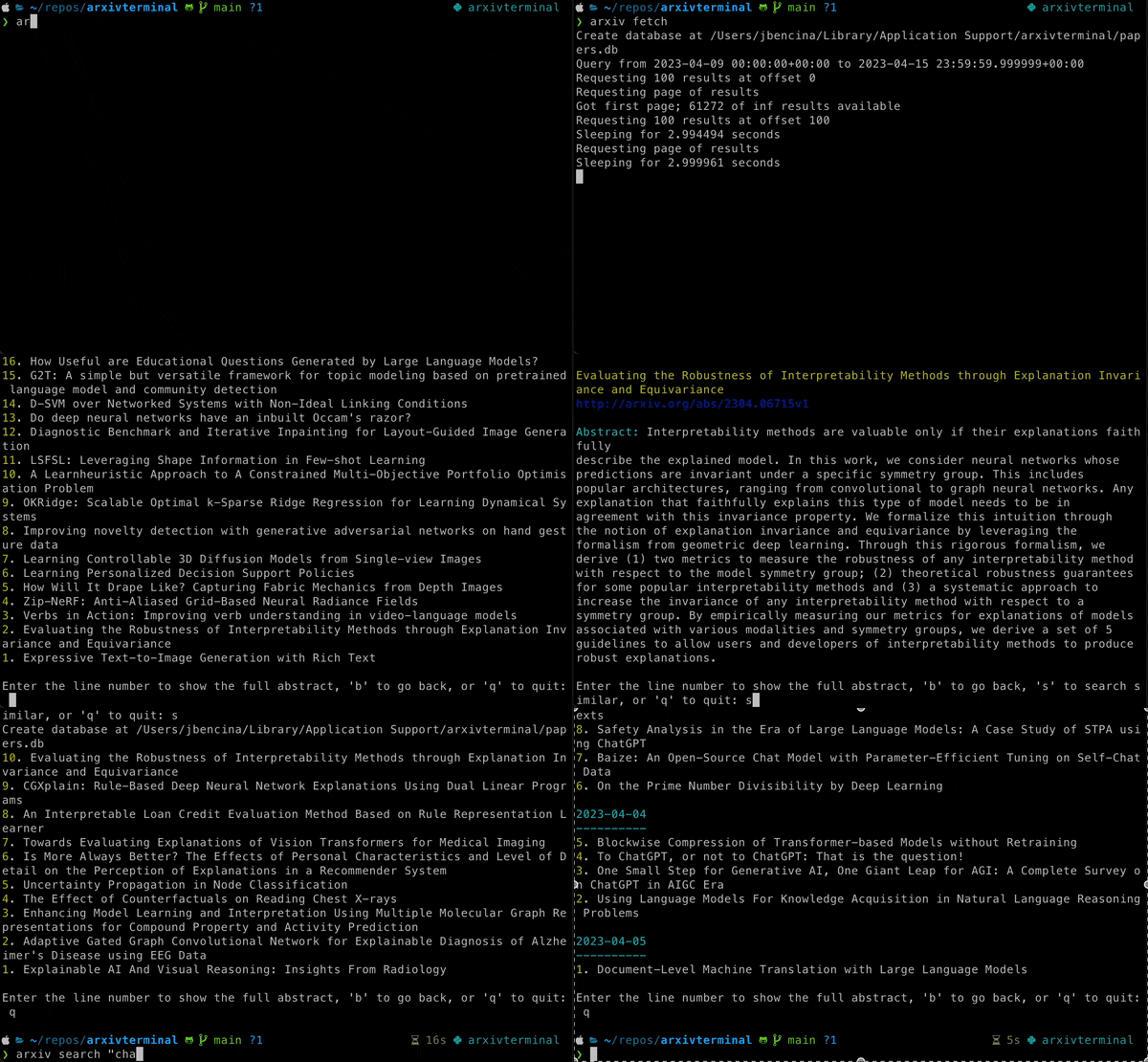
Arxiv Terminal is a command-line interface (CLI) tool for fetching, searching, and displaying papers from the arXiv preprint repository. The tool allows you to fetch papers from specified categories, search the fetched papers, and display their statistics.
Features
- Fetch paper abstracts from specified categories and save them in a local sqllite database.
- Show fetched papers and interatively open for more detailed abstracts
- Search fetched papers based on a query (Currently supports pattern + LSA semantic search)
- Download papers locally as PDF
Contributors
A special call out to ChatGPT (v4) which helped write and modify various code and documentation in this repository.
Installation
pip install arxivterminal
For local builds, you should have Poetry installed: User Guide. After installation you may clone and build this repo:
poetry install
poetry shell
arxiv <command>

# Build the wheels
poetry build
Usage
The CLI is invoked using the arxiv command, followed by one of the available commands:
arxiv fetch [--num-days] [--categories]: Fetch papers from the specified categories and store them in the database.arxiv delete_all: Delete all papers from the database.arxiv show [--days-ago]: Show papers fetched from the specified number of days ago.arxiv stats: Show statistics of the papers stored in the database.arxiv search <query>: Search papers in the database based on a query.
Examples
Fetch papers from the "cs.AI" and "cs.CL" categories from the last 7 days:
arxiv fetch --num-days 7 --categories cs.AI,cs.CL
Delete all papers from database:
arxiv delete_all
Show papers fetched in the last 7 days
arxiv show --days-ago 7

# On this screen the user can select a paper for more
# details by typing a line number. Additional options
# allow for searching & downloading
Display statistics of the papers stored in the database:
arxiv stats
Show papers containing the phrase "deep learning":
arxiv search "deep learning"
Show papers containing the phrase "deep learning" using LSA matching:
arxiv search -e "deep learning"
LSA Search Model
Note: This approach is likely to be replaced in the future by more robust methodology
The LSA search model is largely adapted from the implementation featured in the scikit-learn User Guide example. When used, the model is trained over the entire corpus of abstracts present in the user's local database. The model is persisted in the app cache folder and automatically reloaded on subsequent runs. During a search query, all abstracts from the database are encoded as n-dimensional vectors using the trained LSA model. The search query is also represented as a vector, and a cosine similarity is performed to find the top ranking items.
You may want to force a refresh of the underlying model after loading new papers. This can be done by using the -f
flag when performing a search:
arxiv search -e -f "deep learning"
1 maintainer

Metadata
1 maintainer
Release files for arxivterminal 0.3.1
For a detailed explanation of source distributions (sdists) and built distributions (wheels), please see the package formats documentation.
Source distribution (sdist)
| File | Size | Uploaded | Provenance | Actions |
|---|---|---|---|---|
| arxivterminal-0.3.1.tar.gz | 22.7 kB | Without provenance | Details for arxivterminal-0.3.1.tar.gz |
Built distribution (wheel)
| File | Interpreter | ABI | Platform | Actions Reset |
|---|---|---|---|---|
| arxivterminal-0.3.1-py3-none-any.whl | Python 3 | none | any | Details for arxivterminal-0.3.1-py3-none-any.whl |
Total release size: 47.2 kB
Release files / arxivterminal-0.3.1.tar.gz
| Download URL | arxivterminal-0.3.1.tar.gz |
|---|---|
| Size | 22.7 kB |
| Tags | Source |
|
SHA-256 checksum How to use checksums |
c4ca7642c24c17f1f47aa769f0ec0ef78baa073b1af78c0eeb104828e765a422
|
|
BLAKE2b-256 checksum How to use checksums |
ac09a5d6d073d82983ad04d7096fed5da1dfe6ea949d85ea570edf3d1e93513a
|
| Upload date | |
|
Uploaded using Trusted Publishing? What is trusted publishing? |
No |
| Uploaded via |
poetry/1.4.2 CPython/3.11.3 Darwin/22.2.0
|
Release files / arxivterminal-0.3.1-py3-none-any.whl
| Download URL | arxivterminal-0.3.1-py3-none-any.whl |
|---|---|
| Size | 24.5 kB |
| Tags | Python 3 |
|
SHA-256 checksum How to use checksums |
6c0b1cb984ca1a5901f244fd43b3bf8c034484455725d13eea2ae35dee6f3125
|
|
BLAKE2b-256 checksum How to use checksums |
d70c2b579196a3ecedee663cf8d5a2eaa2c7f45137d84f1e34bb386a08067d8f
|
| Upload date | |
|
Uploaded using Trusted Publishing? What is trusted publishing? |
No |
| Uploaded via |
poetry/1.4.2 CPython/3.11.3 Darwin/22.2.0
|
Security for arxivterminal 0.3.1
Provenance
Provenance describes where a file came from. On PyPI, provenance is shared via attestations, which provide a verifiable record of the build or publishing details. View details, limitations and caveats.
No provenance found
None of the files in this release were uploaded with provenance metadata.
A note on package security
PyPI is a repository for distributing packages, not a service for auditing them. While third-party security researchers and our staff do their best to detect and remove malicious packages, PyPI cannot guarantee the quality, security or suitability of any given package.
To learn more about protecting yourself from malicious actors, visit our package security documentation.














