
As-Agreed
What you agreed is what arrives.
As-Agreed checks each step of a pipeline against what was agreed. It stops the last step if a must term changed.
In a multi-agent system, agents give work to agents, and at each hand-off a term you agreed can change. As-Agreed keeps the record of what was agreed, and names the hand-off where a declared term changed.
Before the last step writes its result, As-Agreed compares each declared field with the agreed record. If a field of a MUST or MUST_NOT commitment changed, As-Agreed stops that step. It tells you which field changed, and at which step.
The record is a file on your disk. The test tests/test_no_network.py gives an error if the code imports a known network module.
Run the demo
git clone https://github.com/as-agreed/as-agreed
cd as-agreed
PYTHONPATH=src python3 -m as_agreed demo --no-retry
You must have Python 3.9 or higher. You do not install a package, and you do not use an account. The last line of the demo shows how much time it used.
What you see
The order sets a limit: "up to 18,400 dollars". The output for the payment system has 19,800. All the types are correct, thus the schema check passes. As-Agreed stops the step, and the code does not call the payment system. The demo above shows these lines:
commit#1@1    schema  amount: float ok | po: str ok | approved: bool ok   -> schema: PASS
             commitment pay-invoice      limit.amount                 WIDENED            19800 where at most 18400 USD was agreed
             claim [flat]                words only, no status        PRESERVED          "Pay the October invoice from Northwind Freight, up to 18,400 dollars, only if it mat"
gate: HOLD (1 reason(s))    outputs discarded; the payment system was never called    code 1
A commitment line compares one declared field. Here, the field limit.amount is WIDENED. A claim line compares the status of a claim: a hedge, a source, a date, or "not found". It does not compare numbers. Thus the claim of the order arrives (PRESERVED), but its limit does not arrive (WIDENED).
Without --no-retry, the demo sends the reason back to the step one time. The next output comes from a file, not from a model, and it passes. With --fixture dropped, the agreed commitment phone-check does not arrive (DROPPED).
Use it in your code
import as_agreed.sdk as aa

agreed = aa.register("Pay the invoice, up to 18,400 dollars.", [{
    "commitment_id": "pay", "act": "pay the invoice", "obligor": "finance", "obligee": "vendor",
    "modality": "MUST", "limit": {"amount": {"max": 18400, "unit": "USD"}},
    "carried_by": {"limit.amount": "amount"}}])

def pay(note, *, idempotency_key):
    print("paid", note["amount"])

@aa.step("commit", agreed, commit=pay)
def prepare(text, reason=None):
    return {"amount": 19800.0}

prepare("Pay 19,800 dollars.")  # raises DriftHold: limit.amount WIDENED; pay() is not called
Run this code from the clone with PYTHONPATH=src. A commitment must have 4 fields: act, obligor, obligee and modality. The fields condition, limit, deadline and acceptance_criteria are optional. The key carried_by tells As-Agreed which output key holds a field. The step gets the reason in reason, and it runs one more time. If the next output also breaks the limit, As-Agreed stops the step. The record goes to ledger.jsonl in the folder where you start Python.
The text gate
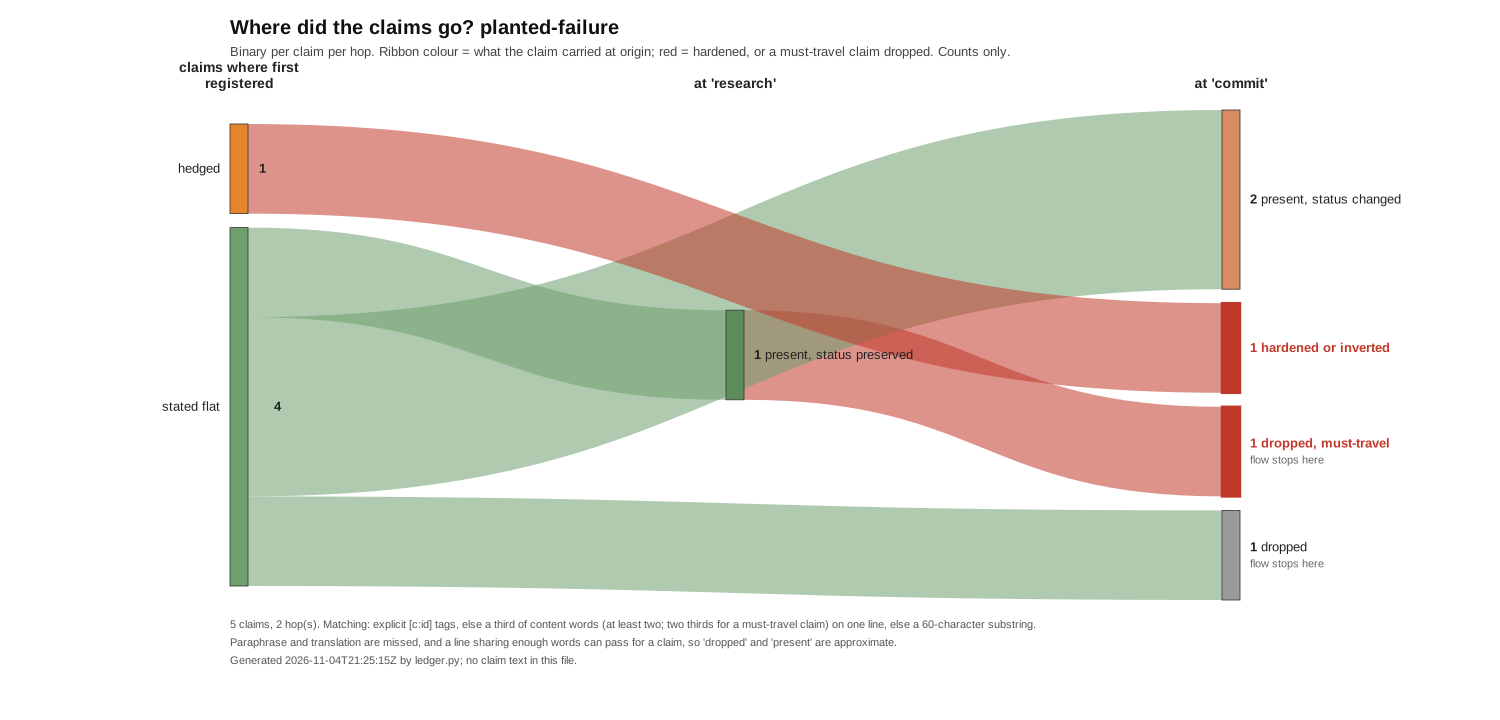
For text files, ledger.py checks that each claim keeps its status from one stage to the next. Put one file for each stage in a folder, in sequence. Mark each line that must arrive with [!] before its full stop. In the example below, a line that must arrive does not arrive (DROPPED!). The claim "probably allows early payment" arrives as "allows early payment" (DANGER). Thus the run exits with a code that is not 0, and it can stop the next step. It also writes ledger.jsonl and flow.svg, which shows each claim at each stage.
python3 ledger.py run examples/planted-failure --against-all --only hedged,not_found,sourced,dated,must --fail-on danger,dropped_must
Its limits
It compares only the fields that you declare, and it does not read a field from text.
Where this goes
Version 0.2 will read traces from the tools that you use, thus you will not write stage files. After that, an As-Agreed service will keep one record for all your pipelines. To use that service, you will change one value in your code: destination=. All other code stays the same.
Tests
python3 -m unittest discover -s tests
Licence
The code is under the Apache-2.0 licence (LICENSE, NOTICE), copyright BizBuilder, Inc. The files in readings/ are under CC BY 4.0. A change that you send must have a DCO sign-off (git commit -s).
Help
Write to hello@bizbuilderai.com. To send the map of your pipeline without its data, read SEND-A-MAP.md.
1 maintainer

Metadata
1 maintainer
Release files for as-agreed 0.0.1
For a detailed explanation of source distributions (sdists) and built distributions (wheels), please see the package formats documentation.
Source distribution (sdist)
| File | Size | Uploaded | Provenance | Actions |
|---|---|---|---|---|
| as_agreed-0.0.1.tar.gz | 162.9 kB | Without provenance | Details for as_agreed-0.0.1.tar.gz |
Built distribution (wheel)
| File | Interpreter | ABI | Platform | Actions Reset |
|---|---|---|---|---|
| as_agreed-0.0.1-py3-none-any.whl | Python 3 | none | any | Details for as_agreed-0.0.1-py3-none-any.whl |
Total release size: 300.7 kB
Release files / as_agreed-0.0.1.tar.gz
| Download URL | as_agreed-0.0.1.tar.gz |
|---|---|
| Size | 162.9 kB |
| Tags | Source |
|
SHA-256 checksum How to use checksums |
a824bc01afe902df596784e51d1ce3f2ee68e5044ce220ab82cc5a5c9971612e
|
|
BLAKE2b-256 checksum How to use checksums |
c6f5a8f9753d68839e17983b35f1b71d47d943f4bfedff5e2b3310b17a4d9d18
|
| Upload date | |
|
Uploaded using Trusted Publishing? What is trusted publishing? |
No |
| Uploaded via |
twine/7.0.0 CPython/3.14.6
|
Release files / as_agreed-0.0.1-py3-none-any.whl
| Download URL | as_agreed-0.0.1-py3-none-any.whl |
|---|---|
| Size | 137.8 kB |
| Tags | Python 3 |
|
SHA-256 checksum How to use checksums |
1a2f5f768d8c7c660450a7b368b68defb07cea2066a1dc440a84f160bbe5b333
|
|
BLAKE2b-256 checksum How to use checksums |
de960e1ae1aafcdf79ebd5cb94e501b13047cb79cadccaf825bbb68f4d178e26
|
| Upload date | |
|
Uploaded using Trusted Publishing? What is trusted publishing? |
No |
| Uploaded via |
twine/7.0.0 CPython/3.14.6
|
Security for as-agreed 0.0.1
Provenance
Provenance describes where a file came from. On PyPI, provenance is shared via attestations, which provide a verifiable record of the build or publishing details. View details, limitations and caveats.
No provenance found
None of the files in this release were uploaded with provenance metadata.
A note on package security
PyPI is a repository for distributing packages, not a service for auditing them. While third-party security researchers and our staff do their best to detect and remove malicious packages, PyPI cannot guarantee the quality, security or suitability of any given package.
To learn more about protecting yourself from malicious actors, visit our package security documentation.














