
nputop
Your Ascend NPUs, at a glance.
An interactive NPU and process monitor for the terminal. Familiar nvitop controls, with Ascend card/chip topology, live resource graphs and process management.







English · 简体中文 · Installation · Usage · Supported devices · Changelog
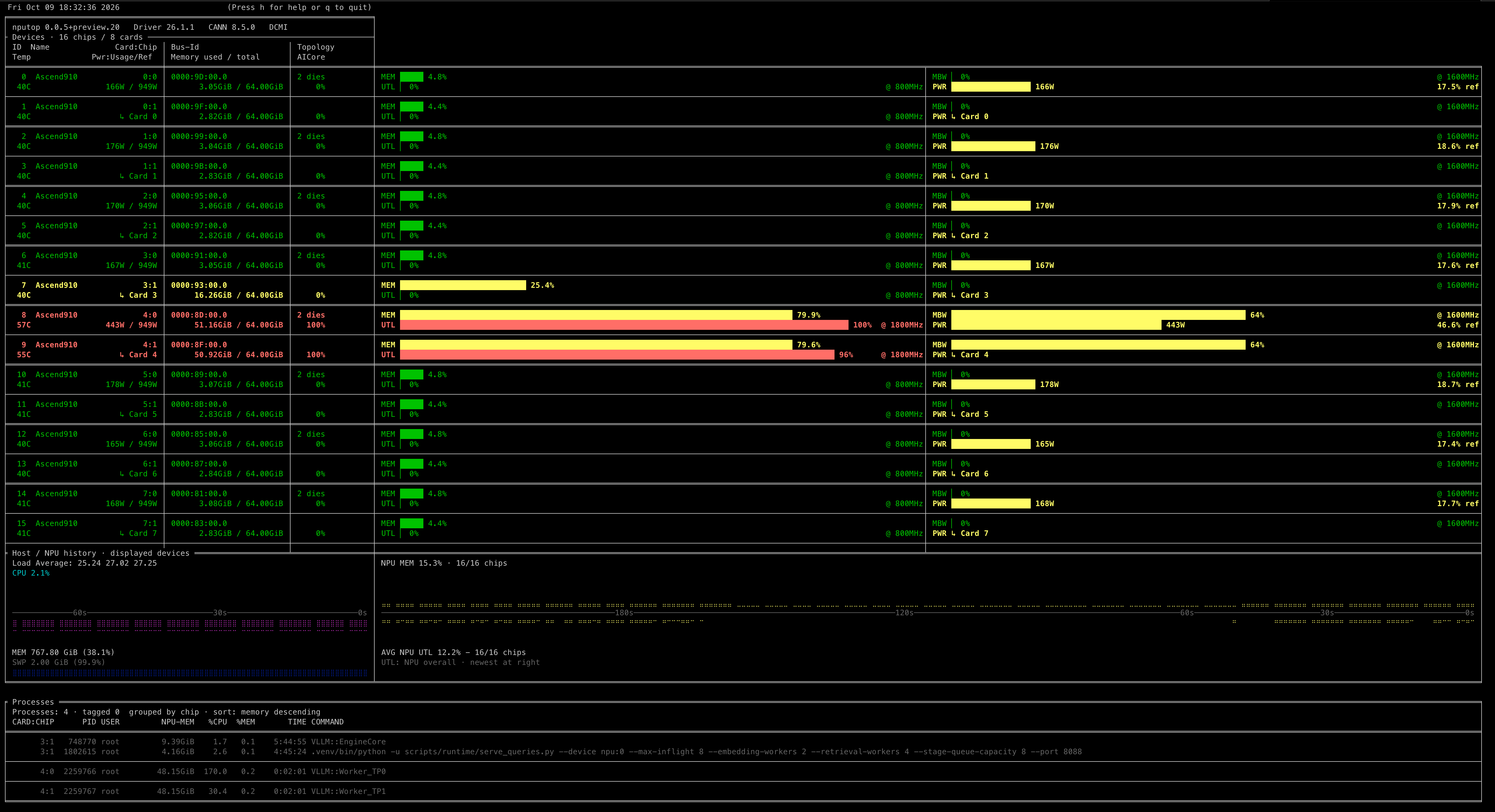
Ascend 910C · 8 cards / 16 chips · DCMI · Full view. Click to see the original screenshot.
Why nputop?
- See the whole machine. NPU memory, AICore, utilization, temperature, power, clocks and bandwidth alongside CPU, RAM and SWAP history.
- Find the process behind the load. Click a process to highlight its chips; inspect its tree, resource history or environment, then manage it from the same screen.
- Built for Ascend. Single- and multi-chip cards, logical device IDs, 310P memory interfaces and 910C's dual-die layout get their own handling.
- Keep your workflow. Keyboard and mouse navigation, full/compact layouts, light terminals, color gradients and ASCII support.
- Stay responsive. DCMI collection runs outside the UI. Automatic
npu-smifallback keeps monitoring available when the primary backend fails.
Installation
Requires Python 3.7+, Linux and an installed Ascend driver. No PyACL or NVIDIA NVML Python package is needed.
PyPI
python -m pip install --upgrade ascend-nputop
Conda
Available on conda-forge:
conda install -c conda-forge nputop
uv
Run in an isolated environment without installing into your project:
uvx --from ascend-nputop nputop
Or install it as a persistent command:
uv tool install --upgrade ascend-nputop
The package is ascend-nputop on PyPI/uv and nputop on Conda. All provide
the nputop command. uv uses PyPI by default,
so it receives the same published package.
Install from source
git clone https://github.com/youyve/nputop.git
cd nputop
python -m pip install -e .
Usage
nputop
Start with the automatic layout, or tailor the view to your session:
nputop --monitor full
nputop --only 0 2
nputop --user
nputop --interval 1
nputop --light --colorful
nputop --readonly
The default interval is two seconds. --only selects display IDs; use
ASCEND_RT_VISIBLE_DEVICES=0 nputop --only-visible to filter by runtime logical IDs.
| Action | Keys |
|---|---|
| Help / quit | h / q |
| Select / clear selection | Click or ↑↓ / Esc or click outside the process rows |
| Auto / full / compact layout | a / f / c |
| Process tree / history / environment | t / Enter / e |
| Device details / mark a process | d / Space |
| Sort / reverse order | s / / |
| Kill / terminate / interrupt | k/K / T / I or Ctrl-C |
Process signals require a selected or marked target and confirmation.
As in nvitop, k/K requests SIGKILL; use ↑↓ or Alt-k / Alt-j to move the selection.
Ctrl-C requests SIGINT inside the TUI; use q to quit.
Backends, reports and compatibility options
nputop --backend dcmi
nputop --backend smi
nputop --once
nputop --json
nputop --diagnose > nputop-diagnostics.json
nputop --ascii
nputop --legacy-ui
nputop --help
Automatic mode prefers DCMI and falls back to npu-smi; an explicit backend
selection stays fixed. In 0.1.0, the new dashboard is the default;
--legacy-ui retains the previous UI and --preview remains an alias.
Supported devices
- Ascend 910B
- Ascend 910C / Atlas A3, including dual-die cards
- Ascend 310P
- Ascend 310B, via the
npu-smibackend
Available metrics depend on the device and driver. See device compatibility for model-specific details.
AICore and UTL use distinct counters; 310P's AICore fallback is labeled UTL*.
Power references are labeled Ref, and same-card power is grouped on dual-die
devices. See power sources and interpretation.
Contributing
Bug reports, device feedback and pull requests are welcome.
Open an issue with your model and driver
version; nputop --diagnose produces a report without process IDs, commands or
environment contents.
For development and hardware checks, see the contributor guide. Release maintainers can follow the PyPI / Conda / uv release guide.
License and credits
Based on nvitop by Xuehai Pan. The project contains Apache-2.0 and GPL-3.0-only modules; consult the file headers, LICENSE, COPYING and NOTICE. Maintained by Lianzhong You.
1 maintainer

Metadata
1 maintainer
Release files for ascend-nputop 0.1.0
For a detailed explanation of source distributions (sdists) and built distributions (wheels), please see the package formats documentation.
Source distribution (sdist)
| File | Size | Uploaded | |
|---|---|---|---|
| ascend_nputop-0.1.0.tar.gz | 664.2 kB | Details |
Built distribution (wheel)
| File | Interpreter | ABI | Platform | Reset |
|---|---|---|---|---|
| ascend_nputop-0.1.0-py3-none-any.whl | Python 3 | none | any | Details |
Total release size: 841.0 kB
Release files / ascend_nputop-0.1.0.tar.gz
| Download URL | ascend_nputop-0.1.0.tar.gz |
|---|---|
| Size | 664.2 kB |
| Tags | Source |
|
SHA-256 checksum How to use checksums |
1664e9a570ef0de4e5598c2a8d6887ea9468f0398fd2df33e6281bce2f48a8ce
|
|
BLAKE2b-256 checksum How to use checksums |
ab282f7c434daff5fd10e33760edb74e30dd3cc72f005f0933b2aa3ed5e8ef67
|
| Upload date | |
|
Uploaded using Trusted Publishing? What is trusted publishing? |
No |
| Uploaded via |
twine/7.0.0 CPython/3.11.10
|
Release files / ascend_nputop-0.1.0-py3-none-any.whl
| Download URL | ascend_nputop-0.1.0-py3-none-any.whl |
|---|---|
| Size | 176.8 kB |
| Tags | Python 3 |
|
SHA-256 checksum How to use checksums |
97f639609a96522d9c07d933029b49658bbb4087f9cdaec36d338e5f2a7dfc81
|
|
BLAKE2b-256 checksum How to use checksums |
b3c504cda5081e28b0f506091cda2d07bd28474916eb1eb4e5aa1a90aeff06f5
|
| Upload date | |
|
Uploaded using Trusted Publishing? What is trusted publishing? |
No |
| Uploaded via |
twine/7.0.0 CPython/3.11.10
|














