

ascended-browser
A real browser for your AI agent. One command to add.


A real browser for AI agents, as an MCP server. Your agent opens pages, reads them, and acts on them through verified actions: it fills a whole form in one call, picks "Mrs." from a custom React dropdown by name, and is told what the page did in response, instead of clicking coordinates and hoping.
It is the browser from Ascended, packaged on its own: Camoufox (a hardened Firefox that looks like a person's browser to the sites it visits) behind the same tool dispatcher, page reading and result formatting Ascended's own agent uses.
See it work
Three real runs of Claude Code with only this server attached, on live sites.
The panel on the side is Claude Code's own transcript: every tool call it made
and what came back, errors included, with the real elapsed time. Waiting is
cut and tool time plays faster; the pointer, device frames, devtools panels
and outlines are drawn afterwards from the server's event log
(demo/record_demo.py), so they sit on what the agent really touched and read.
The full unedited screen recordings are in videos/unedited/
(the browser is driven through Playwright, so no OS pointer appears in them).
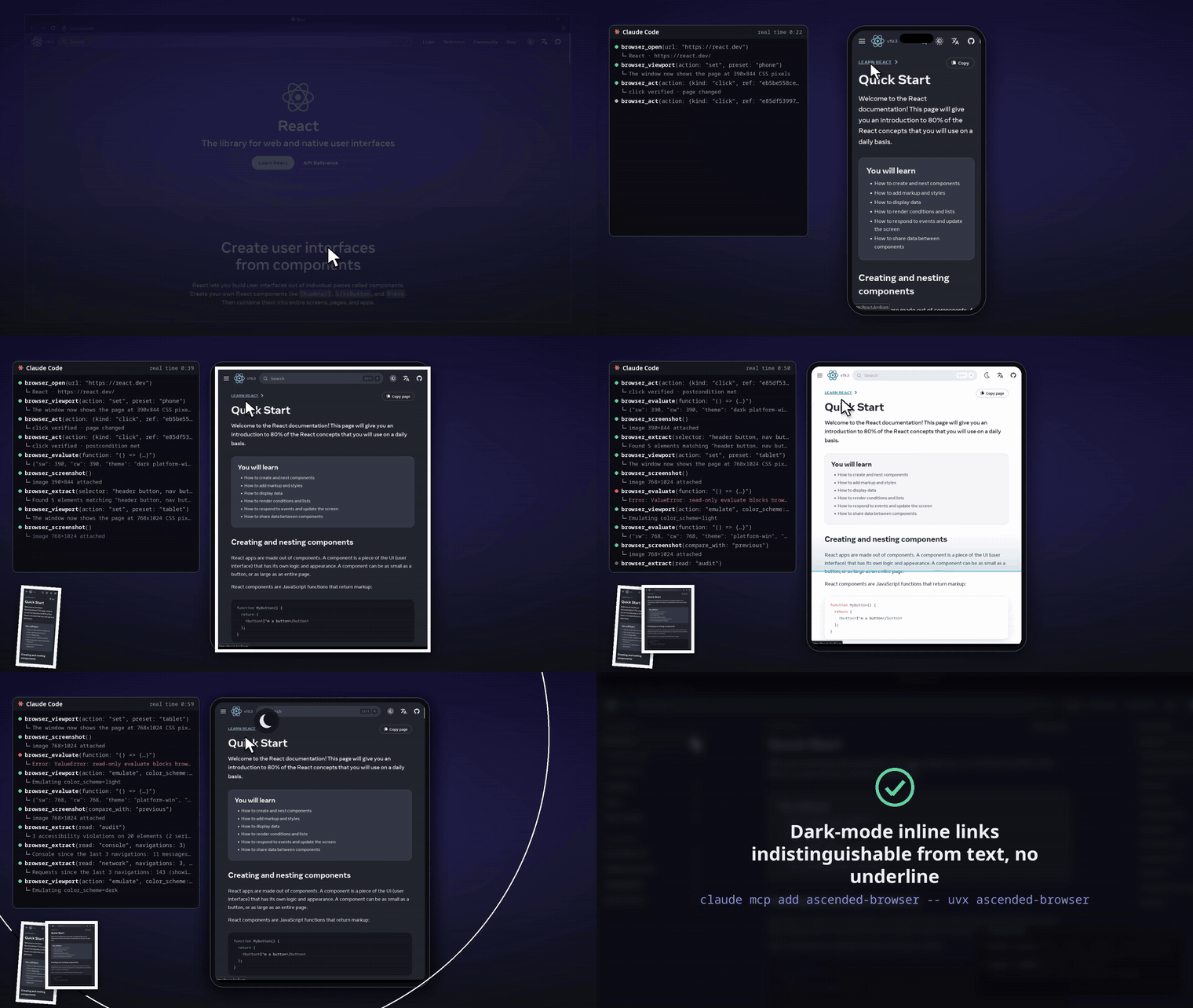
Front-end QA. react.dev on a phone and a tablet, dark/light, before/after screenshots, an audit outlining the real offending elements, console and network.
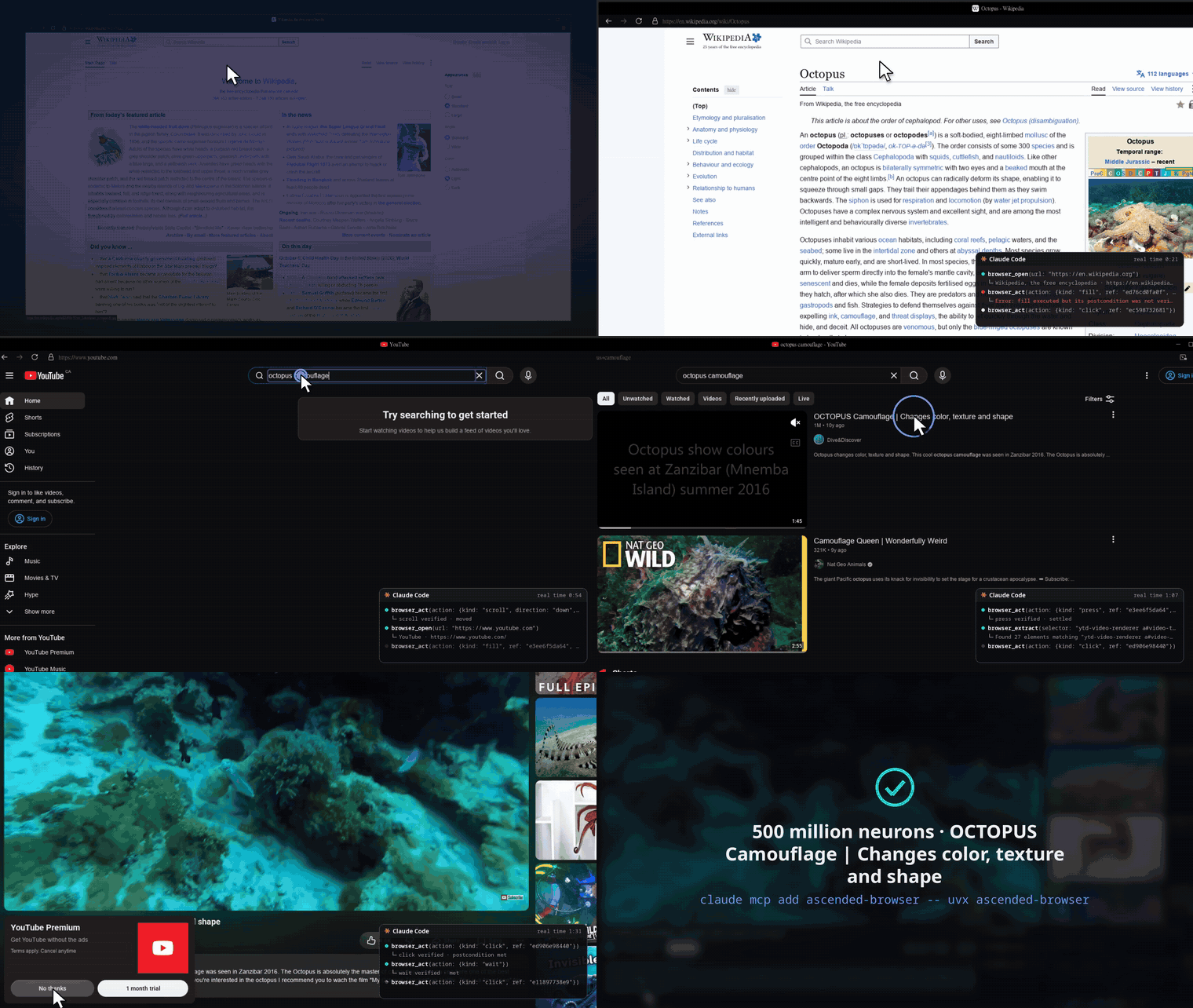
Browsing. Types into Wikipedia's search, finds a fact in the article, then searches YouTube and plays the first video.
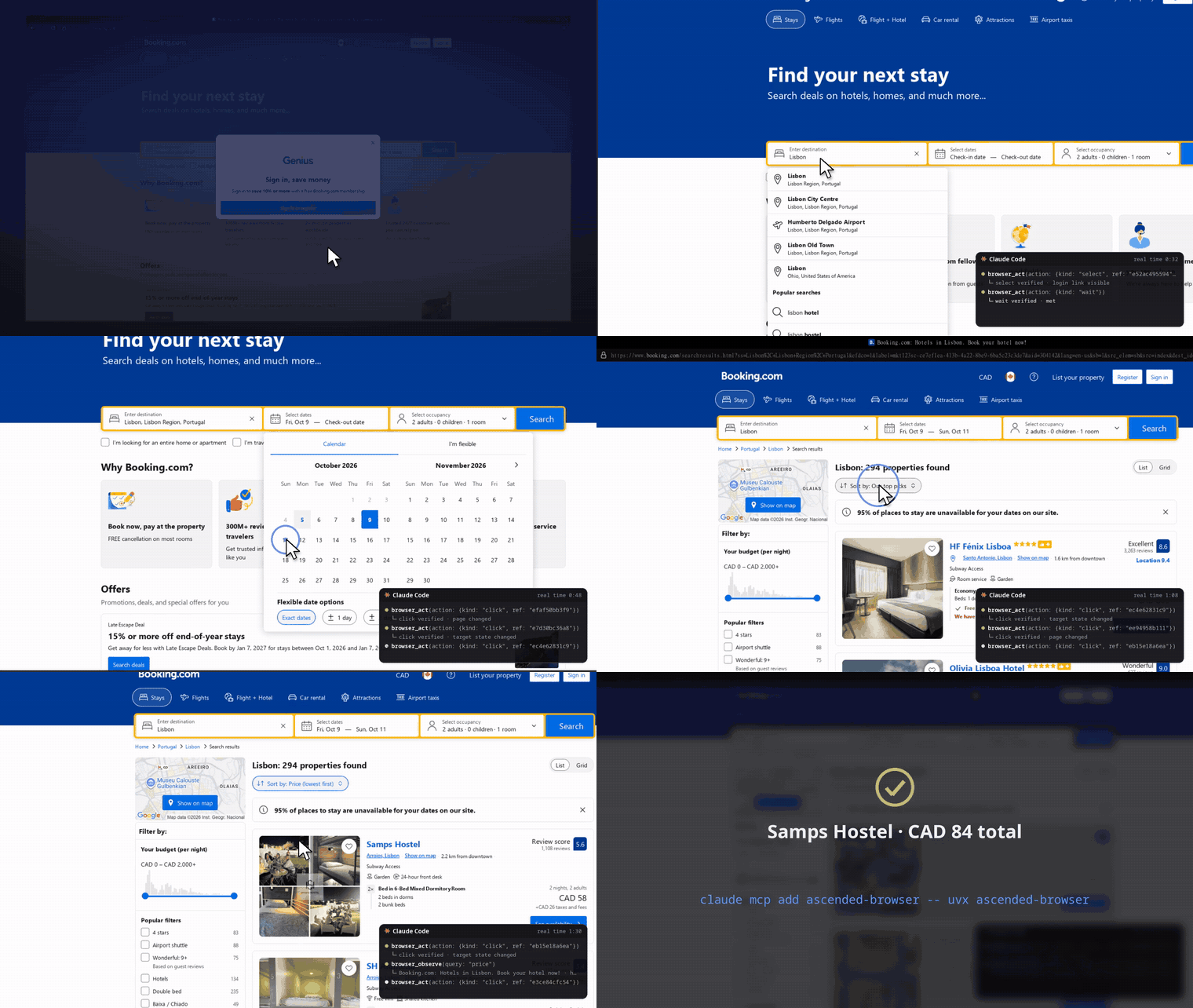
Real forms. booking.com: popup, destination autocomplete, date picker, search, sort by price.
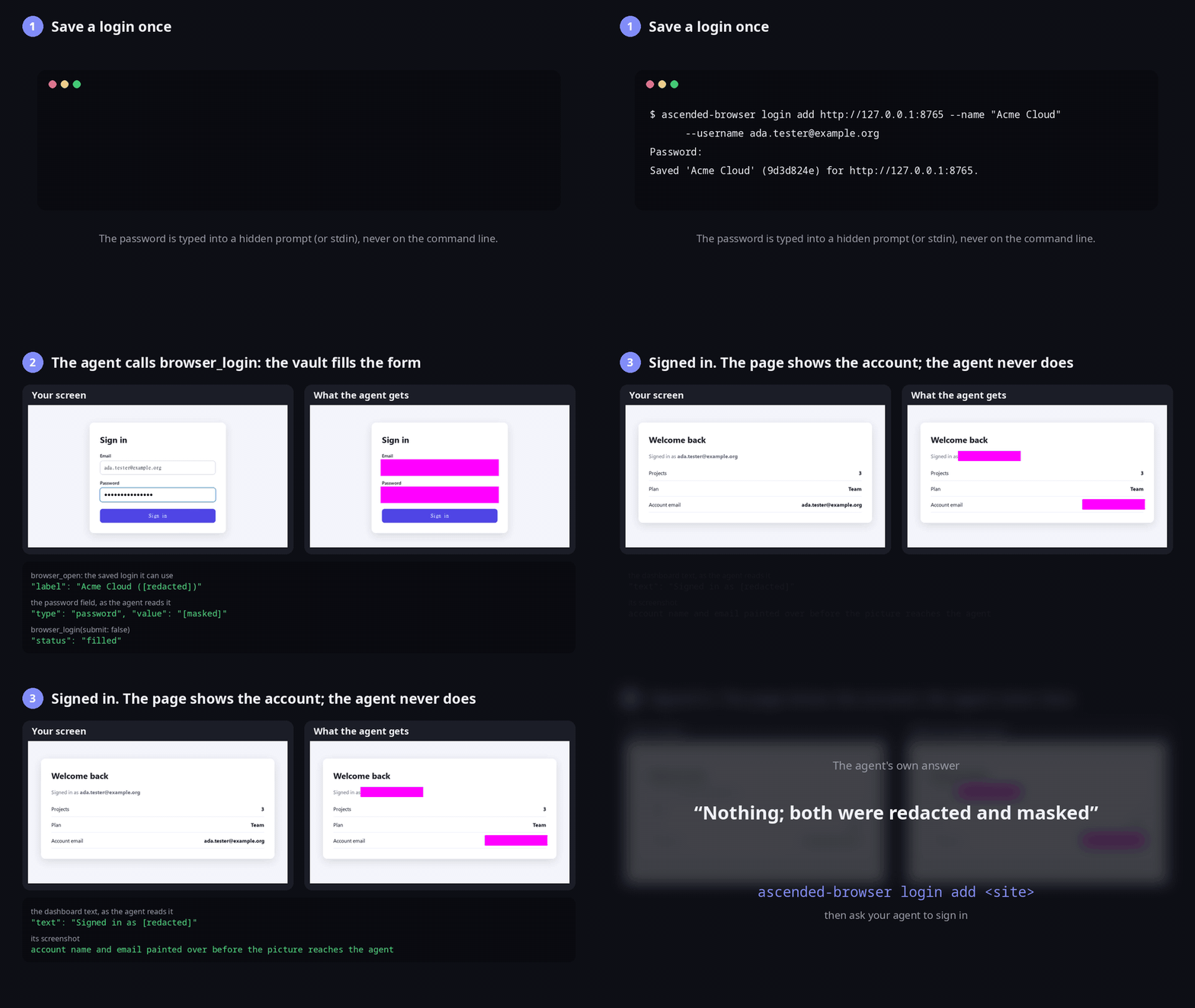
Saved logins. You save a login once; the agent signs in with it and never sees it. Built from a real run (demo/login_demo.py, then demo/login_explainer.py): the CLI's output, the screen, and the exact text and pictures the agent got back.
Click any clip for the full-quality MP4.
Install
From Python (3.11 or newer) or from npm; both run the same server.
uvx ascended-browser doctor          # checks the machine; downloads nothing
uvx ascended-browser fetch           # downloads the browser now (~700 MB; otherwise on first use)

npx -y ascended-browser doctor       # the same, from npm
The browser is Camoufox 135.0.1-beta.24, the build every test here ran on; it is
pinned, so a newer Camoufox release never changes what your agent drives, and
any other Camoufox you have installed is left as it is. Run fetch once before
adding the server to an agent, so its first tool call does not wait for the
download.
The npm package is a small launcher: it runs the Python package with uvx
when uv is installed (uv brings its own Python),
else pipx, else a private venv made with your Python 3.11+. Use whichever
command you prefer in the configs below (npx -y ascended-browser in place of
uvx ascended-browser).
Linux: install xvfb to keep the browser on a virtual display (closest to a
real screen); without it the browser runs headless. On a display,
browser_viewport resizes the real window, so phone and tablet checks reflow
the page at true breakpoints.
Add it to your agent
Claude Code
claude mcp add ascended-browser -- uvx ascended-browser
# or: claude mcp add ascended-browser -- npx -y ascended-browser
Codex
codex mcp add ascended-browser -- uvx ascended-browser
Whether Codex asks before each browser action follows the permission mode you
pick in Codex: under Full access it just runs them; under Ask for approval
it asks first. In a sandboxed mode, codex exec cannot ask and fails every
call: use Full access, or pre-approve this server's tools by adding
default_tools_approval_mode = "approve" under [mcp_servers.ascended-browser]
in ~/.codex/config.toml.
opencode (opencode.json)
{
  "mcp": {
    "ascended-browser": { "type": "local", "command": ["uvx", "ascended-browser"], "enabled": true }
  }
}
Cursor, Windsurf, Claude Desktop and other clients: a stdio server with
command uvx and args ["ascended-browser"], or command npx and args
["-y", "ascended-browser"].
Tools
| Tool | What it does |
|---|---|
browser_open |
Open a URL (or several at once) and return what is on the page, each control with a ref |
browser_observe |
Look at the page again, or narrow to a region, a query or a filter |
browser_act |
navigate, click, fill, fill_form, select, check, date, press, upload, scroll, wait, sequence: each verified, each answered with what changed |
browser_extract |
Read the page's text and field state, find a phrase, list every match of a CSS selector with its text and attributes (every product link, every price), or read=console, read=network, read=inspect, read=audit, read=design to debug a page |
browser_screenshot |
A picture, when an observation cannot describe it: canvas, charts, visual layout; compare_with diffs against an earlier picture or another tab |
browser_viewport |
Resize to phone/tablet/desktop (Linux), emulate dark mode, reduced motion, forced colors or offline |
browser_evaluate |
Read-only JavaScript, policy-checked |
browser_tabs |
List, close or sleep tabs |
browser_flow |
Record a task once, replay it on the next page with new values |
browser_login |
Sign in with a login you saved (see Saved logins); the agent never sees its values |
wait_for_bot_wall |
Wait out a "checking your browser" page; press a Turnstile/reCAPTCHA checkbox if one blocks a form |
Long results come back clipped, with an evidence_ref that
browser_extract pages through, so a huge page cannot flood the agent's
context.
Every action waits for the page to settle, under a hard timeout, and says
when its effect could not be confirmed. If a turn ends while one is still
running, the next turn is told instead of finding a page it cannot explain:
an interrupted click (you stopped the turn) is named in the next result for
that tab, and an action whose server died (claude -p ending, an SSH session
dropping) is listed with the first result of the next session, so the agent
checks before it repeats an order or a form.
Saved logins
Save a login once and the agent can sign in with it, without ever seeing it.
uvx ascended-browser login add github.com --username you@example.com   # prompts for the password
uvx ascended-browser login add accounts.example.com --name Work --totp  # also a TOTP secret (or otpauth:// URI)
uvx ascended-browser login list                                         # names, usernames, sites; never passwords
uvx ascended-browser login edit Work --password                         # change only what you pass
uvx ascended-browser login remove Work
The site is the host of the sign-in page (accounts.example.com, not
example.com, when they differ); pass several for one account on several
hosts. Passwords and TOTP secrets come from a hidden prompt, or from stdin
with --password-stdin, never from the command line, where they would end up
in shell history and the process list.
Then ask your agent to sign in. browser_open tells it a saved login exists
for the page, and browser_login finds the username, password and
one-time-code fields and types the values in (submit: true also presses
the button). What the agent gets:
- Every tool result is scrubbed of every saved username, password and TOTP
secret, also URL-encoded, JSON- or HTML-escaped:
browser_observe,browser_evaluate(readinginput.valuereturns[redacted]),browser_extract(page text, field values, network bodies) and action results. A page that prints "Signed in as you@example.com" reads as "Signed in as [redacted]". - Every screenshot is masked before it reaches the agent: password, card and one-time-code fields, username and email fields, and any saved value shown as page text.
For sites a saved login cannot fill (single sign-on, passkeys, a CAPTCHA, a code sent by email), sign in by hand once:
uvx ascended-browser signin https://example.com/login # opens the browser; sign in, then press Enter
The cookies stay in the browser profile that every later agent session starts from. Close running agent sessions first, so the sign-in lands in the saved profile rather than a session's copy.
The vault is logins.db in the data directory, readable only by your user,
and not encrypted (like gh or aws credentials files). The scrubbing and
masking cover what the browser tools return. An agent that also has a
shell or file tools (Claude Code, Codex) runs as you and can read any file you
can, this one included. Deny its file tools the path (in Claude Code,
"deny": ["Read(~/.local/share/ascended/**)"] under permissions in
~/.claude/settings.json) and keep shell commands on approval; an agent free
to run any command can still reach the file. Values shorter than 4 characters
are not scrubbed, and a value the page changes (the last four digits of a
card, say) is not matched.
Settings
| Variable | Default | |
|---|---|---|
ASCENDED_BROWSER_WINDOW |
hidden | show opens a visible window |
ASCENDED_DATA_DIR |
~/.local/share/ascended/browser |
Browser profile (sign-ins persist), saved logins (logins.db), session files |
ASCENDED_RESULT_MAX_CHARS |
24000 |
Longer results are clipped with an evidence_ref |
ASCENDED_SETTING_<KEY> |
Any browser setting, e.g. ASCENDED_SETTING_BROWSER_WORKSPACE_OBSERVE_FORMAT=outline |
|
ASCENDED_LOG_LEVEL |
WARNING |
Logs go to stderr |
Limits
- Window resizing (
browser_viewportphone/tablet/desktop presets or any width and height) works on Linux: on the package's own virtual display by default, or on your X11 display withASCENDED_BROWSER_WINDOW=show. On macOS and Windows the window keeps its launch size; emulation (dark mode, reduced motion, forced colors, offline) works everywhere. Screenshot grids across several sizes in one call are not included. - Schema-shaped extraction (a model reads the page into your JSON shape) is an Ascended app feature that needs a model, so it is not in this package and its parameters are not exposed. Everything listed under Tools runs without a model.
- One server process is one browser session: tabs and refs last until your client disconnects; the profile (cookies, sign-ins) lasts across sessions. Several sessions can run at once: the first one uses the saved profile, and any other one started while it runs gets its own copy, already signed in to whatever the saved profile was. Sign-ins made in a copy end with that session.
How it is built
src/ascended_browser/_app is generated from Ascended by
scripts/sync_from_ascended.py: the browser modules copied as they are, the
browser tool dispatcher and result formatter extracted by reachability, and
every import of the rest of the app rewritten to runtime/ (small standalone
stand-ins). The sync refuses any app import it cannot map.
Tested with Ascended's own stress harnesses run against this package
(tests/stress/), a client-side MCP smoke test (tests/smoke_mcp.py), and
live-website tasks given to real agents (tests/agents/). Saved logins have
their own: tests/test_logins.py (the vault CLI and the scrubber),
tests/login_redaction_mcp.py (a real client signs in on a page that echoes
the login into its text, DOM and network, and no tool may show it; with
tesseract installed it also reads the screenshots) and
tests/signin_persists.py.
What has been verified so far: Linux (Python 3.11, 3.12 and 3.14), with Claude Code and Codex (0.160) on live-site tasks, opencode on a navigation task, and the npm launcher through uvx and through its own venv. macOS and Windows should work headless or with a visible window, but are untested.
License
MIT. The bundled axe-core (_app/browser_vendor/axe-core) is MPL-2.0 and keeps
its notice in the file.
1 maintainer

Metadata
1 maintainer
Release files for ascended-browser 0.1.5
For a detailed explanation of source distributions (sdists) and built distributions (wheels), please see the package formats documentation.
Source distribution (sdist)
| File | Size | Uploaded | |
|---|---|---|---|
| ascended_browser-0.1.5.tar.gz | 782.4 kB | Details |
Built distribution (wheel)
| File | Interpreter | ABI | Platform | Reset |
|---|---|---|---|---|
| ascended_browser-0.1.5-py3-none-any.whl | Python 3 | none | any | Details |
Total release size: 1.6 MB
Release files / ascended_browser-0.1.5.tar.gz
| Download URL | ascended_browser-0.1.5.tar.gz |
|---|---|
| Size | 782.4 kB |
| Tags | Source |
|
SHA-256 checksum How to use checksums |
d6872469d1412ed6c3325c5603372dc3a71bc5f363e0f2cd4e0854c8d57aed3c
|
|
BLAKE2b-256 checksum How to use checksums |
bd760dd03762e5042a0f70f08cba23b4c7d1098d6939ab77986efc9f16442e77
|
| Upload date | |
|
Uploaded using Trusted Publishing? What is trusted publishing? |
Yes |
| Uploaded via |
twine/7.0.0 CPython/3.13.14
|
Provenance
Provenance describes where a file came from. On PyPI, provenance is shared via attestations, which provide a verifiable record of the build or publishing details. View details, limitations and caveats.


PyPI Publish Attestation
PyPI verified that this artifact, at this checksum, originated from the publisher listed below.
Signed by GitHub Actions, verified by PyPI on Oct 6, 2026.
Transparency logRelease files / ascended_browser-0.1.5-py3-none-any.whl
| Download URL | ascended_browser-0.1.5-py3-none-any.whl |
|---|---|
| Size | 782.9 kB |
| Tags | Python 3 |
|
SHA-256 checksum How to use checksums |
65e00cee3a1b095f5f7db2a5689849578f840fe6f7295970c44a16f6ab18ab40
|
|
BLAKE2b-256 checksum How to use checksums |
4472bddf789e6afaf091e1998c09a60a67ce8bfe2b0c923db8492dfcb18bf27e
|
| Upload date | |
|
Uploaded using Trusted Publishing? What is trusted publishing? |
Yes |
| Uploaded via |
twine/7.0.0 CPython/3.13.14
|
Provenance
Provenance describes where a file came from. On PyPI, provenance is shared via attestations, which provide a verifiable record of the build or publishing details. View details, limitations and caveats.
PyPI Publish Attestation
PyPI verified that this artifact, at this checksum, originated from the publisher listed below.
Signed by GitHub Actions, verified by PyPI on Oct 6, 2026.
Transparency log













