
asciipixels
Generate dynamic ASCII art with images and videos.
By Leonardo - UmActually
asciipixels is a quick-and-easy library for converting images and videos to highly customizable ASCII art. The library has four primary functions that do all the asciification work, and save the result as an image, gif, or video: image.asciify(), image.dynamic_asciify(), video.asciify() and video.dynamic_asciify().
For a more granular control of what the program should do, the CoreAsciifier class (the class behind the primary asciipixels functions) and wrapper functions for both ImageMagick and FFmpeg are also available.
What Is 'Dynamic'
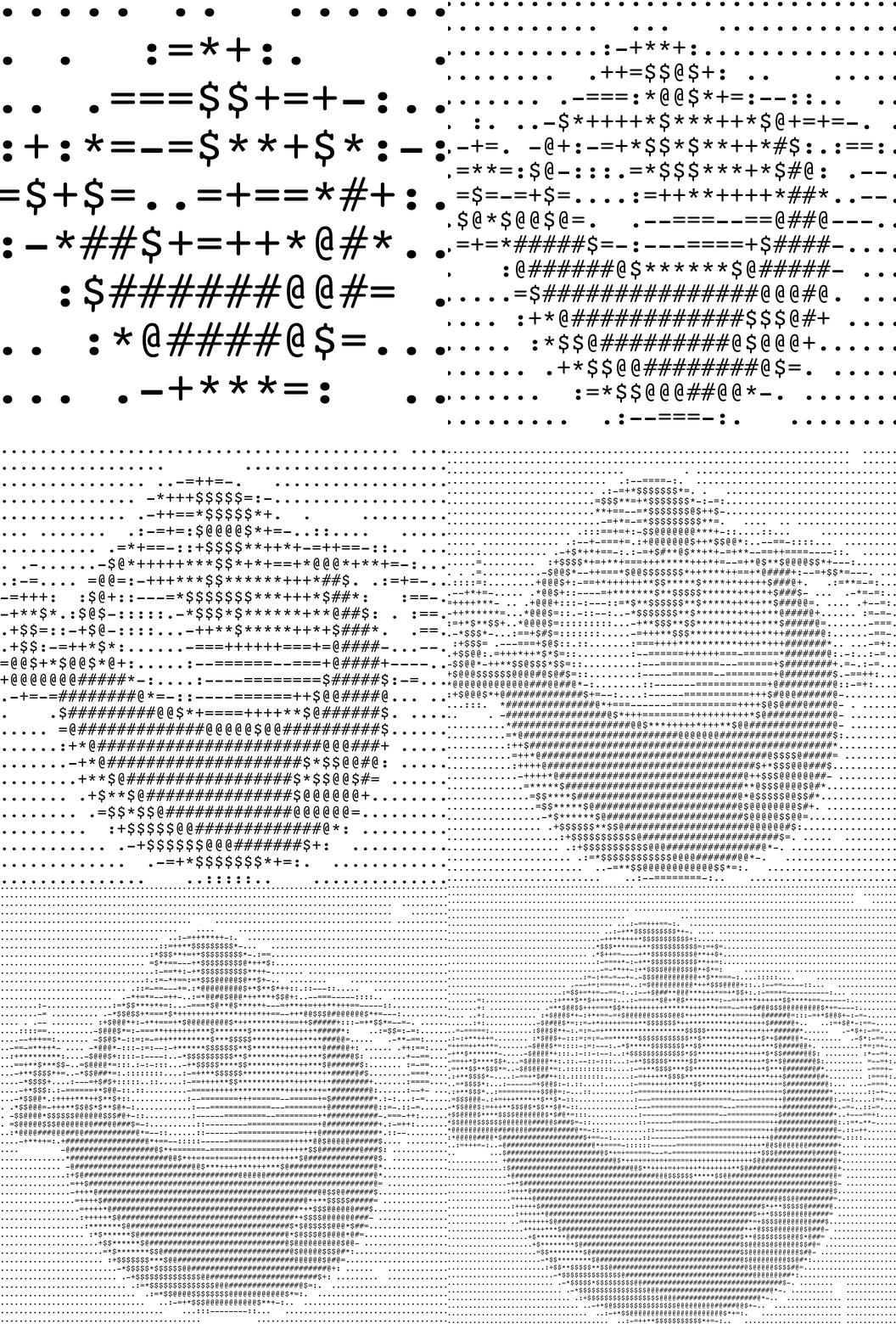
What really sets the asciipixels library apart is the dynamic functionality. In the functions image.dynamic_asciify() and video.dynamic_asciify() some parameters can change over time. The user can pass callables that receive the frame number and return the parameter value, rather than passing the hard-coded value itself. In the example below, the definition parameter increases by 16 units every frame. It is modeled by a very simple lambda expression.
Basic Usage
Note: asciipixels depends on two particular command-line software: ImageMagick and FFmpeg. If you're a CLI nerd and already have these installed, then go ahead with this guide. If not, go to the Installation section.
Use the corresponding function depending on your use case:
-
image.asciify()converts image to image. The generated ASCII art is returned as a string and optionally saved in a txt. -
image.dynamic_asciify()converts image to gif or mp4 video. Supports dynamic parameters. -
video.asciify()converts video to video. -
video.dynamic_asciify()converts video to video. Supports dynamic parameters.
All four have the path of the input file as the first argument. The rest of the arguments all have default values. Something along these lines is enough to get you started:
import asciipixels as ap
ap.image.asciify('foo.png')
This will generate a new asciified image named foo2.png.
It is important to note that all functions except image.asciify() require a if __name__ == '__main__' check in the top level of the user code (unless you are using interactive python on the command line). This is because the library uses multiprocessing to speed up frame generation. So, in order to asciify a video, for example, you can do the following:
import asciipixels as ap
if __name__ == '__main__':
    ap.video.asciify('foo.mp4')
The most important parameter to play around with is the definition. It is simply the number of characters in the horizontal axis. Defaults to 100 in all functions. Set it too high and the ASCII art will just look like art. Set it too low and it will just look like ASCII.
Also, keep in mind that you can set the output resolution of the image/video. The output dimensions approximate the input dimensions by default, but you can change that with the out_width argument.
Lastly, if you decide to work with dark text on a light background, remember to set reverse_chars to True in order to correct the pixel-to-ASCII mapping.
As a final example, I made the Bigweld gif in the What Is 'Dynamic' section with the following code:
import asciipixels as ap

if __name__ == '__main__':
    ap.image.dynamic_asciify(
        'ceo.png',
        bg_color=255,
        txt_color=0,
        definition=lambda f: f * 16,
        fps=2,
        frame_count=7,
        out_width=1000,
        reverse_chars=True
    )
The complete list of parameters/arguments of a given primary function can be found in its documentation.
Installation
To install asciipixels, use pip in the terminal:
Windows
pip install asciipixels
macOS / Linux
python3 -m pip install asciipixels
Asciipixels has two dependencies that aren't installed automatically. These are ImageMagick, for image manipulation, and FFmpeg, for video and audio manipulation. You can download them from their official sites or by using Homebrew (if applicable).
Cool, But What Is ASCII Art
ASCII art is simply the representation of images (or video) with characters and letters. This art can be composed by using characters that match either the brightness or contour of a part of an image. This library works with the brightness aspect.
1 maintainer

Metadata
1 maintainer
Release files for asciipixels 0.1.3
For a detailed explanation of source distributions (sdists) and built distributions (wheels), please see the package formats documentation.
Source distribution (sdist)
| File | Size | Uploaded | |
|---|---|---|---|
| asciipixels-0.1.3.tar.gz | 943.1 kB | Details |
Built distribution (wheel)
| File | Interpreter | ABI | Platform | Reset |
|---|---|---|---|---|
| asciipixels-0.1.3-py3-none-any.whl | Python 3 | none | any | Details |
Total release size: 1.9 MB
Release files / asciipixels-0.1.3.tar.gz
| Download URL | asciipixels-0.1.3.tar.gz |
|---|---|
| Size | 943.1 kB |
| Tags | Source |
|
SHA-256 checksum How to use checksums |
2bd706be79dda34bf7fd566ce346c690eba9a91ea58e397ecda7cc4f69136bfc
|
|
BLAKE2b-256 checksum How to use checksums |
e2738f5eb82a4ec57ab1329ec8914af0bdbdfce6ab24b52421ea6e42d76a6d41
|
| Upload date | |
|
Uploaded using Trusted Publishing? What is trusted publishing? |
No |
| Uploaded via |
twine/4.0.1 CPython/3.10.2
|
Release files / asciipixels-0.1.3-py3-none-any.whl
| Download URL | asciipixels-0.1.3-py3-none-any.whl |
|---|---|
| Size | 942.2 kB |
| Tags | Python 3 |
|
SHA-256 checksum How to use checksums |
90d9313e69827618ddf1d3906839afbf626d8996d684d6558f958c6f25155b74
|
|
BLAKE2b-256 checksum How to use checksums |
cd47e964f87ad6d726d879471ba6fe7d4cf29586f0e299aeb001f500d2c0ade9
|
| Upload date | |
|
Uploaded using Trusted Publishing? What is trusted publishing? |
No |
| Uploaded via |
twine/4.0.1 CPython/3.10.2
|













