
Ask-Shell

Logo generated by Google Gemini
🤖 Your AI Task Automation Agent - Not Just Command Generator!
Describe complex tasks in plain language, and let AI execute them step-by-step until completion
Multi-step execution • Auto-retry on failure • Real-time thinking display


📖 Complete Documentation | Quick Start | Examples | API Reference
🌟 What Makes Ask-Shell Special?
Not Just a Command Generator - A True Task Automation Agent!
| 🔄 | Executes multi-step tasks from start to finish |
🧠 | Learns from failures and automatically retries |
| 💭 | Shows its thinking in real-time for transparency |
✅ | Doesn't stop until your task is complete |
中文 | English
Ask-Shell is an AI-powered task automation agent that goes beyond simple command generation. Unlike tools that only translate queries into commands, Ask-Shell executes multi-step tasks, learns from failures, and adapts its strategy until completion.
🎯 Why Ask-Shell?
| Other Tools | Ask-Shell |
|---|---|
| Generate ONE command → Done | Execute MULTIPLE steps → Analyze → Adjust → Complete |
| "Here's your command, run it yourself" | "I'll keep working until it's done" |
| Fails? You figure it out | Fails? AI analyzes, retries, finds alternatives |
Example: "Organize my project files"
Other tools: ls -la  # Just one command, you do the rest

Ask-Shell:  Step 1: Analyze directory structure
            Step 2: Create organized folders
            Step 3: Move files to appropriate locations
            Step 4: Verify organization
            ✓ Task complete!
🎬 Demo
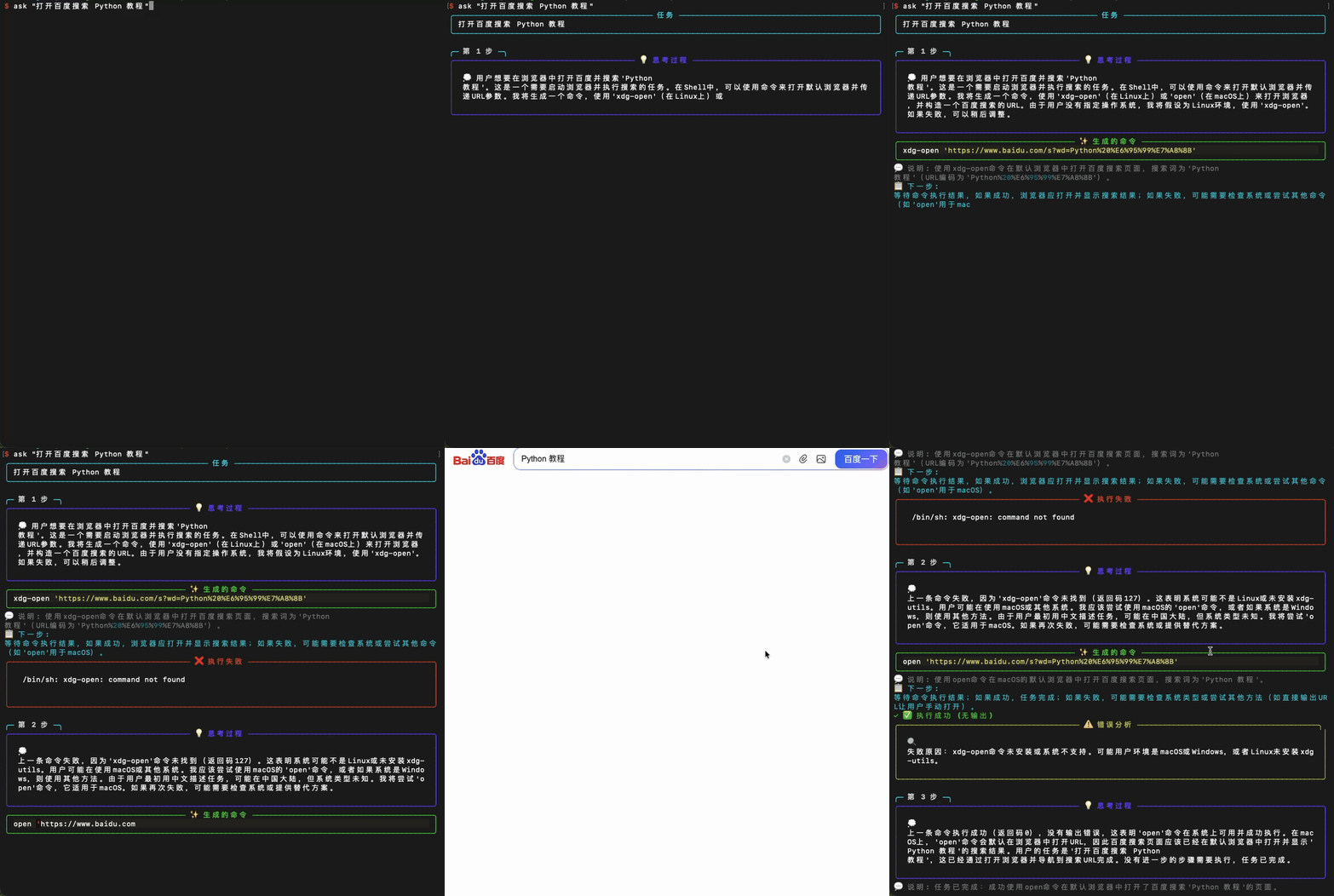
Demo 1: Using ask-shell to control terminal with natural language
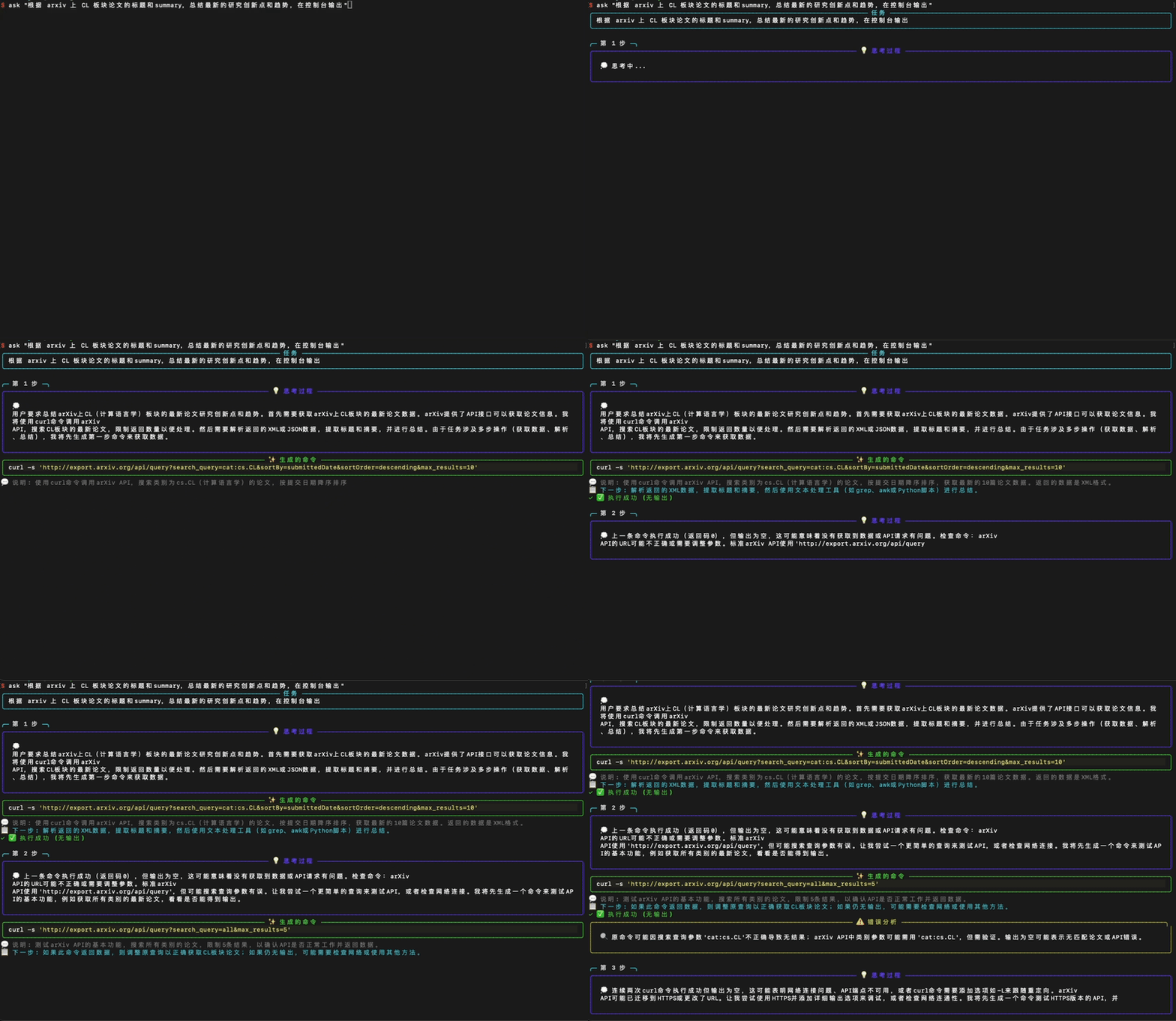
Demo 2: Using ask-shell to control terminal with natural language
Ask-Shell provides a beautiful terminal interface with real-time feedback:
- 💭 Real-time Thinking Process - See AI's thought process
- ⚙️ Command Execution Animation - Dynamic loading effects during command execution
- ✨ Syntax Highlighting - Generated commands with syntax highlighting
- 📊 Structured Output - Clear panels and icon displays
- 🎯 Interactive Confirmation - Dangerous operations with clear warning indicators
🚀 Quick Start
Installation
Method 1: Development Mode (Recommended)
# Clone the repository
git clone https://github.com/fssqawj/ask-shell.git
cd ask-shell

# Install in development mode (can use ask-shell or ask command directly)
pip install -e .
Method 2: Install from PyPI
pip install askshell-ai
Method 3: Install Dependencies Only
pip install -r requirements.txt
Configure API Key
- Copy the environment variable template:
cp .env.example .env
- Edit the
.envfile and fill in your OpenAI API Key:
OPENAI_API_KEY=your-api-key-here
💡 Usage
After Installation (Recommended)
If you installed with pip install -e . or pip install askshell-ai, you can use commands directly:
# Use ask-shell command
ask-shell "list all Python files in current directory"

# Or use the shorter ask command
ask "list all Python files in current directory"

# Interactive mode
ask -i

# Demo mode (no API Key required)
ask -d "create a test folder"

# Auto execution mode (no confirmation needed for each command)
ask -a "count lines of code in current directory"

# Specify working directory
ask -w /path/to/dir "your task"
Direct Run (Without Installation)
# Single task execution
python ask_shell/cli.py "list all Python files in current directory"

# Interactive mode
python ask_shell/cli.py -i

# Demo mode (no API Key required)
python ask_shell/cli.py -d "create a test folder"

# Auto execution mode
python ask_shell/cli.py -a "count lines of code in current directory"

# Specify working directory
python ask_shell/cli.py -w /path/to/dir "your task"
Examples
The following examples work with both ask command and python ask_shell/cli.py:
Simple Tasks (Like other tools)
# File operations
ask "find all files larger than 1MB"
ask "list all running Python processes"
Complex Multi-Step Tasks (Where Ask-Shell shines!)
# Project organization - Multiple steps executed automatically
ask "organize this project: create docs, tests, and src folders, then move files accordingly"

# Environment setup - Handles errors and retries
ask "set up a Python virtual environment and install dependencies from requirements.txt"

# Git workflow - Complete task automation
ask "commit all changes with meaningful message, then push to origin"

# System maintenance - Intelligent execution
ask "find and compress all log files older than 7 days"

# Development tasks - Multi-step coordination
ask "find all TODO comments in Python files and create a summary file"
Browser & System Operations
# Browser operations
ask "open GitHub in default browser"
ask "open Google and search for Python tutorial"

# System information
ask "check system memory usage"
ask "show disk usage for all mounted drives"
More Examples
# Text processing with verification
ask "count total lines of all .py files"
ask "search for lines containing 'error' in all .txt files"

# Backup operations
ask "create a timestamped backup of this directory"
💡 Pro Tip: The more complex your task, the more Ask-Shell's advantages shine compared to simple command generators!
Interactive Mode
ask -i
# or
python ask_shell/cli.py -i
In interactive mode, you can continuously input tasks:
Ask-Shell > list files in current directory
Ask-Shell > create a test file
Ask-Shell > exit  # Exit
📁 Project Structure
ask-shell/
├── ask_shell/           # Core code
│   ├── agent.py        # Task automation agent with intelligent loop
│   ├── executor/       # Command executor with safety checks
│   ├── llm/            # LLM client with context management
│   ├── models/         # Data models
│   └── ui/             # Beautiful terminal interface
├── requirements.txt    # Dependencies
└── .env.example        # Environment variable template
🆚 Comparison with Other Tools
| Feature | Shell-GPT | Aichat | Warp AI | Ask-Shell |
|---|---|---|---|---|
| Multi-step task execution | ❌ | ❌ | ⚠️ Limited | ✅ Full support |
| Auto-retry on failure | ❌ | ❌ | ❌ | ✅ Yes |
| Task context awareness | ❌ | Partial | Partial | ✅ Full context |
| Real-time thinking display | ❌ | ❌ | ⚠️ Basic | ✅ Streaming |
| Execution loop | ❌ Single-shot | ❌ Chat only | ⚠️ Limited | ✅ Until completion |
| Error analysis | ❌ Manual | ❌ Manual | ⚠️ Basic | ✅ Automatic |
| Dangerous operation detection | ⚠️ Basic | ⚠️ Basic | ✅ Yes | ✅ Dual-layer |
| Browser automation | ❌ | ❌ | ❌ | ✅ Built-in |
| File generation | ❌ | ❌ | ❌ | ✅ PPT, Images, etc. |
| Open source | ✅ Python | ✅ Rust | ❌ Closed | ✅ Python |
| Easy to extend | ⚠️ | ⚠️ | ❌ | ✅ Plugin-ready |
What Makes Ask-Shell Different?
Shell-GPT / sgpt: Great for quick command translation, but stops after generating one command.
Aichat: Powerful chat interface with many features, but not task-focused.
Warp Terminal: Modern terminal with AI features, but closed-source and requires full terminal replacement.
Ask-Shell: ✨ Focused on autonomous task completion - keeps executing until your task is actually done.
Advanced Capabilities
Browser Automation: Built-in Playwright integration for web automation tasks. File Generation: Generate PPTs, images, and other files directly from natural language. Extensible Skills: Plugin-ready architecture for adding new capabilities.
⚙️ Configuration Options
Environment Variables
You can configure the following options in the .env file:
# OpenAI API Key (required)
OPENAI_API_KEY=your-api-key-here

# Custom API URL (optional, for compatible APIs)
OPENAI_API_BASE=https://api.openai.com/v1

# Model name (optional, default: gpt-4)
MODEL_NAME=gpt-4
Command Line Arguments
task- Task description to execute-i, --interactive- Interactive mode-a, --auto- Auto execution mode (no confirmation needed)-d, --demo- Demo mode (no API Key required)-w, --workdir- Specify working directory
🔒 Safety Features
Ask-Shell takes safety seriously with multiple protection layers:
🛡️ Dual-Layer Protection
-
AI-Powered Detection - GPT-4 analyzes commands for potential dangers
- Understands context and intent
- Explains WHY a command is dangerous
- Catches subtle risks that pattern matching misses
-
Built-in Blacklist - Hardcoded protection against catastrophic commands
rm -rf /and variants- Direct disk operations
- System file modifications
- Fork bombs and malicious patterns
✋ User Control
-
Interactive Confirmation - You always have the final say
- Clear danger warnings with explanations
- Edit commands before execution
- Skip commands you don't trust
- Quit anytime
-
Transparency - Know exactly what's happening
- See AI's reasoning process
- Review commands before execution
- Understand potential risks
Safety Philosophy: "Trust, but verify" - Give AI autonomy, but keep humans in control of critical decisions.
🛠️ Tech Stack
- Python 3.7+ - Easy to understand and extend
- OpenAI API - GPT-4 model (extensible to other LLMs)
- Rich - Beautiful terminal output with streaming support
- python-dotenv - Environment variable management
Architecture Highlights
- Agent Loop Pattern: Continuous task execution with feedback integration
- Context Management: Full conversation history with result tracking
- Modular Design: Easy to add new LLM providers, executors, or UI components
- Safety-First: Dual-layer protection (AI + blacklist)
🗺️ Roadmap
- Support for multiple LLM providers (Claude, Gemini, Ollama)
- Task history and replay functionality
- Plugin system for custom commands
- Task templates library
- Web UI interface
- Team collaboration features
📝 License
This project is licensed under the MIT License - see the LICENSE file for details.
🤝 Contributing
Issues and Pull Requests are welcome!
1 maintainer

Metadata
1 maintainer
Release files for askshell-ai 0.3.0
For a detailed explanation of source distributions (sdists) and built distributions (wheels), please see the package formats documentation.
Source distribution (sdist)
| File | Size | Uploaded | |
|---|---|---|---|
| askshell_ai-0.3.0.tar.gz | 187.3 kB | Details |
Built distribution (wheel)
| File | Interpreter | ABI | Platform | Reset |
|---|---|---|---|---|
| askshell_ai-0.3.0-py3-none-any.whl | Python 3 | none | any | Details |
Total release size: 237.5 kB
Release files / askshell_ai-0.3.0.tar.gz
| Download URL | askshell_ai-0.3.0.tar.gz |
|---|---|
| Size | 187.3 kB |
| Tags | Source |
|
SHA-256 checksum How to use checksums |
80a460de8ab42d4b503eecc9e197f3ae09ea3d3729e7bdfe41226214af05f15c
|
|
BLAKE2b-256 checksum How to use checksums |
1fd87892b75dbe059eb78c461f94d699c9299b907fae06b3f54771110e7a111e
|
| Upload date | |
|
Uploaded using Trusted Publishing? What is trusted publishing? |
No |
| Uploaded via |
twine/6.2.0 CPython/3.9.1
|
Release files / askshell_ai-0.3.0-py3-none-any.whl
| Download URL | askshell_ai-0.3.0-py3-none-any.whl |
|---|---|
| Size | 50.2 kB |
| Tags | Python 3 |
|
SHA-256 checksum How to use checksums |
4068104c42f0a985b20bf86c035655e670f6d08d3aabd42b64d0bbcd30a600b3
|
|
BLAKE2b-256 checksum How to use checksums |
493a4a2f1edae4d805065720d0154bd892e43d1cd55cc9e7d1953549b39dd29c
|
| Upload date | |
|
Uploaded using Trusted Publishing? What is trusted publishing? |
No |
| Uploaded via |
twine/6.2.0 CPython/3.9.1
|














