
asksql
The community-maintained, security-focused continuation of Vanna.
🚧 Work in progress. Vanna was archived on 29 March 2026 with ~227 open issues. asksql picks it up: security fixes first, then bug fixes and dependency updates.
Coming from Vanna? Zero code changes.
pip uninstall vanna
pip install asksql
asksql keeps the vanna import name (like Pillow did for PIL), so import vanna, from vanna import Agent and the legacy 1.x VannaBase API work as before. Don't install both packages in the same environment.
What's fixed so far
| Issue | Fix |
|---|---|
| CVE-2026-4229 · #1121 | SQL injection in the BigQuery vector store |
| #1098 | LLM-written Plotly code could run arbitrary Python on the server (exec with full access) |
| #1078 | LLM-generated SQL ran unfiltered (prompt injection → DROP, shell commands via the database) |
⚠️ One behaviour change: SQL generated by the LLM is now read-only by default. If you need the LLM to write data, opt in with config={"allow_write_sql": True} (legacy API) or RunSqlTool(..., allow_write_sql=True) (v2). See CHANGELOG.md.
Found a bug or a security problem? Open an issue.
Everything below is the original Vanna 2.0 README. Upstream docs at vanna.ai still describe the API.
Vanna 2.0: Turn Questions into Data Insights
Natural language → SQL → Answers. Now with enterprise security and user-aware permissions.



https://github.com/user-attachments/assets/476cd421-d0b0-46af-8b29-0f40c73d6d83
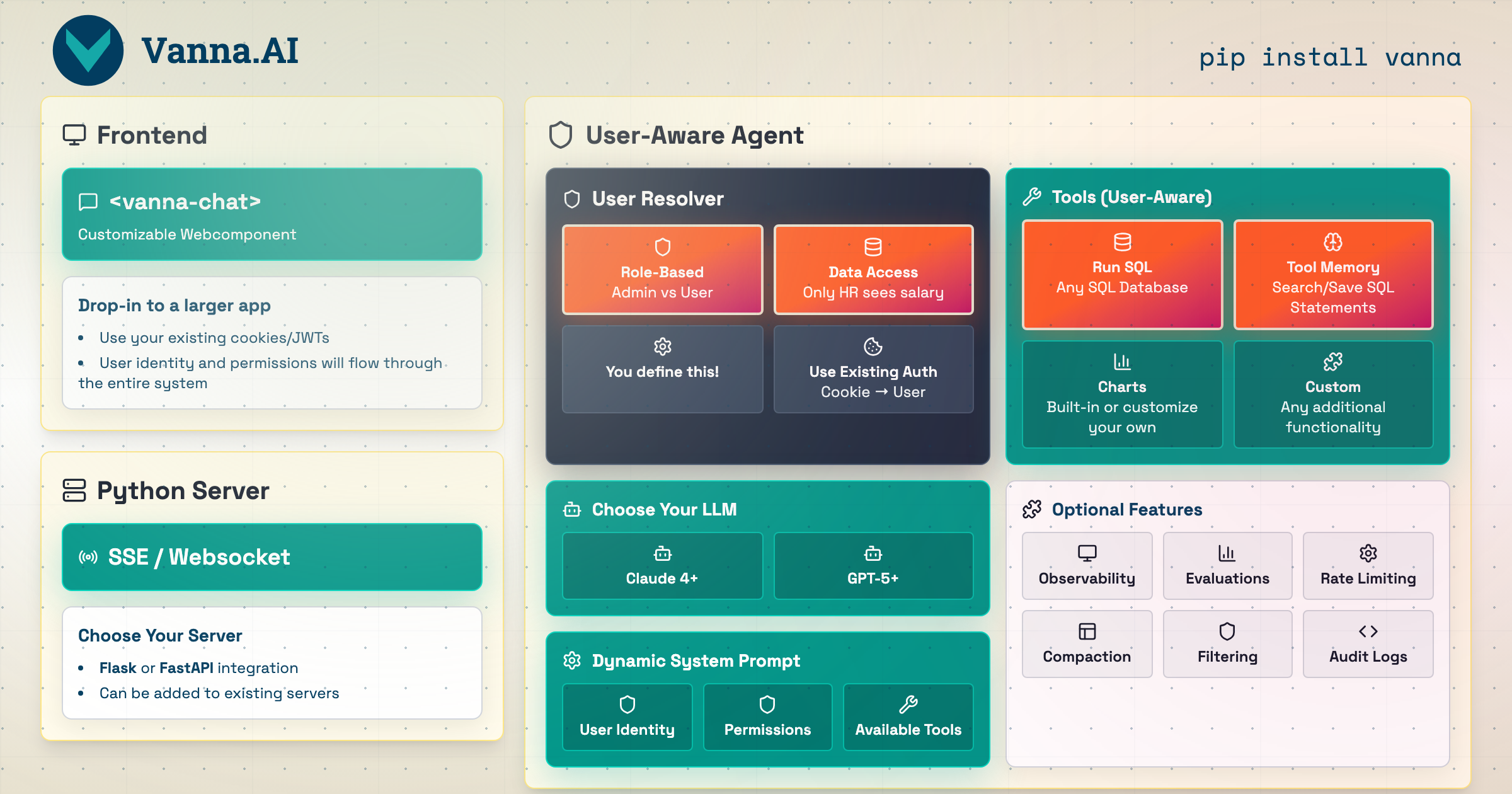
What's New in 2.0
🔐 User-Aware at Every Layer — Queries automatically filtered per user permissions
🎨 Modern Web Interface — Beautiful pre-built <vanna-chat> component
⚡ Streaming Responses — Real-time tables, charts, and progress updates
🔒 Enterprise Security — Row-level security, audit logs, rate limiting
🔄 Production-Ready — FastAPI integration, observability, lifecycle hooks
Upgrading from 0.x? See the Migration Guide | What changed?
Get Started
Try it with Sample Data
Configure
Web Component
<!-- Drop into any existing webpage -->
<script src="https://img.vanna.ai/vanna-components.js"></script>
<vanna-chat
  sse-endpoint="https://your-api.com/chat"
  theme="dark">
</vanna-chat>
Uses your existing cookies/JWTs. Works with React, Vue, or plain HTML.
What You Get
Ask a question in natural language and get back:
1. Streaming Progress Updates
2. SQL Code Block (By default only shown to "admin" users)
3. Interactive Data Table
4. Charts (Plotly visualizations)
5. Natural Language Summary
All streamed in real-time to your web component.
Why Vanna 2.0?
✅ Get Started Instantly
- Production chat interface
- Custom agent with your database
- Embed in any webpage
✅ Enterprise-Ready Security
User-aware at every layer — Identity flows through system prompts, tool execution, and SQL filtering Row-level security — Queries automatically filtered per user permissions Audit logs — Every query tracked per user for compliance Rate limiting — Per-user quotas via lifecycle hooks
✅ Beautiful Web UI Included
Pre-built <vanna-chat> component — No need to build your own chat interface
Streaming tables & charts — Rich components, not just text
Responsive & customizable — Works on mobile, desktop, light/dark themes
Framework-agnostic — React, Vue, plain HTML
✅ Works With Your Stack
Any LLM: OpenAI, Anthropic, Ollama, Azure, Google Gemini, AWS Bedrock, Mistral, Others Any Database: PostgreSQL, MySQL, Snowflake, BigQuery, Redshift, SQLite, Oracle, SQL Server, DuckDB, ClickHouse, Others Your Auth System: Bring your own — cookies, JWTs, OAuth tokens Your Framework: FastAPI, Flask
✅ Extensible But Opinionated
Custom tools — Extend the Tool base class
Lifecycle hooks — Quota checking, logging, content filtering
LLM middlewares — Caching, prompt engineering
Observability — Built-in tracing and metrics
Architecture

How It Works
sequenceDiagram
    participant U as 👤 User
    participant W as 🌐 <vanna-chat>
    participant S as 🐍 Your Server
    participant A as 🤖 Agent
    participant T as 🧰 Tools

    U->>W: "Show Q4 sales"
    W->>S: POST /api/vanna/v2/chat_sse (with auth)
    S->>A: User(id=alice, groups=[read_sales])
    A->>T: Execute SQL tool (user-aware)
    T->>T: Apply row-level security
    T->>A: Filtered results
    A->>W: Stream: Table → Chart → Summary
    W->>U: Display beautiful UI
Key Concepts:
- User Resolver — You define how to extract user identity from requests (cookies, JWTs, etc.)
- User-Aware Tools — Tools automatically check permissions based on user's group memberships
- Streaming Components — Backend streams structured UI components (tables, charts) to frontend
- Built-in Web UI — Pre-built
<vanna-chat>component renders everything beautifully
Production Setup with Your Auth
Here's a complete example integrating Vanna with your existing FastAPI app and authentication:
from fastapi import FastAPI
from vanna import Agent
from vanna.servers.fastapi.routes import register_chat_routes
from vanna.servers.base import ChatHandler
from vanna.core.user import UserResolver, User, RequestContext
from vanna.integrations.anthropic import AnthropicLlmService
from vanna.tools import RunSqlTool
from vanna.integrations.sqlite import SqliteRunner
from vanna.core.registry import ToolRegistry

# Your existing FastAPI app
app = FastAPI()

# 1. Define your user resolver (using YOUR auth system)
class MyUserResolver(UserResolver):
    async def resolve_user(self, request_context: RequestContext) -> User:
        # Extract from cookies, JWTs, or session
        token = request_context.get_header('Authorization')
        user_data = self.decode_jwt(token)  # Your existing logic

        return User(
            id=user_data['id'],
            email=user_data['email'],
            group_memberships=user_data['groups']  # Used for permissions
        )

# 2. Set up agent with tools
llm = AnthropicLlmService(model="claude-sonnet-4-5")
tools = ToolRegistry()
tools.register(RunSqlTool(sql_runner=SqliteRunner("./data.db")))

agent = Agent(
    llm_service=llm,
    tool_registry=tools,
    user_resolver=MyUserResolver()
)

# 3. Add Vanna routes to your app
chat_handler = ChatHandler(agent)
register_chat_routes(app, chat_handler)

# Now you have:
# - POST /api/vanna/v2/chat_sse (streaming endpoint)
# - GET / (optional web UI)
Then in your frontend:
<vanna-chat sse-endpoint="/api/vanna/v2/chat_sse"></vanna-chat>
See Full Documentation for custom tools, lifecycle hooks, and advanced configuration
Custom Tools
Extend Vanna with custom tools for your specific use case:
from vanna.core.tool import Tool, ToolContext, ToolResult
from pydantic import BaseModel, Field
from typing import Type

class EmailArgs(BaseModel):
    recipient: str = Field(description="Email recipient")
    subject: str = Field(description="Email subject")

class EmailTool(Tool[EmailArgs]):
    @property
    def name(self) -> str:
        return "send_email"

    @property
    def access_groups(self) -> list[str]:
        return ["send_email"]  # Permission check

    def get_args_schema(self) -> Type[EmailArgs]:
        return EmailArgs

    async def execute(self, context: ToolContext, args: EmailArgs) -> ToolResult:
        user = context.user  # Automatically injected

        # Your business logic
        await self.email_service.send(
            from_email=user.email,
            to=args.recipient,
            subject=args.subject
        )

        return ToolResult(success=True, result_for_llm=f"Email sent to {args.recipient}")

# Register your tool
tools.register(EmailTool())
Advanced Features
Vanna 2.0 includes powerful enterprise features for production use:
Lifecycle Hooks — Add quota checking, custom logging, content filtering at key points in the request lifecycle
LLM Middlewares — Implement caching, prompt engineering, or cost tracking around LLM calls
Conversation Storage — Persist and retrieve conversation history per user
Observability — Built-in tracing and metrics integration
Context Enrichers — Add RAG, memory, or documentation to enhance agent responses
Agent Configuration — Control streaming, temperature, max iterations, and more
Use Cases
Vanna is ideal for:
- 📊 Data analytics applications with natural language interfaces
- 🔐 Multi-tenant SaaS needing user-aware permissions
- 🎨 Teams wanting a pre-built web component + backend
- 🏢 Enterprise environments with security/audit requirements
- 📈 Applications needing rich streaming responses (tables, charts, SQL)
- 🔄 Integrating with existing authentication systems
Community & Support
- 🐛 asksql Issues — Bug reports and security problems for this fork
- 📖 Upstream Vanna Documentation — Guides and API reference (still applies)
Migration Notes
Upgrading from Vanna 0.x?
Vanna 2.0 is a complete rewrite focused on user-aware agents and production deployments. Key changes:
- New API: Agent-based instead of
VannaBaseclass methods - User-aware: Every component now knows the user identity
- Streaming: Rich UI components instead of text/dataframes
- Web-first: Built-in
<vanna-chat>component and server
Migration path:
- Quick wrap — Use
LegacyVannaAdapterto wrap your existing Vanna 0.x instance and get the new web UI immediately - Gradual migration — Incrementally move to the new Agent API and tools
See the complete Migration Guide for step-by-step instructions.
License
MIT License — See LICENSE for details. Original copyright (c) 2024 Vanna.AI is kept.
Originally built with ❤️ by the Vanna team. asksql is an independent community fork and is not affiliated with or endorsed by Vanna.AI.
1 maintainer

Metadata
1 maintainer
Release files for asksql 2.1.0
For a detailed explanation of source distributions (sdists) and built distributions (wheels), please see the package formats documentation.
Source distribution (sdist)
| File | Size | Uploaded | |
|---|---|---|---|
| asksql-2.1.0.tar.gz | 381.5 kB | Details |
Built distribution (wheel)
| File | Interpreter | ABI | Platform | Reset |
|---|---|---|---|---|
| asksql-2.1.0-py3-none-any.whl | Python 3 | none | any | Details |
Total release size: 873.2 kB
Release files / asksql-2.1.0.tar.gz
| Download URL | asksql-2.1.0.tar.gz |
|---|---|
| Size | 381.5 kB |
| Tags | Source |
|
SHA-256 checksum How to use checksums |
d1a1d5edc6a5621d2b8d1fe81e4f71a3c8316db85709b8a963e847cf0e8c0dfd
|
|
BLAKE2b-256 checksum How to use checksums |
6868a5153fac14007df8dd4ff10cc34d1b427b32e2d3276bdeed42c463e25804
|
| Upload date | |
|
Uploaded using Trusted Publishing? What is trusted publishing? |
Yes |
| Uploaded via |
twine/7.0.0 CPython/3.13.14
|
Provenance
Provenance describes where a file came from. On PyPI, provenance is shared via attestations, which provide a verifiable record of the build or publishing details. View details, limitations and caveats.


PyPI Publish Attestation
PyPI verified that this artifact, at this checksum, originated from the publisher listed below.
Signed by GitHub Actions, verified by PyPI on Sep 28, 2026.
Transparency logRelease files / asksql-2.1.0-py3-none-any.whl
| Download URL | asksql-2.1.0-py3-none-any.whl |
|---|---|
| Size | 491.7 kB |
| Tags | Python 3 |
|
SHA-256 checksum How to use checksums |
706dbadd3d7860de6f3ff2a67b5133f3ba6898f0cf2cd5372c8bda6d4c582087
|
|
BLAKE2b-256 checksum How to use checksums |
f42e6292a8c826f56931b501fadbc4f1411f854c2f98839ce0bf8ceca98ca1af
|
| Upload date | |
|
Uploaded using Trusted Publishing? What is trusted publishing? |
Yes |
| Uploaded via |
twine/7.0.0 CPython/3.13.14
|
Provenance
Provenance describes where a file came from. On PyPI, provenance is shared via attestations, which provide a verifiable record of the build or publishing details. View details, limitations and caveats.
PyPI Publish Attestation
PyPI verified that this artifact, at this checksum, originated from the publisher listed below.
Signed by GitHub Actions, verified by PyPI on Sep 28, 2026.
Transparency log













