

Asphallea
A Genovo Technologies company
A security runtime that secures what your AI agent does, not what it says.
Asphallea sits between an agent and its tools (shell, filesystem, network, and MCP tool-calls) and blocks disallowed actions by declarative policy. Enforcement is deterministic: the same tool-call against the same policy always yields the same decision, with no model in the loop, and a full audit trail of everything the agent tried.





The problem
An AI agent that runs code, calls tools, browses, and touches APIs is a new kind of privileged process. It acts on its own, and it has none of the containment we built for normal processes over the last fifty years. When an agent is prompt-injected or its tools are poisoned, it can do anything its credentials allow. It can exfiltrate data, delete infrastructure, call APIs, and spend money.
Asphallea wraps an agent's tool-execution layer and enforces a least-privilege policy on every action, with a complete audit trail. A hijacked agent can only do what the policy allows, and you can see everything it did.
This is not guardrails
Asphallea does not judge or filter what the model says. It contains what the agent does. This is an operating-systems problem wearing an AI costume: process isolation, least privilege, syscall filtering, blast-radius containment. That framing is the whole point. A pure-ML approach cannot give you kernel-level containment. Asphallea does, on Linux, Windows, and macOS, where it counts.
Two tiers
Policy tier. Cross platform. Every tool call is intercepted, checked against a declarative policy, allowed or denied deterministically, and logged. Works on Linux, macOS, and Windows. This alone is useful.
Containment tier. For high-blast-radius tools that spawn processes, execute code, or run shell commands, Asphallea contains them at the OS level using each platform's own engine. Linux gets a Landlock filesystem allowlist, seccomp-bpf syscall and network filtering, resource limits, and network-namespace isolation. Windows gets an AppContainer filesystem allowlist and network deny inside a Job Object that bounds memory, CPU, and process count and guarantees the whole process tree is killed. macOS gets a Seatbelt profile that allowlists the filesystem and denies network. This is the part a pure-ML competitor cannot replicate.
Install
Asphallea is not on PyPI yet. Install from the repository:
pip install git+https://github.com/Asphallea/Asphallea.git
That gives you the whole policy tier: interception, deterministic allow/deny, rate and spend limits, and the JSONL audit trail, behaving identically on Linux, macOS, and Windows. It is a pure-Python install with no Rust toolchain and nothing to compile.
It does not include the asphallea-run core binary, so the containment tier is
unavailable until you supply one. In that state sandbox.run fails closed: it
refuses the command and tells you what is missing, rather than running it
uncontained.
Adding the containment tier
Two ways, and they differ in who verifies the binary.
Install a release wheel (the core is verified for you). The wheels attached to
each release are platform
specific and bundle a prebuilt asphallea-run together with a
_core/checksums.json manifest. Before the SDK runs that binary it recomputes the
SHA-256 and refuses a binary that does not match, so a swapped or patched core is
rejected and the run fails closed. This is the only path where that check has
something to check against.
# Linux x86_64
pip install https://github.com/Asphallea/Asphallea/releases/download/v0.0.1/asphallea-0.0.1-py3-none-linux_x86_64.whl

# macOS (universal2)
pip install https://github.com/Asphallea/Asphallea/releases/download/v0.0.1/asphallea-0.0.1-py3-none-macosx_10_9_universal2.whl

# Windows x86_64
pip install https://github.com/Asphallea/Asphallea/releases/download/v0.0.1/asphallea-0.0.1-py3-none-win_amd64.whl
Or point the SDK at a core binary yourself. Every release also publishes the
standalone binary. Download the one for your platform and set ASPHALLEA_CORE_BIN:
curl -L -o asphallea-run \
  https://github.com/Asphallea/Asphallea/releases/download/v0.0.1/asphallea-run-linux-x86_64
chmod +x asphallea-run
export ASPHALLEA_CORE_BIN="$PWD/asphallea-run"
A binary you download or build has no entry in a bundled manifest, so the SDK has
nothing to verify it against. It proceeds and reports the check as none rather
than implying it verified something. If that matters to you, check the binary's
SHA-256 against the digest published on the release page yourself. Release binaries
are code-signed on Windows and macOS when signing certificates are configured.
To build the core from source, see core/. The trust model is in
SECURITY.md.
Quickstart
Define a policy once and put it between the agent and its tools. This uses only the policy tier, so it runs the same on every platform.
from asphallea import Interceptor, Policy

# One declarative policy. It governs tools it did not author (an MCP server's) by
# declaring how each tool's arguments map to resources.
policy = (
    Policy.builder("agent")
    .tool("filesystem.read", reads="path")
    .tool("filesystem.delete", writes="path")
    .read_paths("./workspace")
    .write_paths("./workspace/out")
    .deny_network()
    .build()
)

# The choke point: decide a tool-call by name and arguments. Deterministic.
gate = Interceptor(policy)
gate.decide("filesystem.delete", {"path": "/etc/passwd"}).allowed   # -> False
gate.enforce("filesystem.delete", {"path": "/etc/passwd"})          # raises PolicyViolation
Wrap an MCP session so every tool-call is decided before it runs:
from asphallea.integrations.mcp import guard_mcp_session

session = guard_mcp_session(session, policy)   # a denied call never reaches the server
Or guard a Python function tool directly:
from asphallea import guard

@guard(policy, tool="filesystem.read", reads="path")
def read_file(path: str) -> str:
    with open(path) as fh:
        return fh.read()
@guard, the MCP adapter, and Interceptor.decide all funnel through one decision
point, so a decorated function and an MCP tool-call are decided and logged by the
same code. The full quickstart is examples/quickstart.py:
python examples/quickstart.py
The containment tier
The policy tier gates whether a tool runs. For tools that run shell commands or execute code, the containment tier contains what they then do, at the OS level, on Linux, Windows, and macOS.
If you installed a release wheel the core is already bundled, so skip this. Otherwise download the standalone binary from the releases page, or build it:
cd core
cargo build --release
export ASPHALLEA_CORE_BIN="$PWD/target/release/asphallea-run"
Then run commands under OS enforcement:
from asphallea import Policy, sandbox

policy = (
    Policy.builder("shell")
    .allow_tools("run_shell")
    .read_paths("./workspace")
    .write_paths("./workspace/out")
    .deny_network()
    .limits(cpu_seconds=10, memory_mb=512, max_processes=64)
    .build()
)

result = sandbox.run(["bash", "-c", "echo hello > ./workspace/out/ok.txt"],
                     policy=policy, tool="run_shell")
print(result.returncode, result.controls)

# Contained: the read lands outside the allowlist and the OS sandbox blocks it.
blocked = sandbox.run(["bash", "-c", "cat ~/.ssh/id_rsa"], policy=policy, tool="run_shell")
print(blocked.returncode, blocked.stderr)  # non-zero, permission denied
By default sandbox.run fails closed. If OS containment is not available (not
Linux, no core binary, kernel too old), it refuses to run the command and tells you
exactly what is missing. Pass allow_degraded=True to run without containment; that
is logged loudly on every call so it can never pass silently.
Check what your environment can actually enforce:
from asphallea import capabilities
print(capabilities().explain())
The demo
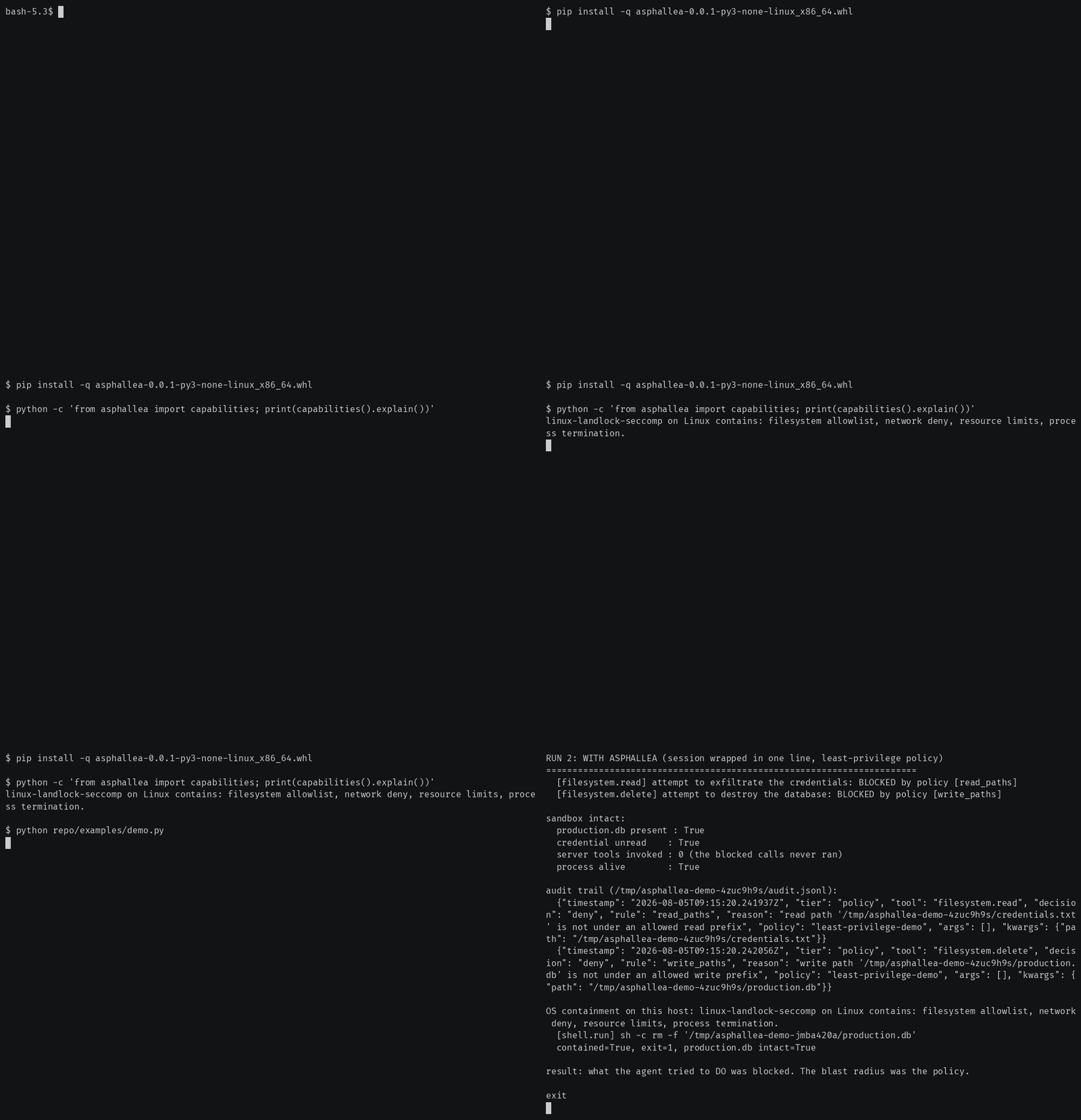
examples/demo.py is the whole pitch in one file. An agent is
connected to a filesystem tool server over MCP and reads a page carrying an injected
instruction that tells it to steal a credential and delete the production database.
It runs twice: once unguarded, where the attack succeeds against throwaway temp
files, and once with the MCP session wrapped in one line, where both tool-calls are
BLOCKED by policy before they run, the database is intact, the credential is never
read, and the audit log is printed. If the OS containment core is present, it adds a
run showing a shell command contained at the OS level too.
python examples/demo.py
Policy model
A policy declares, per policy:
- which tools may be called (allowlist), and which are denied outright (a denial wins)
- how each tool's arguments map to resources, so a tool it did not author can be
governed:
.tool("filesystem.delete", writes="path") - filesystem paths that are readable and writable
- network hosts that are allowed or denied (exact host or parent domain)
- per-tool call-count and rate limits
- a wall-clock timeout per call
- a spend cap, modeled as a maximum number of invocations of a paid tool
- OS resource limits for the containment tier
Build it fluently or load it from YAML. See
policies/example.yaml.
from asphallea import Policy

policy = Policy.from_yaml("policies/example.yaml")
Audit log
Every decision is written as one JSON object per line (JSONL), append-only. Each record carries the timestamp, tool, arguments (by name, the shape a tool-call has), the allow or deny decision, the reason, and the exact policy rule that fired. A redaction hook scrubs likely secrets before anything is written.
{"timestamp": "2026-07-12T18:20:01Z", "tier": "policy", "tool": "filesystem.delete", "decision": "deny", "rule": "write_paths", "reason": "write path '/etc/passwd' is not under an allowed write prefix", "policy": "agent", "args": [], "kwargs": {"path": "/etc/passwd"}}
Swap in your own audit sink or redactor. See asphallea/audit.py.
MCP
An MCP tool-call is a tool name and an arguments dict, which is exactly what the decision point takes, so guarding a session is one line. A denied tool-call never reaches the server.
from asphallea.integrations.mcp import guard_mcp_session

session = guard_mcp_session(session, policy)          # raises PolicyViolation on deny
# or, to let the agent loop continue on a normal tool error:
session = guard_mcp_session(session, policy, on_deny="error")
guard_call_tool(fn, policy) wraps a bare call_tool (client or server side, sync
or async), and namespace= keeps two servers exposing the same tool name apart. The
adapter is duck-typed, so it works whether or not the mcp package is installed.
LangChain and LangGraph
Wrap existing LangChain or LangGraph tools with a policy. The adapter is duck-typed,
so it works whether or not langchain is installed.
from asphallea import Policy, Engine, AuditLog
from asphallea.integrations.langchain import guard_tool

policy = Policy.builder("lc").allow_tools("read_file").read_paths("./workspace").build()
engine = Engine(policy)

safe_tool = guard_tool(read_file, engine, reads="path", audit=AuditLog("audit.jsonl"))
# hand `safe_tool` to your agent or graph in place of the original
OpenAI and Anthropic tool-calling adapters are fast-follow.
Honest platform support
Each OS has its own containment engine, and the coverage differs. Asphallea reports what it actually enforces per dimension and never claims more. When a policy needs a dimension the local backend cannot deliver, it fails closed rather than run partially contained.
| Capability | Linux 5.13+ | Windows | macOS |
|---|---|---|---|
| Policy tier: allow/deny, allowlists, rate, spend, timeout | yes | yes | yes |
| Audit trail (JSONL) | yes | yes | yes |
| Filesystem allowlist at the OS level | yes (Landlock) | yes (AppContainer) | yes (Seatbelt) |
| Network deny at the OS level | yes (seccomp + netns) | yes (AppContainer) | yes (Seatbelt) |
| Syscall filtering | yes (seccomp-bpf) | n/a | n/a |
| Resource limits (memory, CPU, processes) | yes (setrlimit) | yes (Job Objects) | planned |
| Guaranteed process termination | yes | yes (Job Objects) | yes (process group) |
| Containment engine | Landlock + seccomp | AppContainer + Job Objects | Seatbelt |
The policy tier enforces the tool allowlist, path allowlist, rate limits, spend caps, and timeouts identically on all three. The containment tier is where the OS matters:
- Linux contains with Landlock (filesystem allowlist), seccomp (syscall and network filter), network namespaces, and setrlimit, applied to the process and everything it spawns.
- Windows contains with an AppContainer (filesystem allowlist and network deny) inside a Job Object (memory, CPU, and process-count limits, and guaranteed termination of the whole process tree). A hijacked shell command cannot read the user's files, write outside the workspace, or reach the network.
- macOS contains with a Seatbelt profile: a deny-by-default sandbox that allows the system directories a program needs to run, allows the policy's read and write paths, and denies everything else including network. Resource limits are a follow-up.
Coverage is reported per dimension. A run proceeds contained only when the backend covers every dimension the policy requires; otherwise it fails closed rather than run partially contained.
Architecture
The design and the decisions behind it are in PLAN.md. The short
version: the Python SDK is the developer-facing surface, and the Rust
core/ crate is the OS enforcement, invoked as a launcher binary that
applies containment to itself and then execs the sandboxed command. The launch essay
is in docs/why-agent-security-is-an-os-problem.md.
What v0 is not
No observe mode, no baseline learning, no anomaly detection, no ML. No dashboard, no web UI, no SaaS backend. No real-time dollar metering. No content filtering or prompt-injection detection. Asphallea contains actions. It does not judge text. These are deliberate non-goals for v0.
License
Apache-2.0. See LICENSE.
1 maintainer

Download files
Download the file for your platform. If you're not sure which to choose, learn more about installing packages.
Source Distribution
Built Distributions
Filter files by name, interpreter, ABI, and platform.
If you're not sure about the file name format, learn more about wheel file names.
Copy a direct link to the current filters
File details
Details for the file asphallea-0.0.1.tar.gz.
File metadata
- Download URL: asphallea-0.0.1.tar.gz
- Upload date:
- Size: 296.8 kB
- Tags: Source
- Uploaded using Trusted Publishing? No
- Uploaded via:
twine/7.0.0 CPython/3.14.6
File hashes
| Algorithm | Hash digest | |
|---|---|---|
| SHA256 |
2ba41988dfe1ad25adc239c4fdf16b621d8c9d9daa38555096c51be81b9413da
|
|
| MD5 |
b7c509d8b8435d934233fb175a5df41a
|
|
| BLAKE2b-256 |
4351f7e2b92a62d081ce538a4ce9bef2f4b662ef694d64202124902ceceaabfb
|
File details
Details for the file asphallea-0.0.1-py3-none-musllinux_1_2_x86_64.whl.
File metadata
- Download URL: asphallea-0.0.1-py3-none-musllinux_1_2_x86_64.whl
- Upload date:
- Size: 292.8 kB
- Tags: Python 3, musllinux: musl 1.2+ x86-64
- Uploaded using Trusted Publishing? No
- Uploaded via:
twine/7.0.0 CPython/3.14.6
File hashes
| Algorithm | Hash digest | |
|---|---|---|
| SHA256 |
ef98cf586ed87a7ed7a5431fe83d0cf7ddebabdba57d71c0ace92f32c6c2f84b
|
|
| MD5 |
29f555e41ae0f016f76f54747df9887c
|
|
| BLAKE2b-256 |
2bdd2b61641d295a40ece3986a6305bc0c386741f41f76a4549a7aa0814b5838
|
File details
Details for the file asphallea-0.0.1-py3-none-manylinux_2_17_x86_64.whl.
File metadata
- Download URL: asphallea-0.0.1-py3-none-manylinux_2_17_x86_64.whl
- Upload date:
- Size: 292.8 kB
- Tags: Python 3, manylinux: glibc 2.17+ x86-64
- Uploaded using Trusted Publishing? No
- Uploaded via:
twine/7.0.0 CPython/3.14.6
File hashes
| Algorithm | Hash digest | |
|---|---|---|
| SHA256 |
3c94d3006467be6607ddbc540c1a3b574c8104bdcb21a6e22ad4ad18efe9ddb4
|
|
| MD5 |
3b2acb9e96edf583d70daa9fdf9ea729
|
|
| BLAKE2b-256 |
5afcc0ea5d4d9d8d15f6333f2721d22ad5ab5df8c4e4aad0ccca085602e4dbdb
|







