
Aspose.PSD FOSS for Python





Aspose.PSD FOSS for Python is a free, open-source, pure-Python library for reading, inspecting and saving Adobe Photoshop .psd/.psb files without rendering. It runs on Python 3.7+ and depends only on the standard library. The library supports reading of document metadata, layers, channel information, blend modes, masks, image resources and image-data structures (RLE and ZIP compression).
Navigation
- At a Glance
- Key Capabilities
- Installation
- Dependencies
- Quick Start
- Additional Examples
- API Reference
- Documentation & Resources
- Scope and Limitations
- Development and Testing
- License
At a Glance
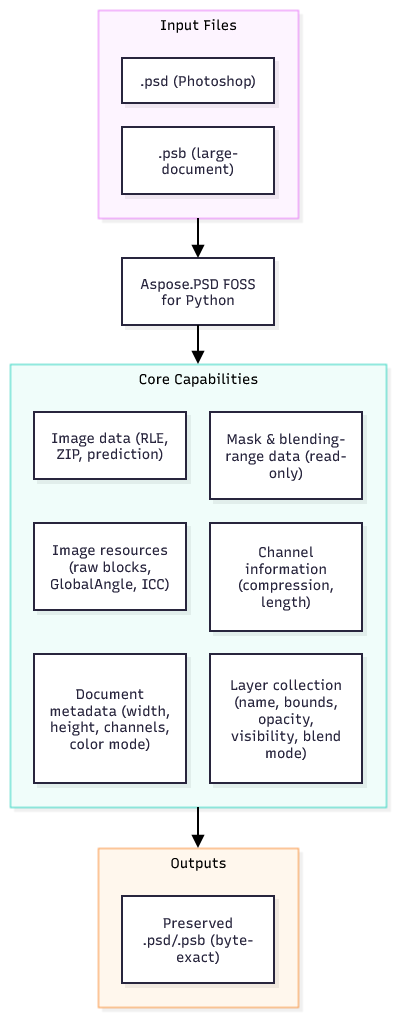
Key Capabilities
- Document inspection –
PsdImageexposeswidth,height,channels,bits_per_channel,color_mode,version,is_psb,layer_count,resource_count,compression,image_data_kind, etc. - Layer model –
Layerprovidesname,bounds,top/left/bottom/right,width,height,opacity,is_visible,clipping,blend_mode_key,channels_count,channel_information. Mutations (name, visibility, opacity, blend mode, bounds) are tracked and saved preserving raw bytes when possible. - Blend modes –
BlendModeenum andLayerBlendModeMappermap between 4-character PSD keys and enum values. - Channel information –
ChannelInformationrepresents per-channel compression, length and identifier; read-only, raisesNotSupportedExceptionon write. - Mask & blending ranges –
LayerMaskDataShort,LayerBlendingRangesDataexpose raw length and basic properties; mutations are not supported. - Image resources –
ImageResourcesSectionparses unknown resources, preserving raw payloads;UnknownResourceoffersresource_id,name,data. Helper classes (ResourceBlock,PreservedResourceBlock) provide a public surface. - Image data parsing –
ImageDataparses RLE and ZIP structures without pixel decoding, exposingstructure.kind,row_length_field_size,row_byte_counts,compressed_payload_length,uses_prediction. - Byte-exact round-trip –
PsdImage.savepreserves all unmodified sections, enabling lossless save-load cycles. - Non-seekable stream support – loading works with streams that do not support seeking.
Installation
pip install aspose-psd-foss
Requires Python 3.7 or later.
Dependencies
Required
- Python standard library only (no external packages).
Native / System
- None.
Development
pytest≥ 7.0.0 – test runner.pytest-cov≥ 4.0.0 – coverage reporting.
Quick Start
from aspose_psd_foss.psdimage import PsdImage

# Load a PSD file
with PsdImage.load("example.psd") as img:
    print(f"Size: {img.width}x{img.height}")
    print(f"Layers: {len(img.layers)}")
    first = img.layers[0]
    print(f"First layer name: {first.name}")
    print(f"Blend mode: {first.blend_mode_key}")

    # Change visibility and save
    first.is_visible = not first.is_visible
    img.save("modified.psd")
Additional Examples
Enumerate layers and bounds
from aspose_psd_foss.psdimage import PsdImage

with PsdImage.load("sample.psd") as img:
    for idx, layer in enumerate(img.layers):
        print(f"{idx}: {layer.name} – {layer.bounds}")
Change layer blend mode
from aspose_psd_foss.psdimage import PsdImage
from aspose_psd_foss.layers.blendmode import BlendMode

with PsdImage.load("sample.psd") as img:
    img.layers[1].blend_mode_key = BlendMode.MULTIPLY
    img.save("blend_changed.psd")
Inspect image resources
from aspose_psd_foss.psdimage import PsdImage
from aspose_psd_foss.resources.imageresourceids import ImageResourceIds

with PsdImage.load("sample.psd") as img:
    for res in img.image_resources:
        if res.resource_id == ImageResourceIds.GLOBAL_ANGLE:
            print("Global angle resource found")
Verify byte-exact round-trip
with open(input_path, "rb") as f:
    input_bytes = f.read()

    input_stream = io.BytesIO(input_bytes)
    original_position = input_stream.tell()
    image = Image.load(input_stream)  # type: PsdImage

    print("Aspose.PSD Stream Sample")
    print(f"Input: {input_path}")
    print(f"Output: {output_path}")
    print(f"InputBytes: {input_byte_count}")
    print(f"OriginalStreamPosition: {original_position}")
    print(f"StreamPositionAfterLoad: {current_position}")

    output_stream = io.BytesIO()
    image.save(output_stream)
    output_bytes = output_stream.getvalue()
    with open(output_path, "wb") as f:
        f.write(output_bytes)
API Reference
The public entry point is the aspose_psd_foss package.
Supported Public Types
Core
| Class / Enum | Description |
|---|---|
PsdImage |
Main image class; load, inspect and save PSD/PSB files. |
Image (ABC) |
Abstract base for image loaders. |
ImageLoader |
Static loader used by Image.load. |
PsdHeader |
Parsed file header. |
ColorData |
Color mode data (RGB, CMYK, Indexed palette). |
ImageResourcesSection |
Image resources container. |
UnknownResource |
Raw resource block without specific semantics. |
LayerAndMaskSection |
Layer & mask information container. |
Layer |
Represents a single layer; mutable properties. |
LayerRawData |
Internal raw data for a layer (preserved on save). |
ChannelInformation |
Public view of a layer channel. |
BlendMode (Enum) |
Blend mode enumeration. |
LayerBlendModeMapper |
Maps between PSD keys and BlendMode. |
Rectangle |
Integer rectangle utility. |
Point |
2-D point utility. |
Size |
Width/height container. |
ImageData |
Image data section with compression and structure. |
ImageDataStructure |
Structural view of image data payload. |
ImageDataKind (Enum) |
Kind of image data (RAW, RLE, ZIP, UNKNOWN). |
CompressionMethod (Enum) |
Compression methods (RAW, RLE, ZIP). |
PsdColorDataKind (Enum) |
Color data kinds (NONE, INDEXED_PALETTE, RGB_PAYLOAD, CMYK_PAYLOAD, RAW_PRESERVED). |
PsdResourceKind (Enum) |
Resource classification (UNKNOWN, GLOBAL_ANGLE, ICC_PROFILE, ICC_UNTAGGED_PROFILE). |
ResourceBlock (ABC) |
Base class for resource blocks. |
PreservedResourceBlock |
Wrapper for raw-preserved resources. |
BigEndianReader |
Reads big-endian primitives from a stream. |
BigEndianWriter |
Writes big-endian primitives to a stream. |
BigEndianBitConverter |
Byte-array conversion helpers. |
PsdLoadException |
Loading-time errors. |
PsdSaveException |
Saving-time errors. |
ArgumentNullException |
Null argument errors. |
NotSupportedException |
Unsupported operation errors. |
ImageResourceIds |
Common resource identifiers used in tests. |
IndexedColorPalette |
Indexed palette parser (256 entries). |
IndexedColorPaletteInfo |
Public view of an indexed palette. |
PsdVersion (Enum) |
Container version (PSD, PSB). |
LayerMaskInfo |
Mask presence info. |
LayerMaskDataShort |
Short mask data implementation. |
LayerBlendingRangesData |
Blending range data (read-only). |
LayerBlendingRangesInfo |
Blending range presence info. |
LayerMaskFlags (Flag) |
Mask flag bits. |
LayerChannelInfo |
Internal channel metadata. |
PsdLayerChannelInfo |
Public read-only channel info. |
PsdImageDocumentState |
Internal state holder for all sections. |
PsdImageWriter |
Writes a complete document state. |
</details>

## Documentation & Resources

- **[Getting Started Guide](https://products.aspose.org/psd/python/)** – Overview of loading, inspection and saving.
- **[API Reference](https://reference.aspose.org/psd/python/)** – Full browsable documentation of public types.
- **[Knowledge Base](https://kb.aspose.org/psd/python/)** – FAQs, troubleshooting and how-to articles.
- **[GitHub Repository](https://github.com/aspose-psd-foss/Aspose.PSD-FOSS-for-Python)** – Source code, issue tracker and contribution guide.

## Scope and Limitations

- **Supported formats** – Only Photoshop `.psd` (≤ 30 000 px) and `.psb` (≤ 300 000 px) containers are read. Other Photoshop-related formats (e.g., `.psd` with 16-bit or 32-bit per channel beyond supported bit depths) are not parsed.
- **No pixel rendering** – The library provides metadata and structural access; actual pixel rasterisation is out of scope.
- **Read-only mask and blending-range data** – Modifying mask data or blending ranges throws `NotSupportedException`.
- **Limited color-mode support** – Indexed palette, RGB and CMYK payloads are parsed; other modes (Bitmap, Grayscale, Multichannel, Duotone, Lab) are treated as raw preserved data.
- **Compression** – Supports RAW, RLE and ZIP (with/without prediction) image data structures; other compression schemes are not implemented.

## Development and Testing

```bash
# Install development dependencies and the package in editable mode
pip install -e ".[dev]"

# Run the full test suite
pytest -o python_files="*tests.py"
The test suite includes unit tests for header parsing, color data, image data structures, layer handling, resource parsing, non-seekable streams and byte-exact round-trip verification.
License
This project is licensed under the MIT License. The MIT License permits use, copying, modification, distribution, sublicensing and commercial use, provided the original copyright and permission notice are retained. The software is provided without warranty.
1 maintainer

Metadata
1 maintainer
Release files for aspose-psd-foss 26.10.0
For a detailed explanation of source distributions (sdists) and built distributions (wheels), please see the package formats documentation.
Built distribution (wheel)
| File | Interpreter | ABI | Platform | Reset |
|---|---|---|---|---|
| aspose_psd_foss-26.10.0-py3-none-any.whl | Python 3 | none | any | Details |
Release files / aspose_psd_foss-26.10.0-py3-none-any.whl
| Download URL | aspose_psd_foss-26.10.0-py3-none-any.whl |
|---|---|
| Size | 58.2 kB |
| Tags | Python 3 |
|
SHA-256 checksum How to use checksums |
dc75b2862c8df60a41bb17b0aef0bfa40038c4d7d481696e1aeecfe79b1d0b79
|
|
BLAKE2b-256 checksum How to use checksums |
dea2c44764bf828330f440408c0a900c9f5d44ea3c0793c5cc0ee40c31efc036
|
| Upload date | |
|
Uploaded using Trusted Publishing? What is trusted publishing? |
No |
| Uploaded via |
twine/7.0.0 CPython/3.11.0
|
Security for aspose-psd-foss 26.10.0
Provenance
Provenance describes where a file came from. On PyPI, provenance is shared via attestations, which provide a verifiable record of the build or publishing details. View details, limitations and caveats.
No provenance found
None of the files in this release were uploaded with provenance metadata.
A note on package security
PyPI is a repository for distributing packages, not a service for auditing them. While third-party security researchers and our staff do their best to detect and remove malicious packages, PyPI cannot guarantee the quality, security or suitability of any given package.
To learn more about protecting yourself from malicious actors, visit our package security documentation.













