
ASQI quality checks for AI systems

Project description
ASQI Engineer
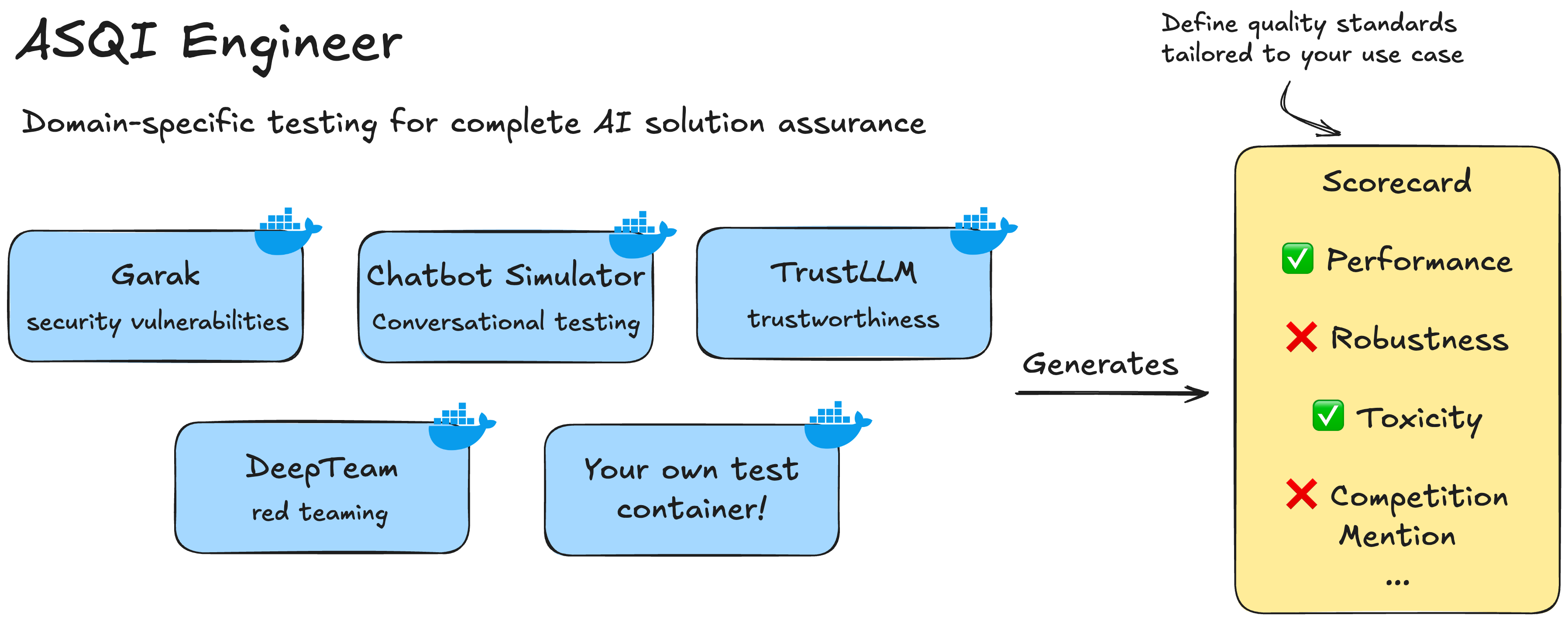
ASQI (AI Solutions Quality Index) Engineer helps teams test and evaluate AI systems. It runs containerized test packages, automates scoring, and provides durable execution workflows.
The project focuses first on chatbot testing and supports extensions for other AI system types. Resaro welcomes contributions of test packages, score cards, and schemas.
Table of Contents
Key Features
Modular Test Execution
- Durable execution: DBOS-powered fault tolerance with automatic retry and recovery
- Concurrent testing: Parallel test execution with configurable concurrency limits
- Container isolation: Each test runs in isolated Docker containers for consistency and reproducibility
Flexible Scenario-based Testing
- Core schema definition: Specifies the underlying contract between test packages and users running tests, enabling an extensible approach to scale to new use cases and test modules
- Multi-system orchestration: Tests can coordinate multiple AI systems (target, simulator, evaluator) in complex workflows
- Flexible configuration: Test packages specify input systems and parameters that can be customised for individual use cases
Automated Assessment
- Structured reporting: JSON output with detailed metrics and assessment outcomes
- Configurable score cards: Define custom evaluation criteria with flexible assessment conditions
- Metric expressions: Combine multiple metrics using mathematical operations (
+,-,*,/) and functions (min,max,avg,sum,abs,round,pow) for sophisticated composite scoring
Developer Experience
- Type-safe configuration: Pydantic schemas with JSON Schema generation for IDE support
- Rich CLI interface: Typer-based commands with comprehensive help and validation
- Real-time feedback: Live progress reporting with structured logging and tracing
LLM Testing
We have introduced the llm_api and rag_api system types for comprehensive AI system testing. We support both traditional LLM APIs and Retrieval-Augmented Generation (RAG) systems with contextual retrieval capabilities. We have also open-sourced a draft ASQI score card for customer chatbots that provides mappings between technical metrics and business-relevant assessment criteria.
LLM Test Containers
- Garak: Security vulnerability assessment with 40+ attack vectors and probes
- DeepTeam: Red teaming library for adversarial robustness testing
- TrustLLM: Comprehensive framework and benchmarks to evaluate trustworthiness of LLM systems
- Inspect Evals: Comprehensive evaluation suite with 80+ tasks across cybersecurity, mathematics, reasoning, knowledge, bias, and safety domains
- LLMPerf: Token-level performance benchmarking for latency, throughput, and request metrics
- Resaro Chatbot Simulator: Persona and scenario based conversational testing with multi-turn dialogue simulation
The llm_api and rag_api system types use OpenAI-compatible API interfaces. Through LiteLLM integration, ASQI Engineer provides unified access to 100+ LLM providers including OpenAI, Anthropic, AWS Bedrock, Azure OpenAI, and custom endpoints. RAG systems additionally require responses with contextual citations for retrieval-augmented evaluation. This standardisation enables test containers to work seamlessly across different AI providers while supporting complex multi-system test scenarios (e.g., using different models for simulation, evaluation, and target testing).
Quick Start
Get started with ASQI Engineer in 3 simple steps:
Requirements
- Python 3.12+ is required
- Docker for running test containers
Note: If you are facing issues detecting your Docker daemon, you might need to set the
DOCKER_HOSTenvironment variable in your.envfile. See.envfor details.
1. Install the package:
pip install asqi-engineer
2. Run the setup script:
curl -sSL https://raw.githubusercontent.com/asqi-engineer/asqi-engineer/main/setup.sh | bash
This downloads all required configuration files and creates a .env template.
3. Configure and run:
# Start the services and run your first test:
docker compose up -d
asqi execute-tests -t config/suites/demo_test.yaml -s config/systems/demo_systems.yaml
This short flow should download a demo test container and generate the test results in output.json. Now, to actually test your AI system, configure the .env file and try out the other test packages in: https://www.asqi.ai/quickstart.html
Documentation
Detailed documentation lives on the project docs site — use the links below to jump to the full guides and examples:
- Quickstart (installation & environment): https://www.asqi.ai/quickstart.html
- Library usage & workflow customization: docs/library.md
- CLI & usage reference: https://www.asqi.ai/cli.html
- Configuration & environment variables: https://www.asqi.ai/configuration.html
- Test container examples & how-to: https://www.asqi.ai/examples.html
- LLM test containers overview (Garak, DeepTeam, TrustLLM, Inspect Evals, LLMPerf, Chatbot Simulator): https://www.asqi.ai/llm-test-containers.html
- Score cards & evaluation: https://www.asqi.ai/examples.html#score-cards
- Developer guide & architecture: https://www.asqi.ai/architecture.html
- Creating custom test containers: https://www.asqi.ai/custom-test-containers.html
If a link is missing or the page content is unclear, please open an issue: https://github.com/asqi-engineer/asqi-engineer/issues
Key Highlights
- Durable, DBOS-backed execution with retries and recovery
- Containerized test packages for isolation and reproducibility
- Extensible test-suite and score-card model for automated assessment
- Pydantic-based schemas and rich CLI (Typer) for developer ergonomics
Contributing & development
We keep contributor-facing documentation split into two focused documents so each file stays concise and actionable.
Quick actions:
- To see how to contribute (PR process, templates, commit guidance), open CONTRIBUTING.md.
- To get your dev environment ready and run tests locally (venv,
uvcommands, and devcontainer), open DEVELOPMENT.md. - Example configs and test containers live under
config/andtest_containers/respectively.
If you're unsure where to start, read CONTRIBUTING.md first for the workflow and then follow the setup steps in DEVELOPMENT.md to run the test suite locally.
License
Release history Release notifications | RSS feed


Download files
Download the file for your platform. If you're not sure which to choose, learn more about installing packages.
Source Distributions
Built Distribution
Filter files by name, interpreter, ABI, and platform.
If you're not sure about the file name format, learn more about wheel file names.
Copy a direct link to the current filters
File details
Details for the file asqi_engineer-0.3.3-py3-none-any.whl.
File metadata
- Download URL: asqi_engineer-0.3.3-py3-none-any.whl
- Upload date:
- Size: 65.0 kB
- Tags: Python 3
- Uploaded using Trusted Publishing? Yes
- Uploaded via: twine/6.1.0 CPython/3.13.7
File hashes
| Algorithm | Hash digest | |
|---|---|---|
| SHA256 |
1d92d8725fcb2e4f7cb892a9b8638f04f26e4a0158d35b8727b37d45003d224b
|
|
| MD5 |
a88ba04353c68d38e54ce47fb95e9776
|
|
| BLAKE2b-256 |
1359a04e06905344fcd7f8b3b0b6414bba9d3d2e9f2c21d3a938c79050d5bc43
|
Provenance
The following attestation bundles were made for asqi_engineer-0.3.3-py3-none-any.whl:
Publisher:
asqi-cd.yaml on asqi-engineer/asqi-engineer
-
Statement:
-
Statement type:
https://in-toto.io/Statement/v1 -
Predicate type:
https://docs.pypi.org/attestations/publish/v1 -
Subject name:
asqi_engineer-0.3.3-py3-none-any.whl -
Subject digest:
1d92d8725fcb2e4f7cb892a9b8638f04f26e4a0158d35b8727b37d45003d224b - Sigstore transparency entry: 739460402
- Sigstore integration time:
-
Permalink:
asqi-engineer/asqi-engineer@38c98e68f40dd15b0a549be9f63af75e762dbb18 -
Branch / Tag:
refs/tags/v0.3.3 - Owner: https://github.com/asqi-engineer
-
Access:
public
-
Token Issuer:
https://token.actions.githubusercontent.com -
Runner Environment:
github-hosted -
Publication workflow:
asqi-cd.yaml@38c98e68f40dd15b0a549be9f63af75e762dbb18 -
Trigger Event:
push
-
Statement type:






