
AssayInspector: A Python package for diagnostic assessment of data consistency in molecular datasets.


Project description
Data consistency assessment facilitates transfer learning in ADME modeling
AssayInspector: A Python package for diagnostic assessment of data consistency in molecular datasets


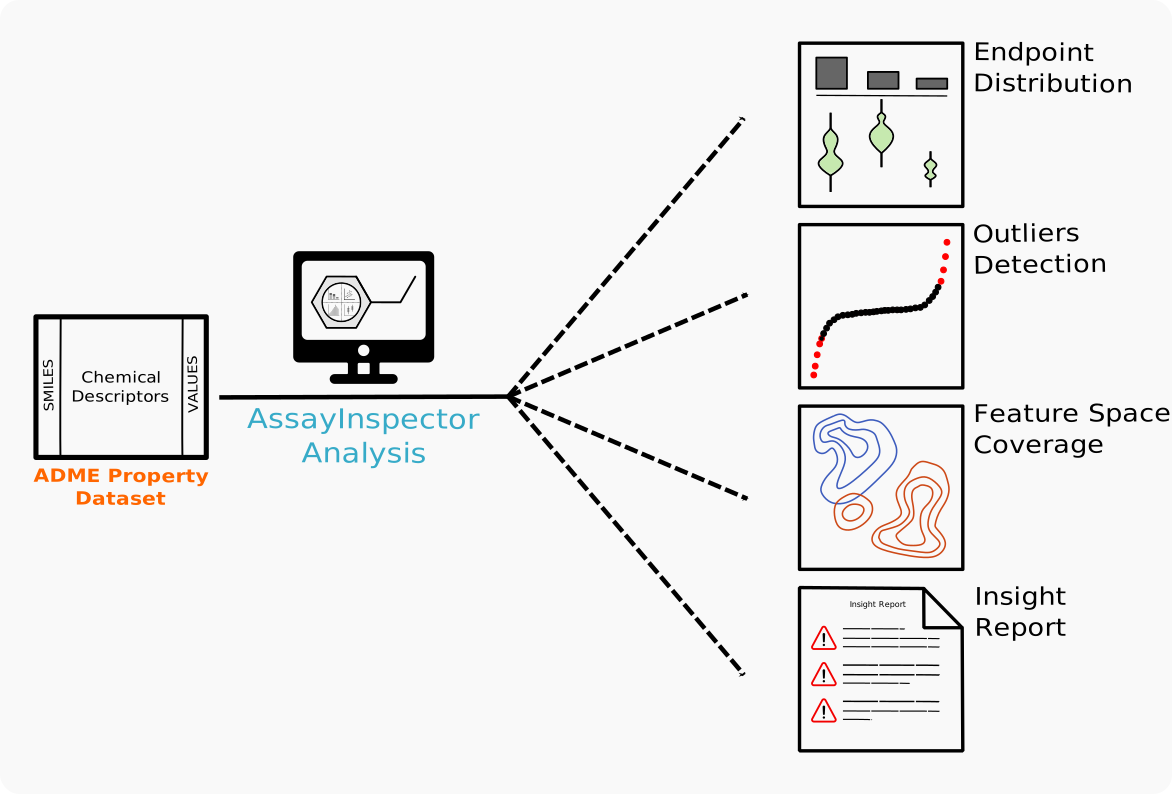
Data heterogeneity and distributional misalignments pose critical challenges for machine learning models, often compromising predictive accuracy. These challenges are exemplified in preclinical safety modeling, a crucial step in early-stage drug discovery where limited data and experimental constraints exacerbate integration issues. Analyzing public ADME datasets, we uncovered significant misalignments between benchmark and gold-standard sources that degrade model performance. Our analyses further revealed that dataset discrepancies arise from differences in various factors, from experimental conditions in data collection to chemical space coverage. This highlights the importance of rigorous data consistency assessment (DCA) prior to modeling. To facilitate a systematic DCA across diverse datasets, we developed AssayInspector, a model-agnostic package that leverages statistics, visualizations, and diagnostic summaries to identify outliers, batch effects, and discrepancies. Beyond preclinical safety, DCA can play a crucial role in federated learning scenarios, enabling effective transfer learning across heterogeneous data sources and supporting reliable integration across diverse scientific domains.
Keywords: data reporting, molecular property, ADME, physicochemical, machine learning, data aggregation, predictive accuracy, benchmark
Installation
To install and use the package, first create the conda environment as follows:
conda env create -f AssayInspector_env.yml
Then, activate the environment:
conda activate assay_inspector
Finally, install the package from PyPI using pip:
pip install assay_inspector
Getting Started
To run AssayInspector, you first need to prepare your input data. The file should be in .tsv or .csv format and include the following required columns:
smiles: The SMILES string representation of each molecule in the dataset.value: The annotated value for each molecule — use a numerical value for regression tasks or a binary label (0 or 1) for classification tasks.ref: The reference source name from which each value-molecule annotation was obtained.endpoint: The name of the endpoint to analyze.
You can find two example input files for the half-life and clearance datasets.
Usage
Once the input data file has been prepared, you can run AssayInspector in the following way:
from assay_inspector import AssayInspector

# Prepare AssayInspector report
report = AssayInspector(
	data_path='path/to/dataset/file.tsv',
	endpoint_name='endpoint',
	task='regression',
	feature_type='ecfp4',
	reference_set='path/to/reference_set.tsv' # optional
)

# Run AssayInspector report
report.get_individual_reporting()
report.get_comparative_reporting()
AssayInspector arguments
| Argument | Type | Description |
|---|---|---|
data_path |
str |
Path to the input dataset file (.csv or .tsv format). |
endpoint_name |
str |
Name of the endpoint to analyze. |
task |
str |
Type of task: either 'regression' or 'classification'. |
feature_type |
str |
Type of features to use: one of 'ecfp4', 'rdkit', or 'custom'. |
outliers_method |
str |
(Optional) Method to detect outliers: 'zscore' (default) or 'iqr'. |
distance_metric |
str |
(Optional) Distance metric for custom descriptors: 'euclidean' (default). |
descriptors_df |
pd.DataFrame |
(Optional) DataFrame containing molecular descriptors for dataset molecules (required when feature_type='custom'). |
reference_set |
str |
(Optional) Path to an additional dataset used for comparative analysis. |
lower_bound |
int or float |
(Optional) Lower bound to define the endpoint applicability domain. |
upper_bound |
int or float |
(Optional) Upper bound to define the endpoint applicability domain. |
The resulting output will be saved in a folder named AssayInspector_YYYYMMDD, which will contain:
- A tabular file that summarizes key descriptive parameters for each data source.
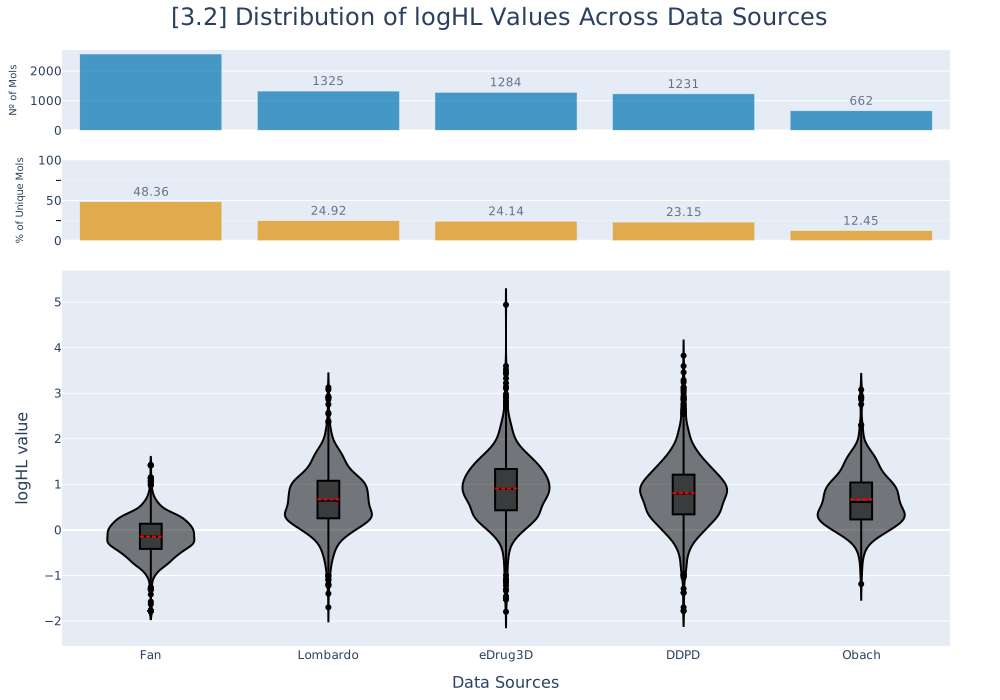
- A comprehensive set of visualization plots that facilitate the detection of inconsistencies across data sources.
- An insight report containing multiple alerts and recommendations to guide data cleaning and preprocessing.
Examples
Below are a few sample outputs generated by AssayInspector.
| Endpoint | Outlier Visualization | Endpoint Distribution Comparative Visualization |
|---|---|---|
| Half-life | 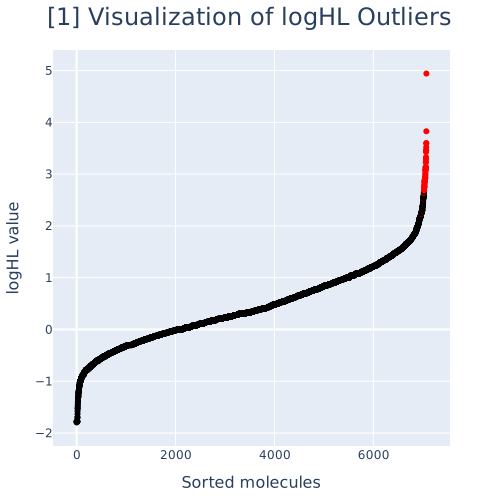 |
 |
| Clearance | 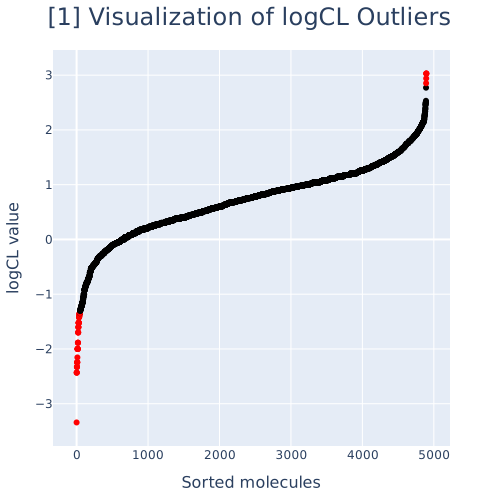 |
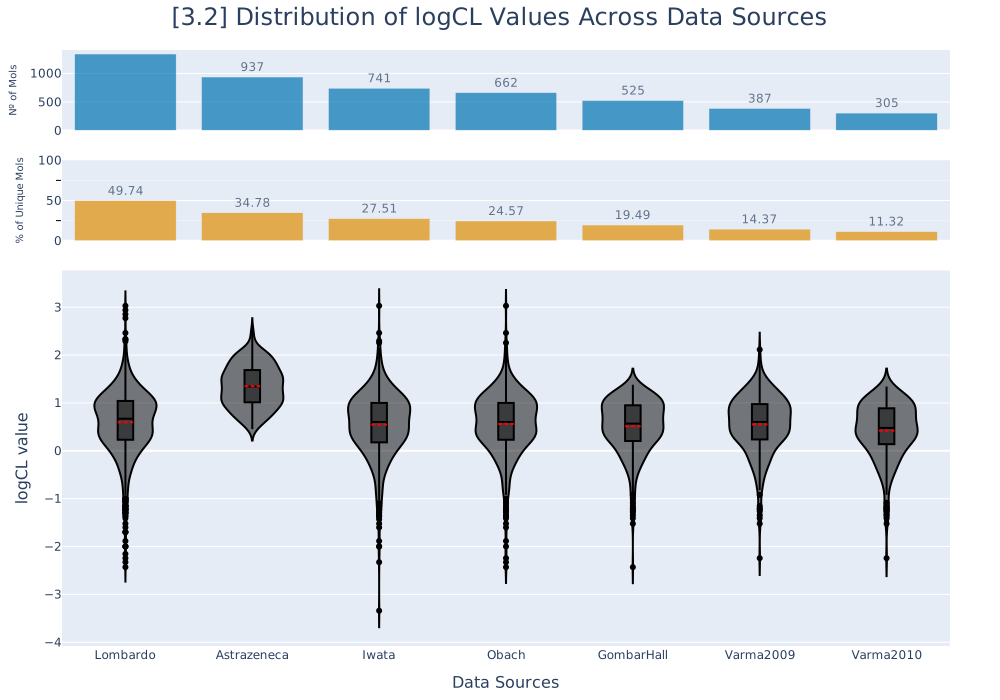 |
License
AssayInspector is licensed under the MIT License. See the LICENSE file.
Release history Release notifications | RSS feed


Download files
Download the file for your platform. If you're not sure which to choose, learn more about installing packages.
Source Distribution
Built Distribution
Filter files by name, interpreter, ABI, and platform.
If you're not sure about the file name format, learn more about wheel file names.
Copy a direct link to the current filters
File details
Details for the file assay_inspector-1.0.4.tar.gz.
File metadata
- Download URL: assay_inspector-1.0.4.tar.gz
- Upload date:
- Size: 44.8 kB
- Tags: Source
- Uploaded using Trusted Publishing? No
- Uploaded via: twine/6.1.0 CPython/3.9.21
File hashes
| Algorithm | Hash digest | |
|---|---|---|
| SHA256 |
1d808bd725af98be406b28cad3f1a10fd880125b18af2e7ee025fa6aa9a0dd31
|
|
| MD5 |
166004e68e5435bb09348bfef804339e
|
|
| BLAKE2b-256 |
f23d3f888b99d07883f05f13ecf2ec564ad9c3c42dba2720191e68477143b7a1
|
File details
Details for the file assay_inspector-1.0.4-py3-none-any.whl.
File metadata
- Download URL: assay_inspector-1.0.4-py3-none-any.whl
- Upload date:
- Size: 48.4 kB
- Tags: Python 3
- Uploaded using Trusted Publishing? No
- Uploaded via: twine/6.1.0 CPython/3.9.21
File hashes
| Algorithm | Hash digest | |
|---|---|---|
| SHA256 |
e48d1dcef333a447583bd42577efd9f0e13d8b38ebc7988cc28da42ff497d86e
|
|
| MD5 |
e1e0d18009622260b262eefda16381e1
|
|
| BLAKE2b-256 |
3dcf71b848bd9e37dd089a75bad0c778c083f04001795c55e7fba081cba1d57c
|






