








ast-grep(sg)
ast-grep(sg) is a CLI tool for code structural search, lint, and rewriting.
Introduction
ast-grep is an abstract syntax tree based tool to search code by pattern code. Think of it as your old-friend grep, but matching AST nodes instead of text.
You can write patterns as if you are writing ordinary code. It will match all code that has the same syntactical structure.
You can use $ sign + upper case letters as a wildcard, e.g. $MATCH, to match any single AST node. Think of it as regular expression dot ., except it is not textual.
Try the online playground for a taste!
Screenshot
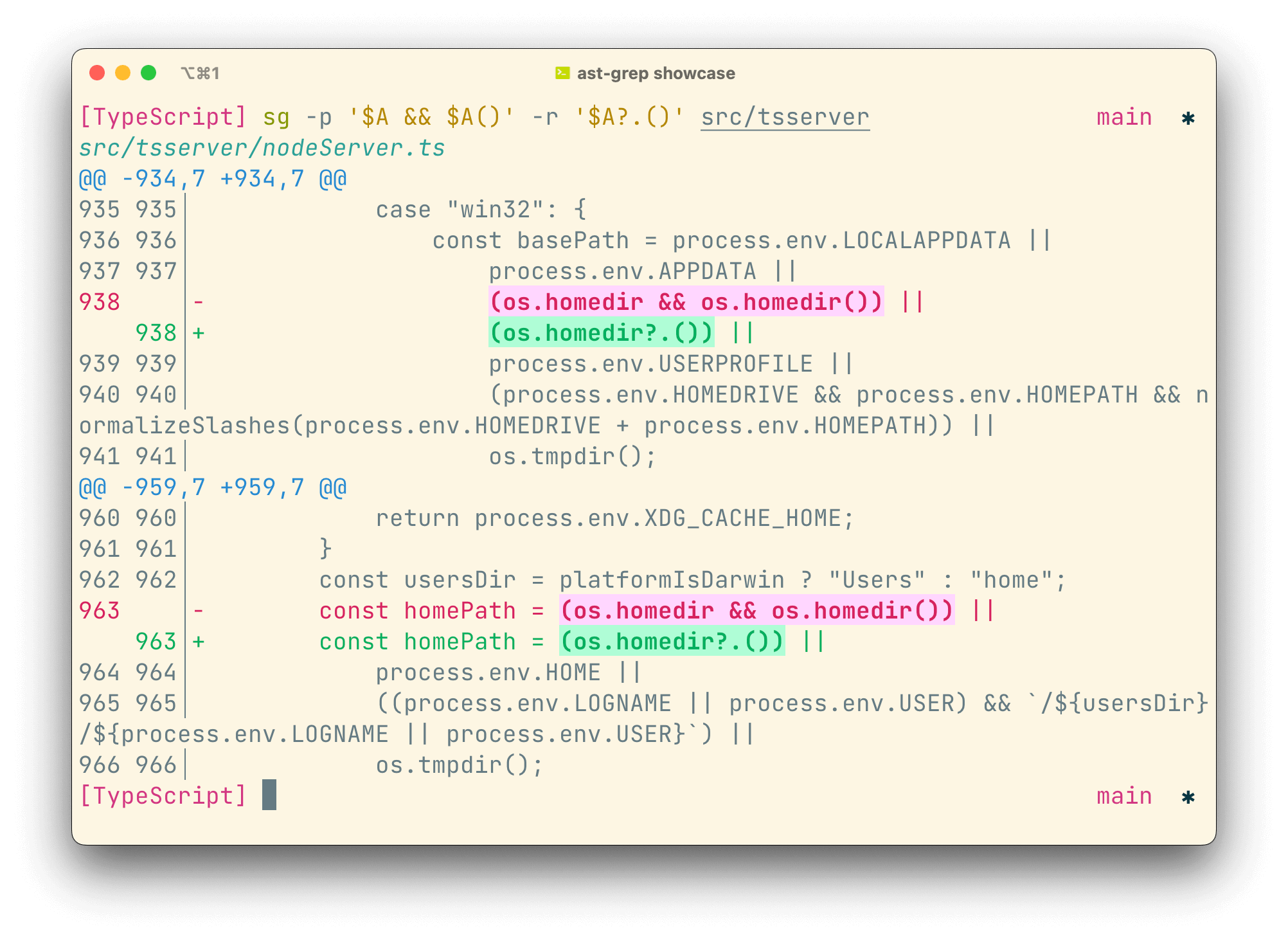
See more screenshots on the website.
Installation
You can install it from npm, pip, cargo, cargo-binstall, homebrew, scoop, mise or MacPorts!
npm install --global @ast-grep/cli
# `pnpm approve-builds` may be needed
pip install ast-grep-cli
brew install ast-grep
Click for more installation methods
cargo install ast-grep --locked
cargo binstall ast-grep

# install via scoop, thank @brian6932
scoop install main/ast-grep

# install via MacPorts
sudo port install ast-grep

# try ast-grep in nix-shell
nix-shell -p ast-grep

# try ast-grep with mise
mise use -g ast-grep
Or you can build ast-grep from source. You need to install rustup, clone the repository and then
cargo install --path ./crates/cli --locked
Packages are available on other platforms too.
Command line usage example
ast-grep has following form.
ast-grep --pattern 'var code = $PATTERN' --rewrite 'let code = new $PATTERN' --lang ts
Example
ast-grep -p '$A && $A()' -l ts -r '$A?.()'
ast-grep -p 'new Zodios($URL, $CONF as const,)' -l ts -r 'new Zodios($URL, $CONF)' -i
Sponsor

If you find ast-grep interesting and useful for your work, please buy me a coffee so I can spend more time on the project!
Feature Highlight
ast-grep's core is an algorithm to search and replace code based on abstract syntax tree produced by tree-sitter. It can help you to do lightweight static analysis and massive scale code manipulation in an intuitive way.
Key highlights:
-
An intuitive pattern to find and replace AST. ast-grep's pattern looks like ordinary code you would write every day (you could say the pattern is isomorphic to code).
-
jQuery like API for AST traversal and manipulation.
-
YAML configuration to write new linting rules or code modification.
-
Written in compiled language, with tree-sitter based parsing and utilizing multiple cores.
-
Beautiful command line interface :)
ast-grep's vision is to democratize abstract syntax tree magic and to liberate one from cumbersome AST programming!
- If you are an open-source library author, ast-grep can help your library users adopt breaking changes more easily.
- if you are a tech lead in your team, ast-grep can help you enforce code best practice tailored to your business need.
- If you are a security researcher, ast-grep can help you write rules much faster.
1 maintainer

Metadata
1 maintainer
Release files for ast-grep-cli 0.51.1
For a detailed explanation of source distributions (sdists) and built distributions (wheels), please see the package formats documentation.
Source distribution (sdist)
| File | Size | Uploaded | Provenance | Actions |
|---|---|---|---|---|
| ast_grep_cli-0.51.1.tar.gz | 298.1 kB | Without provenance | Details for ast_grep_cli-0.51.1.tar.gz |
Built distributions (wheels)
Total release size: 94.8 MB
Release files / ast_grep_cli-0.51.1.tar.gz
| Download URL | ast_grep_cli-0.51.1.tar.gz |
|---|---|
| Size | 298.1 kB |
| Tags | Source |
|
SHA-256 checksum How to use checksums |
8141811f78542527d9ebfb51eefd8a1dd24d132ca775dda3d7dbdbe05437510d
|
|
BLAKE2b-256 checksum How to use checksums |
fd2925b5cae72b135d739d5139022f049d85575f58fbf990e964a7fb233d173f
|
| Upload date | |
|
Uploaded using Trusted Publishing? What is trusted publishing? |
Yes |
| Uploaded via |
uv/0.13.6 {"installer":{"name":"uv","version":"0.13.6","subcommand":["publish"]},"python":null,"implementation":{"name":null,"version":null},"distro":{"name":"Ubuntu","version":"26.04","id":"resolute","libc":null},"system":{"name":null,"release":null},"cpu":null,"openssl_version":null,"setuptools_version":null,"rustc_version":null,"ci":true}
|
Release files / ast_grep_cli-0.51.1-py3-none-win_arm64.whl
| Download URL | ast_grep_cli-0.51.1-py3-none-win_arm64.whl |
|---|---|
| Size | 16.9 MB |
| Tags | Python 3 Windows ARM64 |
|
SHA-256 checksum How to use checksums |
1de5b7c8d74a6b1a92dd13545ed7604ad663ffc5b367a2c88fa2adbcac63ecc5
|
|
BLAKE2b-256 checksum How to use checksums |
76b25c8f821ec33eac8a4b34570348ca256092b221d13973bf03aa9fec13b695
|
| Upload date | |
|
Uploaded using Trusted Publishing? What is trusted publishing? |
Yes |
| Uploaded via |
uv/0.13.6 {"installer":{"name":"uv","version":"0.13.6","subcommand":["publish"]},"python":null,"implementation":{"name":null,"version":null},"distro":{"name":"Ubuntu","version":"26.04","id":"resolute","libc":null},"system":{"name":null,"release":null},"cpu":null,"openssl_version":null,"setuptools_version":null,"rustc_version":null,"ci":true}
|
Release files / ast_grep_cli-0.51.1-py3-none-win_amd64.whl
| Download URL | ast_grep_cli-0.51.1-py3-none-win_amd64.whl |
|---|---|
| Size | 17.7 MB |
| Tags | Python 3 Windows x86-64 |
|
SHA-256 checksum How to use checksums |
b24a766dbc311fe340831a11bdf4071573543c338f48f38f379dc6a61bdd349c
|
|
BLAKE2b-256 checksum How to use checksums |
ab9ed2ebef2a06dd71ef941b501290eaeb66ed555fa8217d438ca1420ebd9e4d
|
| Upload date | |
|
Uploaded using Trusted Publishing? What is trusted publishing? |
Yes |
| Uploaded via |
uv/0.13.6 {"installer":{"name":"uv","version":"0.13.6","subcommand":["publish"]},"python":null,"implementation":{"name":null,"version":null},"distro":{"name":"Ubuntu","version":"26.04","id":"resolute","libc":null},"system":{"name":null,"release":null},"cpu":null,"openssl_version":null,"setuptools_version":null,"rustc_version":null,"ci":true}
|
Release files / ast_grep_cli-0.51.1-py3-none-win32.whl
| Download URL | ast_grep_cli-0.51.1-py3-none-win32.whl |
|---|---|
| Size | 16.6 MB |
| Tags | Python 3 Windows x86-32 |
|
SHA-256 checksum How to use checksums |
01827dfcc986673dc8b911d1ebb19b229772aa12e9ef9c28429af09699f78bef
|
|
BLAKE2b-256 checksum How to use checksums |
73a8084f669279e86a80352e89d4ffb50f67781128b3ef8e4eb1203345755c05
|
| Upload date | |
|
Uploaded using Trusted Publishing? What is trusted publishing? |
Yes |
| Uploaded via |
uv/0.13.6 {"installer":{"name":"uv","version":"0.13.6","subcommand":["publish"]},"python":null,"implementation":{"name":null,"version":null},"distro":{"name":"Ubuntu","version":"26.04","id":"resolute","libc":null},"system":{"name":null,"release":null},"cpu":null,"openssl_version":null,"setuptools_version":null,"rustc_version":null,"ci":true}
|
Release files / ast_grep_cli-0.51.1-py3-none-manylinux_2_28_x86_64.whl
| Download URL | ast_grep_cli-0.51.1-py3-none-manylinux_2_28_x86_64.whl |
|---|---|
| Size | 8.9 MB |
| Tags | Linux glibc 2.28+ x86-64 Python 3 |
|
SHA-256 checksum How to use checksums |
f924a19765482f2ec8ce5450b053510b8fb609da4b57d19e332ad7b02584587b
|
|
BLAKE2b-256 checksum How to use checksums |
5d12c6782fbfad60f73cd8ddf292109c6bc2af709f95a66c0b0eb406e1c61634
|
| Upload date | |
|
Uploaded using Trusted Publishing? What is trusted publishing? |
Yes |
| Uploaded via |
uv/0.13.6 {"installer":{"name":"uv","version":"0.13.6","subcommand":["publish"]},"python":null,"implementation":{"name":null,"version":null},"distro":{"name":"Ubuntu","version":"26.04","id":"resolute","libc":null},"system":{"name":null,"release":null},"cpu":null,"openssl_version":null,"setuptools_version":null,"rustc_version":null,"ci":true}
|
Release files / ast_grep_cli-0.51.1-py3-none-manylinux_2_28_aarch64.whl
| Download URL | ast_grep_cli-0.51.1-py3-none-manylinux_2_28_aarch64.whl |
|---|---|
| Size | 8.5 MB |
| Tags | Linux glibc 2.28+ ARM64 Python 3 |
|
SHA-256 checksum How to use checksums |
fab0058789f5bf9c46cbcce58055942128bd170dda6517bcdb03f8e56fb51095
|
|
BLAKE2b-256 checksum How to use checksums |
12916b46dfa14ebf94cca8496a4fd5174b7cfbbe2b9a45b02588577091ea5859
|
| Upload date | |
|
Uploaded using Trusted Publishing? What is trusted publishing? |
Yes |
| Uploaded via |
uv/0.13.6 {"installer":{"name":"uv","version":"0.13.6","subcommand":["publish"]},"python":null,"implementation":{"name":null,"version":null},"distro":{"name":"Ubuntu","version":"26.04","id":"resolute","libc":null},"system":{"name":null,"release":null},"cpu":null,"openssl_version":null,"setuptools_version":null,"rustc_version":null,"ci":true}
|
Release files / ast_grep_cli-0.51.1-py3-none-macosx_10_12_x86_64.whl
| Download URL | ast_grep_cli-0.51.1-py3-none-macosx_10_12_x86_64.whl |
|---|---|
| Size | 8.7 MB |
| Tags | Python 3 macOS 10.12+ x86-64 |
|
SHA-256 checksum How to use checksums |
ccff11653cfd2ca55424d3a32b1301725865403b2d4f0447223d49bc2994ffa3
|
|
BLAKE2b-256 checksum How to use checksums |
7d88b4f005d0b17da2899eba32ebe5ace065403e4bead1f41da42e4b4d5c40cd
|
| Upload date | |
|
Uploaded using Trusted Publishing? What is trusted publishing? |
Yes |
| Uploaded via |
uv/0.13.6 {"installer":{"name":"uv","version":"0.13.6","subcommand":["publish"]},"python":null,"implementation":{"name":null,"version":null},"distro":{"name":"Ubuntu","version":"26.04","id":"resolute","libc":null},"system":{"name":null,"release":null},"cpu":null,"openssl_version":null,"setuptools_version":null,"rustc_version":null,"ci":true}
|
Release files / ast_grep_cli-0.51.1-py3-none-macosx_10_12_universal2.macosx_10_12_x86_64.macosx_11_0_arm64.whl
| Download URL | ast_grep_cli-0.51.1-py3-none-macosx_10_12_universal2.macosx_10_12_x86_64.macosx_11_0_arm64.whl |
|---|---|
| Size | 17.3 MB |
| Tags | Python 3 macOS 10.12+ universal2 (ARM64, x86-64) macOS 10.12+ x86-64 macOS 11.0+ ARM64 |
|
SHA-256 checksum How to use checksums |
ca4195b9c8d844fbd541991062ca64b1a6b81fb6e90a95c96e6b468366436ffd
|
|
BLAKE2b-256 checksum How to use checksums |
de9eaf0b805ae2d2307cad8a40708cd985dc160d304b8699a8a3471c4d897568
|
| Upload date | |
|
Uploaded using Trusted Publishing? What is trusted publishing? |
Yes |
| Uploaded via |
uv/0.13.6 {"installer":{"name":"uv","version":"0.13.6","subcommand":["publish"]},"python":null,"implementation":{"name":null,"version":null},"distro":{"name":"Ubuntu","version":"26.04","id":"resolute","libc":null},"system":{"name":null,"release":null},"cpu":null,"openssl_version":null,"setuptools_version":null,"rustc_version":null,"ci":true}
|
Security for ast-grep-cli 0.51.1
Provenance
Provenance describes where a file came from. On PyPI, provenance is shared via attestations, which provide a verifiable record of the build or publishing details. View details, limitations and caveats.
No provenance found
None of the files in this release were uploaded with provenance metadata.
A note on package security
PyPI is a repository for distributing packages, not a service for auditing them. While third-party security researchers and our staff do their best to detect and remove malicious packages, PyPI cannot guarantee the quality, security or suitability of any given package.
To learn more about protecting yourself from malicious actors, visit our package security documentation.














