

AST-Monitor --- A wearable Raspberry Pi computer for cyclists














💻 Graphical User Interface • ⚙️ Hardware • 🖥️ Software • 📦 Installation • 📢 Deployment • 🚀 Examples • 🔑 License • 📄 Cite us • 📖 Further read • 🔗 Related packages • 📝 References • 🫂 Contributors
Welcome to AST-Monitor: Revolutionizing Sport Training Sessions! 🏋️♂️ This repository aims to introduce a low-cost, and efficient embedded device that can transform the way you monitor cycling training sessions. Allow us to present AST-Monitor.
To begin, we invite you to explore the paper that introduces the capabilities of AST-Monitor. Dive into the future of artificial sports trainers by reading this paper. 📄💡
- Free software: MIT license
- Python versions: 3.8.x, 3.9.x, 3.10.x, 3.11.x, 3.12.x
- Documentation: https://ast-monitor.readthedocs.io/en/latest
- Tested OS: Windows, Ubuntu, Fedora, Alpine, Arch, macOS. However, that does not mean it does not work on others
💻 Graphical User Interface
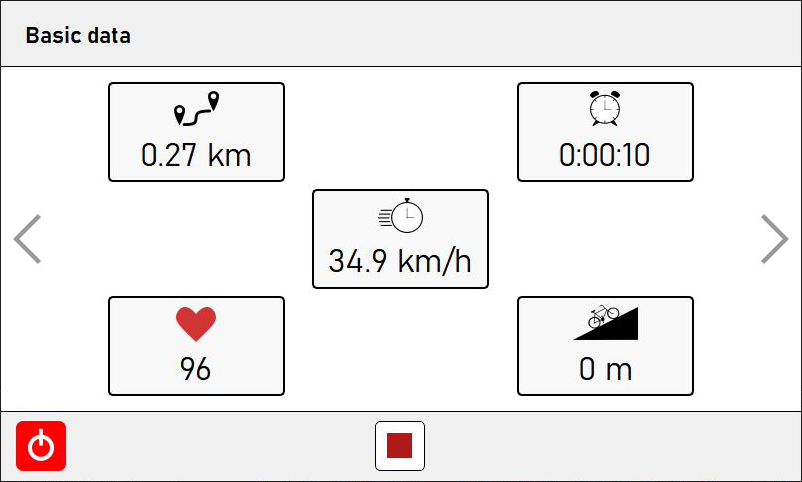
Basic data: Power at Your Fingertips 💪
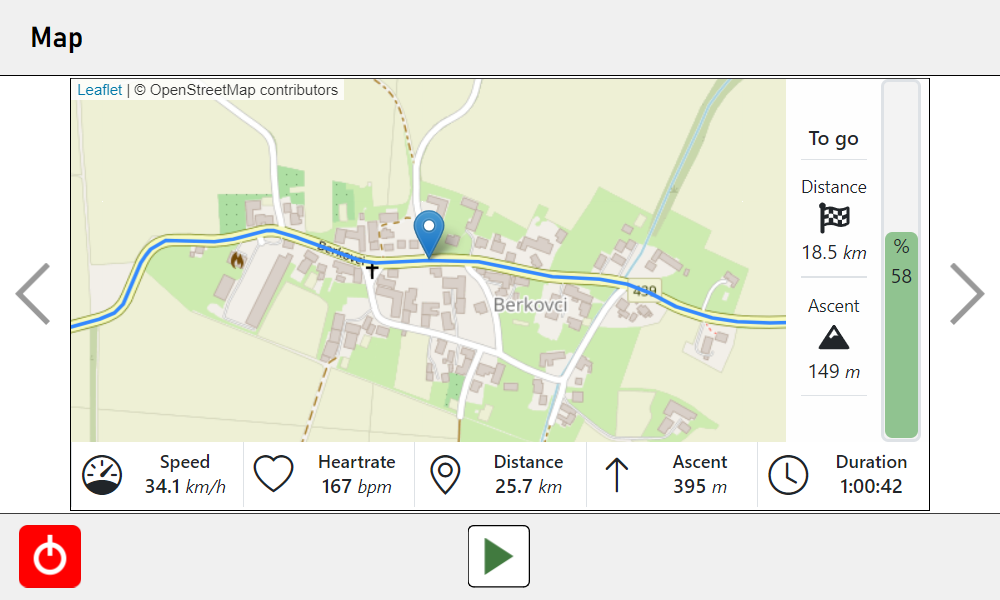
Interactive map: Embark on a Visual Journey 🗺️🚀
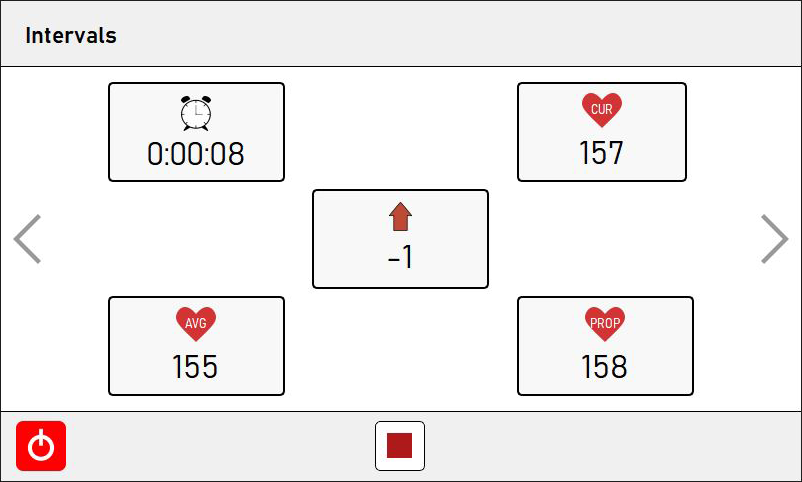
Interval training data: Unleash Your Inner Athlete 🏃♀️💪
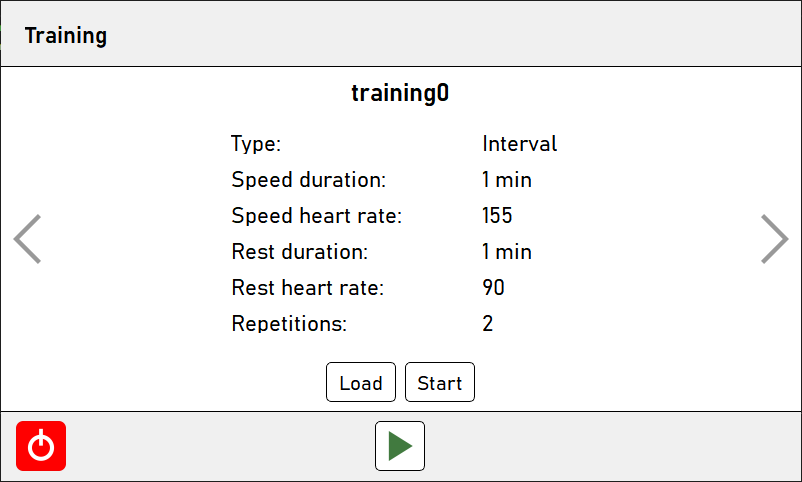
Interval training plan: Unleash the Potential 💯📝💥
⚙️ Hardware
Where Innovation Meets Performance ⚙️🔩💡
Prepare to be dazzled by the complete hardware setup featured in AST-Monitor.
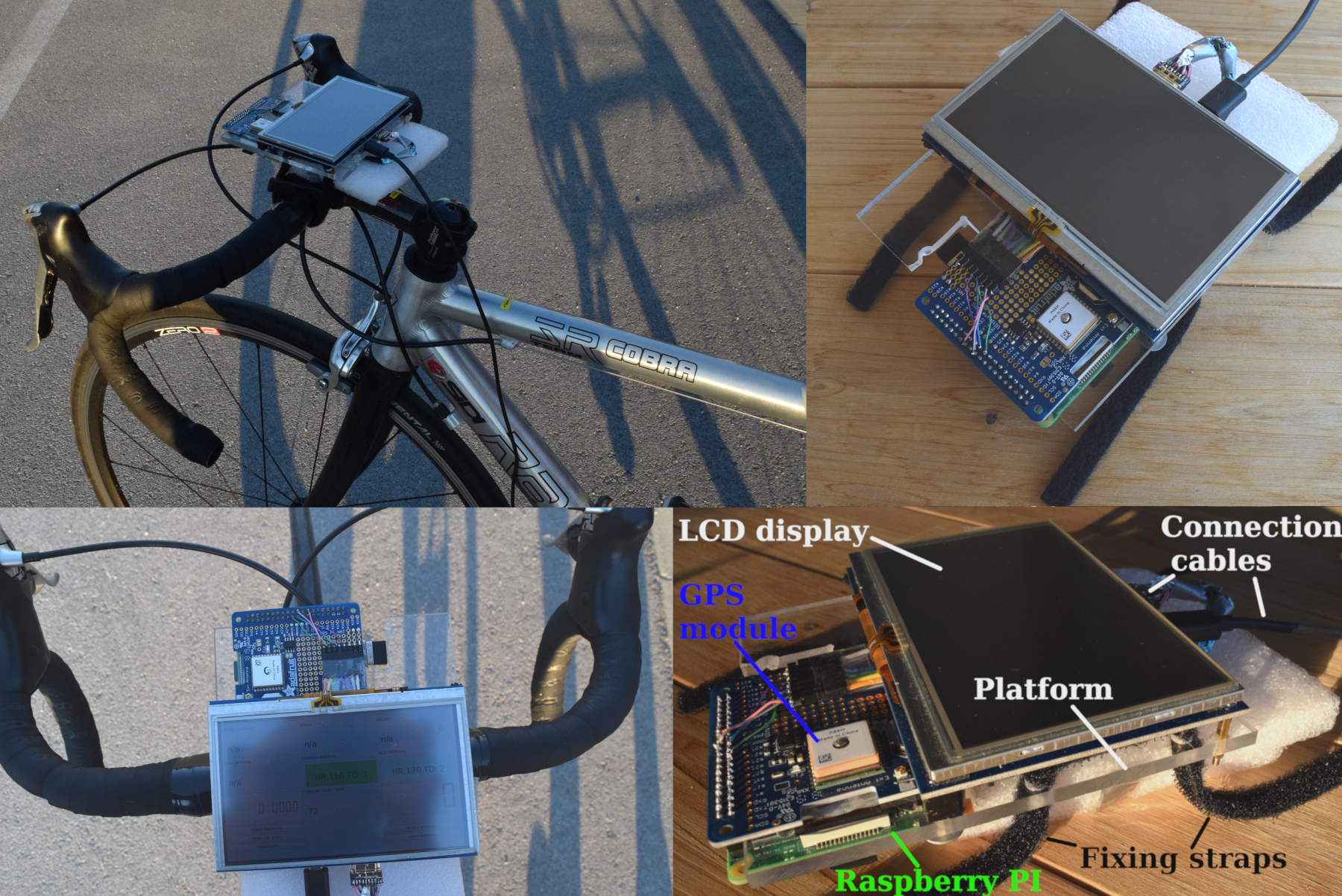
Let's take a closer look at the components:
- A platform with fixing straps that securely attach to your bicycle, ensuring a seamless training experience. 🚲🔒
- The powerful Raspberry Pi 4 Model B micro-controller, powered by the dynamic Raspbian OS. 💻
- A five-inch LCD touchscreen display, allowing the interaction with AST-Monitor during the training. ✨🖥️
- Equipped with a USB ANT+ stick, AST-Monitor captures the heartbeat of your training, providing crucial data for your journey to greatness. 📡
- Adafruit's Ultimate GPS HAT module joins the lineup, empowering you with location information and paving the way for GPS integration (coming soon!). 🌐🛰️
But that's not all:
A Serial Peripheral Interface (SPI) protocol ensures seamless communication between the Raspberry Pi and the GPS peripheral, guaranteeing accurate and timely data. The screen display, connected using a physically shortened HDMI cable, ensures a sleek and compact design that doesn't compromise performance.
During the testing phase, the AST-Monitor prototype was powered by Trust's 5 VDC power bank, providing unparalleled endurance. While the current prototype may be a bit bulky, rest assured, our team is hard at work, exploring sleeker and more discreet solutions. 💪💦
For those who crave a glimpse inside AST-Monitor:
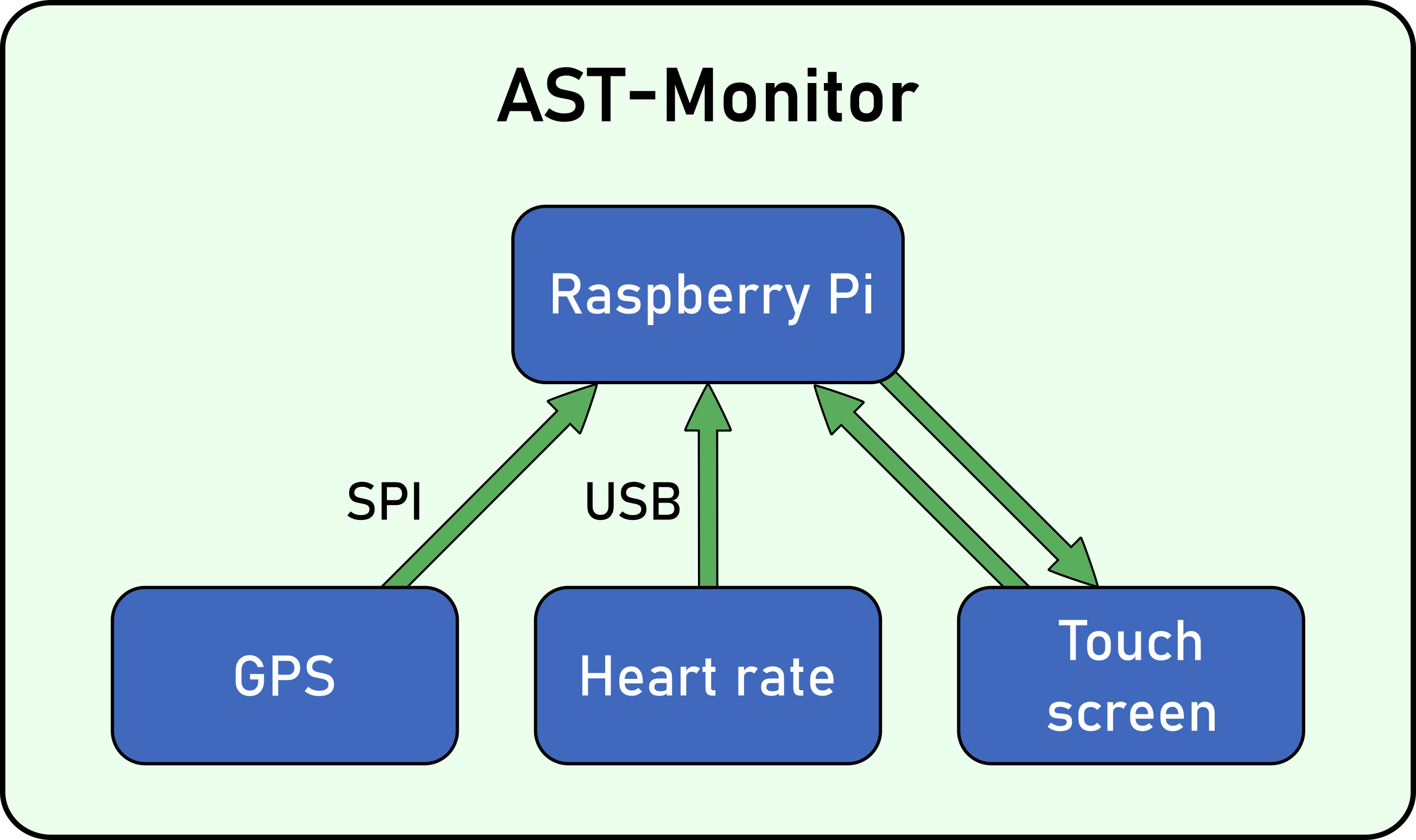
Welcome to the next stage of sports training. Welcome to AST-Monitor—your ultimate companion on the road to victory! 🌟🏆🚀
🖥️ Software
Dependencies 📦🔗
List of dependencies:
| Package | Version | Platform |
|---|---|---|
| PyQt6 | ^5.15.6 | All |
| matplotlib | ^3.5.1 | All |
| geopy | ^2.2.0 | All |
| openant | ^1.2.0 | All |
| pyqt-feedback-flow | ^0.1.0 | All |
| tcxreader | ^0.4.1 | All |
| sport-activities-features | ^0.3.6 | All |
Additional note: adafruit-circuitpython-gps package must be installed in order to work with the GPS sensor:
$ pip install adafruit-circuitpython-gps
📦 Installation
Install AST-Monitor with pip:
$ pip install ast-monitor
In case you want to install directly from the source code, use:
$ git clone https://github.com/firefly-cpp/AST-Monitor.git
$ cd AST-Monitor
$ poetry build
$ python setup.py install
To install AST-Monitor on Fedora Linux, please use:
$ dnf install python3-ast-monitor
To install AST-Monitor on Alpine Linux, please use:
$ apk add py3-ast-monitor
To install AST-Monitor on Arch Linux, please use an AUR helper:
$ yay -Syyu python-ast-monitor
📢 Deployment
Our project was deployed on a Raspberry Pi device using Raspberry Pi OS.
The hardware configuration of AST-Monitor using Raspberry Pi OS is described in HARDWARE_CONFIGURATION.md.
🚀 Examples
Basic run
import os
import sys

from PyQt6 import QtWidgets

try:
    from ast_monitor.model import AST
except ModuleNotFoundError:
    sys.path.append('../')
    from ast_monitor.model import AST

# Paths to the files with heart rates and GPS data.
hr_data = os.path.join(os.path.dirname(os.path.abspath(__file__)), '..', 'sensor_data', 'hr.txt')
gps_data = os.path.join(os.path.dirname(os.path.abspath(__file__)), '..', 'sensor_data', 'gps.txt')
route_data = os.path.join(os.path.dirname(os.path.abspath(__file__)), '..', 'development', 'routes', 'route.json')

if __name__ == '__main__':
    app = QtWidgets.QApplication(sys.argv)
    window = AST(hr_data, gps_data, route_data)
    window.show()
    sys.exit(app.exec())
🔑 License
This package is distributed under the MIT License. This license can be found online at http://www.opensource.org/licenses/MIT.
Disclaimer
This framework is provided as-is, and there are no guarantees that it fits your purposes or that it is bug-free. Use it at your own risk!
📄 Cite us
Lukač, L., Fister Jr., I., Fister, I. "Digital Twin in Sport: From an Idea to Realization." Applied Sciences 12.24 (2022): 12741, DOI: 10.3390/app122412741.
📖 Further read
[1] Awesome Computational Intelligence in Sports
🔗 Related packages/frameworks
[2] ast-tdl: Training Description Language for Artificial Sport Trainer
📝 References
Fister Jr, I., Fister, I., Iglesias, A., Galvez, A., Deb, S., & Fister, D. (2021). On deploying the Artificial Sport Trainer into practice. arXiv preprint arXiv:2109.13334.
Fister Jr, I., Salcedo-Sanz, S., Iglesias, A., Fister, D., Gálvez, A., & Fister, I. (2021). New Perspectives in the Development of the Artificial Sport Trainer. Applied Sciences, 11(23), 11452. DOI: 10.3390/app112311452
🫂 Contributors
 Iztok Fister Jr. 🐛 📖 💻 🚧 🧑🏫 📦 |
 luckyLukac 🐛 📖 💻 🎨 |
 Oromion 📦 |
 alenrajsp 🖋 💻 🚧 🐛 |
 Tatookie 📖 🐛 |
 rhododendrom 🎨 |
 Sertonix 🐛 |
 Tadej Lahovnik 📖 💻 🐛 |
1 maintainer

Metadata
1 maintainer
Release files for ast_monitor 0.5.6
For a detailed explanation of source distributions (sdists) and built distributions (wheels), please see the package formats documentation.
Source distribution (sdist)
| File | Size | Uploaded | |
|---|---|---|---|
| ast_monitor-0.5.6.tar.gz | 111.7 kB | Details |
Built distribution (wheel)
| File | Interpreter | ABI | Platform | Reset |
|---|---|---|---|---|
| ast_monitor-0.5.6-py3-none-any.whl | Python 3 | none | any | Details |
Total release size: 234.4 kB
Release files / ast_monitor-0.5.6.tar.gz
| Download URL | ast_monitor-0.5.6.tar.gz |
|---|---|
| Size | 111.7 kB |
| Tags | Source |
|
SHA-256 checksum How to use checksums |
540ea1ef5cb3dbcb8a21acfa2ee6cee7d8234979a3dd96f64c287616f79b2425
|
|
BLAKE2b-256 checksum How to use checksums |
43340e81b6e9e6f1801a0a9afdc2e8e42a8a5272ed7da6839edb14f884b75e77
|
| Upload date | |
|
Uploaded using Trusted Publishing? What is trusted publishing? |
No |
| Uploaded via |
poetry/2.3.1 CPython/3.14.5 Linux/7.0.12-201.fc44.x86_64
|
Release files / ast_monitor-0.5.6-py3-none-any.whl
| Download URL | ast_monitor-0.5.6-py3-none-any.whl |
|---|---|
| Size | 122.7 kB |
| Tags | Python 3 |
|
SHA-256 checksum How to use checksums |
60f617d24fcbe30da74248b0cc7e7161da99ab9f760e4003dca588ea5f59f01c
|
|
BLAKE2b-256 checksum How to use checksums |
117cacb4c59ed41a8381f92ff38f21dcf9141912c7596d42959713ff313581ce
|
| Upload date | |
|
Uploaded using Trusted Publishing? What is trusted publishing? |
No |
| Uploaded via |
poetry/2.3.1 CPython/3.14.5 Linux/7.0.12-201.fc44.x86_64
|














