
Star maps maker


Project description
Switch language


🌌 AstraGeek. Star maps
This is a project for AstraGeek astronomy online school. Here you can find some software for building star maps.
On the website of this AstraGeek project you are able to create classic skycharts and star sky maps.
Also visit astrageek.ru for educational videos on astronomy and related topics.
Release plan. Current release 0.2
During the development process, the interface uses software to generate maps via the command line. While it is being developed, you can use ready-made generated maps of random areas of the sky or use the source code yourself under a license.
0.1 Stereographic projection of the starry sky (skychart) according to a given geographical position and time. Also available is the representation of planets, great circles (ecliptic, celestial equator and galactic equator). Available to display horizontal and equatorial coordinate grid, cardinal directions. For example, here the site we were targeting.
0.2 Add plotting particular parts of the sky using pinhole projection mode. This mode provides all the same features listed in 0.1, but in a different sky projection. It's available to plot constellations by the name, set FOV, camera rotation angle and size of the resulting image.
0.3 Animations of planets' transits (gif and static image sequences)
0.4 Add precession of the Earth's rotation
Features
- Stereographic projection of the entire sky available at specified location and time
- Pinhole projection for a specific small area of the sky at specified constellation direction
- You can add various additional reference elements, such as a coordinate grids, coordinate great circles (ecliptic, galactic and celestial equator), cardinal directions, zenith point, and celestial poles.
- You can add the outlines of all visible constellations, selected constellations, and the names of each visible constellation to the image.
Examples
Pinhole projection example (without a legend) with parameters: ...
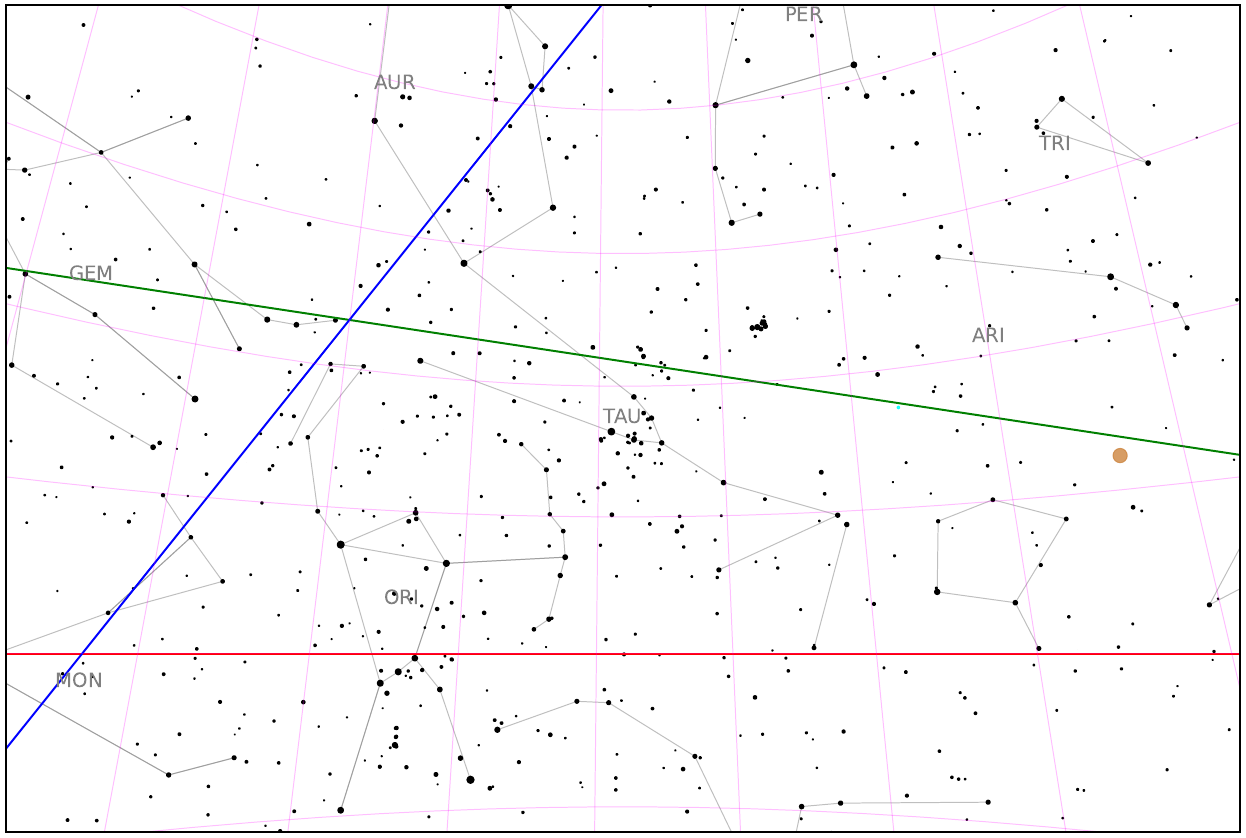
Full: pinhole_local_logo.pdf
Stereographic projection example (without a legend) with parameters: ...
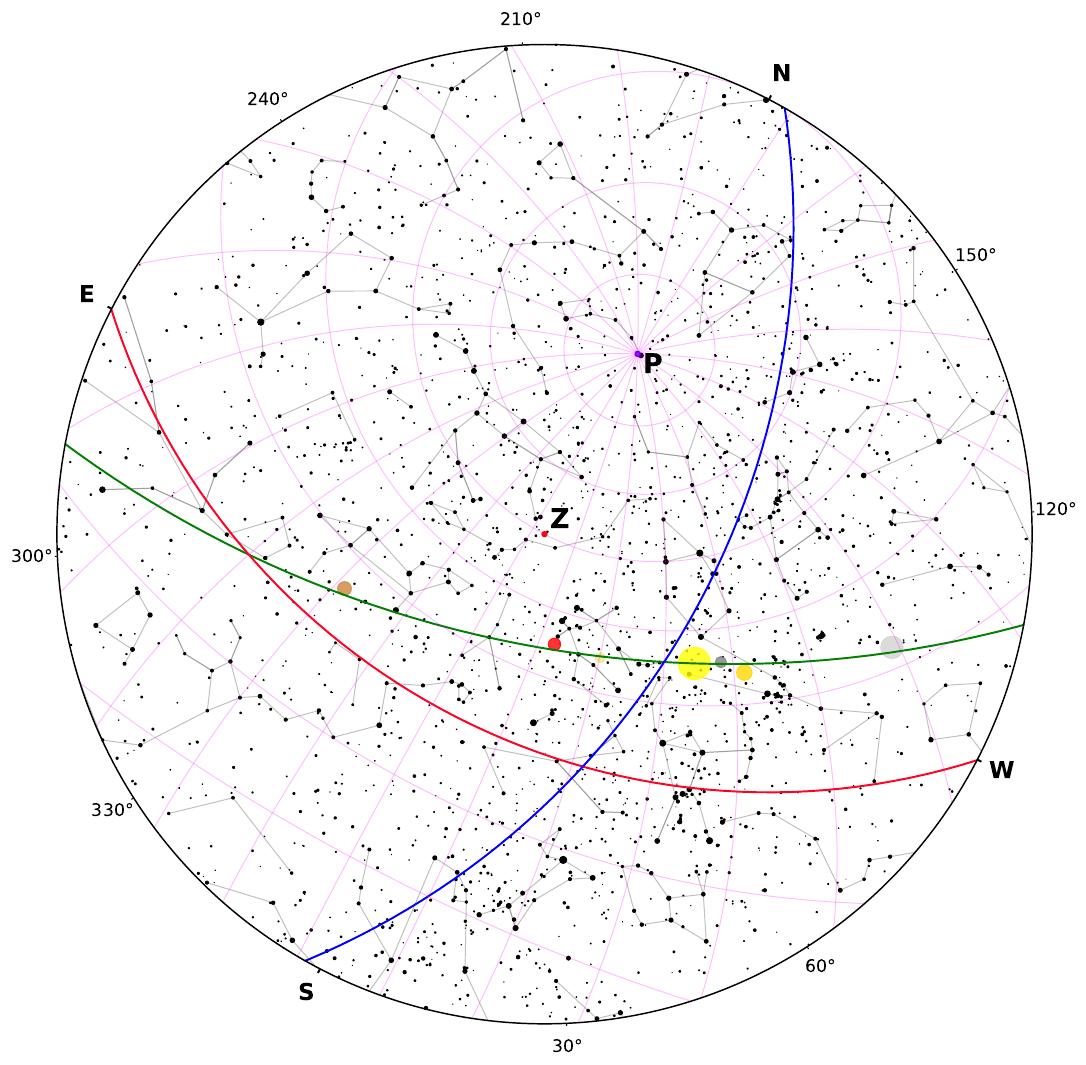
Full: polar_scatter_local_logo.pdf
How to use
You can use the ready-made sets of starry sky maps that we have already generated. To do this, you need:
- Follow the link
- Download pinhole_samples archives.zip and samples.zip with pinhole camera mode maps and skycharts, respectively
Inside each folder there are maps of the starry sky with tasks grouped by numbers.
There are two folders inside the pinhole_samples folder:
- сonstellations - maps with a specific central constellation, for each of the 88 constellations
- random_sky - maps with an arbitrary central constellation, 10 examples
The 100 skycharts for random date and place are grouped inside the samples folder.
Each group consists of three files:
- For a student without planets - student.pdf
- For a student with planets - student_with_planets.pdf
- For the teacher - teacher.pdf
Each file consists of two pages: on the first there are tasks for the map, on the second there is the map itself.
The student's file contains only assignments and a "bare" map. The file for the teacher contains all the answers and a completed map.
But if use want to generate new maps by yourself, do this (it is in the process of being developed):
-
Choose your type of required projection:
- You want the view of the entire sky available at this location at this time - choose stereographic projection mode
- If you want to see a specific small area of the sky, as if you were observing it with your eyes or a small telescope - choose pinhole projection mode
-
Configure your catalog and projector:
- Set position (latitude and longitude) and local observation time.
- Set the visual magnitude limits
- Use flags to set the additional functions and properties you want to display. Or, for educational purposes, you can use ready-made teacher and student sets (see the section below)
-
Get the resulting star maps
Example of usage:
./....
Documentation
On the website you will be able soon to get full functional documentation of the project.
| Section | Link |
|---|---|
| Learn More | Usage documentation |
| Project on GitHub | GitHub Repo |
| Submit Issue | Report |
Release history Release notifications | RSS feed


Download files
Download the file for your platform. If you're not sure which to choose, learn more about installing packages.
Source Distribution
Built Distribution
Filter files by name, interpreter, ABI, and platform.
If you're not sure about the file name format, learn more about wheel file names.
Copy a direct link to the current filters
File details
Details for the file astrageek-0.2.0.tar.gz.
File metadata
- Download URL: astrageek-0.2.0.tar.gz
- Upload date:
- Size: 8.3 MB
- Tags: Source
- Uploaded using Trusted Publishing? No
- Uploaded via: twine/6.2.0 CPython/3.12.12
File hashes
| Algorithm | Hash digest | |
|---|---|---|
| SHA256 |
dbb30996988ebd2ff39a52b3b56c3b76918ec6456f52da74ca629a1359d446e2
|
|
| MD5 |
e9bbbb20f270092643332927a24acdef
|
|
| BLAKE2b-256 |
5fcd1a67938986ec8b3980129ad96243ebe229d8064fd84b223b666fe1d2d4ae
|
File details
Details for the file astrageek-0.2.0-py3-none-any.whl.
File metadata
- Download URL: astrageek-0.2.0-py3-none-any.whl
- Upload date:
- Size: 8.4 MB
- Tags: Python 3
- Uploaded using Trusted Publishing? No
- Uploaded via: twine/6.2.0 CPython/3.12.12
File hashes
| Algorithm | Hash digest | |
|---|---|---|
| SHA256 |
d74186a91b522ba3a42c6bf36663943b3f5e8d3be30134590fa6c365eee30dfe
|
|
| MD5 |
bc861bac4363a1b07cbee293ccb3d31a
|
|
| BLAKE2b-256 |
123559e4d841951f6209a558d0cc424743e6b538393646219bc7dccffd2fa413
|






