
Build provenance: This package is built and distributed by Astral as part of
astral-dev-toolchain. It packagescargo-instrumentsfrom tagv0.4.17at commitd20d2c92866e91c5683a152e104f77465b9dd35d.
cargo-instruments
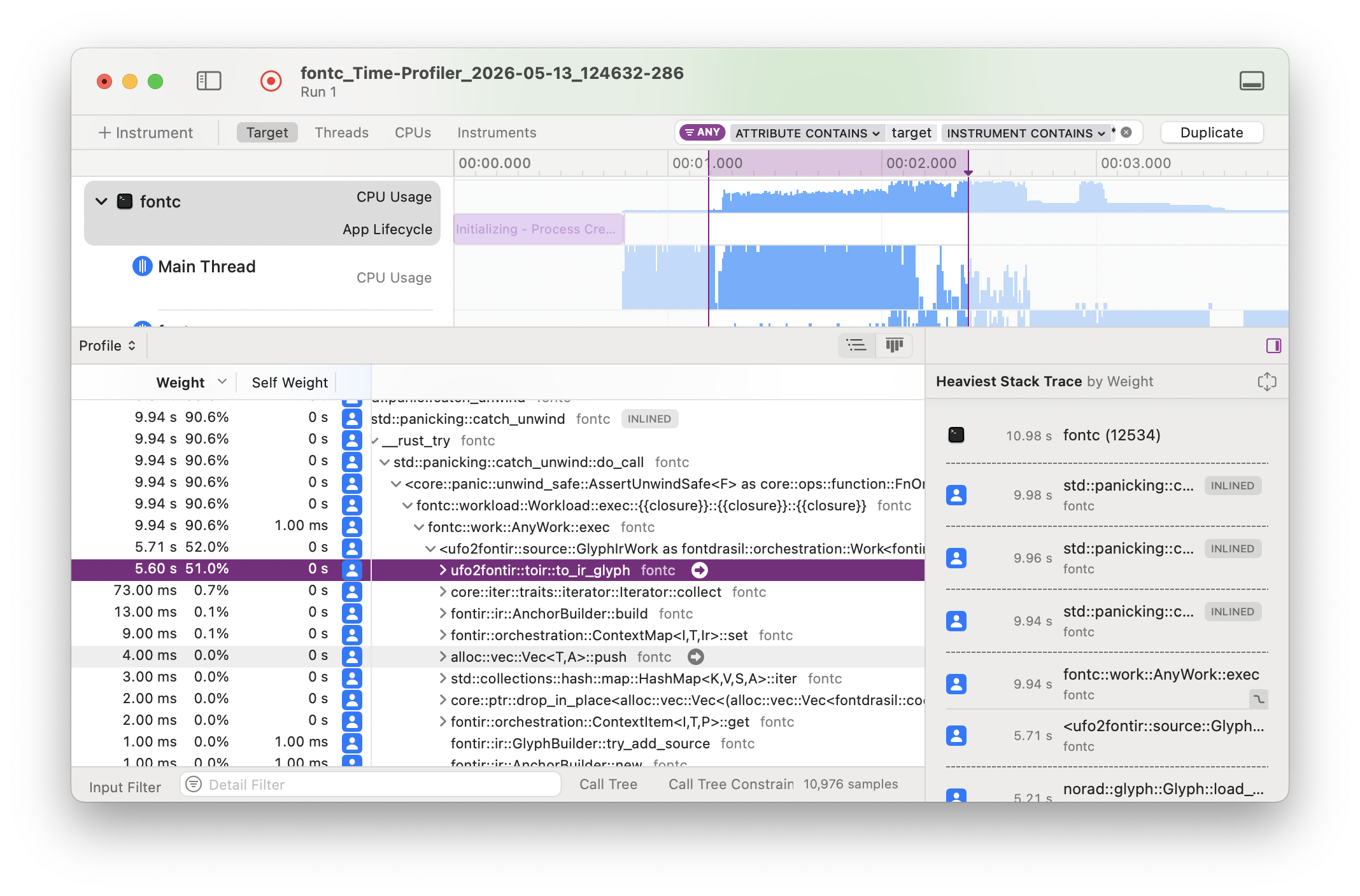
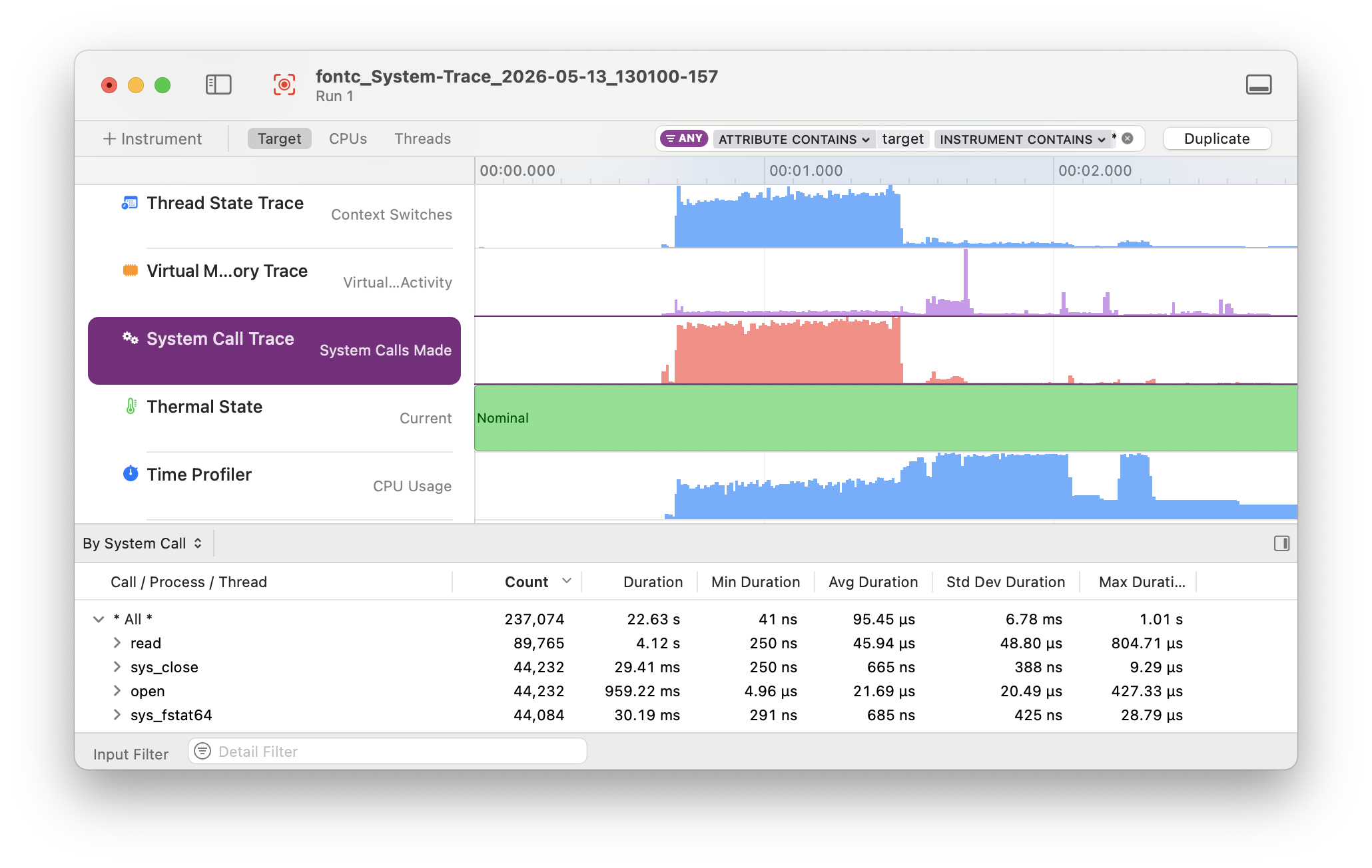
Easily profile your rust crate with Xcode Instruments.
cargo-instruments is the glue between Cargo and Xcode's bundled profiling
suite. It allows you to easily profile any binary in your crate, generating
files that can be viewed in the Instruments app.
Pre-requisites
Xcode Instruments
This crate only works on macOS because it uses Instruments for profiling and creating the trace file. The benefit is that Instruments provides great templates and UI to explore the Profiling Trace.
To install Instruments, install Xcode from the App Store. (The Command Line Tools you might have already installed while setting up Rust are not sufficient.)
Verify that install by running xctrace. It should print help output.
If you see an error about the active developer directory, check the path
printed by xcode-select --print-path. It should look as follows:
$ xcode-select --print-path
/Applications/Xcode.app/Contents/Developer
If not, this command will reset the path:
$ sudo xcode-select --reset
Compatibility
This crate works on macOS 10.13+. In practice, it transparently detects and
uses the appropriate Xcode Instruments version based on your macOS version:
either /usr/bin/instruments on older macOS, or starting with macOS 10.15, the
new xcrun xctrace.
Installation
brew
The simplest way to install is via Homebrew:
$ brew install cargo-instruments
Alternatively, you can install from source.
Building from Source
First, ensure that you are running macOS, with Cargo, Xcode, and the Xcode Command Line Tools installed.
If OpenSSL is installed (e.g., via brew), then install with
$ cargo install cargo-instruments
If OpenSSL is not installed or if cargo install fails with an error message starting with "Could not find directory of OpenSSL installation, and this -sys crate cannot proceed without this knowledge," then install with
$ cargo install --features vendored-openssl cargo-instruments
Building from Source on nix
If you're using nix, this command should provide all dependencies and build cargo-instruments from source:
$ nix-shell --command 'cargo install cargo-instruments' --pure -p \
	darwin.apple_sdk.frameworks.SystemConfiguration \
	darwin.apple_sdk.frameworks.CoreServices \
	rustc cargo sccache libgit2 pkg-config libiconv \
	llvmPackages_13.libclang openssl
Usage
Basic
cargo-instruments requires a binary target to run. By default, it will try to
build the current crate's main.rs. You can specify an alternative binary by
using the --bin or --example flags, or a benchmark target with the --bench
flag.
Assuming your crate has one binary target named mybin, and you want to profile
using the Allocations Instruments template:
Generate a new trace file (by default saved in target/instruments)
$ cargo instruments -t Allocations
Open the trace file in Instruments.app manually
By default the trace file will immediately be opened with Instruments.app. If you do not want this behavior use the --no-open flag.
$ open target/instruments/mybin_Allocations_2021-05-09T12_34_56.trace
If there are multiple packages, you can specify the package to profile with
the --package flag.
For example, you use Cargo's workspace to manage multiple packages. To profile
the bin bar of the package foo:
$ cargo instruments --package foo --template alloc --bin bar
In many cases, a package only has one binary. In this case --package behaves the
same as --bin.
Profiling application in release mode
When profiling the application in release mode the compiler doesn't provide debugging symbols in the default configuration.
To let the compiler generate the debugging symbols even in release mode you
can append the following section in your Cargo.toml.
[profile.release]
debug = true
All options
As usual, thanks to Clap, running cargo instruments -h prints the compact help.
Profile a binary with Xcode Instruments.

By default, cargo-instruments will build your main binary.

Usage: cargo instruments [OPTIONS] [ARGS]...

Arguments:
  [ARGS]...
          Arguments passed to the target binary.

          To pass flags, precede child args with `--`,
          e.g. `cargo instruments -- -t test1.txt --slow-mode`.

Options:
  -l, --list-templates             List available templates
  -t, --template <TEMPLATE>        Specify the instruments template to run
  -p, --package <NAME>             Specify package for example/bin/bench
      --example <NAME>             Example binary to run
      --bin <NAME>                 Binary to run
      --bench <NAME>               Benchmark target to run
      --release                    Pass --release to cargo
      --profile <NAME>             Pass --profile NAME to cargo
  -o, --output <PATH>              Output .trace file to the given path
      --time-limit <MILLIS>        Limit recording time to the specified value (in milliseconds)
      --no-open                    Do not open the generated trace file in Instruments.app
      --features <CARGO-FEATURES>  Features to pass to cargo
      --manifest-path <PATH>       Path to Cargo.toml
  -h, --help                       Print help (see a summary with '-h')
      --all-features               Activate all features for the selected target
      --no-default-features        Do not activate the default features for the selected target
      --no-demangle                Do not demangle Rust symbols in the profiling output

EXAMPLE:
    cargo instruments -t time    Profile main binary with the (recommended) Time Profiler.
And cargo instruments --help provides more detail.
Templates
Instruments has the concept of 'templates', which describe sets of dtrace
probes that can be enabled. You can ask cargo-instruments to list available
templates, including your custom ones (see help above). If you don't provide a
template name, you will be prompted to choose one.
Typically, the built-in templates are
built-in                   abbrev
---------------------------------
Activity Monitor
Allocations                (alloc)
Animation Hitches
App Launch
Audio System Trace
CPU Counters
CPU Profiler               (cpu)
Core ML
Data Persistence
File Activity              (io)
Game Memory
Game Performance
Game Performance Overview
Leaks
Logging
Metal System Trace
Network
Power Profiler
Processor Trace
RealityKit Trace
Swift Concurrency
SwiftUI
System Trace               (sys)
Tailspin
Time Profiler              (time)
Examples
# View all args and options
$ cargo instruments --help
# View all built-in and custom templates
$ cargo instruments --list-templates
# profile the main binary with the Allocations template
$ cargo instruments -t alloc
# profile examples/my_example.rs, with the Allocations template,
# for 10 seconds, and open the trace when finished
$ cargo instruments -t Allocations --example my_example --time-limit 10000 --open
Resources
WWDC videos
The best source of information about Instruments is likely the various WWDC sessions over the years:
- Getting Started with Instruments
- Developing a Great Profiling Experience
- Visualize and Optimize Swift Concurrency
- Track Down Hangs with Xcode and On-Device Detection
- Analyze Hangs with Instruments
- Analyze Heap Memory
- Optimize CPU Performance with Instruments
- Optimize SwiftUI Performance with Instruments
Release files for astral-dev-toolchain-cargo-instruments 0.4.17
For a detailed explanation of source distributions (sdists) and built distributions (wheels), please see the package formats documentation.
Built distributions (wheels)
| File | Interpreter | ABI | Platform | Reset |
|---|---|---|---|---|
| astral_dev_toolchain_cargo_instruments-0.4.17-py3-none-macosx_11_0_arm64.whl | Python 3 | none | macOS 11.0+ ARM64 | Details |
| astral_dev_toolchain_cargo_instruments-0.4.17-py3-none-macosx_10_12_x86_64.whl | Python 3 | none | macOS 10.12+ x86-64 | Details |
Total release size: 23.3 MB
Release files / astral_dev_toolchain_cargo_instruments-0.4.17-py3-none-macosx_11_0_arm64.whl
| Download URL | astral_dev_toolchain_cargo_instruments-0.4.17-py3-none-macosx_11_0_arm64.whl |
|---|---|
| Size | 11.7 MB |
| Tags | Python 3 macOS 11.0+ ARM64 |
|
SHA-256 checksum How to use checksums |
9aec20f324098c34c77bc15d6df806c09dd0e0121d2c45928a660901f0beea84
|
|
BLAKE2b-256 checksum How to use checksums |
d5b40cd7925263364d8751305a3880496b691feb6c378b7ce4cdeef09ab8ef69
|
| Upload date | |
|
Uploaded using Trusted Publishing? What is trusted publishing? |
Yes |
| Uploaded via |
uv/0.12.19 {"installer":{"name":"uv","version":"0.12.19","subcommand":["publish"]},"python":null,"implementation":{"name":null,"version":null},"distro":{"name":"Ubuntu","version":"24.04","id":"noble","libc":null},"system":{"name":null,"release":null},"cpu":null,"openssl_version":null,"setuptools_version":null,"rustc_version":null,"ci":true}
|
Provenance
Provenance describes where a file came from. On PyPI, provenance is shared via attestations, which provide a verifiable record of the build or publishing details. View details, limitations and caveats.


PyPI Publish Attestation
PyPI verified that this artifact, at this checksum, originated from the publisher listed below.
Signed by GitHub Actions, verified by PyPI on Sep 28, 2026.
Transparency logRelease files / astral_dev_toolchain_cargo_instruments-0.4.17-py3-none-macosx_10_12_x86_64.whl
| Download URL | astral_dev_toolchain_cargo_instruments-0.4.17-py3-none-macosx_10_12_x86_64.whl |
|---|---|
| Size | 11.6 MB |
| Tags | Python 3 macOS 10.12+ x86-64 |
|
SHA-256 checksum How to use checksums |
adb42d9f70ed4b807ff16b4acfff25c43bc2fbe7720126ba8bf8d773b18bed99
|
|
BLAKE2b-256 checksum How to use checksums |
4257735c54f076534d65c5a0ae1e43130e4c12a5ee8776e4b0ff2e81bda017a6
|
| Upload date | |
|
Uploaded using Trusted Publishing? What is trusted publishing? |
Yes |
| Uploaded via |
uv/0.12.19 {"installer":{"name":"uv","version":"0.12.19","subcommand":["publish"]},"python":null,"implementation":{"name":null,"version":null},"distro":{"name":"Ubuntu","version":"24.04","id":"noble","libc":null},"system":{"name":null,"release":null},"cpu":null,"openssl_version":null,"setuptools_version":null,"rustc_version":null,"ci":true}
|
Provenance
Provenance describes where a file came from. On PyPI, provenance is shared via attestations, which provide a verifiable record of the build or publishing details. View details, limitations and caveats.
PyPI Publish Attestation
PyPI verified that this artifact, at this checksum, originated from the publisher listed below.
Signed by GitHub Actions, verified by PyPI on Sep 28, 2026.
Transparency log













