
This release is a pre-release and may not be stable for production use.
Build provenance: This package is built and distributed by Astral as part of
astral-dev-toolchain. It packageshyperfinefrom tagv2.0.0-alpha.2at commitd746117b419f3303f4b6263bba5b1e4bf0e6fa8c.
hyperfine
A command-line benchmarking tool.
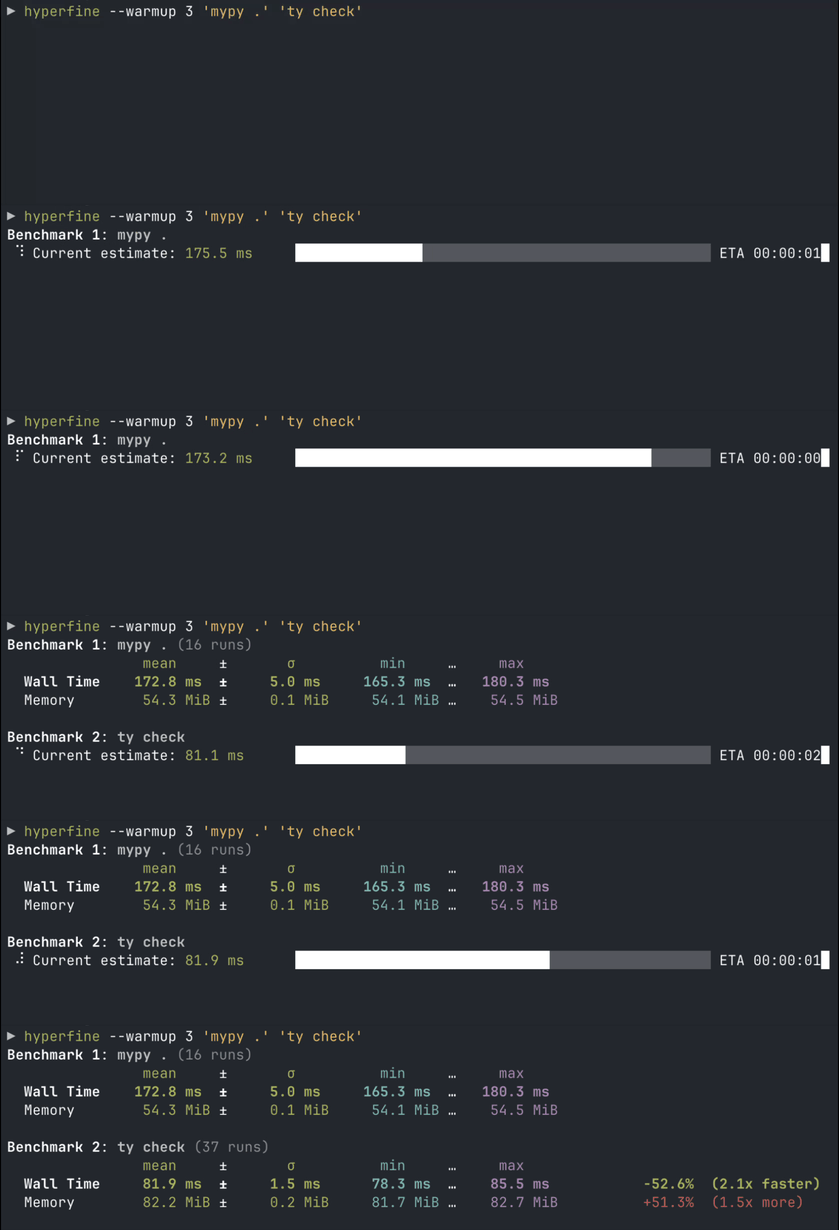
(hyperfine in action, benchmarking mypy and ty)
Features
- Statistical analysis across multiple runs.
- Support for various performance metrics and hardware counters.
- Support for arbitrary shell commands.
- Constant feedback about the benchmark progress and current estimates.
- Warmup runs can be executed before the actual benchmark.
- Cache-clearing commands can be set up before each benchmark run.
- Statistical outlier detection to detect interference from other programs and caching effects.
- Export results to various formats: CSV, JSON, Markdown, AsciiDoc.
- Parameterized benchmarks (e.g. vary the number of threads).
- Cross-platform
Usage
Basic benchmarks
To run a benchmark, you can simply call hyperfine <command>.... Each argument is an executable
and its arguments. Commands run directly by default; use -S for shell syntax such as
pipes, redirections, and wildcards. For example:
hyperfine 'sleep 0.3'
Hyperfine will automatically determine the number of runs to perform for each command. By default,
it will perform at least 10 benchmarking runs and estimate a run count targeting roughly
3 seconds, including shell overhead and preparation and conclusion commands. To set an exact
number of runs, you can use the -r/--runs option:
hyperfine --runs 5 'sleep 0.3'
If you want to compare different programs, you can pass multiple commands:
hyperfine 'hexdump file' 'xxd file'
Commands run and appear in input order. The first command is the reference for all comparisons; each subsequent result shows its change from that reference.
Warmup runs and preparation commands
For programs that perform a lot of disk I/O, the benchmarking results can be heavily influenced by disk caches and whether they are cold or warm.
If you want to run the benchmark on a warm cache, you can use the -w/--warmup option to
perform a certain number of program executions before the actual benchmark:
hyperfine -S --warmup 3 'grep -R TODO *'
Conversely, if you want to run the benchmark for a cold cache, you can use the -p/--prepare
option to run a special command before each benchmark run. For example, to clear Linux filesystem caches,
you can run
sync; echo 3 | sudo tee /proc/sys/vm/drop_caches
To use this specific command with hyperfine, call sudo -v to temporarily gain sudo permissions
and then call:
hyperfine -S --prepare 'sync; echo 3 | sudo tee /proc/sys/vm/drop_caches' 'grep -R TODO *'
Parameterized benchmarks
If you want to run a series of benchmarks where a single parameter is varied (say, the number of
threads), you can use the -P/--parameter-scan option and call:
hyperfine --prepare 'make clean' --parameter-scan num_threads 1 12 'make -j {num_threads}'
This also works with decimal numbers. The -D/--parameter-step-size option can be used
to control the step size:
hyperfine --parameter-scan delay 0.3 0.7 -D 0.2 'sleep {delay}'
This runs sleep 0.3, sleep 0.5 and sleep 0.7.
For non-numeric parameters, you can also supply a list of values with the -L/--parameter-list
option:
hyperfine -L compiler g++,clang++ '{compiler} -O2 main.cpp'
A common use case is comparing the same command across multiple Git branches. Use --setup
to switch branches once before each set of benchmark runs, so the branch switch is not part of
the measured command:
hyperfine \
    --parameter-list branch main,performance-improvements \
    --setup 'git switch {branch}' \
    'python main.py'
If you need a unique value for each individual run of a benchmark command, hyperfine also exposes
the zero-based $HYPERFINE_ITERATION environment variable inside the benchmarked command itself:
hyperfine -S 'my-command > output-${HYPERFINE_ITERATION}.log'
Intermediate shell
By default, benchmarked commands, including warmup runs, are executed directly, without an intermediate shell (--shell=none).
Arguments are split using shell-like quoting, so quoted arguments containing spaces are supported.
Shell syntax such as pipes, redirections, environment-variable expansion, *, and ~ is not interpreted.
This avoids shell startup overhead and the noise from correcting for it, especially for fast commands
(< 5 ms).
Commands containing unquoted, standalone shell operators such as && or > require an explicit
choice: use -S / --shell=default to interpret shell syntax, or -N / --shell=none to pass
the operators as literal arguments.
To enable shell syntax, use -S (an alias for --shell=default). This selects sh
on Unix (resolved through PATH) or cmd.exe on Windows:
hyperfine -S 'sleep 0.1 && echo done'
You can also select a specific shell with --shell <SHELL>:
hyperfine --shell zsh 'for i in {1..10000}; do echo test; done'
The --setup, --prepare, --conclude, and --cleanup commands always run through a shell.
They use the shell selected by --shell, or the platform shell (sh on Unix, cmd.exe on Windows)
when --shell is omitted or set to none.
When benchmarked commands use a shell, hyperfine corrects for the shell spawning time. It runs the shell with an empty command multiple times to measure its startup time, then subtracts this time from each time measurement.
Shell functions
If you are using bash, you can export shell functions to directly benchmark them with hyperfine:
my_function() { sleep 1; }
export -f my_function
hyperfine --shell=bash my_function
Otherwise, inline the function into the benchmarked command:
hyperfine -S 'my_function() { sleep 1; }; my_function'
Choosing metrics and units
By default, hyperfine displays wall-clock time and memory usage
(time_wall_clock,memory_peak_resident). Use --metrics with a
comma-separated list to select a different set of metrics. Each
metric can have an optional unit after it:
hyperfine \
    --metrics memory_peak_resident:MiB,time_wall_clock:ms,instructions \
    './baseline' './candidate'
The following metrics are available:
-
time_wall_clock: Time from start to finish, including time spent waiting, in seconds. -
time_user: CPU time spent executing application and library code in user mode, summed across threads, in seconds.- Linux/macOS: Includes child-process time when parents wait for their children to finish.
- Windows: Includes the command and its child processes.
-
time_system: CPU time spent executing kernel code on the program's behalf, for example to read files, summed across threads, in seconds.- Linux/macOS: Includes child-process time when parents wait for their children to finish.
- Windows: Includes the command and its child processes.
-
time_cpu: Total CPU time, calculated astime_user + time_systemfor each run, in seconds. It excludes time spent sleeping or waiting without executing. CPU time is summed across threads, so it can exceed wall-clock time: four threads running on four cores for one second can consume roughly four CPU-seconds. -
memory_peak_resident: Peak memory held in physical RAM, in bytes.- Linux/macOS: Peak resident set size (RSS). This is the largest per-process peak among the command and child processes (whose usage is collected when their parents wait for them), not the simultaneous total memory of the full process tree. On Linux, measuring commands with a very small peak RSS (below the peak inherited from hyperfine at startup, which can be a few MiB) will currently result in that inherited value being reported instead.
- Windows: Currently not supported.
-
cpu_cycles: CPU cycles consumed.- Linux: Includes threads and child processes, but excludes kernel and hypervisor execution.
- macOS: Includes the process's threads and kernel execution, but excludes child processes.
- Windows: Currently not supported.
-
instructions: Completed CPU instructions.- Linux/macOS: Same scope as
cpu_cycles. - Windows: Currently not supported.
- Linux/macOS: Same scope as
-
cache_references: Cache accesses counted by the CPU's generic cache event.- Linux: Same scope as
cpu_cycles. Cache-event definitions depend on the CPU. - macOS/Windows: Currently not supported.
- Linux: Same scope as
-
cache_misses: Cache misses.- Linux: Same scope as
cpu_cycles. Cache-event definitions depend on the CPU. - macOS/Windows: Currently not supported.
- Linux: Same scope as
-
branch_misses: Mispredicted branches.- Linux: Same scope as
cpu_cycles. - macOS/Windows: Currently not supported.
- Linux: Same scope as
Note that hardware counters are not available when a shell is enabled (--shell=..).
Time measurements support units ns, us, ms, s, min, and h. Memory measurements
support B, kB, MB, GB, TB, KiB, MiB, GiB, and TiB. Hardware counters
support count (1), k (thousand), M (million), and B (billion).
You can also use a preset to select a group of metrics:
| Preset | Metrics |
|---|---|
--metrics=default |
time_wall_clock,memory_peak_resident |
--metrics=time |
time_wall_clock,time_cpu,time_user,time_system |
--metrics=all |
All available metrics |
Exporting results
Hyperfine can export results to CSV, JSON, Markdown, AsciiDoc, and org-mode. Non-JSON formats
contain only the primary metric, which is the first metric selected by --metrics.
Markdown
You can use the --export-markdown <file> option to create tables like the following:
| Command | Mean Wall Time [s] | Change | Factor |
|---|---|---|---|
find . -iregex '.*[0-9]\.jpg$' |
2.275 ± 0.046 | ||
find . -iname '*[0-9].jpg' |
1.427 ± 0.026 | -37.3% | (1.6x faster) |
fd -HI '.*[0-9]\.jpg$' |
0.232 ± 0.002 | -89.8% | (9.8x faster) |
JSON
The JSON export includes all available metrics listed in Choosing metrics and units for each measured run (excluding warmup runs).
The JSON output is useful if you want to analyze the benchmark results in more detail. The
scripts/ folder includes a lot
of helpful Python programs to further analyze benchmark results and create helpful
visualizations, like a histogram of runtimes or a whisker plot to compare
multiple benchmarks.
For example, these two commands create the following plots:
uvx --from 'git+https://github.com/sharkdp/hyperfine' \
  plot_histogram results.json
uvx --from 'git+https://github.com/sharkdp/hyperfine' \
  plot_whisker results.json
 |
 |
|---|
Detailed benchmark flowchart
The following chart explains the execution order of various benchmark runs when using options
like --warmup, --prepare <cmd>, --setup <cmd> or --cleanup <cmd>:

Installation

On Ubuntu
On Ubuntu, hyperfine can be installed from the official repositories:
apt install hyperfine
Alternatively, for the latest version, you can download the appropriate .deb package from the Release page and install it via dpkg:
wget https://github.com/sharkdp/hyperfine/releases/download/v1.21.0/hyperfine_1.21.0_amd64.deb
sudo dpkg -i hyperfine_1.21.0_amd64.deb
On Fedora
On Fedora, hyperfine can be installed from the official repositories:
dnf install hyperfine
On Alpine Linux
On Alpine Linux, hyperfine can be installed from the official repositories:
apk add hyperfine
On Arch Linux
On Arch Linux, hyperfine can be installed from the official repositories:
pacman -S hyperfine
On Debian Linux
On Debian Linux, hyperfine can be installed from the official repositories:
apt install hyperfine
On Exherbo Linux
On Exherbo Linux, hyperfine can be installed from the rust repositories:
cave resolve -x repository/rust
cave resolve -x hyperfine
On NixOS
On NixOS, hyperfine can be installed from the official repositories:
nix-env -i hyperfine
On Flox
On Flox, hyperfine can be installed as follows.
flox install hyperfine
Hyperfine's version in Flox follows that of Nix.
On openSUSE
On openSUSE, hyperfine can be installed from the official repositories:
zypper install hyperfine
On Void Linux
Hyperfine can be installed via xbps
xbps-install -S hyperfine
On macOS
Hyperfine can be installed via Homebrew:
brew install hyperfine
Or you can install using MacPorts:
sudo port selfupdate
sudo port install hyperfine
On FreeBSD
Hyperfine can be installed via pkg:
pkg install hyperfine
On OpenBSD
doas pkg_add hyperfine
On Windows
Hyperfine can be installed via Chocolatey, Scoop, or Winget:
choco install hyperfine
scoop install hyperfine
winget install hyperfine
With conda
Hyperfine can be installed via conda from the conda-forge channel:
conda install -c conda-forge hyperfine
With cargo (Linux, macOS, Windows)
Hyperfine can be installed from source via cargo:
cargo install --locked hyperfine
Make sure that you use Rust 1.97 or newer.
From binaries (Linux, macOS, Windows)
Download the corresponding archive from the Release page.
Alternative tools
Hyperfine is inspired by bench.
Integration with other tools
Chronologer is a tool that uses hyperfine to
visualize changes in benchmark timings across your Git history.
Bencher is a continuous benchmarking tool that supports hyperfine to
track benchmarks and catch performance regressions in CI.
Drop hyperfine JSON outputs onto the Venz chart to visualize the results, and manage hyperfine configurations.
Make sure to check out the scripts folder
in this repository for a set of tools to work with hyperfine benchmark results.
Origin of the name
The name hyperfine was chosen in reference to the hyperfine levels of caesium 133 which play a crucial role in the definition of our base unit of time — the second.
Citing hyperfine
Thank you for considering citing hyperfine in your research work. Please see the information in the sidebar on how to properly cite hyperfine.
License
hyperfine is dual-licensed under the terms of the MIT License and the Apache License 2.0.
See the LICENSE-APACHE and LICENSE-MIT files for details.
Metadata
Release files for astral-dev-toolchain-hyperfine 2.0.0a2
For a detailed explanation of source distributions (sdists) and built distributions (wheels), please see the package formats documentation.
Built distributions (wheels)
| File | Reset | |||
|---|---|---|---|---|
| astral_dev_toolchain_hyperfine-2.0.0a2-py3-none-win_arm64.whl | Python 3 | none | Windows ARM64 | Details |
| astral_dev_toolchain_hyperfine-2.0.0a2-py3-none-win_amd64.whl | Python 3 | none | Windows x86-64 | Details |
| astral_dev_toolchain_hyperfine-2.0.0a2-py3-none-manylinux_2_17_x86_64.manylinux2014_x86_64.whl | Python 3 | none | Linux glibc 2.17+ x86-64 | Details |
| astral_dev_toolchain_hyperfine-2.0.0a2-py3-none-manylinux_2_17_aarch64.manylinux2014_aarch64.whl | Python 3 | none | Linux glibc 2.17+ ARM64 | Details |
| astral_dev_toolchain_hyperfine-2.0.0a2-py3-none-macosx_11_0_arm64.whl | Python 3 | none | macOS 11.0+ ARM64 | Details |
| astral_dev_toolchain_hyperfine-2.0.0a2-py3-none-macosx_10_12_x86_64.whl | Python 3 | none | macOS 10.12+ x86-64 | Details |
Total release size: 3.8 MB
Release files / astral_dev_toolchain_hyperfine-2.0.0a2-py3-none-win_arm64.whl
| Download URL | astral_dev_toolchain_hyperfine-2.0.0a2-py3-none-win_arm64.whl |
|---|---|
| Size | 592.9 kB |
| Tags | Python 3 Windows ARM64 |
|
SHA-256 checksum How to use checksums |
ca3e7429bbe273633f28ae730ccf4f77278d1ef345dc3014d4e7b20cd5796eb5
|
|
BLAKE2b-256 checksum How to use checksums |
022c2de989d4b9ba57ee94b6e52b768f7b6b8fe16df01ffce168a38ec196b222
|
| Upload date | |
|
Uploaded using Trusted Publishing? What is trusted publishing? |
Yes |
| Uploaded via |
uv/0.12.23 {"installer":{"name":"uv","version":"0.12.23","subcommand":["publish"]},"python":null,"implementation":{"name":null,"version":null},"distro":{"name":"Ubuntu","version":"24.04","id":"noble","libc":null},"system":{"name":null,"release":null},"cpu":null,"openssl_version":null,"setuptools_version":null,"rustc_version":null,"ci":true}
|
Provenance
Provenance describes where a file came from. On PyPI, provenance is shared via attestations, which provide a verifiable record of the build or publishing details. View details, limitations and caveats.


PyPI Publish Attestation
PyPI verified that this artifact, at this checksum, originated from the publisher listed below.
Signed by GitHub Actions, verified by PyPI on Oct 7, 2026.
Transparency logRelease files / astral_dev_toolchain_hyperfine-2.0.0a2-py3-none-win_amd64.whl
| Download URL | astral_dev_toolchain_hyperfine-2.0.0a2-py3-none-win_amd64.whl |
|---|---|
| Size | 634.5 kB |
| Tags | Python 3 Windows x86-64 |
|
SHA-256 checksum How to use checksums |
49b1423df898c139923d1a00c9752c92b870a4eac3873131e8d7795278d20471
|
|
BLAKE2b-256 checksum How to use checksums |
773ad8240d4f942d9d57c65f9c7cf4316d536beb94aa66056748c2997c7f6acc
|
| Upload date | |
|
Uploaded using Trusted Publishing? What is trusted publishing? |
Yes |
| Uploaded via |
uv/0.12.23 {"installer":{"name":"uv","version":"0.12.23","subcommand":["publish"]},"python":null,"implementation":{"name":null,"version":null},"distro":{"name":"Ubuntu","version":"24.04","id":"noble","libc":null},"system":{"name":null,"release":null},"cpu":null,"openssl_version":null,"setuptools_version":null,"rustc_version":null,"ci":true}
|
Provenance
Provenance describes where a file came from. On PyPI, provenance is shared via attestations, which provide a verifiable record of the build or publishing details. View details, limitations and caveats.
PyPI Publish Attestation
PyPI verified that this artifact, at this checksum, originated from the publisher listed below.
Signed by GitHub Actions, verified by PyPI on Oct 7, 2026.
Transparency logRelease files / astral_dev_toolchain_hyperfine-2.0.0a2-py3-none-manylinux_2_17_x86_64.manylinux2014_x86_64.whl
| Download URL | astral_dev_toolchain_hyperfine-2.0.0a2-py3-none-manylinux_2_17_x86_64.manylinux2014_x86_64.whl |
|---|---|
| Size | 688.7 kB |
| Tags | Linux glibc 2.17+ x86-64 Python 3 |
|
SHA-256 checksum How to use checksums |
79c1db475e5a90b847894afeb6143fef3f8385da84a93847666555a0f1c09f08
|
|
BLAKE2b-256 checksum How to use checksums |
c87959810a2979a90bfdd1fb93ae32cebe9f6714c3fccf06a093d254d5cda40e
|
| Upload date | |
|
Uploaded using Trusted Publishing? What is trusted publishing? |
Yes |
| Uploaded via |
uv/0.12.23 {"installer":{"name":"uv","version":"0.12.23","subcommand":["publish"]},"python":null,"implementation":{"name":null,"version":null},"distro":{"name":"Ubuntu","version":"24.04","id":"noble","libc":null},"system":{"name":null,"release":null},"cpu":null,"openssl_version":null,"setuptools_version":null,"rustc_version":null,"ci":true}
|
Provenance
Provenance describes where a file came from. On PyPI, provenance is shared via attestations, which provide a verifiable record of the build or publishing details. View details, limitations and caveats.
PyPI Publish Attestation
PyPI verified that this artifact, at this checksum, originated from the publisher listed below.
Signed by GitHub Actions, verified by PyPI on Oct 7, 2026.
Transparency logRelease files / astral_dev_toolchain_hyperfine-2.0.0a2-py3-none-manylinux_2_17_aarch64.manylinux2014_aarch64.whl
| Download URL | astral_dev_toolchain_hyperfine-2.0.0a2-py3-none-manylinux_2_17_aarch64.manylinux2014_aarch64.whl |
|---|---|
| Size | 646.0 kB |
| Tags | Linux glibc 2.17+ ARM64 Python 3 |
|
SHA-256 checksum How to use checksums |
f2241f748ef22167424efae6c131bf7ee248ca5800eec2746519cb9bbd61fbfb
|
|
BLAKE2b-256 checksum How to use checksums |
1cc85d2abe9d4520af2f713c1a51538236926deb1419c1b1cc37097952eb2234
|
| Upload date | |
|
Uploaded using Trusted Publishing? What is trusted publishing? |
Yes |
| Uploaded via |
uv/0.12.23 {"installer":{"name":"uv","version":"0.12.23","subcommand":["publish"]},"python":null,"implementation":{"name":null,"version":null},"distro":{"name":"Ubuntu","version":"24.04","id":"noble","libc":null},"system":{"name":null,"release":null},"cpu":null,"openssl_version":null,"setuptools_version":null,"rustc_version":null,"ci":true}
|
Provenance
Provenance describes where a file came from. On PyPI, provenance is shared via attestations, which provide a verifiable record of the build or publishing details. View details, limitations and caveats.
PyPI Publish Attestation
PyPI verified that this artifact, at this checksum, originated from the publisher listed below.
Signed by GitHub Actions, verified by PyPI on Oct 7, 2026.
Transparency logRelease files / astral_dev_toolchain_hyperfine-2.0.0a2-py3-none-macosx_11_0_arm64.whl
| Download URL | astral_dev_toolchain_hyperfine-2.0.0a2-py3-none-macosx_11_0_arm64.whl |
|---|---|
| Size | 608.7 kB |
| Tags | Python 3 macOS 11.0+ ARM64 |
|
SHA-256 checksum How to use checksums |
5d9802c2c068ca67df34fe554a74c6ccc5cdb8d98052156f2a406951b39eaacc
|
|
BLAKE2b-256 checksum How to use checksums |
8cf2e56e1df137de7e37fc9f57b13efcf8f5b9c40c0b08cc0475b5bfcfba03a3
|
| Upload date | |
|
Uploaded using Trusted Publishing? What is trusted publishing? |
Yes |
| Uploaded via |
uv/0.12.23 {"installer":{"name":"uv","version":"0.12.23","subcommand":["publish"]},"python":null,"implementation":{"name":null,"version":null},"distro":{"name":"Ubuntu","version":"24.04","id":"noble","libc":null},"system":{"name":null,"release":null},"cpu":null,"openssl_version":null,"setuptools_version":null,"rustc_version":null,"ci":true}
|
Provenance
Provenance describes where a file came from. On PyPI, provenance is shared via attestations, which provide a verifiable record of the build or publishing details. View details, limitations and caveats.
PyPI Publish Attestation
PyPI verified that this artifact, at this checksum, originated from the publisher listed below.
Signed by GitHub Actions, verified by PyPI on Oct 7, 2026.
Transparency logRelease files / astral_dev_toolchain_hyperfine-2.0.0a2-py3-none-macosx_10_12_x86_64.whl
| Download URL | astral_dev_toolchain_hyperfine-2.0.0a2-py3-none-macosx_10_12_x86_64.whl |
|---|---|
| Size | 644.7 kB |
| Tags | Python 3 macOS 10.12+ x86-64 |
|
SHA-256 checksum How to use checksums |
56af039cf20afff837c28dd79c9e8d9ff0f968f7d8202a1ddd4c147d72cfd12f
|
|
BLAKE2b-256 checksum How to use checksums |
f9576e35b1d0799025fec41b460ac2d875a7f61b9914b9049e2c26cdd4fc8d92
|
| Upload date | |
|
Uploaded using Trusted Publishing? What is trusted publishing? |
Yes |
| Uploaded via |
uv/0.12.23 {"installer":{"name":"uv","version":"0.12.23","subcommand":["publish"]},"python":null,"implementation":{"name":null,"version":null},"distro":{"name":"Ubuntu","version":"24.04","id":"noble","libc":null},"system":{"name":null,"release":null},"cpu":null,"openssl_version":null,"setuptools_version":null,"rustc_version":null,"ci":true}
|
Provenance
Provenance describes where a file came from. On PyPI, provenance is shared via attestations, which provide a verifiable record of the build or publishing details. View details, limitations and caveats.
PyPI Publish Attestation
PyPI verified that this artifact, at this checksum, originated from the publisher listed below.
Signed by GitHub Actions, verified by PyPI on Oct 7, 2026.
Transparency log













