
A dynamic configuration file manager.

Project description
What does it do?
Astrality is a tool for managing configuration files and scheduling tasks related to those files.
You can create templates for your configuration files, and Astrality will replace placeholders within those templates with context values defined in a central configuration file. Furthermore, you can dynamically manipulate that context at predefined times and events.
By publishing an Astrality module to GitHub, others can try out your configuration by only pasting one line into their configuration. The use of template placeholders in your configuration files make such sharing portable on cross of different systems and user preferences.
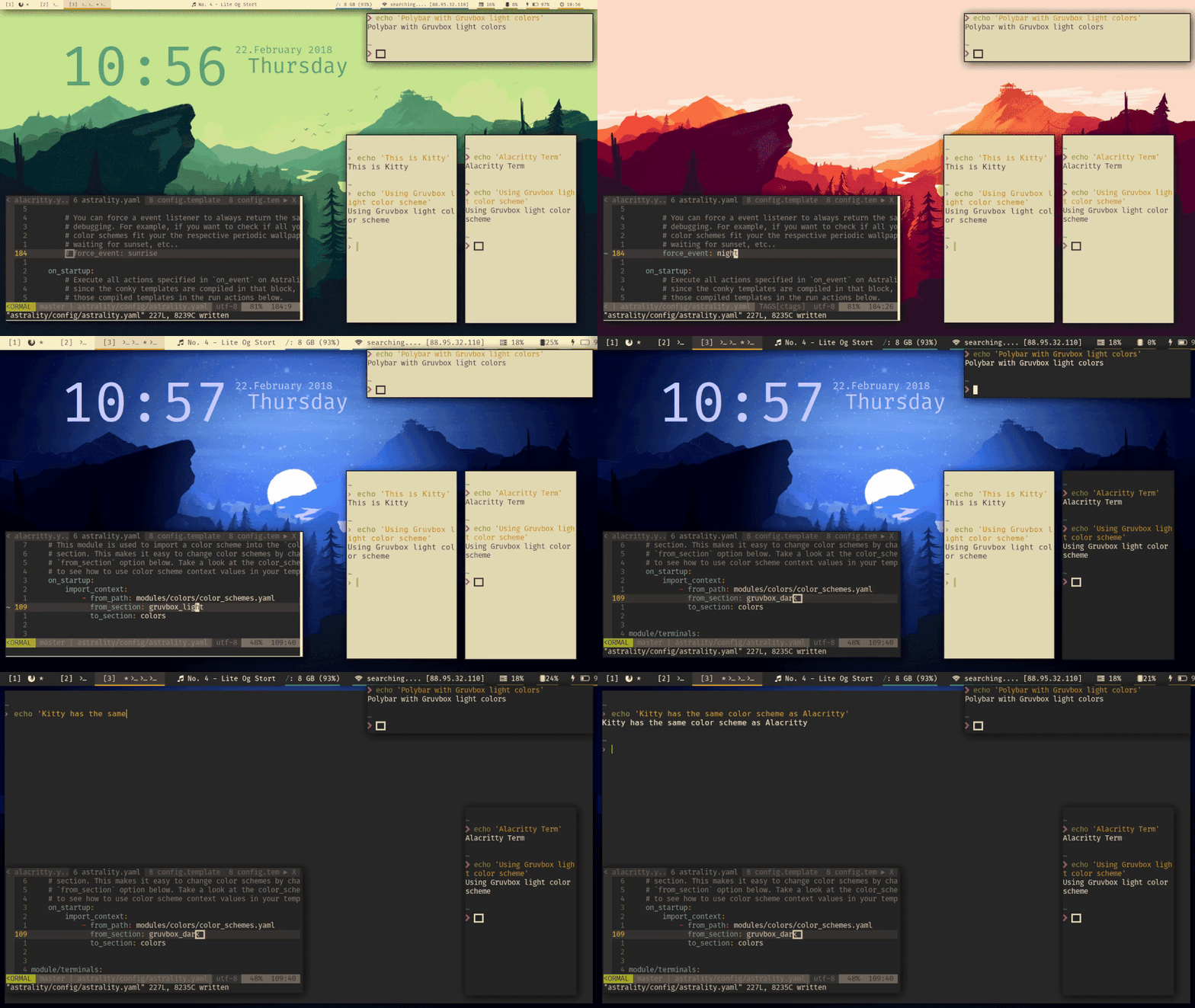
Here is gif demonstrating how Astrality is used to:
Automatically change the desktop wallpaper based on the sun’s position in the sky.
Dynamically change the font size, and implicitly the bar height, of polybar.
Simultaneously change the color scheme of alacritty, kitty, and polybar at the same time.
Possible use cases are:
Create a single source of truth for configuration options. Change your preferred font type or color scheme, and see that change be applied across several different graphical applications.
Receive rapid feedback when editing configuration files by specifying commands to run when specific configuration files are modified.
Conditionally copy (or compile) configuration files to specific paths. For example, only copy neovim’s configuration if it is available on the system.
Configure dynamic behaviour for applications that do not support it. For example, set your desktop wallpaper based on the sun’s position in the sky at your location.
Couple configurations across your applications. When you change your desktop wallpaper, automatically change the font type and color of your conky modules.
Insert environment variables, by writing {{ env.USER }}, and command substitutions, by writing {{ 'xrandr | grep -cw connected' | shell }}), into configuration files that do not natively support them.
Modularize your desktop configuration, allowing you to switch between different combinations of applications and/or configurations by only editing one line. With Astrality you can, for example, quickly switch between different status bars with little effort.
Share modules with others who can effortlessly try out your configuration, and easily switch back to their old configuration if they wish, making experimentation frictionless.
And much more… An example configuration with several examples is included.
The configuration format uses the flexible YAML format, and the template language uses the Jinja2 syntax, which is easy to get started with, but allows complex templating for those who need it.
It is relatively easy to create modules to your own liking. Pull requests with new example modules are welcome.
Getting started
Prerequisites
Astrality requires python 3.6 or greater. Make sure to install it if you do not already have it:
# Example installation on ArchLinux
$ sudo pacman -Syu python
Installation
Create a new virtualenv for python 3.6 (or use your system python 3.6 if you prefer). Install Astrality from pypi like so:
$ python3.6 -m pip install astralityYou should now be able to start astrality from your command line, but first, let us create an example configuration:
$ astrality --create-example-configAnd now start astrality:
$ astralityIf you have feh installed, your desktop wallpaper should now be changed according to the sun’s position in the sky at Null Island. Since you probably don’t live there, you should now configure Astrality.
Optional dependencies
The included example configuration for Astrality contains modules which are dependent on conky and feh. These modules are automatically disabled if their dependencies are not satisfied. If you want to use them, you should install conky and feh. An example installation on ArchLinux would be:
$ sudo pacman -Syu conky fehThe default configuration also uses the Nerd Font “FuraCode Nerd Font”. Install it if you don’t change the font in your configuration. On ArchLinux, it can be installed with the nerd-fonts-complete AUR package:
$ yaourt -S nerd-fonts-completeConfiguration and further documentation
I recommend taking a look at the full documentation of Astrality hosted at Read the Docs.
Release history Release notifications | RSS feed


Download files
Download the file for your platform. If you're not sure which to choose, learn more about installing packages.
Source Distribution
Built Distribution
Filter files by name, interpreter, ABI, and platform.
If you're not sure about the file name format, learn more about wheel file names.
Copy a direct link to the current filters
File details
Details for the file astrality-0.6.tar.gz.
File metadata
- Download URL: astrality-0.6.tar.gz
- Upload date:
- Size: 2.5 MB
- Tags: Source
- Uploaded using Trusted Publishing? No
File hashes
| Algorithm | Hash digest | |
|---|---|---|
| SHA256 |
ed4bec0273732ecd460d1dfcf304326cb589e74b5c3759f87b38f50e15a91949
|
|
| MD5 |
d5365ec9455d2df7123433905ce478bc
|
|
| BLAKE2b-256 |
ddfec46d3f7dae4ac831ebeef50959e03962cdaabf351c9cb3aa3360c3c1e8b8
|
File details
Details for the file astrality-0.6-py3-none-any.whl.
File metadata
- Download URL: astrality-0.6-py3-none-any.whl
- Upload date:
- Size: 2.6 MB
- Tags: Python 3
- Uploaded using Trusted Publishing? No
File hashes
| Algorithm | Hash digest | |
|---|---|---|
| SHA256 |
b78dd648a4f920a89ca7ba33b9847cce77b3f1442840561eb636012670002de9
|
|
| MD5 |
156fc089fe042e3150283125fdcff6f0
|
|
| BLAKE2b-256 |
5e80c45467689574192c14c638e00c5d3ef6311874cc9f4f9da1eee860966fd1
|






