


A Cloudy database with functions to quickly interpolate the physical state of astrophysical plasma without detailed plasma modeling
Running Cloudy models on the fly, especially when there are a lot of models to run with different parameters, can become extremely expensive. AstroPlasma aims to provide a workaround using a library of pre-computed cloudy models to generate most of the common plasma properties for a large range of parameter space by interpolation. Owing to a simple and easy-to-use interface, AstroPlasma also provides an abstraction layer enabling the user to get the plasma properties without worrying much about the details of plasma modeling. We find this extremely useful while building models and predicting observables like column densities in different kinds of astrophysical systems.













Install
This is just a one-time process. AstroPlasma has been tested with Python 3.11
Install from PyPI
For simply using AstroPlasma, install the published package:
pip install astro-plasma
Or, with uv:
uv pip install astro-plasma
To additionally pull in the optional GPU support (CuPy, see the RUN_ON_CUDA section below):
pip install "astro-plasma[gpu]"
Note: The package ships only the code and two small lookup tables. The
Cloudydatabase itself is not bundled — it is several GB and is downloaded on demand the first time it is needed, or up front withdownload_all()as described in Download the database.
Install from source instead if you intend to modify AstroPlasma or run the Cloudy scripts.
Get the AstroPlasma code:
git clone https://github.com/dutta-alankar/AstroPlasma.git
Setting up dependencies
Change to the code directory
cd AstroPlasma
Install uv
AstroPlasma uses uv for environment and package management. Install it with:
curl -LsSf https://astral.sh/uv/install.sh | sh
Or via pip:
pip install uv
Prepare Python virtual environment
Create a virtual environment (named .venv) and install AstroPlasma in editable mode:
uv venv .venv
source .venv/bin/activate
Now install AstroPlasma using
uv pip install --editable .
If you want to enable the optional gpu support use
uv pip install --editable .[gpu]
Install the dependencies:
For user,
uv pip install -r requirements/requirements.txt
For user with GPU,
uv pip install -r requirements/requirements-gpu.txt
For developer,
uv pip install -r requirements/requirements-dev.txt
For running Cloudy scripts,
uv pip install -r requirements/requirements-all.txt
Note:
Python.hfrom thepython3.11-devpackage must be available for installingmpi4pydependency required by theCloudyscripts.
At any point later, in order to use AstroPlasma, just activate this virtual environment:
source .venv/bin/activate
Download the database
Once AstroPlasma and its dependencies are set up, the simplest way to get the entire database locally is to run the following script in Python with the virtual environment activated. Before running the following script, the environment variable export PARALLEL_DOWNLOAD_JOBS=8 needs to be set. Here, one can replace 8 with any number that sets how many files in the database will be downloaded from the web simultaneously.
from astro_plasma import download_all
download_all()
Alternatively, one can use a custom data location as well. Please see the relevant Note provided near the end of this README.
User Guide
The following are code snippets that demonstrate the basic usage of AstroPlasma
Info: A
jupyter-notebookof this User Guide can be found in theexample-scriptsdirectory.
Ionization modeling
This is how one would use astro_plasma to calculate the ionization state of any typical astrophysical plasma. This would be useful in any modeling that depends on calculating the ionization of the plasma. Determining temperature from density and calculating the free electron density in the plasma are a few examples of applications of AstroPlasma.
# Import AstroPlasma Ionization module
from astro_plasma import Ionization
from astro_plasma.core.utils import AtmElement # for element naming using symbols (optional)
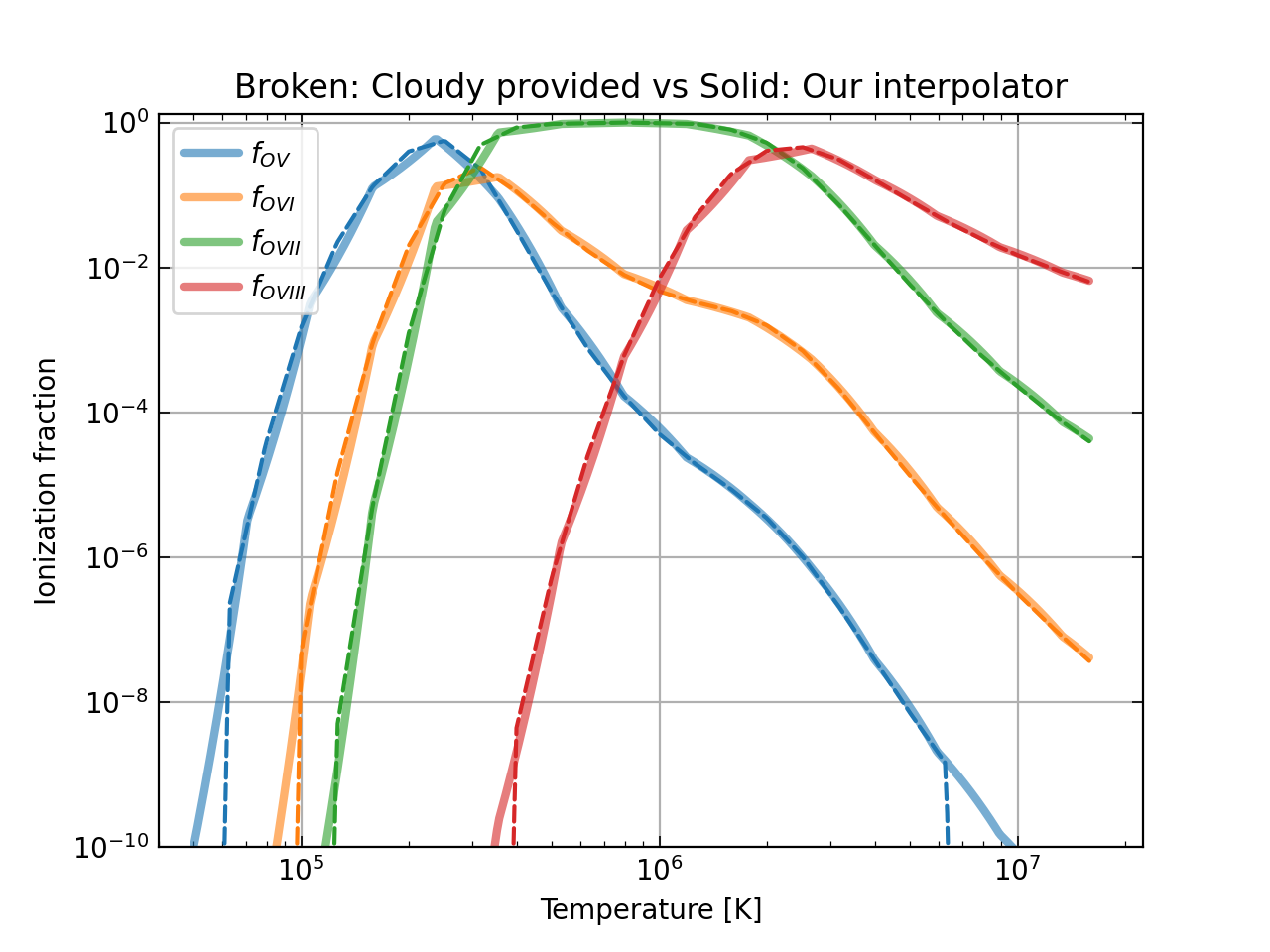
Let us calculate ionization fraction of $\bf{OVI\ (O^{5+}})$
In AstroPlasma elements are labeled by their atomic number.
- Atomic number of the desired element is passed to the
elementargument in several functions ofAstroPlasma. For example, Oxygen corresponds toelement=8. - For the ionization state,
AstroPlasmalabels them according to the value passed to theionargument. For example, ionization state III, corresponds toion=3. - Summarizing, to know the ionization state of $\bf{OVI}$, one needs to pass
element=8andion=6.
fIon = Ionization.interpolate_ion_frac
Now, we are going to define typical physical values that characterize an astrophysical plasma.
nH = 1.2e-04 # Hydrogen number density in cm^-3
temperature = 4.2e+05 # Temperature of the plasma in kelvin
metallicity = 0.99 # Metallicity of plasma with respect to solar
redshift = 0.001 # Cosmological redshift
mode = "CIE"
Note: The mode passed in the above code refers to the equilibrium state of the plasma. Right now, AstroPlasma only supports two equilibrium conditions, namely, collisional ionization equilibrium (CIE in code) and photo-ionization equilibrium (PIE in code).
For photo-ionization equilibrium, the photo-ionizing backgrounds that are used in the calculation of the Cloudy interpolation tables are Haardt-Madau (2012) extra-galactic UV/X-ray diffuse background and Cosmic Microwave Background (CMB) at any given redshift.
# Let's get the ionization of OVI
element = AtmElement.Oxygen
ion = 6
fOVI = fIon(nH = nH,
            temperature = temperature,
            metallicity = metallicity,
            redshift = redshift,
            element = element,
            ion = ion,
            mode = mode,
            ) # This value is in log10
fOVI = pow(10, fOVI)
print(f"f_OVI = {fOVI:.3e}")
Note:
- The ionization fraction returned by
AstroPlasmais on the log10 scale. - Currently, we do not support vectorization of these functions and indivdual values must be passed and not arrays. This can lead to errors or un-defined behavior.
- You can provide
elementandionin 4 ways# Using atomic number and ion count (int version of roman) fIon(element=8, ion=6) # OVI # Using the symbol of the element fIon(element='O', ion=6) # OVI # Using AtmElement for element fIon(element=AtmElement.Oxygen, ion=6) # OVI # Using element and ion in one string # In this case explicit value of ion will be ignored fIon(element='OVI')
Note We recommend using the last two methods as we think it is the most convenient to use and read.
One can also caluculate other plasma quantities as follows
The total free electron density
num_dens = Ionization.interpolate_num_dens

ne = num_dens(nH = nH,
              temperature = temperature,
              metallicity = metallicity,
              redshift = redshift,
              mode = mode,
              part_type = "electron",
              )
print(f"Free electron density = {ne:.3e} cm^-3")
In order to get
- total particle number density, use
part_type = "all" - total ion number density, use
part_type = "ion" - total neutral particle number density, use
part_type = "neutral" - any particular ion number density, use
element = "<element_name>"(similar tofIon)
num_dens = Ionization.interpolate_num_dens

n = num_dens(nH = nH,
              temperature = temperature,
              metallicity = metallicity,
              redshift = redshift,
              mode = mode,
              part_type = "all",
              )
ni = num_dens(nH = nH,
              temperature = temperature,
              metallicity = metallicity,
              redshift = redshift,
              mode = mode,
              part_type = "ion",
              )
nn = num_dens(nH = nH,
              temperature = temperature,
               metallicity = metallicity,
               redshift = redshift,
               mode = mode,
               part_type = "neutral",
               )

nHI = num_dens(nH = nH,
               temperature = temperature,
               metallicity = metallicity,
               redshift = redshift,
               mode = mode,
               element = "HI",
               )

print(f"Total particle density = {n:.3e} cm^-3")
print(f"Total ion density = {ni:.3e} cm^-3")
print(f"Total neutral particle density = {nn:.3e} cm^-3")
print(f"Total HI particle density = {nHI:.3e} cm^-3")
Although it is straightforward to obtain mean particle mass, we provide functions to do so for the convenience of the user. We use the following relation for calculating these quantities.
$$\rho = n \mu m_p = n_e \mu_e m_p = n_i \mu_i m_p = n_H m_H X^{-1}$$
mean_mass = Ionization.interpolate_mu

mu = mean_mass(nH = nH,
               temperature = temperature,
               metallicity = metallicity,
               redshift = redshift,
               mode = mode,
               part_type = "all",
               )
mu_e = mean_mass(nH = nH,
               temperature = temperature,
               metallicity = metallicity,
               redshift = redshift,
               mode = mode,
               part_type = "electron",
               )
mu_i = mean_mass(nH = nH,
               temperature = temperature,
               metallicity = metallicity,
               redshift = redshift,
               mode = mode,
               part_type = "ion",
               )
print(f"Mean particle mass = {mu:.2f} mp")
print(f"Mean free electron mass = {mu_e:.2f} mp")
print(f"Mean ion mass = {mu_i:.2f} mp")
Emission spectrum
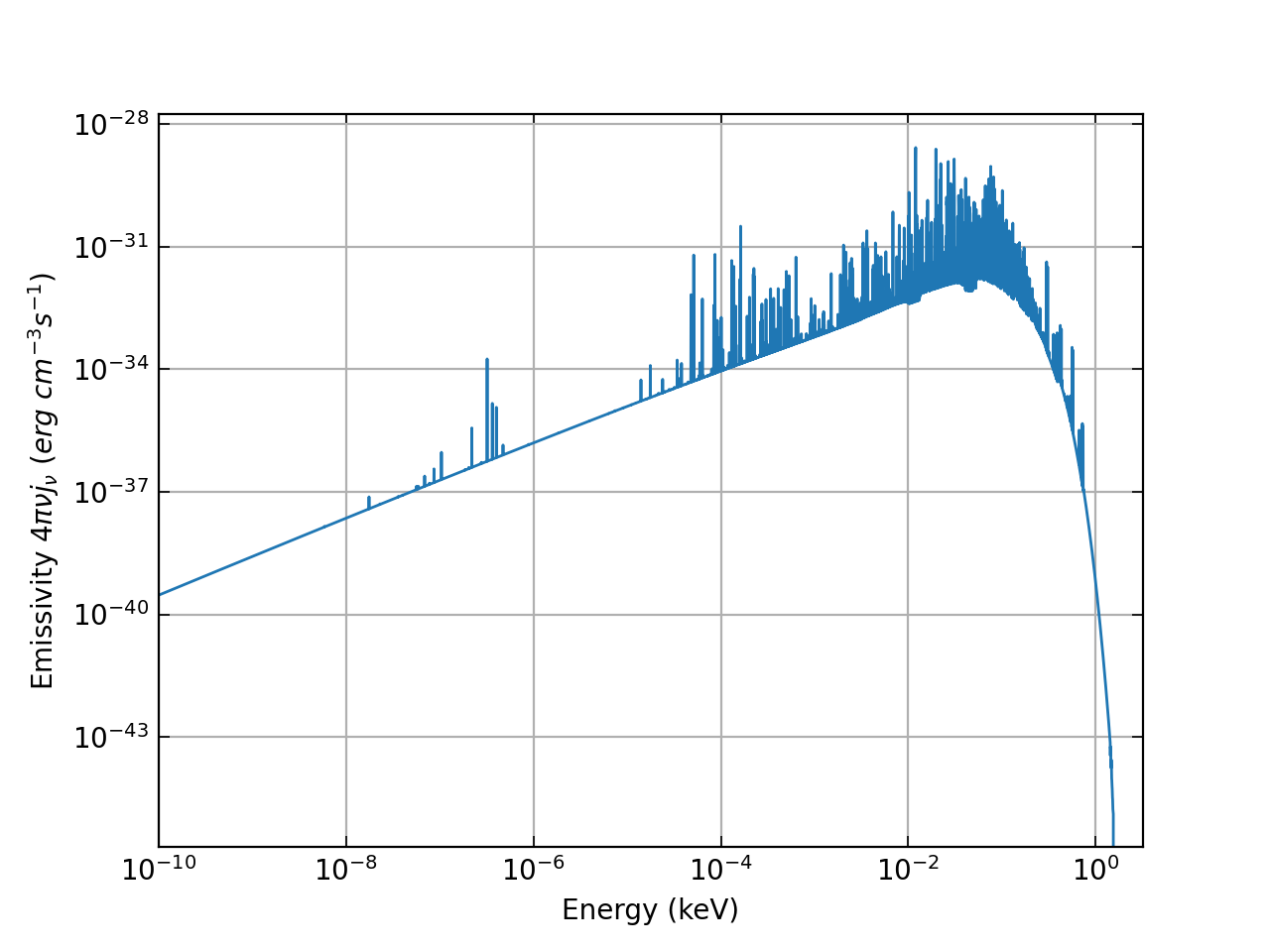
AstroPlasma can be used in determing the emission spectrum emitted from a one-zone plasma. Here's the code that does that. This can be used as a starting point for modeling plasma emission from astrophysical objects like the circumgalactic medium or galaxy clusters by stacking emission from multiple such one-zones.
# Import AstroPlasma EmissionSpectrum module
from astro_plasma import EmissionSpectrum
gen_spectrum = EmissionSpectrum.interpolate_spectrum

# Generate spectrum
spectrum = gen_spectrum(nH = nH,
               temperature = temperature,
               metallicity = metallicity,
               redshift = redshift,
               mode = mode
               )
Let us plot the spectrum generated by AstroPlasma
import matplotlib
import matplotlib.pyplot as plt

plt.loglog(spectrum[:,0], spectrum[:,1])
plt.xlabel(r"Energy (keV)")
plt.ylabel(r"Emissivity $4 \pi \nu j_{\nu}$ ($erg\ cm^{-3} s^{-1}$)")
plt.xlim(xmin = 1.0e-10, xmax=3.2)
plt.show()
Note:
AstroPlasmaassumes by default that the data is located at<module_location>/data/<ionization/emission>. The user can change this to something else usingIonization.base_dir = "<new_ionization_data_location_dir>"orEmissionSpectrum.base_dir = "<new_emission_data_location_dir>", where these new directories must contain the validhdf5data files.
Note: We haven't made the server online yet. As a temporary measure, please download and use the data hosted here
https://datashare.mpcdf.mpg.de/s/eiGXTmgM8z6rr9w
Downloading files on demand
We made it easy for you in the code to download only the required files on the go using our built-in service (Cloudy Interpolator web application).
To activate this feature, you should create a .env file in the project root directory and provide the following information.
ASTROPLASMA_SERVER=http://web-server-url-here
Alternatively, you can export the environment variable
# bash / sh
export ASTROPLASMA_SERVER=http://web-server-url-here

# csh
setenv ASTROPLASMA_SERVER http://web-server-url-here
All the environment variables you can configure (either in env file or via export)
| Environment Variable | Default | Description |
|---|---|---|
| ASTROPLASMA_SERVER | — | Base URL of the web server to enable file downloading. To get this information, you can open issue here |
| PARALLEL_DOWNLOAD_JOBS | 4 |
Parallel jobs spawned to download the files. You can increase or decrease based on the download bandwidth of your network connection. |
CHUNK_SIZE_MIN |
128 |
Minimum download chunk size (KiB). The adaptive downloader will not shrink the chunk below this value even on a slow connection. |
CHUNK_SIZE_MAX |
8192 |
Maximum download chunk size (KiB). The adaptive downloader will not grow the chunk above this value. If your download is aborted because of an unstable network, try decreasing this value. |
CHECK_OR_DOWNLOAD_APLASMA_DATA |
1 |
Controls whether AstroPlasma checks for, and attempts to download, missing data files at import time and during interpolation. Set to 0 to disable all network access and file-existence checks — useful when running on an offline HPC node where all data is already present locally. Example: export CHECK_OR_DOWNLOAD_APLASMA_DATA=0 |
RUN_ON_CUDA |
0 |
When set to 1, AstroPlasma will use CuPy instead of NumPy to perform array operations on a CUDA-capable GPU. This can significantly accelerate large batch interpolation workloads. If cupy is not installed or no CUDA device is detected at import time, the code automatically falls back to NumPy and emits a RuntimeWarning. Example: export RUN_ON_CUDA=1 |
CHECK_OR_DOWNLOAD_APLASMA_DATA — Disable automatic data downloads
By default, AstroPlasma will try to download any missing data files from the internet the first time it is imported and whenever an interpolation needs a file that is not yet present locally. If you are working on a machine that has the full database already available (e.g. an HPC node without outbound internet) you can suppress this behaviour entirely:
# bash / sh
export CHECK_OR_DOWNLOAD_APLASMA_DATA=0

# csh
setenv CHECK_OR_DOWNLOAD_APLASMA_DATA 0
Or place it in the project-root .env file:
CHECK_OR_DOWNLOAD_APLASMA_DATA=0
With this set to 0:
- No network requests are made at import time or during interpolation.
- If a required data file is absent, a
FileNotFoundErrorwill be raised rather than triggering a download. - All other
AstroPlasmafunctionality remains unchanged.
RUN_ON_CUDA — GPU-accelerated interpolation with CuPy
AstroPlasma can offload its array computations to a CUDA GPU via CuPy. Install CuPy for your CUDA version (see the CuPy installation guide) and then set:
# bash / sh
export RUN_ON_CUDA=1

# csh
setenv RUN_ON_CUDA 1
Or place it in the project-root .env file:
RUN_ON_CUDA=1
When RUN_ON_CUDA=1:
- All internal array operations in
datasift.py,ionization.py, andspectrum.pyare dispatched to CuPy (instead of NumPy). - HDF5 data is transferred to the GPU at load time via
cupy.asarray(). - Return values are CuPy arrays. Call
.get()on them (or wrap withnumpy.asarray()) to convert back to NumPy if needed.
If cupy is not installed or no CUDA-capable device is found at import time, AstroPlasma automatically falls back to NumPy and emits a RuntimeWarning:
RuntimeWarning: RUN_ON_CUDA=1 but CuPy is unavailable or no CUDA device detected (...). Falling back to numpy.
Developer note —
scaling_funcmust be backend-compatibleThe internal
DataSift._interpolatemethod accepts ascaling_funccallable that is applied to both the grid arrays (nH_grid,T_grid, …) and the per-cell query vectors. WhenRUN_ON_CUDA=1those arrays are CuPy arrays, so anyscaling_funcyou supply must accept CuPy inputs.Wrong (raises
TypeErroron GPU):import numpy as np result = Ionization._interpolate(..., scaling_func=np.log10) # NumPy ufunc rejects CuPy arraysCorrect — use the backend-agnostic shim from
compat:from astro_plasma.core.compat import np # equals cupy when RUN_ON_CUDA=1, numpy otherwise result = Ionization._interpolate(..., scaling_func=np.log10)The default (
scaling_func=lambda x: x) is always safe because it never calls a NumPy ufunc. Only custom callables that call NumPy directly need to be updated.
Note to contributors
If you wish to contribute, fork this repo and open pull requests to the dev branch of this repo. Once everything gets tested and is found working, the new code will be merged with the main branch.
For a successful merge, the code must at least pass all the pre-existing tests. It is recommended to run pre-commit locally before pushing your changes to the repo for a proposed PR. To do so just run pre-commit run --all-files.
Note It is recommended that the git pre-commit hook be installed using
pre-commit installto check all the staged files.
Instructions on generating a release
Releases are cut by pushing a tag. The Release workflow (.github/workflows/release.yml) then builds the distributions, rehearses the upload on TestPyPI, publishes to PyPI and finally creates the GitHub release with the .tar.gz and .whl attached.
One-time setup. Publishing uses trusted publishing, so no API token is stored anywhere. On both PyPI and TestPyPI, add a pending publisher with:
| Field | Value |
|---|---|
| PyPI project name | astro-plasma |
| Owner | dutta-alankar |
| Repository name | AstroPlasma |
| Workflow name | release.yml |
| Environment name | pypi (on PyPI) / testpypi (on TestPyPI) |
Then create the matching pypi and testpypi environments under Settings → Environments. Add required reviewers there if you want a manual gate before either upload.
Cutting a release.
- Bump
versioninpyproject.tomland merge that tomain. The workflow refuses to publish if the tag and this version disagree. - Tag the merge commit and push the tag:
git checkout main && git pull
git tag release_v1.0.1
git push origin release_v1.0.1
- Watch the run under Actions. It stops before PyPI if the version guard fails, if
twine checkfails, or if the wheel contents are wrong — theCloudy.h5tables must never be packaged, andsolar_GASS10.abnandcooltable.datmust always be.
Note: A version number on PyPI is permanent and cannot be reused, even after deleting the file. If a release is broken, bump to the next patch version rather than retrying the same one. The TestPyPI step exists so mistakes surface before that point.
Instructions on generating Cloudy database
All the codes required to generate the Cloudy database are in the cloudy-codes directory. This part of the code is not as clean and user-friendly as the rest of AstroPlasma because it is unnecessary for an average user. Although I plan to improve this as well in the near future. I have tested this using Cloudy 17 (link here to know more on Cloudy)
Setting up and compiling Cloudy
- export
CLOUDY_DATA_PATHto thedatadirectory ofCloudy(for example,c17.03/data) - I have tested my building the library using Makefiles in
source/sys_gcc_shareddirectory ofCloudy. Runmakefrom inside this directory. Ifmakesucceeds thencloudy.exeand a shared librarylibcloudy.sowill get compiled.
Using Cloudy with codes hosted in AstroPlasma repo
AstroPlasmahas three directories insidecloudy-codesionFrac: Generates the ionization database.emmSpec: Generates the emission spectra database (TODO: Work required to make compiled executable enabling faster calculation to generate the database).coolingFunction: Generates cooling function for optically thin radiative cooling in equilibrium. This is an extra feature not directly used inAstroPlasma
- Generating ionization data
- Copy
libcloudy.sotoAstroPlasma/cloudy-codes/ionFrac/src - From inside
AstroPlasma/cloudy-codes/ionFrac/srcdirectory, executebash ./compile-script.sh. This will compile and generate the executables that creates the ionization data. - export
AstroPlasma/cloudy-codes/ionFrac/srctoLD_LIBRARY_PATH - Inside the
AstroPlasma/cloudy-codes/ionFrac/generateIonFraction-parallel.pyscript, change the parameters (total_size,batch_dim,nH,temperature,metallicity,redshift) to desired resolution and range. - Now one can run this script in parallel using
mpiexec -n <nproc> python generateIonFraction-parallel.py. I have tested this usingPython 3.11.6withmpi4py,numpy,h5pyandcoloramapackages installed. Note for cluster usres: A sampleslurmcommand that can be copied and executed from the terminal of a cluster is also provided inslurm-python-job. However, this needed tweaking according to the specifics of the cluster. Since this job runs interactively, it is advisable to use something like gnuscreenortmuxto run this in a detached terminal, as using these tools, interruptions in the connection to the cluster won't kill the job. Also, the user needs to make sure that the binaries compiled should be compiled for the compute nodes and not the login nodes if they are of different configurations. One can see the progress of the run in the log files generated by slurm. For example,tail -F ~/AstroPlasma/cloudy-codes/ionFrac/IonCloudy-2325.logenables you to see the running job status with jobID2325in this example. - Upon successful run, several ascii files with
ionizationin their name will get generated in a directory calledautothat is created inAstroPlasma/cloudy-codes/ionFrac/src. The finalhdf5files for the database is created in thedatadirectory inAstroPlasma/cloudy-codes/ionFrac/src. This directory should be copied toAstroPlasma/astro_plasma/data/and renamed asionization.
- Copy
- Generating emission data
- The steps are similar to the above. But in this case, both
libcloudy.soandcloudy.exefiles need to be copied toAstroPlasma/cloudy-codes/emmSpec/from thesource/sys_gcc_shareddirectory ofCloudy.
- The steps are similar to the above. But in this case, both
- Generating optically thin radiative Cooling table
- This is not used by
AstroPlasmaas of now but is a useful feature ofCloudyand hence included in the repo. - Copy
libcloudy.sotoAstroPlasma/cloudy-codes/coolingFunction/ - From inside
AstroPlasma/cloudy-codes/coolingFunction/directory, executebash ./compile-script.sh. This will compile and generate the executables that can create the cooling tables. - Currently, there are two types of cooling tables available: one with plasma in equilibrium background radiation (PIE) and one without any background radiation (CIE). If you are unsure which one to use, I would recommend PIE.
- export
AstroPlasma/cloudy-codes/coolingFunctiontoLD_LIBRARY_PATH. - To generate the cooling table run
./hazy_coolingcurve_<PIE/CIE> <metallicity> <dT (log_10)> <True/False (progressbar display)>. For example,./hazy_coolingcurve_PIE 0.3 0.1 Truewill create a cooling table for plasma with 0.3 solar metallicity. The temperature spacing in the table is set to 0.1 dex in this example. The table always starts from 10 K and runs till 109 K.Truein command line arguments shows the progress bar as the code runs. - The name of the cooling table created is
cooltable_<PIE/CIE>_Z=<metallicity>.dat. - Useful to note that the cooling loss rate from the tabulated Λ(T) in the file is nH2Λ(T), where nH=ρXH/mH. Here ρ is density and nH is total Hydrogen number density of the plasma. Usually, XH=0.7154. The unit of Λ(T) in the table is erg cm3 s-1. The photoionization background considered here is
Haardt-Madau 2012at redshift 0.
- This is not used by
Good luck generating the database! I understand that this can be daunting and non-intuitive for a beginner. If you encounter any issues, please don't hesitate to contact me for help!
1 maintainer

Metadata
1 maintainer
Release files for astro-plasma 1.0.1
For a detailed explanation of source distributions (sdists) and built distributions (wheels), please see the package formats documentation.
Source distribution (sdist)
| File | Size | Uploaded | Provenance | |
|---|---|---|---|---|
| astro_plasma-1.0.1.tar.gz | 4.2 MB | With provenance | Details |
Built distribution (wheel)
| File | Interpreter | ABI | Platform | Reset |
|---|---|---|---|---|
| astro_plasma-1.0.1-py3-none-any.whl | Python 3 | none | any | Details |
Total release size: 4.3 MB
Release files / astro_plasma-1.0.1.tar.gz
| Download URL | astro_plasma-1.0.1.tar.gz |
|---|---|
| Size | 4.2 MB |
| Tags | Source |
|
SHA-256 checksum How to use checksums |
875fa24754347c4f944d62693a65064462206d15b34b936f406795b1b7acde1e
|
|
BLAKE2b-256 checksum How to use checksums |
b80335427a636be0c6c469c6420449c3cfebd4215c0fd96bcf793c3db5ea56e8
|
| Upload date | |
|
Uploaded using Trusted Publishing? What is trusted publishing? |
Yes |
| Uploaded via |
twine/7.0.0 CPython/3.13.14
|
Provenance
Provenance describes where a file came from. On PyPI, provenance is shared via attestations, which provide a verifiable record of the build or publishing details. View details, limitations and caveats.


PyPI Publish Attestation
PyPI verified that this artifact, at this checksum, originated from the publisher listed below.
Signed by GitHub Actions, verified by PyPI on Sep 8, 2026.
Transparency logRelease files / astro_plasma-1.0.1-py3-none-any.whl
| Download URL | astro_plasma-1.0.1-py3-none-any.whl |
|---|---|
| Size | 97.1 kB |
| Tags | Python 3 |
|
SHA-256 checksum How to use checksums |
a7a043ce522ea83138ee43c2c60470eb9ec2b4afa342d5bfad8397e68eca49e0
|
|
BLAKE2b-256 checksum How to use checksums |
ad8538628e89cf7cef3b914f9efecc1c3005b7c33209aaea69de0fb44353b970
|
| Upload date | |
|
Uploaded using Trusted Publishing? What is trusted publishing? |
Yes |
| Uploaded via |
twine/7.0.0 CPython/3.13.14
|
Provenance
Provenance describes where a file came from. On PyPI, provenance is shared via attestations, which provide a verifiable record of the build or publishing details. View details, limitations and caveats.
PyPI Publish Attestation
PyPI verified that this artifact, at this checksum, originated from the publisher listed below.
Signed by GitHub Actions, verified by PyPI on Sep 8, 2026.
Transparency logSecurity for astro-plasma 1.0.1
Provenance
Provenance describes where a file came from. On PyPI, provenance is shared via attestations, which provide a verifiable record of the build or publishing details. View details, limitations and caveats.
Full provenance
All 2 files in this release have been uploaded with provenance metadata.
Attestation for astro_plasma-1.0.1.tar.gz
PyPI Publish Attestation
PyPI verified that this artifact, at this checksum, originated from the publisher listed below.
Signed by GitHub Actions, verified by PyPI on Sep 8, 2026.
Transparency logA note on package security
PyPI is a repository for distributing packages, not a service for auditing them. While third-party security researchers and our staff do their best to detect and remove malicious packages, PyPI cannot guarantee the quality, security or suitability of any given package.













