
A modern Gemini browser for the terminal

Project description
Astronomo
A modern Gemini browser for the terminal


What is Astronomo?
Gemini is a lightweight internet protocol that sits between Gopher and the web. It prioritizes simplicity, privacy, and user autonomy—no tracking, no ads, no JavaScript. Just clean, focused content served over encrypted connections.
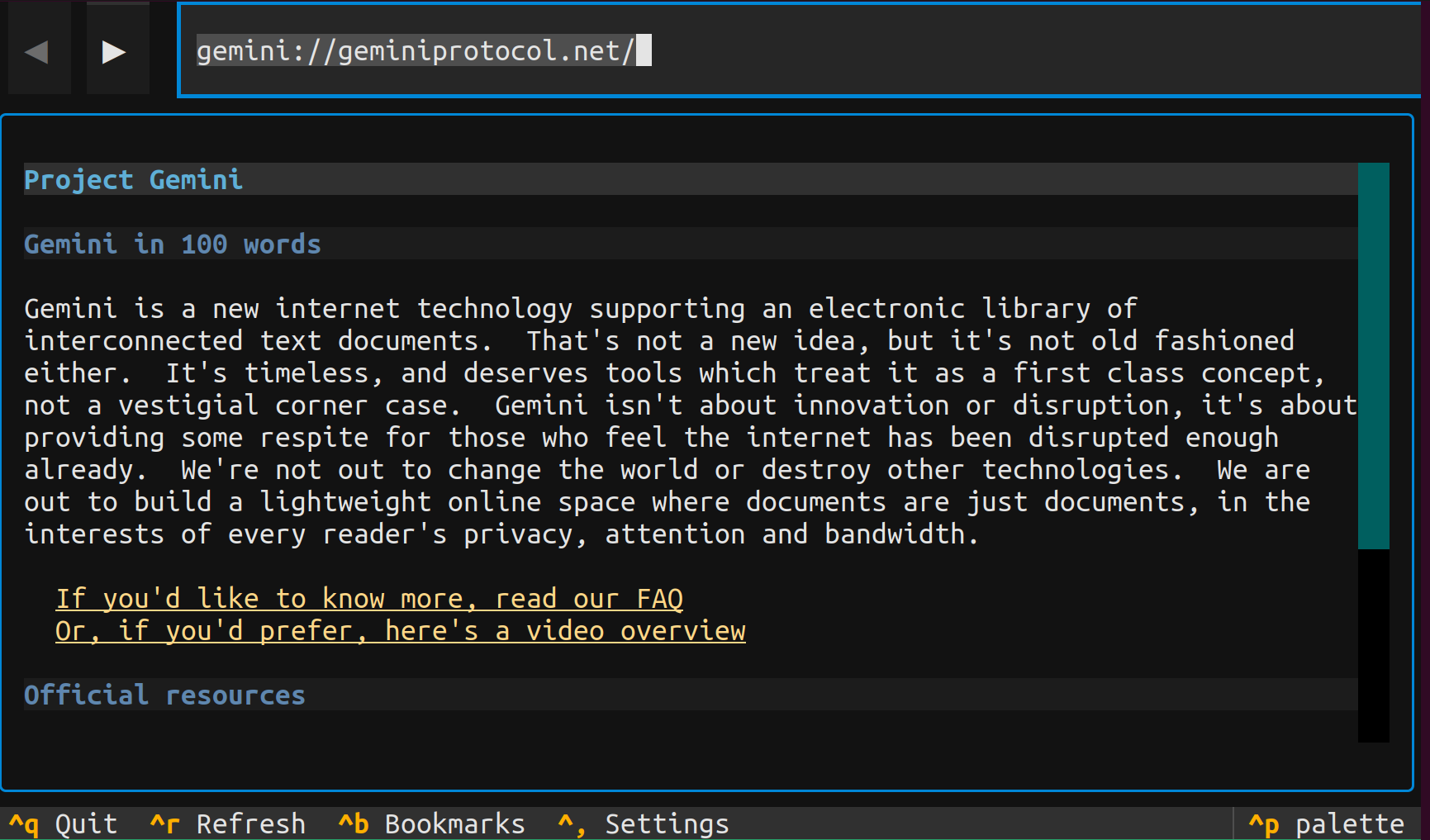
Astronomo brings the Gemini experience to your terminal with a modern, polished interface. Built on Textual—a powerful Python TUI framework—Astronomo offers features you'd expect from a desktop browser: full mouse support, syntax highlighting, beautiful themes, and responsive async networking.
Whether you're exploring Geminispace for the first time or looking for a better terminal client, Astronomo delivers a seamless browsing experience without leaving your command line.
Why Astronomo?
| Feature | Astronomo | Amfora | Bombadillo |
|---|---|---|---|
| UI Framework | Textual (modern) | ncurses | ncurses |
| Mouse Support | Full | Limited | No |
| Syntax Highlighting | Yes | Yes | No |
| Built-in Themes | 10 | User-contributed | No |
| Bookmark Folders | Yes | Flat list | Flat list |
| Client Certificates | Yes | Yes | No |
| TOFU Security | Yes | Yes | No |
| Tabs | Yes | Yes | No |
| Multi-protocol | Gemini + Gopher + Finger + Nex + Spartan | Proxying | Gopher+Finger |
| Mail (Misfin) | Yes (GMAP) | No | No |
| Feed Reader | Yes (RSS/Atom) | No | No |
| Development | Active | Maintenance mode | Maintenance mode |
| Language | Python | Go | Go |
Key advantages:
- Modern TUI — Textual provides superior rendering, full mouse support, and async I/O compared to legacy ncurses
- Active development — Amfora is in maintenance mode; Astronomo is actively evolving
- Python extensibility — Easy to hack, extend, or integrate with your workflow
- Beautiful out of the box — 10 popular themes included (Nord, Dracula, Catppuccin, and more)
Features
Styled Gemtext Rendering
Every Gemtext element is beautifully rendered with distinct visual styling:
- Headings — Three levels with different colors and formatting
- Links — Colored and underlined with arrow indicators when selected
- Blockquotes — Bordered and italicized for clear distinction
- Lists — Properly formatted with bullet points
- Preformatted blocks — Distinct background with preserved formatting
Interactive Navigation
Navigate Geminispace effortlessly:
- Keyboard — Arrow keys to move between links, Enter to activate
- Mouse — Click any link to follow it
- Visual feedback — Clear focus indicators show your current selection
Syntax Highlighting
Code blocks with language hints (```python, ```rust, etc.) are automatically syntax highlighted using Pygments, making technical content easy to read.
History Navigation
- Back/Forward — Navigate your browsing history with Backspace and Shift+Backspace
- Position memory — Scroll position and link selection are preserved
- Fast navigation — Pages are cached in memory, no re-fetching required
Bookmarks System
Organize your favorite capsules:
- Folder organization — Group bookmarks into collapsible folders
- Sidebar — Toggle with Ctrl+B for quick access
- Quick add — Bookmark the current page with Ctrl+D
- Full management — Edit titles, move between folders, delete
- Persistence — Saved as TOML in your config directory
Client Certificates / Identities
Full support for authenticated Gemini sites:
- Identity management — Create, edit, and delete client certificates
- URL assignment — Associate identities with specific capsules
- Settings UI — Manage everything from an in-app settings panel
TOFU Certificate Verification
Trust On First Use security via Nauyaca:
- Automatic trust — Certificates are stored on first connection
- Change detection — Warns if a server's certificate changes unexpectedly
- Known Hosts management — View, search, and revoke trusted servers in Settings (Ctrl+,)
- SQLite storage — Known hosts persisted at
~/.nauyaca/tofu.db
Theming
Choose from 10 built-in themes:
textual-dark(default)textual-lighttextual-ansinordgruvboxtokyo-nightmonokaidraculacatppuccin-mochasolarized-light
Interactive Input
Seamless support for Gemini's input requests:
- Search queries — Status 10 prompts for text input
- Sensitive input — Status 11 for password-style masked entry
- Byte counter — Visual feedback for URL length limits
Inline Images (Optional)
Display images directly in the terminal as ANSI art:
- Formats supported — PNG, JPEG, GIF, WebP
- Quality settings — Low, Medium, High rendering options
- Optional dependency — Install with
pip install astronomo[chafa]
Multi-Protocol Support
Browse beyond Gemini with native support for classic protocols:
Gopher Protocol:
- Directory browsing — Navigate Gopher menus with type indicators ([DIR], [TXT], [SEARCH])
- Text files — View Gopher text documents with proper formatting
- Search support — Interactive search queries (type 7)
- Binary downloads — Download files to
~/Downloads
Finger Protocol:
- User queries — Look up user information from Finger servers
- Flexible URLs — Supports both
finger://user@hostandfinger://host/userformats
Smart URL Detection:
user@host→ automatically usesfinger://gopher.example.com→ automatically usesgopher://misfin:user@host→ opens mail compose- Everything else → defaults to
gemini://
GMAP Mail
Full terminal mail client for Misfin mailboxes via the GMAP protocol:
- Three-pane interface — Tags sidebar, message list, and reading pane (Ctrl+E)
- Compose and reply — Send messages via Misfin protocol with Gemtext formatting
- Tag management — Archive, trash, unread, and custom tags
- Offline access — SQLite message cache for fast queries
- Certificate auth — Uses client certificates for authentication
- Misfin links —
misfin:URLs in pages open compose with pre-filled recipients
RSS/Atom Feeds
Subscribe to and read feeds from Geminispace:
- Feed reader — Browse articles with read/unread tracking (Ctrl+J)
- Folder organization — Group subscriptions into folders
- OPML support — Import and export feed lists
Configuration
- XDG-compliant — Config stored at
~/.config/astronomo/ - TOML format — Human-readable with helpful comments
- Settings screen — Configure without editing files manually
Installation
Recommended: Install with uv
uv tool install astronomo
Alternative: Install with pipx
pipx install astronomo
From Source (for contributors)
git clone https://github.com/alanbato/astronomo.git
cd astronomo
uv sync
uv run astronomo
Quick Start
# Launch Astronomo
astronomo

# Open a Gemini capsule
astronomo gemini://geminiprotocol.net/

# Browse a Gopher server
astronomo gopher://gopher.floodgap.com/

# Query a Finger server (smart detection)
astronomo user@example.com

# Use a custom config file
astronomo --config ~/my-config.toml
Capsules to Explore
New to Gemini? Here are some great starting points:
gemini://geminiprotocol.net/— Official Gemini protocol documentationgemini://geminispace.info/— Search engine for Geminispacegemini://kennedy.gemi.dev/— Gemini search and discoverygemini://rawtext.club/— Community and hosting
Keyboard Shortcuts
| Key | Action |
|---|---|
Enter |
Activate selected link |
Left / Right |
Navigate between links |
Backspace |
Go back in history |
Shift+Backspace |
Go forward in history |
Ctrl+B |
Toggle bookmarks sidebar |
Ctrl+D |
Bookmark current page |
Ctrl+E |
Open mail screen |
Ctrl+J |
Open feeds screen |
Ctrl+K |
Quick navigation (fuzzy finder) |
Ctrl+T |
New tab |
Ctrl+W |
Close tab |
Ctrl+S |
Save page snapshot |
Ctrl+, |
Open settings |
Ctrl+Q |
Quit |
Configuration
Astronomo stores configuration at ~/.config/astronomo/config.toml:
# Astronomo Configuration

[appearance]
# Available themes: textual-dark, textual-light, textual-ansi, nord,
#                   gruvbox, tokyo-night, monokai, dracula,
#                   catppuccin-mocha, solarized-light
theme = "textual-dark"

# Enable syntax highlighting in code blocks
syntax_highlighting = true

[browsing]
# Default home page (uncomment to set)
# home_page = "gemini://geminiprotocol.net/"

# Request timeout in seconds
timeout = 30

# Maximum redirects to follow
max_redirects = 5
Bookmarks are stored separately at ~/.config/astronomo/bookmarks.toml.
Roadmap
Astronomo is actively developed. Here's what's coming next:
Planned:
- Page Search — Find text within pages (Ctrl+F)
- Downloads — Save pages and files to disk
- Custom Keybindings — Vi/Emacs-style key configurations
Contributing
Contributions are welcome! Astronomo is built with:
- Textual — Modern Python TUI framework
- Nauyaca — Gemini protocol library
- Titlani — Misfin protocol library
- pytest — Testing framework
Development Setup
git clone https://github.com/alanbato/astronomo.git
cd astronomo
uv sync --group dev
uv run pre-commit install

# Run the app
uv run astronomo

# Run tests
uv run pytest

# Run with Textual devtools
uv run textual run --dev src/astronomo/astronomo.py
Links
Protocols:
- Gemini Protocol — Learn about the Gemini protocol
- Gopher Protocol — The classic menu-driven protocol
- Finger Protocol — User information lookup protocol
Development:
- Textual Documentation — The TUI framework powering Astronomo
- Nauyaca — Gemini protocol library for Python
- Titlani — Misfin protocol library for Python
Release history Release notifications | RSS feed


Download files
Download the file for your platform. If you're not sure which to choose, learn more about installing packages.
Source Distribution
Built Distribution
Filter files by name, interpreter, ABI, and platform.
If you're not sure about the file name format, learn more about wheel file names.
Copy a direct link to the current filters
File details
Details for the file astronomo-0.20.0.tar.gz.
File metadata
- Download URL: astronomo-0.20.0.tar.gz
- Upload date:
- Size: 124.5 kB
- Tags: Source
- Uploaded using Trusted Publishing? Yes
- Uploaded via: twine/6.1.0 CPython/3.13.7
File hashes
| Algorithm | Hash digest | |
|---|---|---|
| SHA256 |
ee1ee878fce764e2f07949372f148afe310992b89d7b30c681427749efc90250
|
|
| MD5 |
121e057c804a272ca2a06b3a53e092c5
|
|
| BLAKE2b-256 |
bacb530114c2c6c2d9288c464606526af6d99713d2384cba6918cf5fe7ad0cd8
|
Provenance
The following attestation bundles were made for astronomo-0.20.0.tar.gz:
Publisher:
release-pypi.yml on alanbato/astronomo
-
Statement:
-
Statement type:
https://in-toto.io/Statement/v1 -
Predicate type:
https://docs.pypi.org/attestations/publish/v1 -
Subject name:
astronomo-0.20.0.tar.gz -
Subject digest:
ee1ee878fce764e2f07949372f148afe310992b89d7b30c681427749efc90250 - Sigstore transparency entry: 964580966
- Sigstore integration time:
-
Permalink:
alanbato/astronomo@ac1686a3a201180da7dc3e265cda12b9cc1012ab -
Branch / Tag:
refs/tags/v0.20.0 - Owner: https://github.com/alanbato
-
Access:
public
-
Token Issuer:
https://token.actions.githubusercontent.com -
Runner Environment:
github-hosted -
Publication workflow:
release-pypi.yml@ac1686a3a201180da7dc3e265cda12b9cc1012ab -
Trigger Event:
push
-
Statement type:
File details
Details for the file astronomo-0.20.0-py3-none-any.whl.
File metadata
- Download URL: astronomo-0.20.0-py3-none-any.whl
- Upload date:
- Size: 179.1 kB
- Tags: Python 3
- Uploaded using Trusted Publishing? Yes
- Uploaded via: twine/6.1.0 CPython/3.13.7
File hashes
| Algorithm | Hash digest | |
|---|---|---|
| SHA256 |
36541116d99219a24eaec604ee5201ab0cee4691075c4f625fb0c431f78a2eae
|
|
| MD5 |
7f034faed24feb5a00045012a47675af
|
|
| BLAKE2b-256 |
c40cfefd9c771ea682daee1cc3b06eaeeeecaa876d8bf188c04c197e1703417a
|
Provenance
The following attestation bundles were made for astronomo-0.20.0-py3-none-any.whl:
Publisher:
release-pypi.yml on alanbato/astronomo
-
Statement:
-
Statement type:
https://in-toto.io/Statement/v1 -
Predicate type:
https://docs.pypi.org/attestations/publish/v1 -
Subject name:
astronomo-0.20.0-py3-none-any.whl -
Subject digest:
36541116d99219a24eaec604ee5201ab0cee4691075c4f625fb0c431f78a2eae - Sigstore transparency entry: 964581018
- Sigstore integration time:
-
Permalink:
alanbato/astronomo@ac1686a3a201180da7dc3e265cda12b9cc1012ab -
Branch / Tag:
refs/tags/v0.20.0 - Owner: https://github.com/alanbato
-
Access:
public
-
Token Issuer:
https://token.actions.githubusercontent.com -
Runner Environment:
github-hosted -
Publication workflow:
release-pypi.yml@ac1686a3a201180da7dc3e265cda12b9cc1012ab -
Trigger Event:
push
-
Statement type:






