
A cross-platform GUI for full-field astronomical time-series photometry, variable-star candidate detection, plate solving, and Gaia/VSX catalog matching.

Project description
AstroSequence Explorer
📖 Author: Daniele Gasparri
📅 Latest Release: July 2026


AstroSequence Explorer is a cross-platform GUI application for semi-automatic full-field time-series photometry of astronomical point sources. It detects stars in calibrated FITS image sequences, extracts aperture-photometry light curves, ranks candidate variables, and performs Gaia/VSX catalog matching.
It is particularly suited for astrophotographers who want an easy tool to explore the scientific content of their imaging sequences.
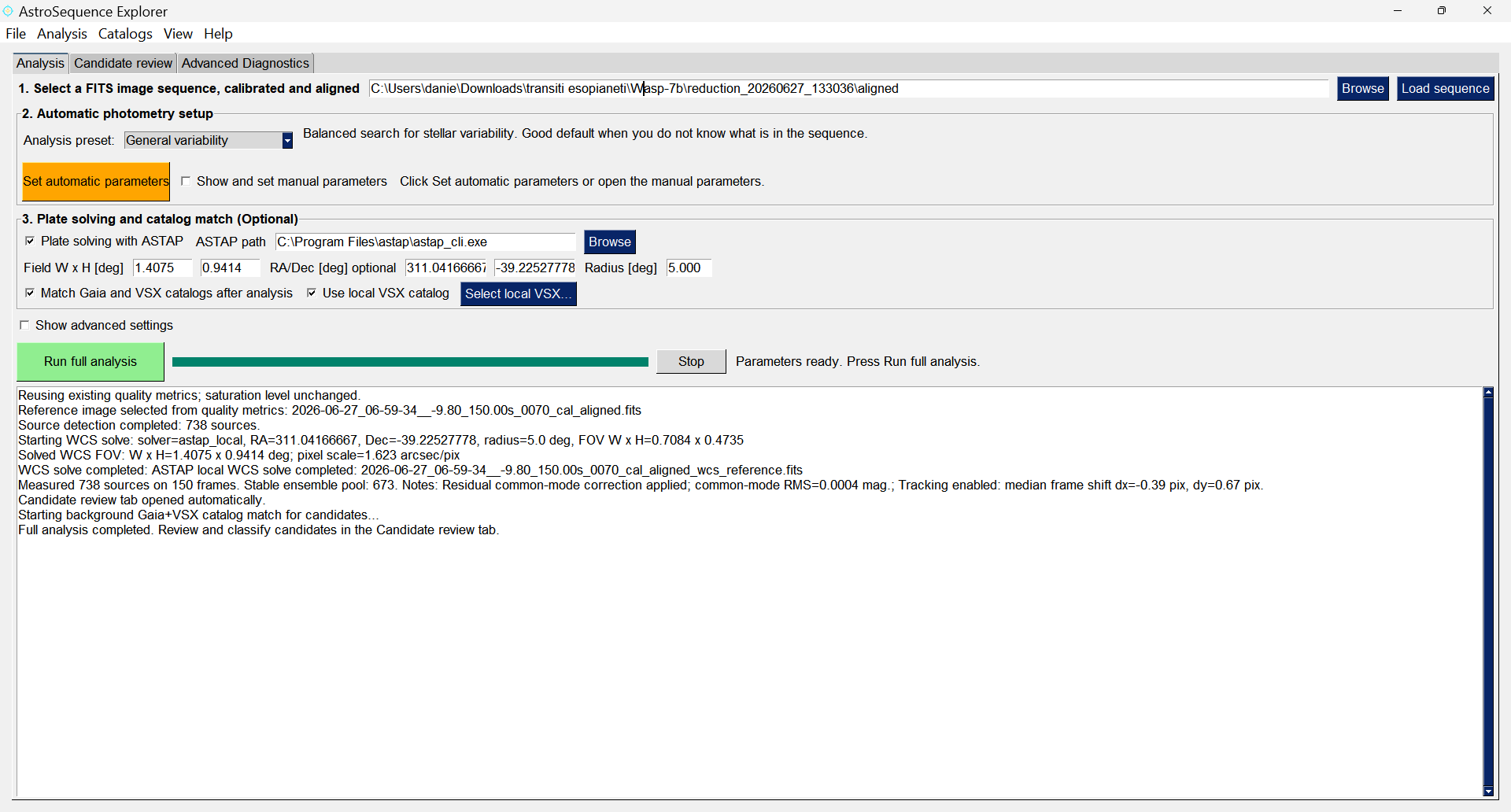
Guided analysis workflow: load a sequence, set automatic parameters, run the full-field variability search, and inspect candidates.
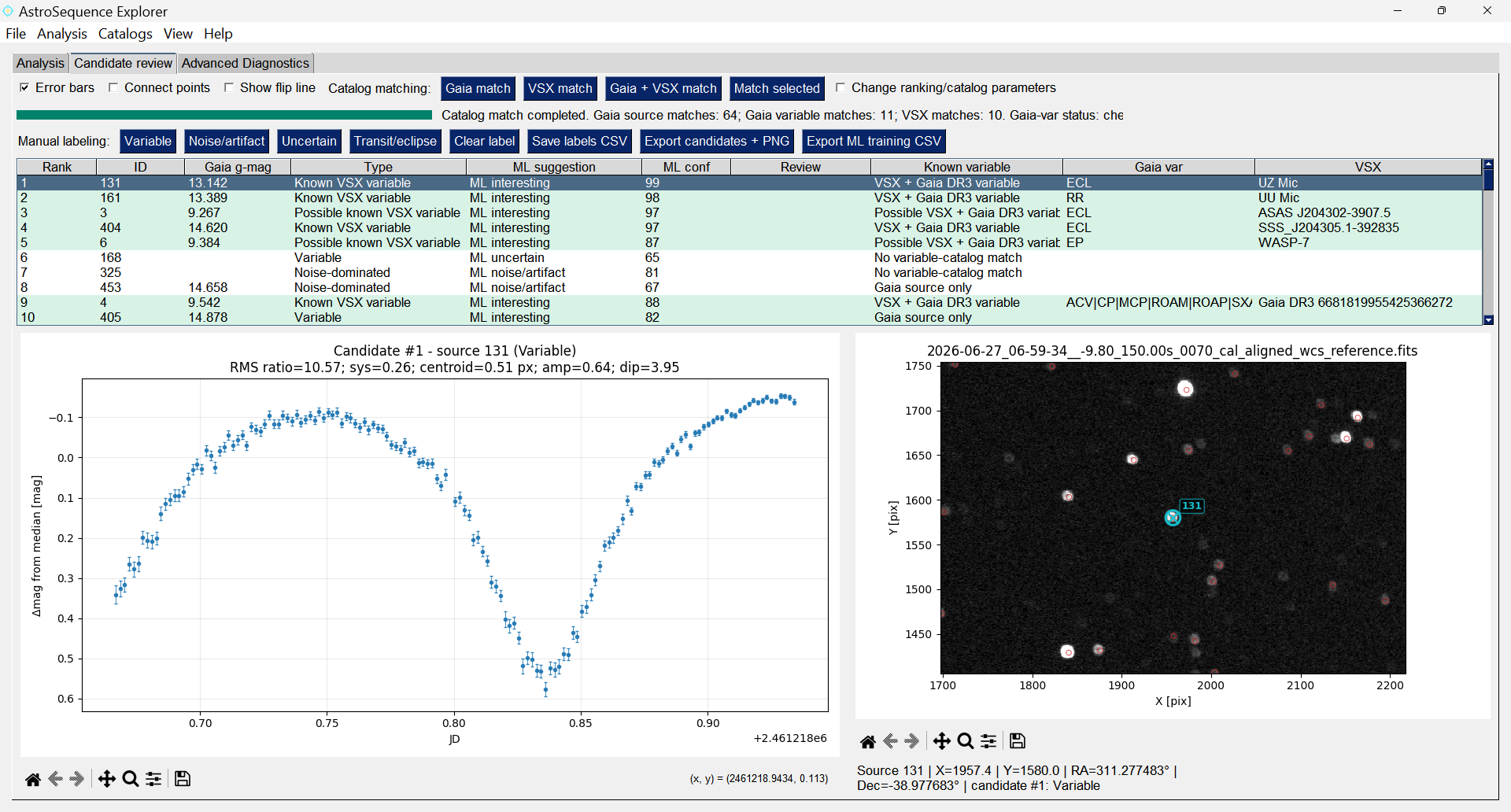
Candidate review panel with light curves, reference-field cutouts, manual labels, ML suggestions, and catalog information.
What AstroSequence Explorer does
AstroSequence Explorer turns a calibrated and aligned astronomical image sequence into a searchable field-wide time-domain dataset. Instead of measuring one target at a time, it performs aperture photometry for all detected point sources, builds light curves, ranks variability candidates, and helps the user identify known or new variable stars, eclipsing systems, and transit-like events.
The program is designed for observers who acquire long FITS sequences of the same field and want a practical way to answer questions such as:
- Which stars in this field are variable?
- Are there transit-like or eclipse-like dips in the sequence?
- Are my candidates already known VSX or Gaia DR3 variables?
- Which candidates deserve manual inspection or follow-up observations?
Features
-
Guided full-field analysis workflow
- Load a folder of calibrated and aligned FITS images.
- Run the complete workflow by pressing only two buttons.
-
Point-source detection and all-star aperture photometry
- Automatic source detection on the reference image.
- Aperture and sky-annulus photometry for all retained sources.
- Centroid recentering and frame-shift handling.
- Support for monochrome data, OSC/color-camera data, debayered images, and extracted color-channel sequences.
-
Candidate ranking for variability and transit-like events
- Ranking based on robust photometric metrics such as RMS excess, amplitude, and dip score.
-
Machine-learning assistance
- Built-in ML suggestions to help prioritize candidates.
-
Plate solving and catalog matching
- Local ASTAP plate solving from the GUI.
- Gaia source matching.
- Gaia DR3 variability matching.
- VSX known-variable matching.
- Optional local VSX catalog support for more reliable and faster matching.
Recommended input data
AstroSequence Explorer expects a sequence of calibrated and aligned FITS images of the same field.
AstroSequence Explorer is not intended to replace a raw-image calibration pipeline. Bias/dark/flat correction, bad-pixel correction, and image alignment should be performed before loading the sequence. To maximize the photometric information contained in your images, you can try the reduction and alignment module of ExoPhotoCurve software, instead of relying on aesthetically optimized commercial software such as Deep Sky Skacker or PixInsight.
The program can work with:
- monochrome-camera FITS sequences;
- color-camera raw/CFA monochrome FITS sequences;
- debayered or channel-extracted OSC sequences;
- sequences with missing frame numbers;
- sequences without progressive filename numbering, provided that valid
DATE-OBStimestamps are present in the FITS.
For best results, use sequences with stable pointing, good alignment, and enough frames to distinguish real variability from noise or artifacts, from the same observing night. If you are working with a sequence taken in different nights, be aware that the physical constraints and machinel-learning model for variability detection and ranking, may not work properly. For optimal results, please use sequences taken during one single night of observation.
System Requirements
- Python 3.10+
- Screen resolution of at least 1600×900 px. Optimal resolution: 1920×1080
- Recommended for plate solving: ASTAP with a suitable local star database (D50 works fine)
- Recommended for fast variable matching: a local copy of the International Variable Star Index (VSX) database, via FTP and in fits format.
- Main Python dependencies include:
numpy,astropy,matplotlib,scipy,photutils,astroquery,scikit-learn,joblib, andFreeSimpleGUI
A standalone Windows installer is also available from the official GitHub Releases page.
Installation
You can install AstroSequence Explorer using pip:
pip install astrosequence-explorer
Then run:
astrosequence-explorer
On Windows, you just download the installer, install the app and run it.
Quick Start
- Open AstroSequence Explorer.
- Select the folder containing your calibrated and aligned FITS sequence.
- Click Load sequence.
- Click Set automatic parameters.
- Optional: enable ASTAP plate solving and Gaia/VSX catalog matching.
- Click Run full analysis.
- Inspect the ranked candidates in the Candidate review tab.
- Click candidates to preview their light curves and reference-field cutouts.
- Perform a deep search using all the available online catalogs via right click on the selected candidate
- Assign manual labels such as Variable, Transit/eclipse, Uncertain, or Noise/artifact.
- Export the candidate tables, plots, and review files.
Quick start with an example dataset
An example dataset is distributed from the GitHub Releases page. After downloading and unzipping it:
- Open AstroSequence Explorer.
- Select the example FITS sequence folder.
- Click Load sequence.
- Click Set automatic parameters.
- Keep the default presets.
- Optional: enable Plate solving with ASTAP and Match Gaia and VSX catalogs after analysis.
- Click Run full analysis.
- When the analysis finishes, the Candidate review will open automatically and you can inspect the ranked candidates.
How candidate ranking should be interpreted
AstroSequence Explorer is designed to find and prioritize interesting candidates, not to make final scientific classifications automatically.
The ranking combines interpretable photometric indicators such as scatter excess, robust amplitude, and dip-like behavior. The ML suggestion is an additional prioritization aid. A source marked as ML-interesting is worth inspecting first, while ML-uncertain candidates should not be ignored when the light curve or catalog information looks promising.
All candidates should be visually checked, especially in crowded fields, near the image border, close to saturated stars, or in sequences affected by clouds, tracking issues, meridian flips, or variable background.
Plate solving and catalog matching
Catalog matching requires sky coordinates. AstroSequence Explorer can use an existing celestial WCS in the FITS files, or it can solve the reference frame locally with ASTAP.
The ASTAP workflow is designed to be robust for common amateur and professional observing setups, including images produced from OSC/color cameras. When the FITS header gives a misleading FOV, such as for extracted Bayer/green-channel images, AstroSequence Explorer automatically tests alternative FOV hypotheses and updates the displayed field size from the solved WCS.
After a valid WCS is available, AstroSequence Explorer can match candidates against:
- Gaia sources;
- Gaia DR3 variability information;
- VSX known variables;
- an optional local VSX catalog/index (recommended).
Catalog matches are meant to help interpretation. A missing catalog match does not prove that a candidate is new, and a loose catalog match should always be checked manually. You can perform a deep catalog search for a selected candidate by right click --> Deep catalog search. This will scan the main catalogs for a match, not just GAIA and VSX. If no match is found and the star exhibits clear variability, it is a new candidate variable star. In this case, a careful deep manual search and follow-up observations will be necessary to confirm its nature.
Output files
AstroSequence Explorer writes its products inside an output folder associated with the analyzed sequence. Depending on the workflow, outputs may include:
- detected-source tables;
- photometry summaries;
- all-star light-curve tables;
- candidate ranking tables;
- candidate review tables;
- ML candidate-feature tables;
- candidate preview plots;
- RMS-versus-magnitude plots;
- WCS-solving diagnostics;
- catalog-match information.
These files are intended to make the analysis reproducible and to allow further inspection with external tools.
Notes and limitations
- AstroSequence Explorer expects calibrated and aligned FITS images.
- It is optimized for point sources. Extended objects and very crowded fields require caution.
- Catalog queries depend on online services unless a local catalog is used.
- ML suggestions are not scientific classifications; they are a prioritization tool for human review.
- Final candidate confirmation requires independent checks and, when appropriate, follow-up observations.
License
AstroSequence Explorer is distributed under the license included in the LICENSE file. Please check the repository license before using, redistributing, or modifying the software.
Contact & Contributions
Found a bug? Want to suggest a feature?
Drop me an email!
Contact: Daniele Gasparri – daniele.gasparri@gmail.com
Take a look also at my website, if you are interested in astronomy: https://www.danielegasparri.com/
Release history Release notifications | RSS feed

Download files
Download the file for your platform. If you're not sure which to choose, learn more about installing packages.
Source Distribution
Built Distribution
Filter files by name, interpreter, ABI, and platform.
If you're not sure about the file name format, learn more about wheel file names.
Copy a direct link to the current filters
File details
Details for the file astrosequence_explorer-1.0.1.tar.gz.
File metadata
- Download URL: astrosequence_explorer-1.0.1.tar.gz
- Upload date:
- Size: 2.2 MB
- Tags: Source
- Uploaded using Trusted Publishing? No
- Uploaded via: twine/6.2.0 CPython/3.13.14
File hashes
| Algorithm | Hash digest | |
|---|---|---|
| SHA256 |
8908f2bd858ce1ac5757a906ca345c5278d994545718a1b07069230a96fd72a7
|
|
| MD5 |
cad7fe3e2478d84883d004f39aeaecbd
|
|
| BLAKE2b-256 |
341b551e1764b970d8f75f7e4b161763cdebc1074eca4829121265209a0a8692
|
File details
Details for the file astrosequence_explorer-1.0.1-py3-none-any.whl.
File metadata
- Download URL: astrosequence_explorer-1.0.1-py3-none-any.whl
- Upload date:
- Size: 2.2 MB
- Tags: Python 3
- Uploaded using Trusted Publishing? No
- Uploaded via: twine/6.2.0 CPython/3.13.14
File hashes
| Algorithm | Hash digest | |
|---|---|---|
| SHA256 |
5ee256427b2d16cea2fd092b939b0162148214c778543eaed6ff4c25c04a4c0c
|
|
| MD5 |
e9507eef970055e867d296c476fd9200
|
|
| BLAKE2b-256 |
694440d6c2c30678b3782f66d4c5cb1fac44ca29036a9af54b6ddc4214e950df
|






